
Product page is an individual listing page in an online store that displays everything a shopper needs to make a purchasing decision about a specific product. It typically includes product images, a title, description, price, variations (size, color, etc.), an add-to-cart button, customer reviews, and shipping or return information. In a WooCommerce store, each product has its own URL and dedicated product page generated from the product data entered in the admin.
The product page is where the buying decision is made — or abandoned. Every element on the page either supports or undermines that decision. A poorly designed product page with low-quality images, an unclear description, or a buried call to action loses sales that the rest of your marketing worked to earn. Getting the product page right is one of the highest-leverage improvements an e-commerce store can make.
[Image: Example WooCommerce product page layout showing image gallery, title, price, variations, add-to-cart button, and reviews section]
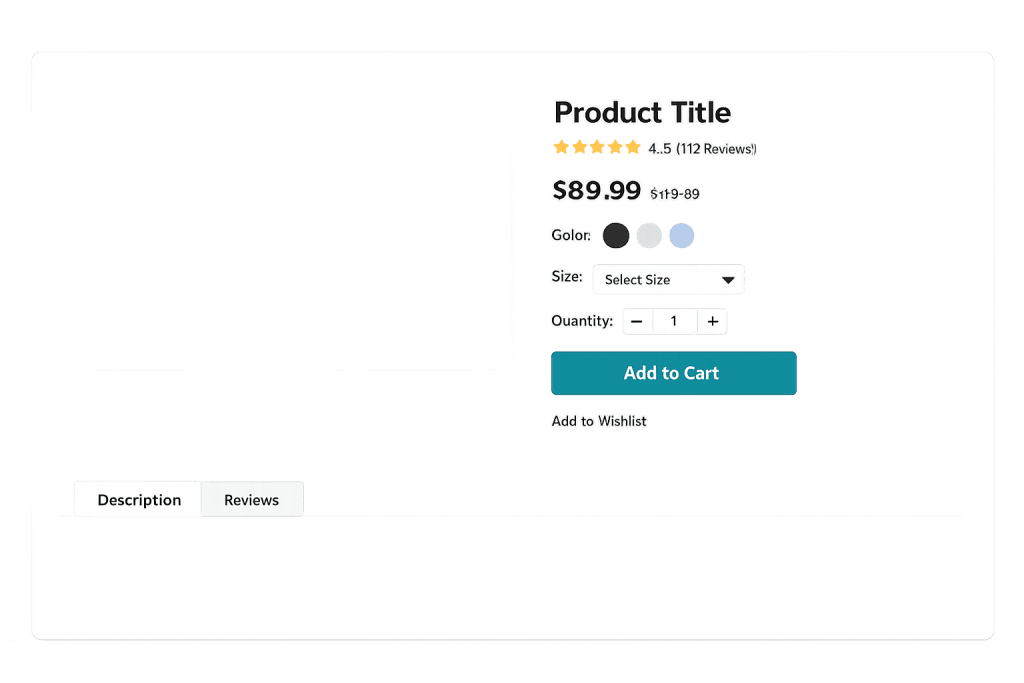
How Product Pages Work in WooCommerce
In WooCommerce, each product has a product data panel in the WordPress admin where you enter:
- Product type — Simple, variable, grouped, or external/affiliate (see product types)
- Pricing — Regular price and optional sale price
- Inventory — SKU, stock status, and stock quantity
- Variations — Attribute combinations for variable products (size, color, etc.)
- Description — Short and long descriptions displayed on the page
- Images — Product image and gallery images
WooCommerce generates the product page automatically from this data using its WooCommerce template system. The default template can be overridden in your theme for custom layouts.
Schema markup for products — including price, availability, and ratings — is typically added by WooCommerce plugins or built into the theme, helping search engines display rich results in SERP features.
Purpose & Benefits
1. Converting Browsers into Buyers
The product page’s primary job is conversion. Every design decision — image size, button placement, description length, review visibility — affects whether visitors add to cart or leave. In our experience building WooCommerce stores, the difference between a well-optimized and a default product page can be significant in conversion rate. Even small improvements in add-to-cart rate compound across all your traffic.
2. Building Shopper Confidence
Online shoppers can’t touch or try the product. Product pages bridge that gap through multiple high-quality images, detailed descriptions that answer likely questions, and visible social proof like customer reviews and ratings. The more confidence a page instills, the lower the hesitation to purchase. Trust signals — secure checkout badges, return policy links, stock availability — belong on the product page, not just at checkout.
3. Supporting Search Engine Visibility
Well-optimized product pages can rank for specific product searches in Google. This requires keyword-informed product titles and descriptions, schema markup for rich snippets (price, availability, ratings), and page speed that doesn’t drive visitors away before the page loads. Each product page is an indexable URL with traffic potential.
Examples
1. A Simple Physical Product
A home goods store sells a ceramic coffee mug. The product page shows six images from different angles and in use, a 150-word description that highlights material, dimensions, and care instructions, a visible price, and an “Add to Cart” button above the fold. Below, a reviews section shows 47 customer reviews averaging 4.7 stars. This combination of visuals, information, and social proof gives the shopper everything they need.
2. A Variable Product with Options
A clothing retailer sells a t-shirt in five colors and three sizes. The product page includes a color swatch selector and size dropdown, with the product image updating dynamically to show the selected color. Stock availability adjusts per variation — “Only 2 left in this color/size” creates appropriate urgency. This is the variable product type in action.
3. A Service or Digital Product
A design agency offers a logo design package as a WooCommerce product. The product page functions less like a product listing and more like a sales page — describing the deliverables, process timeline, and what’s included. There are no physical variations, just a single “Book Now” or “Add to Cart” option. The checkout flow collects project details after purchase.
Common Mistakes to Avoid
- Low-quality or insufficient images — Online shoppers rely on images to assess product quality. A single blurry photo, or only one angle on a physical product, creates doubt. Multiple high-resolution images from different angles — and ideally in-use or lifestyle shots — significantly improve conversion.
- Thin or copied descriptions — Generic manufacturer descriptions are indexed across hundreds of other retailers and offer no differentiation. Write original descriptions that speak to your customer’s needs and address common questions before they’re asked.
- Burying the add-to-cart button — The primary call to action should be visible without scrolling. If a visitor has to hunt for the purchase button, you’ve already lost some of them.
- Missing or hidden reviews — Customer reviews are among the most persuasive elements on a product page. Hiding them below excessive product details, or not soliciting reviews at all, squanders a major trust-building opportunity.
Best Practices
1. Lead with the Decision-Critical Information
Price, key product details, and the add-to-cart button should all be visible above the fold on both desktop and mobile. Visitors who land on a product page are often ready to evaluate — don’t make them scroll to find the basics. The long description, technical specs, and reviews can live below where curious shoppers can find them.
2. Optimize for Mobile
More than half of e-commerce traffic comes from mobile devices. Test your product pages on real phones: is the image gallery easy to swipe? Is the add-to-cart button large enough to tap comfortably? Are variation selectors usable without pinching and zooming? A product page that works beautifully on desktop but frustrates mobile users loses a significant portion of potential customers.
3. Use Structured Data for Rich Snippets
Add schema markup (Product schema) to your product pages so search engines can display price, availability, and star ratings in search results. These rich results increase click-through rates from organic search by making your listing more visually prominent. WooCommerce plugins and many themes handle this automatically.
Frequently Asked Questions
What should every product page include?
At minimum: product title, multiple quality images, price, a clear description, add-to-cart button, and customer reviews. Supporting elements that improve conversion include variant selectors, stock availability indicators, shipping information, return policy link, and related product suggestions.
How long should a product description be?
Long enough to answer the likely questions a buyer has, but not so long it buries the important details. For simple products, 75–150 words often works. For complex or high-consideration products — software, equipment, expensive items — longer descriptions that address objections and explain value are appropriate. Use bullet points and short paragraphs, not walls of text.
How do product pages affect SEO?
Each product page is an indexed URL that can rank for specific product searches. Use keyword-informed titles, original descriptions, and schema markup for rich results. Page speed also matters — a slow-loading product page loses both organic rankings and real shoppers. Regular PageSpeed checks on product pages are worthwhile.
Can I customize WooCommerce product page templates?
Yes. WooCommerce uses a template file system that allows developers to override default templates through a child theme or custom theme. This is how custom product page layouts — different element ordering, custom tabs, unique review displays — are built without modifying WooCommerce core files.
What’s the difference between a product page and a category page?
A product page shows a single product in detail. A category page (or shop archive) shows a grid or list of multiple products within a category, with thumbnail images, prices, and add-to-cart links. Shoppers browse category pages and then click through to individual product pages to complete their evaluation.
Related Glossary Terms
- WooCommerce
- Product Types (Simple, Variable, Grouped)
- Checkout Flow
- Schema Markup
- SKU
- Attributes (Product Attributes)
- Click-Through Rate (CTR)
How CyberOptik Can Help
Building WooCommerce stores with high-converting product pages is one of our specialties. From layout and image presentation to schema markup and mobile optimization, we approach every product page as a conversion tool — not just a data entry form. If your store isn’t converting the way it should, the product page is often where the problem lives. Contact us to discuss your eCommerce project or explore our eCommerce services.


