
WooCommerce is a free, open-source eCommerce plugin for WordPress that transforms any WordPress website into a fully functional online store. It handles everything a business needs to sell online — product listings, shopping cart, checkout, payment processing, order management, inventory tracking, and shipping — all within the familiar WordPress dashboard you already know.
WooCommerce was first released in 2011 and acquired by Automattic (the company behind WordPress.com) in 2015. Today, it powers approximately 4.5 million active online stores worldwide, representing roughly 33% of all eCommerce websites globally, according to data from StoreLeads. That makes it the most widely installed eCommerce platform by store count — ahead of Shopify, Magento, and BigCommerce. For businesses already running on WordPress, WooCommerce is the natural choice to add eCommerce without migrating to an entirely separate platform.
How WooCommerce Works
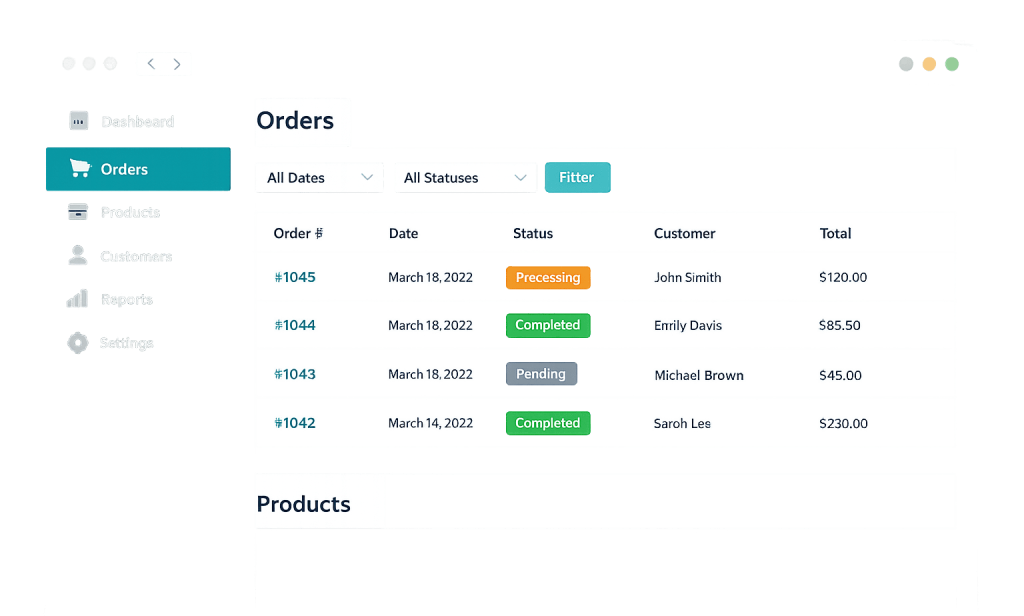
WooCommerce installs as a plugin on any WordPress site. Once activated, it adds a suite of new functionality and admin screens to the WordPress dashboard:
- Products — Create simple products, variable products (with size/color options), grouped products, and digital downloads. Each product has its own SKU, pricing, inventory count, images, and description.
- Orders — Every purchase creates an order record showing customer details, items purchased, payment status, and shipping information. Order statuses (pending, processing, completed, refunded) help you track fulfillment.
- Customers — WooCommerce maintains a customer database with purchase history, contact details, and account management options.
- Reports — Built-in analytics cover sales by date, product, and category, giving you a baseline view of store performance.
- Settings — Configure store currency, tax rules, shipping zones, payment gateways, and more from a central settings panel.
WooCommerce connects to payment processors — PayPal, Stripe, WooCommerce Payments, and dozens of others — via WooCommerce extensions. The default installation includes enough to run a basic store, and the extension ecosystem handles virtually any additional requirement.
[Image: Screenshot of the WooCommerce dashboard showing the Orders screen with status columns and the Products admin with a product listing]
Purpose & Benefits
1. Full eCommerce Functionality on Your Existing WordPress Site
If your business already runs on WordPress, WooCommerce adds a complete online store without requiring a separate platform. You keep your existing content, SEO equity, and branding in one place. This matters because a WordPress site with a strong blog or service presence can use that content infrastructure to drive organic traffic directly to the store — something siloed eCommerce platforms can’t replicate as naturally.
2. Flexibility Through an Extensive Extension Ecosystem
WooCommerce’s open-source foundation and its marketplace of extensions means you can build the exact store you need. There are 800+ official extensions and thousands of third-party plugins covering subscriptions, product bundles, booking systems, affiliate programs, advanced shipping rules, and more. Our eCommerce development services leverage this ecosystem to build stores tailored to specific business models, not just off-the-shelf templates.
3. Cost Control and Ownership
Unlike hosted platforms that charge monthly subscription fees plus transaction percentages, WooCommerce is free to install. You pay for hosting, premium extensions as needed, and any development work — but you own the store and its data outright. For businesses with growing order volumes, avoiding per-transaction fees adds up meaningfully. The average WooCommerce store spends $500–$5,000 annually on extensions, which is typically far less than equivalent SaaS platform costs at scale.
Examples
1. Physical Product Store
A small manufacturer uses WooCommerce to sell directly to consumers. They configure variable products with size and finish options, set up UPS shipping integration via an extension, connect Stripe for credit card processing, and use WooCommerce’s order management to track fulfillment. The store integrates seamlessly with their WordPress blog, where product tutorials and care guides drive organic search traffic to product pages.
2. Digital Downloads and Courses
An online educator sells PDF guides and video course access through WooCommerce. Using the built-in digital product type, customers receive download links immediately after purchase. An extension handles license key management for software products. No inventory management is needed, and the entire operation runs within WordPress without a separate learning management system.
3. Subscription-Based Business
A specialty coffee roaster uses WooCommerce Subscriptions (an extension) to offer monthly subscription boxes alongside one-time purchases. Customers can choose frequency, pause shipments, and update billing from their account page. The subscription revenue provides predictable monthly income that the business can plan around — something not possible with single-purchase-only eCommerce.
Common Mistakes to Avoid
- Underestimating hosting requirements — WooCommerce adds significant server load compared to a standard WordPress site. Shared hosting plans that work fine for a blog often struggle under eCommerce traffic and database queries. Choose managed WordPress hosting with adequate resources from the start.
- Ignoring SSL certificates — An online store collecting payment information without HTTPS is both a security risk and a trust barrier. Shoppers abandon carts when they see “Not Secure” in the browser. An SSL certificate is non-negotiable for any store.
- Installing too many plugins without performance testing — The average WooCommerce store runs 25–35 active plugins. Each adds overhead. Stores with 10 or more WooCommerce-specific plugins often need performance optimization to maintain acceptable page speeds and checkout conversion rates.
- Skipping inventory setup — Not configuring stock tracking means WooCommerce can’t prevent overselling. For physical products, enabling inventory management and setting low stock thresholds is essential from launch.
Best Practices
1. Optimize the Checkout Flow
Every additional step, field, or friction point in checkout costs conversions. Enable guest checkout so customers don’t need an account to buy. Minimize required form fields. Consider a one-page checkout plugin. WooCommerce’s default checkout is functional but rarely optimized — and improvements here have direct revenue impact. Research consistently shows that stores with optimized checkout see 15–35% higher conversion rates.
2. Configure Payment Options Strategically
PayPal is the most widely used gateway (48% of WooCommerce stores) followed by Stripe (35%). Offering multiple payment methods reduces abandonment from shoppers who prefer one over the other. WooCommerce Payments (the platform’s native option) adds a dashboard directly in WordPress for payment management. Evaluate fees carefully — gateway costs vary and affect margin at volume.
3. Treat Performance as a Core Requirement
A one-second delay in page load time can reduce eCommerce conversions by up to 7%, according to industry data. Optimize product images, enable caching, use a content delivery network (CDN) for static assets, and regularly test your store’s PageSpeed scores. Performance optimization for WooCommerce is an ongoing discipline, not a one-time setup task.
Frequently Asked Questions
Is WooCommerce free?
The core WooCommerce plugin is free and open-source. You’ll have costs for hosting, any premium extensions you add, and any development or design work. Many essential extensions are available free on WordPress.org. Premium extensions from WooCommerce’s official marketplace typically cost $49–$249/year each, and most stores need a handful of them.
How does WooCommerce compare to Shopify?
WooCommerce gives you more control and flexibility — you own your store, customize anything, and avoid platform lock-in. Shopify is a hosted solution with simpler setup but ongoing subscription fees and per-transaction costs at higher tiers. WooCommerce is typically better suited for businesses already on WordPress, those needing deep customization, or content-driven commerce. Shopify is often preferred for straightforward product stores where simplicity is the priority.
Can WooCommerce handle large product catalogs?
Yes, with proper hosting. WooCommerce itself doesn’t impose a product limit — stores with tens of thousands of SKUs run successfully on the platform. The key variable is server resources: a large catalog with high traffic needs managed hosting with adequate CPU, RAM, and database optimization. Performance tuning becomes important at scale.
Do I need a developer to run a WooCommerce store?
For initial setup, customization, or ongoing development, working with a developer is valuable. Day-to-day operations — processing orders, managing products, running sales, applying coupons — are designed to be handled without technical knowledge. The line is usually between running the store (no developer needed) and building or significantly changing it (where professional help pays off).
What happens to my store if WooCommerce stops being updated?
WooCommerce is maintained by Automattic and has a very large user base and active developer community, making abandonment highly unlikely. It’s also open-source, so even in a worst-case scenario, the community could continue maintaining it. Regular updates are important to apply, however — both for security patches and compatibility with newer versions of WordPress.
Related Glossary Terms
- WooCommerce Extension / Add-on
- Payment Gateway
- Cart Abandonment
- Product Types (Simple, Variable, Grouped)
- SKU
- Shipping Zone / Shipping Class
- Order Management (WooCommerce)
- Coupon (WooCommerce)
How CyberOptik Can Help
Building and optimizing WooCommerce stores is one of our specialties. From initial store setup and extension configuration to performance optimization and custom development, we help businesses create online shopping experiences that convert. Whether you’re launching your first store or improving an existing one, we can help you get there. Contact us to start your eCommerce project or see our eCommerce services.


