
Headless WordPress is an architecture where WordPress serves as the content management backend while a completely separate frontend framework — typically built in JavaScript — handles what visitors actually see. WordPress manages all content creation, editing, and storage; the frontend application requests that content through WordPress’s REST API or GraphQL, then renders it independently using its own design and templating system.
In a standard WordPress setup, the same system that stores your content also controls how it appears — through themes, templates, and the PHP rendering engine. In a headless setup, those responsibilities are split. WordPress becomes a content repository with a powerful editing interface, while a modern JavaScript framework like Next.js, Gatsby, Nuxt, or Astro takes full ownership of the user-facing experience. The two systems communicate, but they operate independently.
[Image: Architecture diagram showing WordPress admin and database on the left, REST API or GraphQL in the center, and a Next.js or React frontend on the right serving the public website]
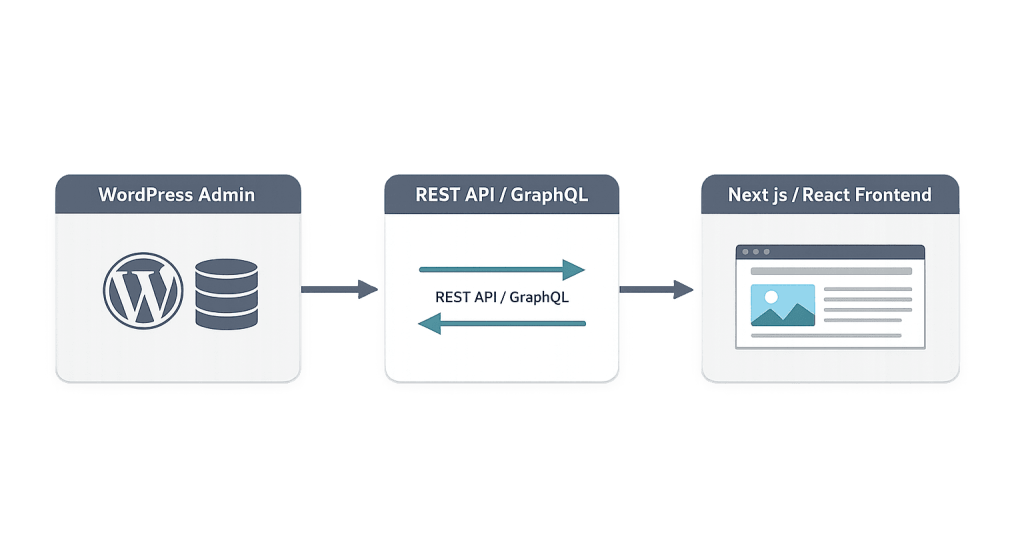
How Headless WordPress Works
The technical flow in a headless WordPress setup:
- Content editors work in the familiar WordPress admin — writing posts, managing pages, uploading media — exactly as they would in a traditional WordPress site.
- WordPress stores content in its database and exposes it through the WordPress REST API or WPGraphQL.
- The frontend application makes API requests for the content it needs — specific posts, navigation structure, media files, custom fields.
- The frontend renders the content using its own React (or other framework) components, completely independent of any WordPress theme.
- Deployment typically involves the frontend being built as a static site or server-rendered application, deployed to a CDN or separate hosting environment.
WordPress plugins like WPGraphQL add a GraphQL endpoint to WordPress, giving frontend developers a more efficient and flexible way to query exactly the content they need rather than consuming entire REST API responses. Advanced Custom Fields remains popular in headless setups for structuring custom content types that are then exposed through the API.
Purpose & Benefits
1. Modern Frontend Development Without Abandoning WordPress
Many organizations have years of content, established editorial workflows, and institutional familiarity with WordPress as a content platform — but their development teams want to build frontends with modern JavaScript frameworks. Headless WordPress preserves the editorial experience that content teams rely on while giving frontend developers the technology freedom they want. The content team doesn’t need to change anything; the developer team gains full control of the presentation layer.
2. Performance Gains Through Static Generation
A headless WordPress frontend built with a framework like Next.js or Gatsby can pre-generate pages at build time, deploying them as static HTML files served from a global CDN. This can dramatically reduce page load times compared to a server-rendered WordPress page — the HTML is already built and sitting on a CDN edge server close to the visitor, rather than being assembled from a database query on every request. For content-heavy sites with significant traffic, this performance difference is meaningful.
3. Security Through Architectural Separation
In a traditional WordPress site, the admin interface and the public-facing site share the same domain and infrastructure. In a headless setup, the WordPress admin can be hosted on a separate, restricted domain that’s not publicly accessible. The public website is a static or API-driven frontend with no direct connection to the WordPress database or file system. This separation reduces the attack surface significantly — there’s no WordPress login page for bots to probe on the public site.
Examples
1. Large-Scale Media Publication
A digital magazine with hundreds of thousands of monthly visitors needs both a robust editorial workflow and extreme front-end performance. Their editorial team uses WordPress’s full content management system — custom post types, editorial calendar, image management — while a Next.js frontend pre-generates every article page at build time and serves them from a CDN. New articles trigger a rebuild and redeployment automatically. Editors use familiar WordPress tools; readers get sub-second page loads.
2. Enterprise Brand Site With Multiple Frontends
A technology company maintains a marketing website, a developer documentation portal, and a mobile app — all consuming content from the same WordPress backend via the REST API. The marketing site uses one frontend development framework, the docs site uses another, and the mobile app consumes the same API directly. WordPress serves as the single source of truth for all three, reducing content duplication and synchronization complexity.
3. WooCommerce Headless E-Commerce
An advanced e-commerce operation uses WordPress and WooCommerce as the product and order management backend while building a custom React storefront for the customer-facing experience. This allows the frontend to be optimized specifically for conversion — custom checkout flows, personalization features, and performance optimizations — while leveraging WooCommerce’s mature product management, order processing, and plugin ecosystem on the backend.
Common Mistakes to Avoid
- Choosing headless for a simple business site — The complexity headless WordPress introduces — dual hosting environments, a separate build/deploy process, frontend developer requirements — is rarely justified for a straightforward business website. Most sites are better served by traditional or block-based WordPress.
- Underestimating the cost and maintenance burden — A headless setup is typically more expensive to build, requires more specialized developers, and has a longer, more complex maintenance lifecycle. These costs need to be factored into project decisions honestly.
- Losing WordPress’s native editing experience — Features like the block editor’s visual page building, inline preview, and WYSIWYG editing don’t carry over to a fully headless setup. Content editors used to seeing what their page looks like as they build it often find headless workflows frustrating without a carefully configured preview system.
- Not setting up a preview environment for editors — One of the most common operational failures in headless WordPress projects is launching without a functional preview system. Content editors need to see how content will render before publishing. This requires a preview deployment environment connected to the WordPress draft API.
Best Practices
1. Use WPGraphQL for Efficient Content Fetching
The default WordPress REST API returns entire data objects that often contain far more information than the frontend needs. WPGraphQL allows frontends to request exactly the fields they need — title, featured image, excerpt, specific custom fields — in a single query. This reduces API response size, speeds up build times for statically generated sites, and makes the frontend code more explicit about what content it depends on.
2. Keep WordPress Plugins Focused on Content Management
In a headless setup, WordPress theme plugins and many front-end optimization plugins are irrelevant — there’s no WordPress theme rendering pages. Focus the WordPress plugin stack on content management functionality: ACF for custom fields, WPGraphQL for the API layer, editorial workflow tools, and security plugins for the admin. Remove or avoid plugins that assume WordPress is rendering the front end.
3. Build Incrementally If Migrating
If you’re considering moving an existing WordPress site to a headless architecture, a full simultaneous migration is high risk. A staged approach — starting with new sections of the site built headlessly while the existing WordPress frontend continues running — lets you work out technical and editorial workflow issues before committing fully. This is especially important for editorial teams who need time to adapt to the new publishing workflow.
Frequently Asked Questions
Is headless WordPress the same as a headless CMS?
Headless WordPress is one specific implementation of a headless CMS pattern, using WordPress as the backend. Other headless CMSs — Contentful, Sanity, Strapi — were built headless-first and don’t have a traditional presentation layer at all. WordPress operating headlessly is a headless CMS; it just happens to also be capable of operating in a traditional, coupled mode.
What JavaScript frameworks are commonly used with headless WordPress?
Next.js is the most widely used frontend framework for headless WordPress because of its support for both static site generation and server-side rendering, strong React ecosystem, and built-in features for image optimization and routing. Gatsby is another popular option, particularly for content-heavy sites that benefit from static generation. Nuxt and Astro are also used in headless WordPress projects.
Does headless WordPress break SEO?
Not inherently, but it requires careful implementation. Server-side rendering or static generation (through frameworks like Next.js) ensures that search engines receive fully rendered HTML — the same content humans see. A purely client-side rendered (CSR) React frontend, where content is rendered in the browser via JavaScript, can create SEO issues if not configured correctly, because search engines may not wait for JavaScript to execute before indexing the page.
Can content editors still use the WordPress block editor with headless WordPress?
The block editor can still be used for content input in headless WordPress, but its visual preview capabilities don’t translate to the decoupled frontend. What editors see in the WordPress admin won’t match what visitors see on the frontend until a preview is generated. This is a usability gap that needs to be addressed specifically in headless WordPress projects — either through a preview deployment or through a purpose-built editing experience.
Is headless WordPress more expensive to build than traditional WordPress?
Yes, typically. It requires frontend developers skilled in modern JavaScript frameworks in addition to WordPress expertise, a more complex hosting and deployment setup, and more time to configure the API layer and editorial workflow. For projects where the benefits justify the investment — high-traffic publishers, enterprise brands, multi-channel content distribution — the additional cost is warranted. For standard business sites, it usually isn’t.
Related Glossary Terms
- Headless CMS
- WordPress REST API
- JavaScript
- Frontend Development
- API (Application Programming Interface)
- CMS (Content Management System)
How CyberOptik Can Help
Headless WordPress is a powerful architecture for the right projects — and our team has experience building and evaluating these setups. We can help you determine whether headless is the right fit for your goals and budget, or whether a modern WordPress build with block editing and performance optimization delivers what you need at a fraction of the complexity. Get in touch to discuss your project or explore our WordPress development services.


