
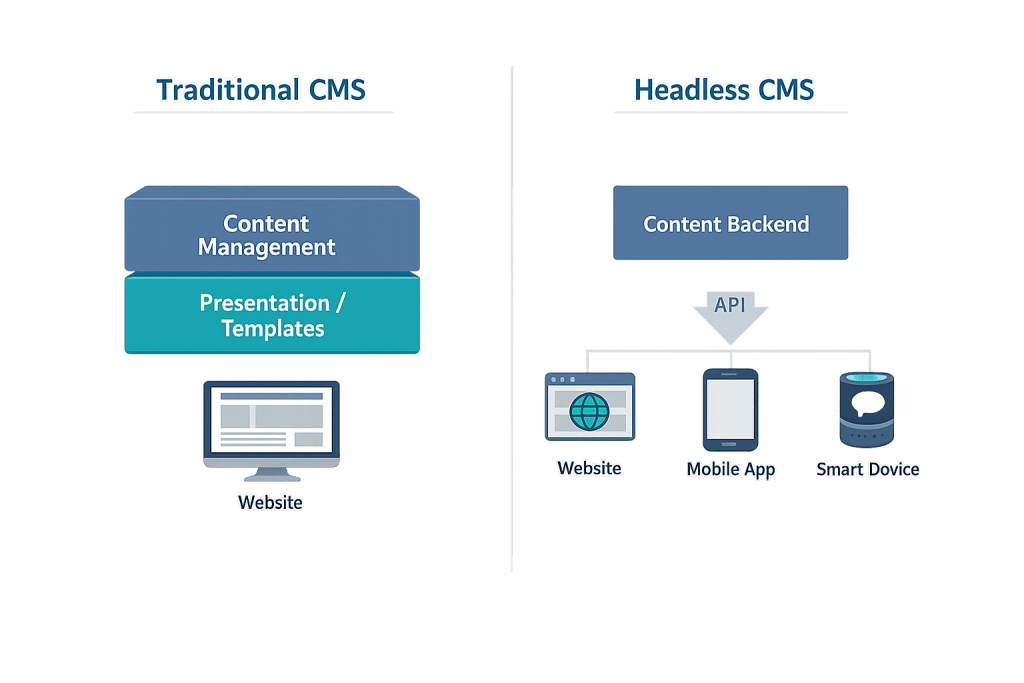
A headless CMS is a content management system that stores and manages content on the backend without dictating how that content is presented on the frontend. The “head” — the presentation layer, the thing users actually see — is removed from the CMS and replaced with any frontend technology the development team chooses. Content is delivered via an API to whatever surfaces need it: a website, a mobile app, a digital display, a voice assistant, or any other channel.
In a traditional CMS like WordPress operating in its conventional setup, content and presentation are tightly coupled — the same system manages both what to publish and how it looks. A headless CMS breaks that coupling. The CMS becomes a content repository and delivery engine. The frontend becomes a separate application that requests content through the API and renders it independently. This architecture unlocks flexibility, but it also introduces complexity that traditional setups don’t require.
[Image: Architecture diagram comparing traditional CMS (content + presentation in one system) versus headless CMS (content backend connected via API to multiple frontend channels)]
How a Headless CMS Works
The mechanics are built around an API layer:
- Content is created and stored in the headless CMS — articles, product descriptions, media assets, structured data fields — without any presentation-layer context.
- The frontend application (built in React, Next.js, Vue, or another framework) requests specific content from the CMS via a REST API or GraphQL endpoint.
- The API delivers content as raw data — typically JSON — with no HTML, styling, or layout attached.
- The frontend renders the content according to its own design system and templates.
This separation means the same content can be delivered to a website, a mobile app, a kiosk display, and an email platform simultaneously — each consuming the same API but rendering content according to its own rules.
Common headless CMS platforms include Contentful, Sanity, Storyblok, Strapi, and Prismic. WordPress itself can function as a headless CMS using the WordPress REST API or the WPGraphQL plugin to expose content to a decoupled frontend.
Purpose & Benefits
1. Omnichannel Content Delivery
Headless architecture shines when content needs to reach multiple destinations. A brand maintaining a website, a mobile app, a digital menu board, and an Alexa skill can manage all content from one CMS and push it anywhere. This eliminates the maintenance burden of updating content in multiple separate systems and ensures consistent messaging across every channel.
2. Frontend Development Freedom
With a headless CMS, frontend developers are free to use the tools and frameworks that best suit the project — React, Next.js, Gatsby, Nuxt, Astro, or anything else. They’re not constrained by the CMS’s templating system. This freedom allows for modern development practices, optimized performance, and richer interactive experiences that may be difficult or impossible to achieve within a traditional CMS theme structure.
3. Performance and Scalability Advantages
Headless frontends are commonly built as static sites or server-side rendered applications that can be deployed on CDN infrastructure. This approach — often called JAMstack — can deliver extremely fast page load times because HTML is pre-generated or rendered close to the user rather than being assembled by a CMS on a server on every request. For high-traffic sites, this architecture scales more gracefully than a traditional CMS under load.
Examples
1. Enterprise Brand With Multiple Digital Channels
A consumer goods company maintains a marketing website, a mobile app, a retail partner portal, and in-store digital displays. A headless CMS manages product descriptions, campaign content, and brand assets centrally. Each channel pulls what it needs via API and presents it according to its own design requirements — no duplication, no inconsistency, no content updating in four separate places.
2. Media Publisher With High Traffic Peaks
A digital news publisher experiences massive traffic spikes when major stories break. A traditional WordPress site on standard hosting might struggle under that load. A headless setup — WordPress as the content backend, a Next.js frontend pre-rendered and deployed on a global CDN — handles traffic spikes without server strain because pages are static files served at the network edge rather than database-driven pages generated on the fly.
3. SaaS Product Documentation Site
A software company wants their documentation site to feel like part of their product experience, built with the same React components as the app itself. They use a headless CMS to manage documentation content and render it using their product’s design system. Updates to the documentation are made in the CMS by non-technical writers; the frontend automatically rebuilds and deploys with new content.
Common Mistakes to Avoid
- Choosing headless for projects that don’t need it — Headless architecture adds complexity. Two separate systems to deploy, two codebases to maintain, and a team that needs to understand both. For most small and medium business websites, a traditional WordPress setup is more efficient to build, maintain, and update.
- Underestimating the developer talent required — Headless projects require frontend developers comfortable with modern JavaScript frameworks and APIs. If your team’s strength is traditional WordPress development, introducing headless architecture increases risk and cost.
- Ignoring the content editing experience — Content editors often find headless CMSs less intuitive than traditional systems because there’s no immediate visual preview of how content will appear. Choosing a headless CMS with strong editorial tools and preview functionality is essential for teams where non-developers are creating content daily.
- Assuming headless is always faster — Performance gains from headless architecture depend on how the frontend is built and deployed. A poorly optimized Next.js frontend deployed on a single server is not automatically faster than a well-optimized WordPress site on managed hosting.
Best Practices
1. Evaluate Whether Headless Architecture Fits Your Actual Requirements
Before choosing a headless approach, identify the specific problem it solves for your project. Omnichannel delivery needs? Strong case for headless. A team of JavaScript developers who want modern tooling? Reasonable case. A 20-page business website maintained by a solo marketing manager? Traditional WordPress is almost certainly the better choice. Match the architecture to the actual requirements.
2. Plan the Content Model Before Choosing a Platform
In headless CMSs, content is structured as data — fields, relationships, and types — before any frontend rendering decisions are made. Getting this content model right is critical and difficult to redo later. Work through content requirements thoroughly before selecting and configuring a headless CMS platform.
3. Build Preview Functionality Early
One of the most common editorial complaints about headless setups is the inability to see how content will look before publishing. Most headless CMS platforms support preview deployments, and setting this up early — so editors can see a rendered preview before going live — dramatically improves the content editing experience and reduces publishing errors.
Frequently Asked Questions
What’s the difference between a headless CMS and a traditional CMS?
A traditional CMS manages both content and presentation in one system — you create content and it renders according to the system’s theme or template structure. A headless CMS manages only content; the presentation is handled by a separate frontend application that consumes content via API. Traditional CMSs are easier to set up and maintain for most use cases; headless CMSs offer more flexibility for complex, multi-channel projects.
Is WordPress a headless CMS?
WordPress can function as a headless CMS through its REST API or the WPGraphQL plugin, which expose WordPress content to external frontends. This is called headless WordPress. However, WordPress wasn’t designed as a headless-first system, so some features (like the block editor’s visual editing experience) don’t carry over cleanly to a fully decoupled setup.
Do I need a headless CMS for my business website?
For most business websites, no. The added complexity of headless architecture is justified when you need to deliver content to multiple channels simultaneously, need extremely high scalability, or have a development team specifically skilled in modern JavaScript frameworks. A traditional WordPress setup is typically faster to build, easier to maintain, and more cost-effective for standard business sites.
Are headless CMSs more secure?
They can be. Because the frontend and backend are separated, the CMS admin interface is not directly exposed to the public internet through the same domain as the frontend site. This reduces some attack vectors. However, the API endpoint itself needs to be secured, and the additional infrastructure components (separate hosting environments, build pipelines, API layers) introduce their own security considerations.
What does “JAMstack” have to do with headless CMS?
JAMstack (JavaScript, APIs, and Markup) is an architecture pattern that pairs well with headless CMSs. In a JAMstack setup, the frontend is built as static HTML/CSS/JavaScript at build time, content is pulled from APIs (like a headless CMS), and the result is deployed on a CDN. Headless CMSs are the content layer in many JAMstack architectures, but JAMstack and headless are distinct concepts — one is a frontend architecture pattern, the other is a backend content management approach.
Related Glossary Terms
- Headless WordPress
- WordPress REST API
- API (Application Programming Interface)
- Frontend Development
- JavaScript
- CMS (Content Management System)
How CyberOptik Can Help
Headless CMS architecture is a genuine advancement for the right use cases — and unnecessary complexity for many others. Our team evaluates each project’s actual requirements before recommending an approach, and we build headless solutions when they genuinely serve the client’s goals. Whether you’re exploring headless for a complex multi-channel project or need honest advice about whether it’s the right fit, we’re here to help. Get in touch to discuss your project or explore our WordPress development services.


