
A CMS (Content Management System) is software that enables people to create, edit, organize, and publish digital content — primarily web content — without needing to write or manage underlying code directly. Instead of editing raw HTML files, a CMS provides a user interface where content is entered, formatted, and published through forms and editing tools. The CMS handles the underlying file management and database storage behind the scenes.
CMS platforms transformed web publishing by separating content from code. A marketing manager can update a product description, publish a blog post, or add a new page without touching a single line of HTML or PHP. This separation also makes sites more scalable — the design and functionality can be managed independently from the content, enabling teams with different skill sets to work on the same site simultaneously.
Types of CMS Platforms
CMS platforms fall into a few broad categories:
Traditional (coupled) CMS: The CMS manages both the content and how it’s displayed on the frontend. WordPress, Drupal, and Joomla are examples. Content is stored in a database, templates control the display, and both the admin interface and the public-facing site live together in the same system.
Headless CMS: Content is managed in a backend system (the “head” is removed), and the display layer is handled by a separate frontend application. This approach is popular for multi-channel publishing — one content repository feeds a website, a mobile app, and a digital display simultaneously.
SaaS website builders: Platforms like Squarespace, Wix, and Shopify are proprietary CMS products that bundle hosting, design, and content management into a subscription service. They’re less flexible than open-source alternatives but require less technical setup.
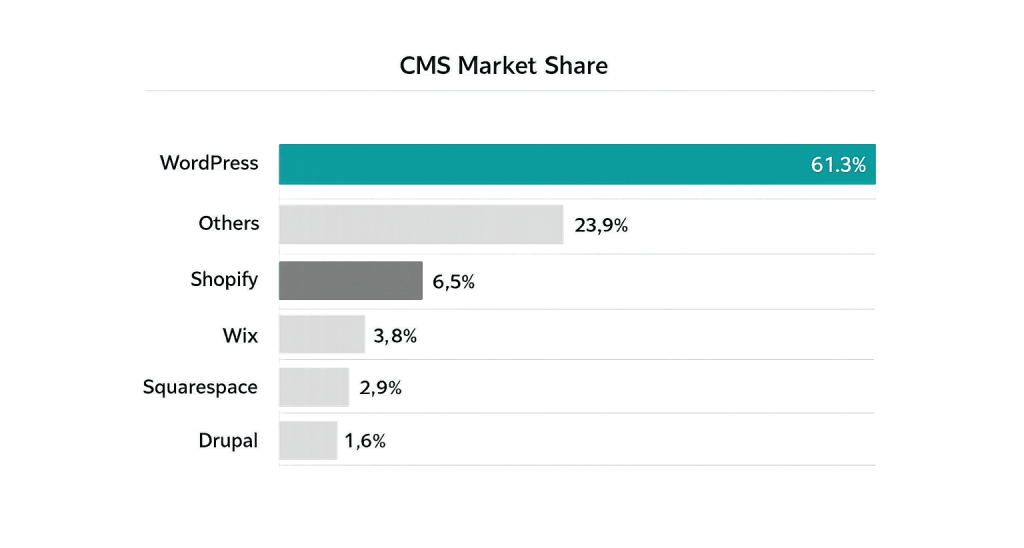
WordPress is by far the dominant CMS globally. As of 2025, WordPress powers approximately 43.4% of all websites on the internet — and holds 61.3% of the market among sites that use any CMS at all. This dominance reflects its combination of flexibility, a vast plugin ecosystem, and an active developer community. See WordPress.org and open-source for more context on why this matters.
[Image: Market share comparison chart showing WordPress (61.3%) vs. Shopify, Wix, Squarespace, Drupal, and other CMS platforms]
Purpose & Benefits
1. Non-Technical Content Management
The core purpose of a CMS is to let people manage website content without developer involvement for every change. In WordPress, this means a business owner can log in, navigate to any page, and update text, images, or structured content through a visual editor — no coding required. This independence reduces overhead and allows content to stay current without creating bottlenecks.
2. Structured, Scalable Content Architecture
A CMS enforces consistency across content. Blog posts follow a standard structure (title, body, excerpt, featured image, category, tags). Product pages share a consistent template. This structure makes sites easier to maintain, helps search engines understand the content hierarchy, and enables teams to produce new content quickly because the framework already exists.
3. Extensibility Through Plugins and Modules
Open-source CMS platforms like WordPress are designed to be extended. Thousands of plugins add e-commerce functionality, form builders, SEO tools, performance optimization, security features, and more — without requiring custom development for common needs. This extensibility is a significant part of why WordPress has maintained its market position for over two decades. Our WordPress development services build on this foundation for custom requirements.
Examples
1. Small Business Website in WordPress
A home services company launches a WordPress site. The office manager updates service descriptions, adds seasonal promotions, and publishes project photos through the WordPress admin interface. No developer is needed for day-to-day content changes. The developer’s time is reserved for structural changes, plugin updates, and new feature additions.
2. Multi-Author Blog
A publication uses WordPress to manage content from 15 different contributors. Each author logs in with their own account and creates drafts. Editors review and approve before publishing. WordPress’s user roles system — separating Administrator, Editor, Author, and Contributor access levels — ensures the right people have the right permissions without granting unnecessary access.
3. Migrating from a Website Builder to WordPress
A business that started on Wix finds it can’t build the custom product catalog features its growing business needs. They migrate to WordPress with WooCommerce, gaining the flexibility to create custom product types, taxonomies, and filtering — features a proprietary website builder doesn’t support. The migration to an open-source CMS unlocks functionality that would otherwise require a completely custom-built solution.
Common Mistakes to Avoid
- Choosing a CMS based on familiarity rather than fit — A platform that’s easy for one person to use isn’t always the right choice for a business’s long-term needs. Evaluate CMS options against your content structure, team size, integration requirements, and growth plans.
- Treating the CMS as “set it and forget it” — CMS software requires ongoing maintenance: security updates, plugin updates, and periodic audits. Neglecting updates is one of the leading causes of website hacks and performance degradation.
- Over-plugging — In WordPress, adding too many plugins — especially redundant or poorly maintained ones — creates security risks, conflicts, and performance problems. Every plugin should have a clear purpose and an active maintenance record.
- Not training content editors — A powerful CMS is only as useful as the people using it. Investing time in training your team on the CMS basics — including how not to break things — pays back quickly in fewer support requests and fewer content errors.
Best Practices
1. Match the CMS to Your Content Model
Before choosing a platform, map out what types of content you need to manage: simple pages, blog posts, products, events, team members, case studies? Some CMS platforms handle complex content types better than others. WordPress with custom post types handles most scenarios well; highly structured multi-channel content may warrant a headless approach.
2. Plan for Maintenance from Day One
When a WordPress site is built, establish a maintenance routine: regular backups, plugin and theme updates, security scanning, and database optimization. A CMS that isn’t maintained is a liability. Consider a managed WordPress hosting provider or a monthly maintenance plan to handle this systematically.
3. Use the Block Editor (Gutenberg) Effectively
WordPress’s block editor offers a visual, component-based editing experience. Learning its capabilities — reusable blocks, template parts, and block patterns — reduces the need to call a developer for layout changes and gives content editors more flexibility without compromising site consistency. Taking time to train your team on this pays off in content velocity.
Frequently Asked Questions
What’s the difference between WordPress.com and WordPress.org?
WordPress.org is the open-source software you download and install on your own hosting. You own everything. WordPress.com is a hosted service run by Automattic — convenient but with limitations on plugins, customization, and data ownership. Most businesses and professional sites run on WordPress.org-based installations.
Is WordPress secure?
WordPress core is generally secure and maintained by a large global community. Most WordPress security issues come from outdated plugins, weak passwords, and poor hosting configurations — not from WordPress itself. Following security best practices and keeping everything updated keeps the vast majority of WordPress sites safe.
Can a non-technical person manage a WordPress website?
Yes — managing existing content is accessible to non-technical users. Publishing posts, editing pages, updating images, and managing basic settings can all be done through the admin interface without any coding knowledge. More complex tasks — theme customization, plugin development, database work — still require technical skill.
How does WordPress compare to Shopify or Squarespace?
WordPress is more flexible and customizable but requires more technical setup and ongoing maintenance. Shopify is better optimized for e-commerce out of the box but has recurring transaction fees and less flexibility outside the e-commerce context. Squarespace is simpler to use but significantly more limited in functionality. WordPress is generally the better long-term choice for businesses that will outgrow a simple template-based site.
What percentage of websites use a CMS?
Approximately 70% of websites with substantial content use a CMS. Of those, WordPress holds a 61.3% market share as of 2025 — more than all other CMS platforms combined.
Related Glossary Terms
How CyberOptik Can Help
Understanding how WordPress works under the hood helps you make better decisions about your site. Our team builds and manages WordPress sites for businesses every day — from initial setup and configuration to custom development and ongoing maintenance. Whether you’re starting fresh or need to improve an existing site, we can help. Get in touch to discuss your project or explore our WordPress development services.


