
ACF (Advanced Custom Fields) is a WordPress plugin that extends the native content editing experience by letting developers add custom input fields to pages, posts, custom post types, users, and other WordPress objects. Instead of storing all content in the default title and content editor, ACF allows teams to create structured data fields — text boxes, image selectors, dropdowns, date pickers, repeaters, and more — tailored exactly to a site’s content requirements.
For business owners, ACF is the reason your WordPress site can have organized, editable fields for things like team member bios, service pricing tables, event details, or product specifications — rather than everything jammed into one generic content block. For developers, ACF is one of the most widely used WordPress plugins in professional development, powering custom content structures on millions of sites. The free version handles most common use cases; ACF PRO adds advanced field types like Repeaters, Flexible Content, and ACF Blocks.
How ACF Is Used in WordPress
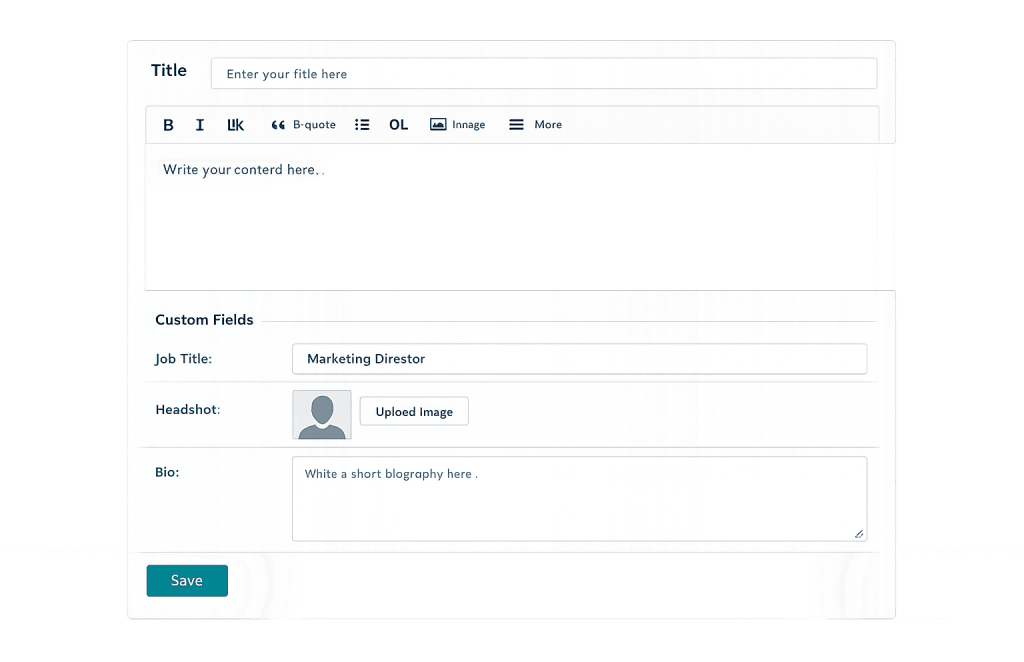
ACF works by creating field groups — collections of related fields — and assigning those groups to specific locations in the WordPress admin. A field group might be called “Team Member Details” and contain fields for Job Title, Headshot Image, LinkedIn URL, and a Brief Bio. That group would be set to appear whenever an editor is working on the “Team Member” custom post type.
The data entered into those fields is stored in WordPress’s post meta table and retrieved in templates using ACF’s PHP functions. The two core functions are:
get_field('field_name')— Retrieves the field value as a variable for use in PHP logicthe_field('field_name')— Outputs the field value directly as HTML
This architecture keeps content structured and editorial — editors use clean, purpose-built fields rather than trying to format custom data inside a generic editor. Developers control how that data is displayed on the front end through templates.
[Image: Screenshot showing the WordPress edit screen with an ACF field group — labeled custom fields like “Job Title,” “Headshot,” and “Bio” — displayed below the standard content editor]
Purpose & Benefits
1. Purpose-Built Content Structures for Any Business Type
WordPress’s default post/page model handles text content well but wasn’t designed for structured data like real estate listings, menus, event schedules, or staff directories. ACF solves this by letting developers build field structures that match exactly what a business actually needs to manage. The result is an editing experience that matches the content — editors see fields labeled with their actual purpose, not a blank text box and a guess. Our WordPress development services use ACF on nearly every custom build.
2. Cleaner, More Maintainable Templates
When content structure is defined through ACF fields rather than hard-coded into templates or pasted into content areas, sites become significantly easier to maintain and update. A client can update their pricing table, change team photos, or modify event details without touching code or worrying about accidentally breaking a page layout. This separation between content and presentation is a cornerstone of well-built custom WordPress sites.
3. Flexible Content Presentation Without a Page Builder
ACF PRO’s Flexible Content and Repeater field types allow editors to build complex page layouts — different section types stacked in any order — without relying on heavy drag-and-drop page builders. This keeps the site’s markup clean, the codebase maintainable, and the performance fast. Developers define the available layout modules; editors choose which to use and in what order. It’s a middle ground between rigid templates and unrestricted page builders that works well for sites with varying content structures.
Examples
1. Displaying a Custom Text Field
The most common ACF use case: a developer adds a “Tagline” text field to the page editor so editors can set a custom subtitle per page without editing templates.
<?php
// Display a custom tagline field below the page title
$tagline = get_field( 'tagline' );
if ( $tagline ) : ?>
    <p class="page-tagline"><?php echo esc_html( $tagline ); ?></p>
<?php endif; ?>
This retrieves the tagline field value, checks that it isn’t empty, and outputs it safely using esc_html() to prevent XSS vulnerabilities. The field only renders if content has been entered — no empty markup.
2. Looping Through a Repeater Field
ACF PRO’s Repeater field handles structured, repeating data — like team members, FAQs, or service tiers. Each row in the repeater has its own sub-fields.
<?php
// Loop through a "team_members" repeater field
if ( have_rows( 'team_members' ) ) :
    while ( have_rows( 'team_members' ) ) : the_row();
        $name    = get_sub_field( 'member_name' );
        $title   = get_sub_field( 'job_title' );
        $photo   = get_sub_field( 'headshot' );
        ?>
        <div class="team-member">
            <?php if ( $photo ) : ?>
                <img src="<?php echo esc_url( $photo['url'] ); ?>"
                     alt="<?php echo esc_attr( $photo['alt'] ); ?>">
            <?php endif; ?>
            <h3><?php echo esc_html( $name ); ?></h3>
            <p><?php echo esc_html( $title ); ?></p>
        </div>
        <?php
    endwhile;
endif;
?>
This outputs a complete team member card for each row added by the editor — name, title, and headshot — without requiring any code changes when new members are added. The editor simply adds another repeater row in the admin.
3. Registering a Field Group via PHP
For production sites, registering ACF fields in code (rather than the database) is a best practice — it keeps field definitions under version control and makes them portable across environments.
<?php
// Register an ACF field group programmatically
// Place in functions.php or a dedicated plugin file
add_action( 'acf/init', 'cyberoptik_register_service_fields' );

function cyberoptik_register_service_fields() {
    if ( ! function_exists( 'acf_add_local_field_group' ) ) {
        return;
    }
    acf_add_local_field_group( array(
        'key'    => 'group_service_details',
        'title'  => 'Service Details',
        'fields' => array(
            array(
                'key'   => 'field_service_tagline',
                'label' => 'Service Tagline',
                'name'  => 'service_tagline',
                'type'  => 'text',
            ),
            array(
                'key'   => 'field_service_icon',
                'label' => 'Service Icon',
                'name'  => 'service_icon',
                'type'  => 'image',
            ),
        ),
        'location' => array(
            array(
                array(
                    'param'    => 'post_type',
                    'operator' => '==',
                    'value'    => 'service',
                ),
            ),
        ),
    ) );
}
This registers a “Service Details” field group with a text field and an image field, assigned to the “service” custom post type. Because these fields are defined in code, they travel with the theme or plugin through version control — rather than being stored only in the database.
Common Mistakes to Avoid
- Outputting field values without escaping — ACF’s
the_field()outputs raw field values. For text fields displayed as HTML, always useecho esc_html( get_field('field_name') )to prevent potential security vulnerabilities. This is especially important for fields that accept user-entered content. - Leaving field groups in the database in production — Fields registered only through the ACF UI (stored in the database) can be lost during migrations, staging-to-production pushes, or database resets. Register fields in PHP via
functions.phpor a plugin for any site beyond a simple prototype. - Using ACF on every site regardless of fit — ACF is excellent for structured, repeating, or complex data. For a simple blog or brochure site where the default editor handles content cleanly, adding ACF introduces unnecessary complexity. Use it when the content structure genuinely calls for it.
- Ignoring field naming conventions — Field names become the keys used throughout your templates. Inconsistent or generic names like
field1ortextmake templates harder to read and maintain. Use descriptive, lowercase, underscore-separated names liketeam_member_bioorservice_icon.
Best Practices
1. Register Fields in Code for Any Production Site
Fields registered via the ACF UI are stored in the database, which creates deployment and versioning problems. The acf_add_local_field_group() function lets you define field groups in PHP within your theme’s functions.php or a dedicated plugin file. This keeps your field structure in version control, makes it portable between staging and production environments, and prevents field data from being overwritten during deployments.
2. Use the Correct Field Type for the Data
ACF offers over 30 field types — text, textarea, image, file, gallery, select, checkbox, radio, date picker, post object, relationship, repeater, flexible content, and more. Choosing the right field type improves the editing experience and ensures data is stored in the most queryable format. An image should be an Image field (which stores the attachment ID), not a text field where someone pastes a URL. Event dates should use the Date Picker field, not a plain text field — this makes the data sortable and filterable via WP_Query meta queries.
3. Combine ACF with Custom Post Types for Structured Content
ACF reaches its full potential when paired with custom post types. A “Service” post type with an ACF field group containing Service Icon, Tagline, Feature List (repeater), and Related Case Study (relationship) creates a structured content architecture that’s far more maintainable than five services hard-coded into five different pages. Editors can add, edit, and manage services through a clean admin interface, and templates pull from a consistent data structure.
Frequently Asked Questions
Do I need ACF to add custom fields to WordPress?
WordPress has built-in custom field support, but the native interface is minimal and not editor-friendly — it’s a basic key-value text input with no field type validation. ACF provides a purpose-built UI, validation, over 30 field types, conditional logic, and developer functions that make working with custom fields practical at a professional level. For anything beyond the most basic use case, ACF is the standard choice.
What’s the difference between ACF free and ACF PRO?
The free version includes core field types (text, textarea, number, email, URL, select, checkbox, radio, image, file, WYSIWYG, oEmbed, color picker, and more) and handles the majority of common content structure needs. ACF PRO adds the Repeater field, Flexible Content field, ACF Blocks, Gallery field, Clone field, and Options Pages. Most custom development work on complex sites benefits from PRO — particularly for page layouts and repeating data structures.
Can ACF slow down my WordPress site?
It can if used carelessly. ACF stores field data as post meta, and complex meta queries — especially on archive pages pulling many posts with multiple custom fields — can create database overhead. The performance impact depends on how fields are queried and displayed. For most sites, properly implemented ACF has negligible performance impact. For high-traffic sites with large datasets, caching layers help. Our WordPress maintenance services can assess and optimize ACF performance on existing sites.
Is ACF compatible with the block editor (Gutenberg)?
Yes. ACF PRO includes ACF Blocks, which allows developers to register custom Gutenberg blocks backed by ACF fields. This combines the editorial flexibility of the block editor with the structured data management of ACF. Field groups can also be assigned to specific blocks through the ACF UI or via PHP, giving editors clean field-based editing inside the block editor context.
Does ACF work with multisite installations?
Yes, ACF works with WordPress multisite. Field groups created on the network’s main site can be applied across the network, or each subsite can have its own field groups. In network-activated configurations, field data is stored per-site in each site’s post meta table. This makes ACF a practical choice for multisite WordPress setups where different sites share a common custom field architecture.
Related Glossary Terms
How CyberOptik Can Help
ACF is part of the standard toolkit on virtually every custom WordPress project we build. Whether you need a structured content architecture built from scratch, existing ACF implementations cleaned up and optimized, or developer-registered field groups added to your theme, our team handles it daily. You don’t need to understand the code to benefit from what ACF enables — you just need a site built to work the way your content actually works. Get in touch to discuss your project or explore our WordPress development services.


