
Severity: Critical · Fix time: 5–15 min · Skill level: Intermediate
The Cloudflare 521 error — “Web Server Is Down” — means Cloudflare attempted to open a TCP connection to your origin web server and the connection was actively refused. Your server is reachable at the IP level, but nothing is listening on the port Cloudflare is trying to connect to (port 80 for HTTP or port 443 for HTTPS, depending on your SSL/TLS mode), or a firewall is blocking Cloudflare’s requests before they reach the web server process.
Unlike a Cloudflare 522 error, where Cloudflare can initiate a connection but gets no response, the 521 is a hard refusal — the operating system on your server is explicitly rejecting the connection attempt. This tells you precisely that either the web server process (Apache or Nginx) isn’t running, or something is actively blocking Cloudflare’s IP addresses from connecting at all.
For WordPress sites, a 521 is typically one of the more straightforward Cloudflare errors to diagnose because the failure is binary: either the web server process is running and accepting connections, or it isn’t.
Need a quick map of every WordPress error? See our 70+ WordPress Errors Guide → for a categorized reference of every common WordPress issue.
[Image: Cloudflare’s branded 521 error page showing “Web Server Is Down” and the Ray ID]
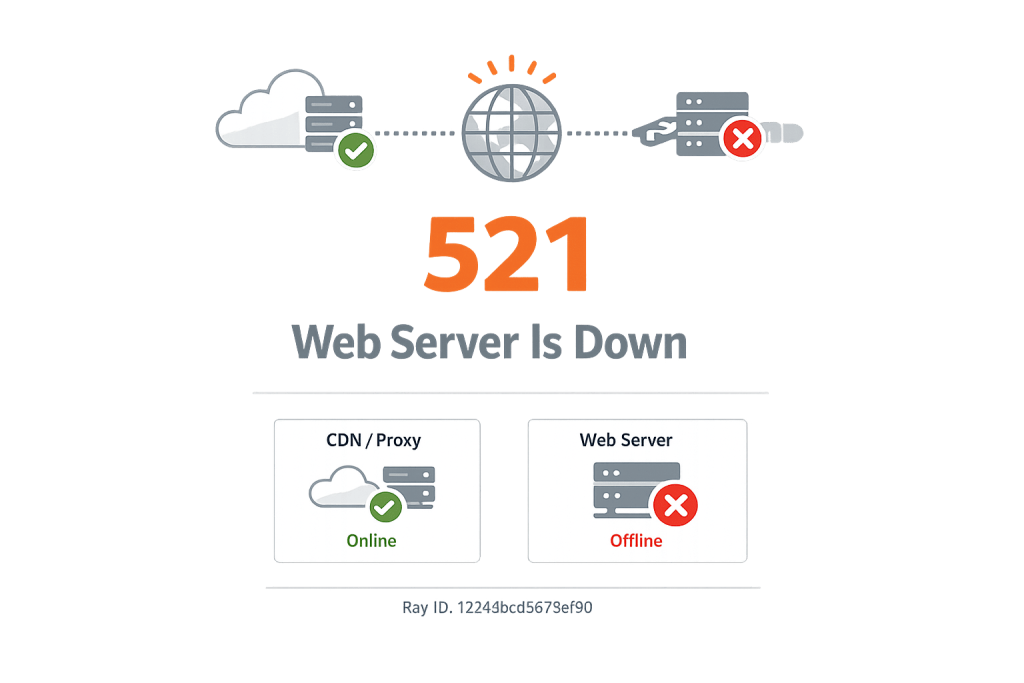
How Cloudflare 521 Error Works
When Cloudflare forwards a visitor’s request to your origin server, it initiates a TCP handshake — a SYN packet sent to your server’s IP on the designated port. A 521 occurs when the server responds with a TCP RST (reset) packet, which is the network equivalent of a door slam. The server’s operating system is saying “nothing is listening on this port” or “this connection is explicitly rejected.”
The Cloudflare documentation identifies two primary causes:
- Origin web server application is offline — The Apache or Nginx process has crashed, was stopped, or never started after a server reboot. The OS is still running, but the web server software isn’t, so nothing answers on port 80 or 443.
- Cloudflare requests are being blocked — A firewall (iptables, UFW, CSF, a hosting-level WAF, or a WordPress security plugin) is blocking connections from Cloudflare’s IP ranges. Your server receives Cloudflare’s SYN packet and immediately sends back a RST, rather than allowing the handshake to complete.
A third, less common cause: if your SSL/TLS mode in Cloudflare is set to Full or Full (Strict), Cloudflare connects to your origin on port 443. If your origin web server is only listening on port 80 (not port 443), the connection to 443 will be refused even though the web server is technically running.
Check This First — 2-Minute Diagnostic
- SSH into your server and check if the web server process is running — Run
systemctl status nginxorsystemctl status apache2. If the status shows “inactive” or “failed,” restart the service and test. On shared hosting without SSH, check the hosting control panel for server status indicators. - Check what ports are actually listening — Run
ss -tlnp | grep -E ':80|:443'to see if anything is listening on the web ports. An empty result means the web server process is stopped. - Pause Cloudflare temporarily — In your Cloudflare dashboard: Overview → Pause Cloudflare on Site. Try to connect directly. If the site loads when Cloudflare is paused, the web server is running but Cloudflare’s IPs are being blocked by a firewall.
- Check your hosting firewall and security plugins — Log into cPanel or your host’s control panel and check CSF (ConfigServer Security & Firewall) or any WAF settings for recently blocked IP ranges. In WordPress, check Wordfence’s blocked IP list.
- Check the SSL/TLS mode in Cloudflare — In your Cloudflare dashboard: SSL/TLS → Overview. If the mode is “Full” or “Full (Strict),” your origin must be listening on port 443 with a valid SSL certificate. If it’s only listening on port 80, switch the Cloudflare SSL mode to “Flexible” temporarily to test.
Purpose & Benefits
1. Immediate Identification of Web Server Downtime
A 521 is one of the clearest signals in the Cloudflare error hierarchy: the web server process is not running, or it’s being blocked. This specificity is operationally valuable — it immediately directs your attention to the right place (the web server process and firewall) rather than to PHP, the database, or WordPress configuration. Time spent diagnosing a 500 Internal Server Error or a 504 Gateway Timeout can be wasted if the actual problem is a stopped Nginx service. A 521 eliminates that ambiguity.
2. Catching the Side Effects of Server Security Hardening
Firewall-blocked Cloudflare IPs causing 521 errors is a surprisingly common result of server security hardening gone slightly wrong. When a system administrator tightens iptables rules or installs a new WAF — correctly, as a security measure — they may inadvertently block Cloudflare’s IP ranges along with the malicious traffic they’re targeting. Understanding the 521 as a firewall issue lets you fix the security configuration surgically: add Cloudflare’s IP ranges to the allowlist without loosening the other protections that were put in place for good reason.
3. Ensuring SSL Mode Consistency Between Cloudflare and Origin
The 521 is a natural audit point for SSL/TLS configuration consistency. If Cloudflare is set to “Full (Strict)” but your origin only handles HTTP on port 80, a 521 is the immediate result. Resolving a 521 often leads to properly aligning Cloudflare’s SSL mode with your origin’s actual configuration — which has the beneficial side effect of ensuring visitors get genuine end-to-end HTTPS encryption rather than a “Flexible” setup where Cloudflare-to-origin traffic is unencrypted.
Examples
1. Nginx Stops After a Server Reboot
A VPS running Ubuntu is rebooted after a kernel security update. Nginx was installed but not configured to start automatically on boot. After the reboot, Nginx stays stopped, nothing listens on port 80 or 443, and all visitors see the Cloudflare 521 error. SSH into the server and check:
# Check Nginx status
systemctl status nginx

# If inactive/dead, start it:
sudo systemctl start nginx

# Enable auto-start on boot to prevent recurrence:
sudo systemctl enable nginx
After starting Nginx, the 521 clears immediately. Setting systemctl enable nginx ensures this doesn’t happen again after future reboots.
2. Security Plugin Blocks Cloudflare IPs After Update
A site owner updates their Wordfence plugin to a new major version. The update resets firewall settings to more aggressive defaults, including blocking all IP ranges not on an explicitly maintained allowlist. Cloudflare’s IP ranges are not on the allowlist. Every request Cloudflare forwards to the origin is blocked by Wordfence at the firewall level, producing a 521. The site owner pauses Cloudflare, accesses the site directly via origin IP, navigates to Wordfence → Firewall → Allowlisted IPs, and adds all of Cloudflare’s current IP ranges.
3. SSL Mode Mismatch After Hosting Migration
A site migrates from shared hosting to a new VPS. The shared hosting had SSL configured; the VPS initially only has HTTP configured while the SSL certificate is still being provisioned. The Cloudflare SSL/TLS mode is still set to “Full (Strict)” from the previous setup. Cloudflare attempts to connect to the VPS on port 443, but nothing is listening there yet, producing a 521.
Temporary fix: switch Cloudflare SSL mode to “Flexible” to allow Cloudflare to communicate with the origin on port 80 while the SSL certificate is configured. Permanent fix: install the SSL certificate on the VPS and verify it’s valid, then switch back to “Full (Strict)” for proper end-to-end encryption:
# Confirm Nginx is listening on both ports once SSL is installed
server {
    listen 80;
    listen 443 ssl;
    server_name yourdomain.com www.yourdomain.com;

    ssl_certificate /etc/letsencrypt/live/yourdomain.com/fullchain.pem;
    ssl_certificate_key /etc/letsencrypt/live/yourdomain.com/privkey.pem;
}
Common Mistakes to Avoid
- Assuming the origin server hardware is down — A 521 does not mean your server is offline. The TCP RST response requires a functioning OS to send it. The web server process is stopped or blocked — not the physical machine. Don’t file a “server down” emergency ticket with your host before checking if Nginx or Apache is simply not running.
- Not checking whether Cloudflare IPs are whitelisted after any firewall change — Any time you install a new security plugin, update your WAF, or modify iptables rules, verify that Cloudflare’s IP ranges remain accessible. This is an easy step to miss and a common cause of 521 errors appearing unexpectedly after a security hardening session.
- Switching Cloudflare SSL mode to “Flexible” permanently — Changing the SSL mode to “Flexible” may resolve a 521 if the origin isn’t listening on port 443, but it means Cloudflare-to-origin traffic is unencrypted even though visitors see HTTPS. It’s a diagnostic tool, not a permanent solution. Install a valid SSL certificate on your origin and switch to “Full (Strict).”
- Overlooking the Cloudflare Ray ID — Even though a 521 is usually straightforward to diagnose, the Ray ID on the error page is useful for confirming the timestamp and origin IP Cloudflare was connecting to. Record it before troubleshooting in case the issue recurs.
- Not verifying which port the origin is listening on — If your Cloudflare SSL mode is “Full” or “Full (Strict),” Cloudflare connects to port 443. If your server only has port 80 open, the connection is refused. Running
ss -tlnp | grep -E ':80|:443'takes five seconds and eliminates a common misdiagnosis.
Best Practices
1. Enable Web Server Auto-Start and Configure Process Monitoring
Configure your web server to start automatically after a system reboot and to restart automatically if it crashes:
# Enable Nginx to start on boot and restart on failure
sudo systemctl enable nginx
sudo systemctl edit nginx
# In the editor, add:
# [Service]
# Restart=always
# RestartSec=5
For Apache: replace nginx with apache2 in all commands. On shared hosting, contact your provider about auto-restart settings — most managed hosts handle this automatically.
2. Maintain a Current Cloudflare IP Allowlist
Cloudflare publishes its current IP ranges at cloudflare.com/ips. These ranges occasionally change as Cloudflare expands its network. In your server firewall (iptables, UFW, CSF) or security plugin, maintain an allowlist for these ranges and check it whenever you update your firewall rules. For CSF users, Cloudflare provides a script to automatically update the allowlist when IP ranges change.
3. Verify Port Availability After Every Configuration Change
After any server configuration change that touches ports, SSL, or firewall rules, run a quick verification from outside your server:
# Test TCP connection to port 80 from your local machine
nc -zv yourdomain.com 80

# Test TCP connection to port 443
nc -zv yourdomain.com 443

# Expected output: "Connection to yourdomain.com 443 port [tcp/https] succeeded!"
# If you see "Connection refused" — Cloudflare will too
4. Use Cloudflare Health Checks for Proactive Monitoring
Cloudflare’s Load Balancing feature includes health checks that probe your origin server and alert you when it’s unreachable. Even if you’re not using load balancing, configuring a health check against your origin’s IP gives you advance notice of a 521-causing condition before visitors see the error. Pair this with uptime monitoring at the application level via a tool like UptimeRobot.
5. Document Your Server’s Port Configuration
Keep a simple record of which ports your origin server listens on, which Cloudflare SSL/TLS mode you’re using, and which IP allowlist entries are in place. When a 521 appears after a configuration change, having this baseline makes it immediately obvious whether the change inadvertently altered port availability or blocked Cloudflare’s IP ranges.
Frequently Asked Questions
What causes a Cloudflare 521 error most often?
The two most common causes are: the web server process (Apache or Nginx) has stopped running — often after a reboot or crash — and Cloudflare’s IP addresses being blocked by a firewall rule or security plugin. Running systemctl status nginx on the server and pausing Cloudflare to test direct origin connectivity are the two fastest diagnostic steps that resolve the majority of 521 situations.
How do I fix a Cloudflare 521 when locked out of wp-admin?
wp-admin isn’t accessible when Cloudflare returns a 521 — the browser can’t even reach the server. The fastest recovery path for VPS users is to SSH into the server and check/restart the web server process. For shared hosting users, use your hosting control panel’s server management tools. To rule out a firewall block, pause Cloudflare in the Cloudflare dashboard and try connecting to your origin’s IP directly.
Can a Cloudflare 521 hurt my SEO?
Yes. A 521 makes your entire site inaccessible to visitors and search engine crawlers. If Google’s crawler encounters a 521, it records the URL as temporarily unavailable. Brief outages rarely cause lasting SEO damage. Sustained outages of more than a few hours can reduce crawl frequency and trigger temporary ranking suppression for affected pages. Resolve 521 errors quickly and monitor Search Console for any crawl error spikes after an incident.
What’s the difference between a Cloudflare 521 and a 522?
A Cloudflare 522 means Cloudflare can establish a TCP connection to your origin — something is listening on the port — but the server doesn’t respond within the timeout window. A 521 means the connection is actively refused: nothing is listening, or a firewall sends a RST packet. The 521 is a harder failure at the connection layer; the 522 suggests the server is reachable but overloaded or unresponsive.
Why does my site work when I visit the IP address directly but not through the domain?
If the site loads when you access your origin IP directly but shows a 521 through your Cloudflare-proxied domain, the web server is running correctly — Cloudflare’s IP addresses are being blocked. Your firewall sees requests from Cloudflare’s IP ranges (not the visitor’s original IP) and blocks them. The fix is to add Cloudflare’s complete IP ranges to your server firewall’s allowlist.
Related Glossary Terms
- Cloudflare 520 Error
- Cloudflare 522 Error
- Cloudflare 524 Error
- 500 Internal Server Error
- SSL Certificate
- ERR_Connection_Refused
- SFTP
- 504 Gateway Timeout
How CyberOptik Can Help
Still broken? Our team fixes WordPress errors like this in under 30 minutes for maintenance clients. A Cloudflare 521 on a live site means zero visitors can reach it — and every minute it’s down costs you traffic, conversions, and search equity. We work across your Cloudflare configuration, server firewall settings, and web server process management to identify the cause and restore service fast. Contact us to discuss your site or learn about our WordPress maintenance plans.


