
A coupon in WooCommerce is a discount code that customers enter at the cart or checkout to receive a reduction in price. WooCommerce includes a built-in coupon system that allows store owners to create and manage discount codes without any additional plugins. Coupons can apply a percentage discount, a fixed dollar amount off the cart total, or a fixed amount off specific products — and can be configured with detailed restrictions around which products, categories, customers, and time frames they apply to.
Coupons are one of the most direct tools a store owner has for driving purchases. Used strategically, they can recover abandoned carts, reward loyal customers, run targeted promotions, and incentivize first-time buyers — all while maintaining control over exactly how much discount is offered and to whom.
[Image: Screenshot of the WooCommerce coupon creation screen showing Discount Type, Coupon Amount, and Usage Restriction fields]
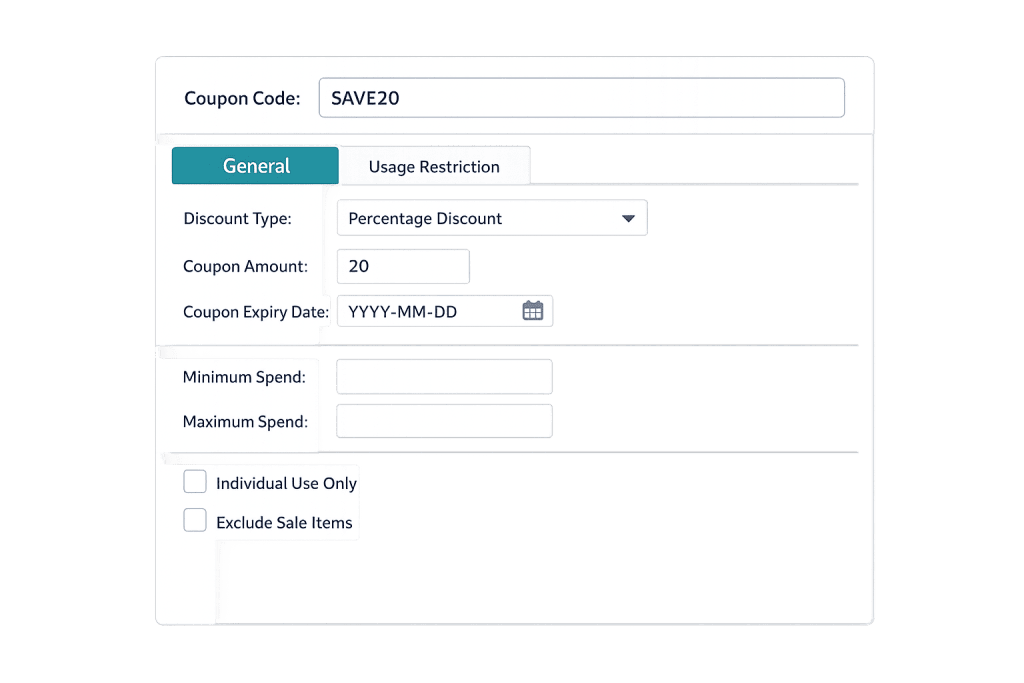
Types of WooCommerce Coupons
WooCommerce core supports three discount types:
- Percentage discount — Takes a set percentage off the qualifying items or cart total. For example, a 20% off coupon applied to a $100 cart gives a $20 discount.
- Fixed cart discount — Removes a specific dollar amount from the entire cart. A “$15 off” coupon works regardless of the specific products in the cart (subject to any minimum spend requirements you set).
- Fixed product discount — Applies a fixed dollar amount off specific products only. The discount applies per unit of the qualifying product in the cart.
Beyond the three base types, WooCommerce’s coupon settings allow for considerable customization:
- Free shipping — A coupon can grant free shipping rather than (or in addition to) a price discount.
- Expiry date — Set a date after which the coupon is no longer valid.
- Minimum/maximum spend — Restrict the coupon to orders above or below a certain subtotal.
- Product and category restrictions — Limit the coupon to specific products or categories, or exclude certain items.
- Email restrictions — Tie the coupon to specific customer email addresses, useful for personalized offers.
- Usage limits — Control how many times the coupon can be used in total and how many times a single customer can use it.
Purpose & Benefits
1. Drive Sales and Recover Revenue
Coupons are effective at prompting purchases that might not otherwise happen. They’re particularly useful for cart abandonment recovery — a well-timed discount offer via email can bring back a shopper who left without completing their purchase. For WooCommerce stores running seasonal promotions, a time-limited coupon creates urgency that moves inventory.
2. Target Specific Customers or Products
WooCommerce coupons can be fine-tuned to apply only to certain customer segments or product lines. You can create a coupon exclusively for customers who made a first purchase last month, or one that only discounts a slow-moving product category. This precision means you’re not giving a blanket discount to everyone — you’re investing the discount where it generates the most return.
3. Support Marketing Campaigns
Coupon codes are trackable. Each unique code you distribute — through an email campaign, a social media post, or a partner referral — tells you exactly which channel drove the redemptions. That data feeds back into your marketing strategy and helps measure ROI on specific campaigns. When combined with WooCommerce order management, coupon usage data is visible directly in the orders dashboard.
Examples
1. Welcome Discount for New Customers
A store creates a coupon code “WELCOME10” offering 10% off the first purchase. The code is shared in the automated welcome email sent when a new customer creates an account. Usage is limited to once per user, ensuring the discount applies only to the intended first-time purchase. This approach rewards new customers without offering repeat discounts to the same person.
2. Seasonal Sale Promotion
A clothing store creates a fixed cart discount coupon worth $25 off any order over $100. The coupon has an expiry date set for the end of the sale period and a minimum spend of $100. It’s shared via email and social media. When the sale ends, the coupon automatically stops working — no need to manually disable it.
3. Cart Abandonment Recovery Sequence
A customer adds items to their cart and leaves without checking out. An automated recovery email is sent one hour later. If the customer still hasn’t purchased after 24 hours, a second email delivers a unique coupon code for free shipping on their cart. The coupon is tied to their email address so it can only be used by them, and it expires in 48 hours to create urgency.
Common Mistakes to Avoid
- No usage limits on promotional codes — A coupon code shared publicly without a usage limit can be used indefinitely. Always set a total usage cap or a per-user limit to control your exposure, especially for higher-value discounts.
- Training customers to expect discounts — If every cart abandonment email includes a coupon, customers learn to abandon carts on purpose to trigger the discount. Reserve coupon offers for the second or third email in a recovery sequence rather than the first.
- Forgetting to set an expiry date — A promotional coupon that was meant to run during a specific campaign will keep working indefinitely if no expiry date is set. Always define end dates for time-limited offers.
- Applying coupon codes to already-discounted items — WooCommerce has an “Exclude sale items” option for a reason. Stacking coupons on top of existing sale prices can result in discounts deeper than intended. Decide your policy and configure restrictions accordingly.
Best Practices
1. Use Unique Codes for Trackable Campaigns
Rather than sharing one generic code across all channels, create distinct codes per campaign — “EMAIL20” for email subscribers, “SOCIAL20” for social media followers. This makes it easy to attribute redemptions to specific channels and calculate the ROI of each promotion. WooCommerce reports coupon usage, so the data is readily available.
2. Combine Restrictions Deliberately
WooCommerce’s coupon restriction settings are powerful when used together. A well-designed coupon specifies a discount type, an amount, applicable products, a minimum order value, a usage limit, and an expiry date. That combination ensures the discount is used in exactly the way you intended — not in ways you didn’t anticipate. Take a few extra minutes when creating each coupon to review all available settings.
3. Test Coupons Before Publishing
Before announcing a promotion, place a test order using the coupon code yourself. Verify that the discount appears correctly in the cart, applies to the right products, and respects any minimum spend or exclusion rules you’ve set. A coupon that doesn’t work as advertised creates customer frustration and support requests. Testing takes two minutes and prevents that entirely.
Frequently Asked Questions
Where do customers enter coupon codes in WooCommerce?
By default, WooCommerce displays a “Coupon code” field on both the cart page and the checkout page. Customers type or paste the code and click “Apply.” The discount is then reflected in the order total before payment is completed.
Can I offer free shipping as a coupon?
Yes. When creating a coupon, there’s an “Allow free shipping” checkbox under the General tab. For this to work, you also need a Free Shipping shipping method configured in your WooCommerce shipping settings. The coupon essentially unlocks the free shipping method for that order.
Can customers use more than one coupon at a time?
By default, WooCommerce allows only one coupon per order. You can enable stacking — allowing multiple coupons — under WooCommerce > Settings > General by checking “Calculate coupon discounts sequentially.” When enabled, WooCommerce applies coupons one at a time in the order they’re added, applying each subsequent discount to the already-reduced price.
How do I prevent coupon abuse?
Use a combination of restrictions: set usage limits per coupon and per user, restrict codes to specific email addresses when sending to individual customers, and set expiry dates on all promotional codes. For public-facing codes, a total usage cap prevents a sale-priced item from being discounted indefinitely.
Do WooCommerce coupons work with variable products?
Yes. Coupons work with all WooCommerce product types, including variable products. You can also apply product-level restrictions to specific variations if needed through the coupon’s product restriction settings.
Related Glossary Terms
- WooCommerce
- Cart Abandonment
- Order Management (WooCommerce)
- Payment Gateway
- WooCommerce Extension / Add-on
- Product Types (Simple, Variable, Grouped)
- E-Commerce
How CyberOptik Can Help
Coupons are a small feature with outsized impact when they’re set up correctly — and they can create real problems when they’re not. We build WooCommerce stores with promotional workflows in mind, from coupon configuration and cart abandonment sequences to full-store optimization. Contact us to discuss your eCommerce project or explore our eCommerce development services.


