
A payment gateway is a technology service that authorizes and processes payment transactions for online stores. It acts as the intermediary between a customer’s payment method — credit card, debit card, digital wallet — and the merchant’s bank account. When a customer clicks “Place Order” on a WooCommerce store, the payment gateway encrypts the payment data, communicates with the issuing bank to verify funds, and either approves or declines the transaction — typically in a matter of seconds.
For any business selling products or services online, the payment gateway is one of the most critical infrastructure choices you’ll make. It directly affects whether customers can complete purchases, what payment methods you can accept, and how your checkout flow is experienced. A poorly configured or unreliable gateway leads to failed transactions and lost revenue.
[Image: Diagram showing the payment flow: Customer → Payment Gateway → Issuing Bank → Merchant Bank]
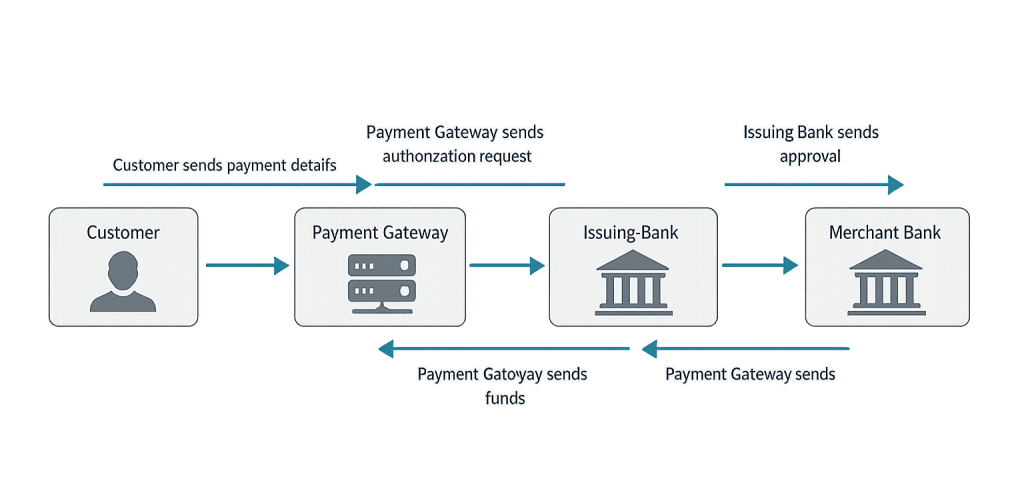
How a Payment Gateway Works
The transaction process involves four parties: the customer, the merchant’s website, the payment gateway, and the banks involved. Here’s the sequence:
- Customer submits payment — They enter card details or choose a wallet option at checkout.
- Gateway encrypts the data — Payment details are tokenized and transmitted securely over an encrypted connection (requiring an active SSL certificate).
- Authorization request — The gateway sends the encrypted data to the card network (Visa, Mastercard, etc.) and then to the customer’s issuing bank.
- Bank approves or declines — The bank checks for available funds and fraud signals, then sends a response back through the gateway.
- Transaction confirmed — The gateway relays the approval or decline to the store. If approved, the merchant’s bank receives the funds (typically within 1–3 business days).
Some gateways process payments on the merchant’s site (on-site/integrated); others redirect customers to an external page to complete payment (hosted/redirect).
Purpose & Benefits
1. Enable Online Sales With Any Payment Method
A payment gateway unlocks your ability to accept credit cards, debit cards, Apple Pay, Google Pay, and other payment methods. Without one, a WooCommerce store can only accept bank transfers or cash on delivery. The breadth of accepted payment methods directly correlates with conversion rates — customers abandon checkout when their preferred method isn’t available.
2. Secure Handling of Sensitive Financial Data
Reputable payment gateways are PCI DSS (Payment Card Industry Data Security Standard) compliant, meaning they handle and store card data according to strict security requirements. This shifts the security burden off your site — your WooCommerce store never directly handles raw card numbers, reducing your liability and protecting customers. This works alongside your SSL certificate to secure the full transaction.
3. Real-Time Transaction Processing and Fraud Prevention
Modern payment gateways include built-in fraud detection that evaluates signals like billing/shipping address mismatches, unusual purchase velocity, and card verification. This happens in real time, before funds are transferred, protecting merchants from chargebacks. For our eCommerce clients, having robust fraud screening is as important as having high uptime.
Examples
1. WooCommerce Store Using Stripe
An online retailer integrates Stripe as their payment gateway via the WooCommerce Stripe plugin. Customers enter their card details directly on the checkout page — no redirect to an external site. Stripe tokenizes the card data, so the store never stores raw card numbers. The retailer logs into their Stripe dashboard to view transactions, issue refunds, and manage disputes from one place.
2. PayPal for International Customers
A business selling digital products globally adds PayPal Payments to their WooCommerce store alongside Stripe. PayPal handles customers who prefer to pay via their PayPal balance or who are uncomfortable entering card numbers on unfamiliar sites — a segment that’s still significant in many markets. The dual-gateway setup reduces checkout abandonment by covering both preferences.
3. Square for a Hybrid Business
A brick-and-mortar boutique that also sells online uses Square as their payment gateway because it unifies online and in-person sales in a single system. Inventory, transactions, and customer records stay synced across both channels, simplifying accounting and preventing overselling.
Common Mistakes to Avoid
- Choosing a gateway based solely on fees — Processing rates matter, but gateway reliability, support quality, and ease of integration matter equally. A slightly cheaper gateway that has frequent outages costs you more in lost sales.
- Not testing the checkout flow before launch — Every payment gateway has sandbox/test mode. Always verify the full checkout process — successful payment, declined card, refund — before accepting real transactions.
- Relying on a single payment gateway — If your gateway experiences downtime, you cannot accept orders. Many larger stores integrate a backup gateway option to reduce this risk.
- Overlooking PCI compliance requirements — Even with a gateway handling card data, merchants have their own PCI compliance obligations. Using an off-site hosted gateway simplifies compliance significantly, which is often worth the slight reduction in checkout control.
Best Practices
1. Match the Gateway to Your Customer Base
Consider where your customers are and how they pay. Stripe is the dominant choice for most US-based stores. PayPal adds coverage for customers who prefer wallet payments or international buyers. Square works well if you also sell in person. Evaluate which payment methods your target customers actually use before committing to a gateway.
2. Prioritize On-Site Checkout When Possible
Redirect-based payment flows (where customers leave your site to pay) add friction and reduce conversion rates compared to integrated on-site checkout. Gateways like Stripe and WooCommerce Payments allow checkout to happen directly on your store’s checkout page, keeping the experience seamless and branded.
3. Keep Your Gateway Plugin Updated
Payment gateway plugins for WooCommerce receive frequent updates — for security patches, PCI compliance updates, and compatibility with new WooCommerce versions. Running an outdated gateway plugin is one of the more common causes of checkout failures after a WordPress or WooCommerce update.
Frequently Asked Questions
What’s the difference between a payment gateway and a payment processor?
They’re often used interchangeably but are technically different. A payment processor handles the communication between the merchant’s bank and the card networks. A payment gateway is the software interface that connects your website to the payment processor. Services like Stripe bundle both into one product, which is why the distinction is often blurred in practice.
How much does a payment gateway cost?
Most gateways charge per-transaction fees (commonly 2.9% + $0.30 for Stripe and PayPal) rather than monthly fees. Some processors offer lower per-transaction rates with a monthly fee, which can be cost-effective for high-volume stores. There’s no single answer — the right choice depends on your monthly sales volume and average order value.
Is my site secure enough to accept payments?
Payment security requires an active SSL certificate (so your site runs on HTTPS) and a PCI-compliant payment gateway. Most reputable gateways handle the PCI-compliance burden, so your main responsibility is ensuring SSL is properly configured. An SSL certificate is non-negotiable for any store accepting payments.
Can I use multiple payment gateways on one WooCommerce store?
Yes. WooCommerce supports multiple active gateways simultaneously. Customers see all available payment options at checkout and choose their preference. This is common for stores that want to offer both card payments (via Stripe) and wallet options (via PayPal).
What happens if a payment gateway is down?
If your payment gateway is unreachable, customers will see checkout errors and be unable to complete purchases. This is why monitoring gateway status pages and, for high-revenue stores, maintaining a backup gateway option is worth the configuration effort. Most major gateways publish real-time status at their respective status pages.
Related Glossary Terms
- WooCommerce
- Checkout Flow
- SSL Certificate
- Cart Abandonment
- E-Commerce
- WooCommerce Extension / Add-On
- Order Management (WooCommerce)
How CyberOptik Can Help
Building and optimizing WooCommerce stores is one of our specialties. From selecting and configuring the right payment gateway to building a checkout flow that converts, we help businesses create online shopping experiences that work. Whether you’re launching a new store or troubleshooting an existing checkout problem, we can help. Contact us to discuss your eCommerce project or explore our eCommerce services.


