
WebAssembly (Wasm) is a binary instruction format that allows code written in languages like C, C++, Rust, and Go to run directly in a web browser at near-native speeds. Rather than replacing JavaScript, it works alongside it — handling the performance-intensive tasks that JavaScript struggles with, while JavaScript continues to manage user interface interactions and standard web logic.
WebAssembly was developed through a collaboration between all major browser vendors and became a W3C standard in 2019. Today it runs in every modern browser — Chrome, Firefox, Safari, and Edge — without plugins or extensions. The practical impact of this is significant: applications that once required desktop software can now run inside a browser tab. Tools like Figma (design), Google Earth (3D mapping), and Adobe Photoshop Web all rely on WebAssembly to deliver performance that simply wasn’t achievable with JavaScript alone.
How WebAssembly Works
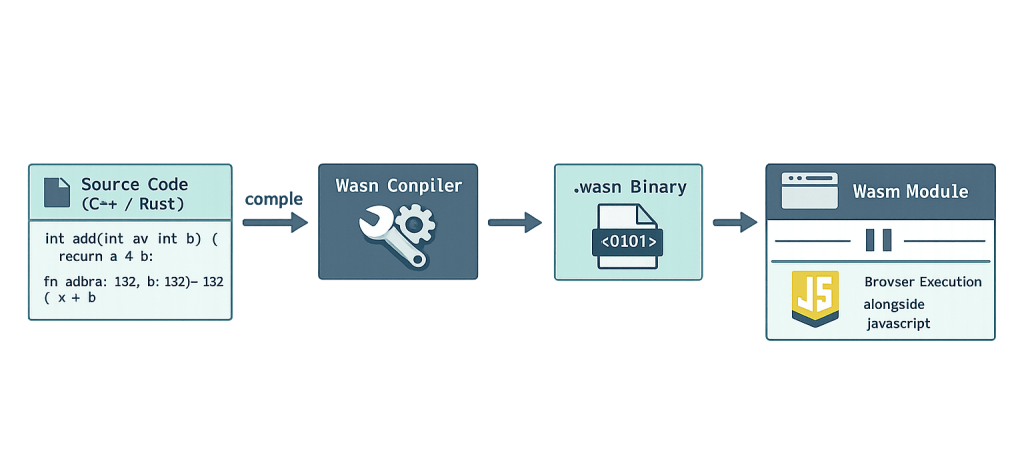
When a developer writes code in a supported language (C++, Rust, etc.), a compiler converts that code into WebAssembly’s compact binary format (.wasm files). This binary format is significantly smaller and faster to parse than equivalent JavaScript text code.
Here’s what happens when a browser loads a WebAssembly module:
- Download — The browser fetches the .wasm binary file, which is compact and loads quickly.
- Validation — The browser validates the binary to confirm it’s well-formed and safe.
- Compilation — The browser’s JavaScript engine compiles the binary to machine code optimized for the user’s hardware.
- Execution — The compiled code runs in a sandboxed environment, isolated from the operating system and other browser processes.
- JavaScript bridge — WebAssembly modules export functions that JavaScript can call, enabling the two to work together seamlessly.
The result is execution speed that is often within 10% of native application performance — a dramatic improvement over what JavaScript can achieve for compute-heavy tasks.
[Image: Diagram showing source code (C++/Rust) → Wasm compiler → .wasm binary → browser execution alongside JavaScript]
Purpose & Benefits
1. Near-Native Performance in the Browser
WebAssembly closes the performance gap between web applications and native desktop software. For tasks involving complex calculations, image processing, video encoding, or 3D rendering, Wasm can run at speeds comparable to a locally installed application. This enables a category of web experiences — professional design tools, browser-based games, simulations — that wasn’t viable before. Our WordPress development services increasingly incorporate Wasm-powered tools for performance-critical use cases.
2. Language Flexibility for Developers
Before WebAssembly, the web was almost exclusively a JavaScript environment. Wasm changes that by allowing developers to compile existing codebases in C++, Rust, and other languages into something a browser can execute. This is particularly valuable when incorporating established libraries (image codecs, physics engines, cryptographic functions) that were originally written in non-JavaScript languages — no need to rewrite them from scratch.
3. Enhanced Security Through Sandboxing
WebAssembly runs in a sandboxed environment that is isolated from the host operating system. It cannot directly access files, network connections, or other system resources unless explicitly provided through controlled JavaScript interfaces. This design makes it more secure by default than many other plugin-based approaches that historically allowed broader system access.
Examples
1. Loading and Running a WebAssembly Module in JavaScript
The most common integration pattern — fetching a .wasm file and calling its exported functions from JavaScript:
// Load and instantiate a WebAssembly module from a .wasm file
async function loadWasm() {
    const response = await fetch('math_utils.wasm');
    const buffer = await response.arrayBuffer();
    const { instance } = await WebAssembly.instantiate(buffer);

    // Call an exported Wasm function (e.g., an optimized "add" function)
    const result = instance.exports.add(10, 25);
    console.log('Result from Wasm:', result); // Output: 35
}

loadWasm();
This pattern fetches the binary, instantiates it, and immediately makes its exported functions available to JavaScript. The add function here runs in Wasm’s compiled environment rather than the JavaScript engine.
2. Compiling Rust to WebAssembly with wasm-pack
Rust is one of the most popular languages for targeting WebAssembly due to its memory safety and performance. Using wasm-pack, developers can compile Rust functions into a Wasm module and publish them as an npm package:
# Install wasm-pack (one-time setup)
cargo install wasm-pack

# Build the Rust project as a WebAssembly module
wasm-pack build --target web

# The output is a .wasm file + JavaScript glue code ready for import
After building, the resulting module can be imported in JavaScript just like any other library, making Wasm integration straightforward in modern JavaScript frameworks.
3. Using WebAssembly for Image Processing in WordPress
A WordPress plugin or theme could offload heavy image operations to a WebAssembly module to avoid blocking the browser’s main thread:
// Load a Wasm-powered image processing module
import init, { apply_grayscale } from './image_processor.js';

async function processImage(imageData) {
    await init(); // Initialize the Wasm module

    // Pass image pixel data to the Wasm function for fast processing
    const processed = apply_grayscale(imageData.data);

    return processed;
}
This approach keeps the browser UI responsive while a Wasm module handles the computationally expensive work in the background.
Common Mistakes to Avoid
- Using Wasm for simple tasks — WebAssembly has overhead in module loading and memory management. Using it for straightforward operations that JavaScript handles efficiently adds complexity without benefit. It’s best suited for CPU-intensive tasks where its performance advantage is measurable.
- Ignoring the JavaScript bridge cost — Passing large amounts of data back and forth between JavaScript and a Wasm module has a performance cost. Designs that minimize how often data crosses this boundary perform significantly better.
- Assuming Wasm replaces JavaScript — WebAssembly doesn’t manage the DOM, handle events, or make HTTP requests on its own. It’s a complement to JavaScript, not a replacement. Planning for a clean separation of concerns — Wasm for computation, JavaScript for browser interaction — leads to better results.
- Skipping MIME type configuration — Web servers must serve .wasm files with the
application/wasmMIME type. Without this, browsers may refuse to load the module or fall back to slower parsing methods. WordPress hosting environments sometimes require a small configuration update to support this.
Best Practices
1. Identify the Right Use Cases First
Not every web application needs WebAssembly. Before incorporating it, identify the specific bottlenecks where JavaScript performance is genuinely limiting the user experience — tasks like video transcoding, complex data visualization, cryptographic operations, or physics simulations. Starting with a clear performance problem makes Wasm adoption purposeful rather than speculative. Our team assesses these trade-offs as part of WordPress development projects.
2. Use Streaming Instantiation for Faster Load Times
Rather than downloading the full .wasm file before compilation begins, use WebAssembly.instantiateStreaming() to compile the module while it’s still downloading:
// Streaming instantiation: compiles while downloading (faster)
const { instance } = await WebAssembly.instantiateStreaming(
    fetch('module.wasm'),
    importObject
);
This approach reduces the time before the module is ready to use and is the recommended method by the WebAssembly specification.
3. Test Across Browsers and Audit Bundle Size
All major browsers support WebAssembly, but behavior around newer features (SIMD, threads, garbage collection) varies. Test your Wasm modules across Chrome, Firefox, Safari, and Edge. Also audit the size of your .wasm binaries — tools like wasm-opt can reduce file sizes significantly, which matters for page speed and initial load performance.
Frequently Asked Questions
Do I need WebAssembly for my WordPress website?
Probably not — most standard WordPress sites don’t have the kind of compute-heavy requirements where Wasm provides a meaningful advantage. It becomes relevant if you’re building complex interactive features, browser-based tools, or processing large datasets client-side. For most business sites, traditional JavaScript and server-side PHP are the right tools.
Is WebAssembly safe to use?
Yes. Wasm runs in a sandboxed environment inside the browser, with no direct access to system resources. It’s subject to the same browser security model as JavaScript and cannot access files or network connections without explicit permission. The sandboxing is a core design requirement, not an afterthought.
What languages can compile to WebAssembly?
The most commonly used are C, C++, Rust, and Go. AssemblyScript (a TypeScript-like language designed for Wasm) is also popular for developers already working in the JavaScript ecosystem. The language ecosystem continues to expand — many major programming languages now have at least experimental Wasm compilation support.
How does WebAssembly affect SEO?
Wasm itself doesn’t directly impact search rankings, but the performance improvements it enables do. Faster load times and better Core Web Vitals scores — which Wasm can contribute to by offloading heavy tasks — are positive ranking signals. Search engines also can’t index content generated solely by Wasm, so any content that needs to be crawled should remain in standard HTML.
Will WebAssembly replace JavaScript?
No. The two are designed to coexist. JavaScript handles DOM manipulation, event handling, and standard web application logic well. WebAssembly handles the compute-intensive work that JavaScript doesn’t do efficiently. The future of high-performance web development will likely involve both working together, with the boundary between them becoming increasingly seamless.
Related Glossary Terms
- JavaScript
- PHP
- API (Application Programming Interface)
- WordPress REST API
- PageSpeed
- Caching
- WordPress
- HTML (Hypertext Markup Language)
How CyberOptik Can Help
WebAssembly represents one of the more significant capability expansions in web development in recent years, and it’s something our team actively tracks. You don’t need to understand the compilation pipeline yourself — that’s what developers are for. If you have a performance challenge on your site or are exploring what’s possible with complex browser-based functionality, we can help you evaluate whether Wasm is the right tool and build accordingly. Get in touch to discuss your project or explore our WordPress development services.


