
HTML (Hypertext Markup Language) is the standard language used to structure content on the web. Every webpage you visit — regardless of how it was built — is ultimately rendered from HTML. It defines the structure and meaning of content: what’s a heading, what’s a paragraph, what’s an image, what’s a link. HTML tells browsers how to interpret and display the content authors create.
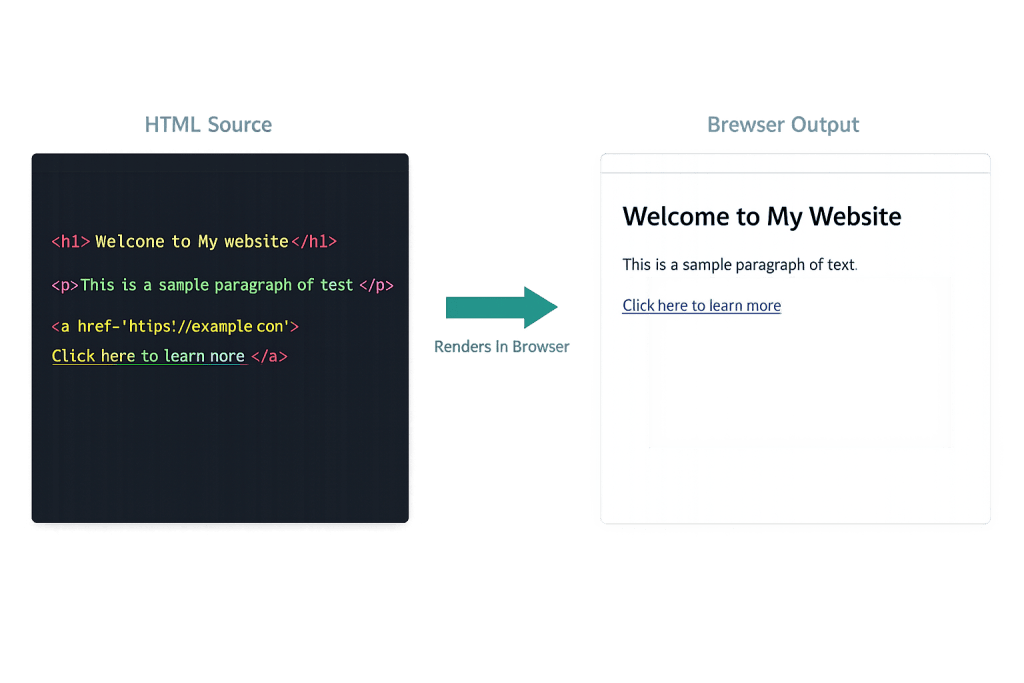
HTML works through a system of elements defined by tags. Tags are written in angle brackets and typically come in pairs: an opening tag like <h1> and a closing tag like </h1>, with content between them. The browser reads these tags and renders the content accordingly. A headline becomes visually prominent, a link becomes clickable, an image is displayed. HTML describes the what — the structure and semantics of content — while CSS handles the visual presentation and JavaScript handles behavior and interactivity.
For business owners, HTML operates behind the scenes. When you add content in the WordPress editor, WordPress generates HTML from your blocks and formatting choices. Understanding HTML at a basic level helps you troubleshoot display issues, make small edits directly in page source, and communicate more clearly with developers about what’s happening on your site.
[Image: Screenshot of HTML source code alongside the rendered browser output — showing the connection between markup and visual display]
Key HTML Concepts
Document Structure
Every HTML document follows a standard structure:
<!DOCTYPE html>
<html lang="en">
  <head>
    <meta charset="UTF-8">
    <meta name="viewport" content="width=device-width, initial-scale=1.0">
    <title>Page Title</title>
  </head>
  <body>
    <!-- Page content goes here -->
  </body>
</html>
The <!DOCTYPE html> declaration tells the browser this is an HTML5 document. The <head> contains metadata — information about the page that isn’t displayed directly, including the <title> (what appears in browser tabs and search results) and <meta> tags for character encoding, viewport settings, and SEO information. The <body> contains everything visible to users.
Semantic HTML
Modern HTML is semantic — meaning the elements themselves carry meaning beyond just visual appearance. Using <h1> through <h6> for headings, <nav> for navigation, <article> for a standalone piece of content, <aside> for supplementary content, <main> for the primary content area, and <footer> for the page footer signals to both browsers and search engines what role each part of the page plays. Semantic HTML is foundational to accessibility and contributes to SEO by giving search engines structural context.
HTML is currently on version 5 (HTML5), which introduced semantic elements, native video and audio support, the canvas element for programmatic drawing, and form enhancements. According to the HTTP Archive’s 2024 Web Almanac, 93% of mobile pages now use the standard <!DOCTYPE html> declaration, reflecting near-universal adoption of HTML5 standards.
Purpose & Benefits
1. Foundation of Every Web Page
HTML is the single universal format that browsers understand. Every website — whether built in WordPress, a headless framework, or hand-coded — ultimately delivers HTML to the visitor’s browser. Without a clean, valid HTML structure, a page cannot be properly displayed, indexed by search engines, or accessed by assistive technologies. This is why web design and development always starts with sound HTML architecture.
2. SEO and Discoverability
Search engines read HTML to understand what a page is about. The <title> tag, heading hierarchy (<h1>, <h2>, etc.), <meta> description, alt attributes on images, and the structure of linked text all communicate relevance and context. Properly structured HTML — with clear heading hierarchies and semantic elements — helps search engines index content accurately and improves how pages appear in search results.
3. Accessibility and Inclusive Design
Well-written HTML is the foundation of an accessible website. Screen readers and assistive technologies navigate pages using HTML structure: headings become landmarks for navigation, <label> elements connect form inputs to their descriptions, alt text on images communicates visual content to non-sighted users. Our WordPress development services build with semantic HTML from the start — not just as a technical preference but as a commitment to accessibility.
Examples
1. A Semantic Article Structure
A well-structured article page using semantic HTML5 elements:
<!-- Semantic HTML structure for a blog article -->
<article>
  <header>
    <h1>How to Choose a WordPress Hosting Provider</h1>
    <p>Published by <span class="author">CyberOptik</span> on
       <time datetime="2026-03-15">March 15, 2026</time></p>
  </header>

  <section>
    <h2>Why Hosting Matters</h2>
    <p>Your hosting provider is the foundation your site runs on.
       A slow server creates slow pages — and slow pages lose visitors.</p>
  </section>

  <footer>
    <p>Tagged: <a href="/tags/wordpress/">WordPress</a>,
               <a href="/tags/hosting/">Hosting</a></p>
  </footer>
</article>
The <article>, <header>, <section>, <time>, and <footer> elements give this content semantic meaning that screen readers, search engines, and browsers can act on — not just visual structure.
2. Accessible Image and Link Markup
<!-- Image with descriptive alt text for SEO and accessibility -->
<img
  src="/images/wordpress-dashboard.jpg"
  alt="WordPress admin dashboard showing the Posts menu open"
  width="800"
  height="450"
  loading="lazy"
>

<!-- Descriptive anchor text vs. vague "click here" -->
<a href="/services/seo/">Learn about our SEO services</a>
<!-- NOT: <a href="/services/seo/">Click here</a> -->
The alt attribute describes the image to search engines and screen readers. Specifying width and height prevents layout shifts during loading. loading="lazy" defers off-screen images, improving PageSpeed. Descriptive anchor text gives both users and search engines context about the destination page.
3. A Well-Structured HTML Form
<!-- Accessible HTML contact form -->
<form action="/contact/" method="POST">
  <div class="form-group">
    <label for="name">Full Name</label>
    <input
      type="text"
      id="name"
      name="name"
      required
      autocomplete="name"
      placeholder="Jane Smith"
    >
  </div>

  <div class="form-group">
    <label for="email">Email Address</label>
    <input
      type="email"
      id="email"
      name="email"
      required
      autocomplete="email"
    >
  </div>

  <button type="submit">Send Message</button>
</form>
Each <input> is linked to its <label> via matching id and for attributes — essential for screen readers. Using type="email" gives mobile users the correct keyboard and enables browser-side validation. autocomplete attributes help browsers and password managers fill in data correctly.
Common Mistakes to Avoid
- Using heading tags for visual styling instead of structure —
<h1>through<h6>tags carry semantic weight. Using<h3>to make text bold or<h1>multiple times per page because it “looks bigger” confuses search engines and breaks accessibility. Use one<h1>per page (typically the main title), and follow a logical heading hierarchy. - Missing or generic
alttext on images — Leavingalt=""blank or writingalt="image"tells search engines and screen readers nothing. Descriptive alt text communicates what the image shows and contributes to image search visibility. - Inline styles over CSS classes — Placing styles directly in HTML attributes (
<p style="color: red;">) makes the code harder to maintain and update. CSS should live in stylesheets, not scattered throughout HTML markup. - Outdated or invalid HTML — Using deprecated elements like
<center>,<font>, or<table>for layout creates compatibility and accessibility issues. W3C’s HTML Validator is a free tool that catches invalid markup before it causes problems.
Best Practices
1. Write with Semantics, Not Just Appearance
Choose HTML elements based on what the content is, not how you want it to look. A list of services should be a <ul> or <ol>, not <div> elements with bullets added via CSS. Navigation should use <nav>. Quotes should use <blockquote>. Semantic markup makes code more maintainable, more accessible, and more meaningful to search engines — all at once.
2. Keep HTML Clean and Minimal
Every unnecessary <div>, inline style, or redundant wrapper adds complexity without value. Clean HTML is easier to debug, faster to parse, and more predictable when styled with CSS. In WordPress specifically, some page builders generate deeply nested HTML with dozens of wrapping elements — which can hurt performance and make future maintenance difficult.
3. Validate and Test in Multiple Browsers
The W3C HTML Validator (validator.w3.org) checks your markup against current HTML standards and flags errors that may cause inconsistent rendering. Testing in multiple browsers (Chrome, Firefox, Safari, Edge) and on mobile devices confirms your HTML renders consistently across environments. Automated tools like Lighthouse also flag HTML-related issues including missing lang attributes, duplicate <h1> tags, and form labeling problems.
Frequently Asked Questions
Do I need to know HTML to manage a WordPress site?
Not extensively. WordPress’s block editor handles most HTML generation automatically. But basic HTML literacy — knowing what a heading tag is, how to add a class attribute, or how to fix a broken link in the HTML source — is genuinely useful. Developers and designers communicate in HTML, so understanding the fundamentals helps you participate in those conversations.
What’s the difference between HTML, CSS, and JavaScript?
HTML defines structure and content. CSS controls visual presentation — colors, fonts, layout, spacing. JavaScript adds interactivity and behavior — animations, form validation, dynamic content loading. All three work together on nearly every modern website, but HTML is the layer that everything else is built on top of.
Does HTML affect SEO?
Directly. Search engines read HTML to understand page content, structure, and relationships. The <title> tag, heading hierarchy, meta description, image alt text, and link anchor text all live in HTML and all influence how pages are indexed and ranked. Properly structured HTML is a foundational SEO practice.
What is HTML5?
HTML5 is the current version of the HTML standard, released in 2014. It introduced semantic elements (<article>, <nav>, <section>, etc.), native <video> and <audio> support, improved form controls, and better support for mobile and modern applications. Virtually all modern websites use HTML5 — 93% of pages now use the HTML5 <!DOCTYPE html> declaration.
Can HTML alone build a modern website?
HTML establishes the structure, but a functional, styled website requires CSS for design and typically JavaScript for interactive features. Most modern WordPress sites also use server-side PHP to dynamically generate HTML from database content. HTML alone would produce readable, functional pages — but they’d be plain text formatting with no visual design.
Related Glossary Terms
- CSS (Cascading Style Sheets)
- JavaScript
- PHP
- Accessibility
- Meta Description
- PageSpeed
- SEO (Search Engine Optimization)
- Alt Text
How CyberOptik Can Help
Sound HTML is the foundation of every site we build — we don’t cut corners on markup quality just because page builders offer faster shortcuts. Whether you need a site built from scratch with clean, semantic HTML, an audit of an existing site’s markup quality, or help understanding what your current code is doing, our team can help. Get in touch to discuss your project or explore our WordPress development services.


