
PHP (Hypertext Preprocessor) is an open-source, server-side scripting language that powers the majority of the web’s dynamic content — including WordPress. Nearly every WordPress site runs on PHP: it processes requests, queries the database, assembles page templates, and delivers HTML to visitors’ browsers. WordPress core, themes, and plugins are all primarily written in PHP, which means understanding PHP’s role helps any site owner communicate more effectively with developers and understand how their site actually works.
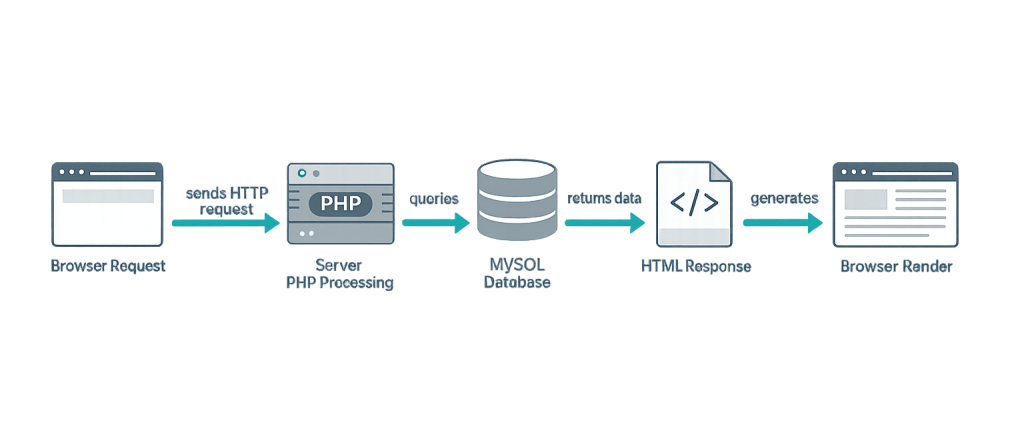
PHP runs on the server, not in the visitor’s browser. When someone loads a WordPress page, the server executes PHP code that retrieves content from the MySQL database, applies template logic from the active theme, runs any registered plugin functionality, and assembles the final HTML response. The visitor’s browser receives only the finished HTML — they never see a line of PHP. This server-side processing is what makes WordPress dynamic: a single PHP template can render hundreds of different posts, each with its own title, content, and metadata.
PHP versions matter significantly for WordPress site owners. Each new version brings performance improvements, security patches, and new language features. Sites running older PHP versions face increased security risk and slower performance. As of 2025, WordPress recommends PHP 8.1 or higher.
How PHP Powers WordPress
WordPress’s relationship with PHP touches every part of the platform:
- WordPress core — All the files in a standard WordPress installation (except CSS and JavaScript) are PHP files:
index.php,wp-login.php,wp-settings.php, and hundreds more - Theme templates — Theme files like
header.php,footer.php,single.php, andpage.phpuse PHP to output dynamic content - Functions.php — The theme’s function file uses PHP to register hooks, enqueue scripts, and add custom functionality
- Plugin code — Every WordPress plugin is a PHP file (or collection of PHP files) that extends WordPress behavior
- wp-config.php — The site configuration file uses PHP constants to define database credentials and site settings
[Image: Diagram showing the request-response cycle: Browser Request → Server PHP Processing → MySQL Database Query → HTML Response → Browser Render]
Purpose & Benefits
1. What PHP Does for WordPress — In Plain English
You don’t need to write PHP to run a WordPress site. But understanding what PHP does helps you make better decisions. When a developer talks about “adding code to functions.php” or “creating a custom template,” they’re working in PHP. PHP is what makes WordPress more than a static HTML site — it’s the engine that makes every page dynamic. Our WordPress development services involve PHP daily.
2. PHP Version Directly Affects Performance and Security
Running an outdated PHP version on your hosting server is one of the most common — and preventable — performance and security risks for WordPress sites. PHP 8.x is significantly faster than PHP 7.x in benchmarks, and PHP versions below 8.0 are past end-of-life and no longer receive security patches. Keeping PHP current is a routine part of WordPress maintenance.
3. PHP Is the Foundation for All WordPress Customization
Every hook, filter, custom plugin, and custom template is written in PHP. If you want WordPress to do something it doesn’t do out of the box — display a custom post type archive, send a notification when a form is submitted, or modify how search results are formatted — the solution is PHP code, usually added via a custom plugin or functions.php.
Examples
1. Basic PHP in a WordPress Template
A theme template file uses PHP to output dynamic content. This is what a simple post template looks like:
<?php
// Display the post title and content for a single post
if ( have_posts() ) :
    while ( have_posts() ) : the_post();
        ?>
        <h1><?php the_title(); ?></h1>
        <div class="post-content">
            <?php the_content(); ?>
        </div>
        <?php
    endwhile;
endif;
?>
This loop — while ( have_posts() ) : the_post() — is “The Loop,” the most fundamental PHP construct in WordPress. It retrieves whatever post or page the current URL maps to and outputs its content.
2. Checking the PHP Version via functions.php
A developer adds a check to confirm the PHP version meets minimum requirements before activating certain functionality:
<?php
// Only run this code if PHP 8.0 or higher is installed
if ( version_compare( PHP_VERSION, '8.0', '>=' ) ) {
    // Enable feature that requires PHP 8.0+
    add_action( 'init', 'my_modern_php_feature' );
}
This prevents errors if a site is running on an older PHP version that doesn’t support newer syntax.
3. A Custom Function in functions.php
Adding a custom body class based on the post category — a common PHP customization:
<?php
// Add custom body class for posts in the 'news' category
function add_news_body_class( $classes ) {
    if ( in_category( 'news' ) ) {
        $classes[] = 'category-news-page';
    }
    return $classes;
}
add_filter( 'body_class', 'add_news_body_class' );
This small function uses a WordPress filter hook to append a CSS class to the <body> tag on any post in the “news” category — enabling targeted styling.
Common Mistakes to Avoid
- Editing PHP files directly on a live site — Syntax mistakes in PHP files cause parse errors that can bring down the entire site. Always use a staging site or make a backup before editing any PHP file.
- Leaving PHP version outdated — Running PHP 7.2 or 7.4 in 2025 means missing both performance improvements and security patches. Check your hosting control panel for PHP version management — most managed hosts allow upgrading in a few clicks.
- Adding custom code to a parent theme’s functions.php — Custom PHP added directly to a parent theme’s functions.php is wiped out when the theme updates. Use a child theme or a custom plugin to keep customizations safe.
- Mixing PHP and HTML without structure — Unorganized mixing of PHP and HTML makes template files hard to read and maintain. Consistent indentation and clear separation between logic and output makes PHP code significantly easier to debug.
Best Practices
1. Keep PHP Updated on Your Hosting Server
Work with your host to ensure your server runs a supported PHP version — currently 8.1 or 8.2. Most managed WordPress hosts and cPanel hosting panels allow switching PHP versions without downtime. Before upgrading, test compatibility on a staging site — especially if you run older plugins that may not support the new version.
2. Never Store Custom Code in a Theme You Didn’t Build
Functionality that should persist regardless of which theme is active — custom post types, shortcodes, utility functions — belongs in a custom plugin, not in a theme’s functions.php. Themes control presentation; plugins control functionality. This separation is a foundational principle of sound WordPress architecture.
3. Use WP_DEBUG When Developing
Enable WP_DEBUG in wp-config.php during development and testing. It surfaces PHP warnings and errors that might otherwise be suppressed, making problems visible before they cause issues in production. Set WP_DEBUG_LOG to true to write errors to a log file rather than displaying them on-screen.
// Enable debug logging in wp-config.php (development only)
define( 'WP_DEBUG', true );
define( 'WP_DEBUG_LOG', true );
define( 'WP_DEBUG_DISPLAY', false );
Frequently Asked Questions
Do I need to know PHP to use WordPress?
No. The vast majority of WordPress site owners never write a line of PHP. The admin dashboard, page builders, and plugins handle most customization without requiring code. You need PHP knowledge only when making custom development changes — which is when you’d typically work with a WordPress developer anyway.
What PHP version should my WordPress site use?
As of 2025, PHP 8.1 or 8.2 is recommended. PHP 8.x offers meaningful performance improvements over PHP 7.x and receives active security support. Avoid PHP versions marked “end of life” by php.net, as they no longer receive security patches. Check your hosting panel — upgrading is usually a one-click operation.
What happens if my plugins aren’t compatible with a newer PHP version?
Incompatible plugins may generate errors or fail entirely after a PHP upgrade. Before upgrading PHP on a live site, test on a staging site first. If a plugin breaks, check whether an update is available. If no update exists and the plugin is essential, you may need to delay the PHP upgrade or find an alternative plugin.
Is PHP being replaced by another language for WordPress?
PHP remains the core language of WordPress with no plans to change. While JavaScript (via the block editor (Gutenberg) and the REST API) plays an increasingly large role in the WordPress front-end, PHP is still the server-side foundation of the entire system. New features in PHP 8.x have actually revitalized interest in the language.
What’s the difference between PHP and JavaScript in WordPress?
PHP runs on the server before the page is delivered. JavaScript runs in the browser after the page loads. PHP generates the initial page content; JavaScript powers interactive behavior on the page (like dynamic filtering, live search, or frontend form validation). WordPress uses both — PHP for server-side rendering, JavaScript for interactive front-end behavior.
Related Glossary Terms
- Functions.php
- wp-config
- WordPress Core
- Parse or Syntax Errors
- Debug Mode (WP_DEBUG)
- Hook
- Child Theme
- Backend Development
How CyberOptik Can Help
As a WordPress-focused agency, our developers work in PHP every day — from custom plugin development to theme customization to PHP version migration planning. You don’t need to understand PHP to work with us, but if you’re curious about what’s happening under the hood of your site, we’re happy to explain. Get in touch to discuss your project or explore our WordPress development services.


