
Upselling and cross-selling are two distinct but complementary sales techniques used in eCommerce to increase the revenue generated from each customer transaction. Upselling encourages a customer to purchase a more premium, higher-priced version of the product they’re already considering. Cross-selling recommends complementary or related products that pair naturally with what the customer is buying.
Think of upselling as “better” and cross-selling as “more.” A customer browsing a basic laptop model might be upsold to a version with more RAM and storage — a better option for more money. That same customer might be cross-sold a laptop bag and a wireless mouse — more products that complement the primary purchase. Both techniques increase average order value, but they do so differently and work best in different moments of the buying journey. When implemented thoughtfully on a WooCommerce store, they can meaningfully improve revenue without acquiring a single additional customer.
[Image: Screenshot of a WooCommerce product page showing “Upgrade to Pro version” (upsell) and “Frequently Bought Together” (cross-sell) sections]
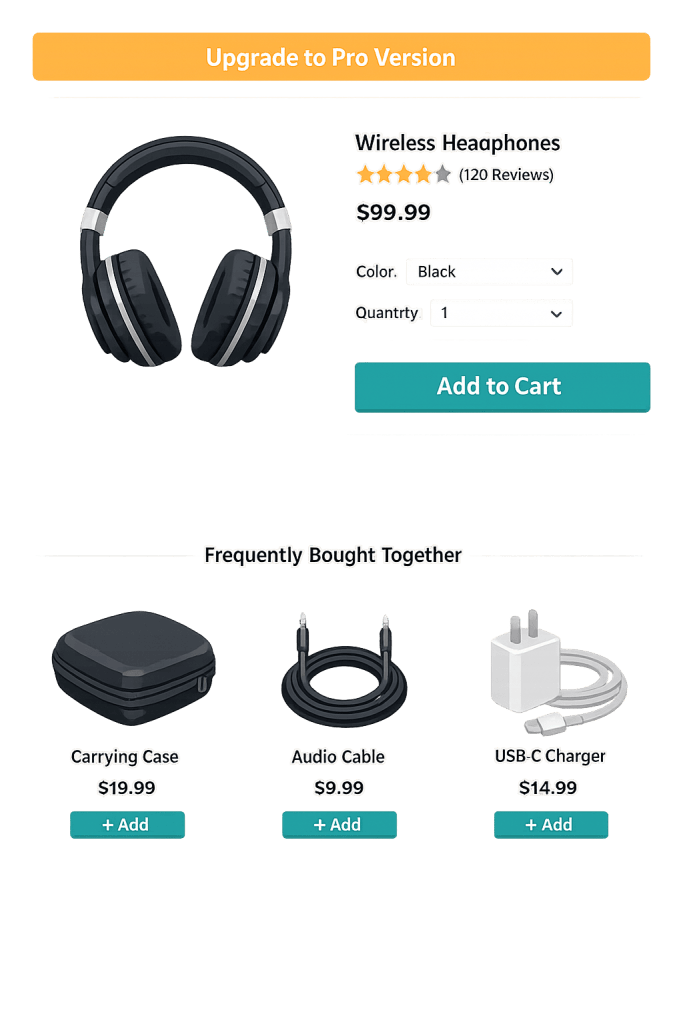
How Upselling and Cross-Selling Work
In a WooCommerce context, both techniques are typically surfaced through:
- Product page recommendations: “Customers also viewed” or “You might also like” sections that surface alternatives (upsells) or accessories (cross-sells).
- Cart page suggestions: “Complete the look” or “Don’t forget” sections shown when a customer has added items.
- Checkout page offers: Simplified add-on options presented just before payment — designed for quick acceptance, not browsing.
- Post-purchase emails: Transactional emails and follow-up sequences that recommend complementary products after the initial order.
Amazon attributes approximately 35% of its revenue to recommendation-based upselling and cross-selling — a data point that illustrates the revenue potential of these techniques when implemented at scale. For smaller stores, the impact is proportional: customers who are already buying are far easier to sell to than new prospects, and even modest improvements in average order value compound significantly over time.
Purpose & Benefits
1. Increase Average Order Value Without New Customer Acquisition
Acquiring new customers is expensive. Increasing revenue from customers already in the purchase flow is substantially more efficient. Upselling and cross-selling target buyers who are already committed to spending — making a relevant, timely offer at this moment has a much higher conversion rate than cold outreach. Businesses that are 60–70% more likely to sell to existing customers than new prospects benefit most from optimizing this stage. Our eCommerce services include conversion optimization as a standard consideration.
2. Improve Customer Experience and Product Fit
Done well, upselling and cross-selling don’t feel pushy — they feel helpful. A customer buying a camera who is offered a memory card and a case genuinely benefits from the recommendation. They don’t have to track down accessories separately, and they’re less likely to be disappointed when their purchase arrives without what they actually needed. The key is relevance: the offer has to make sense in the context of the primary purchase.
3. Increase Customer Lifetime Value
Customers who buy more per transaction, and who are introduced to complementary products, tend to have higher overall lifetime value. A customer who buys a basic product and then upgrades or expands their purchase over time — guided by well-timed recommendations — is more valuable than one who makes a single transaction and never returns. This connects upselling and cross-selling directly to customer lifetime value optimization.
Examples
1. Software Subscription Upsell
A project management tool offers a basic plan at $12/month and a professional plan at $29/month. When a customer clicks “Start Free Trial,” they’re shown a comparison table where the professional plan’s additional features (more users, advanced reporting, priority support) are highlighted. This is upselling at the acquisition stage — presenting a better option with clear value justification before the customer commits.
2. WooCommerce “Frequently Bought Together”
A kitchen supply store using WooCommerce sells chef’s knives. When a customer views a knife product page, the store displays a “Frequently Bought Together” bundle: the knife, a sharpening steel, and a knife block — with a bundle discount applied. The customer, who was planning to buy just the knife, adds all three to the cart. Average order value increases from $79 to $156. This is a classic cross-sell configured through WooCommerce’s product relationship settings or a dedicated plugin.
3. Post-Purchase Email Cross-Sell
A customer buys a DSLR camera from an online camera retailer. Three days later, they receive an email with the subject “Accessories for your [Camera Model]” — featuring a selection of compatible lenses, filters, and bags. Because the recommendation is tied to their specific purchase, the open and click rates are far higher than a generic promotional email. This is a cross-sell delivered through a drip campaign sequence triggered by the order.
Common Mistakes to Avoid
- Offering irrelevant recommendations — Cross-selling a dog toy to someone buying a cat bed destroys the feeling of helpfulness and can annoy customers. Relevance is the first requirement; generic “you might also like” blocks populated by random products fail this test.
- Upselling aggressively at checkout — Presenting multiple upsell offers right before the customer clicks “Complete Order” creates friction and can cause abandonment. Checkout is not the moment for complex decisions. Save intensive upsells for earlier in the funnel.
- Not testing pricing and offer structures — A 10% upgrade for 50% more money may convert poorly. A meaningful feature set for 30% more money may convert well. The relationship between price and perceived value requires testing, not assumption.
- Ignoring mobile experience — Upsell and cross-sell sections that work well on desktop can feel cluttered or be easily missed on mobile. Ensure recommendation sections are readable and actionable on small screens, where much of your traffic likely comes from.
Best Practices
1. Lead with Relevance and Value
Every upsell and cross-sell offer should answer the question: “Why would this specific customer want this specific product right now?” Tie recommendations to what’s already in the cart, the customer’s purchase history, or the product category they’re browsing. A relevant recommendation feels like service; an irrelevant one feels like noise. WooCommerce’s built-in upsell and cross-sell product link system, combined with plugins like Rebuy or CartFlows, enables this kind of targeted recommendation.
2. Use Social Proof in Recommendations
Products recommended as upsells or cross-sells convert better when they carry visible trust signals — star ratings, review counts, or “Most Popular” labels. A customer comparing two product options will choose with more confidence when they can see that other buyers have found the upgrade worthwhile. This connects upsell effectiveness to your broader social proof strategy.
3. Time Cross-Sells Strategically
Present cross-sell offers at natural decision points — on the product page before the customer commits, on the cart page as they review their order, and in post-purchase emails after they’ve received the item and may have discovered a need for accessories. Different timing works for different product types: immediate cross-sells work for consumables and accessories; delayed follow-up works better for products where needs emerge over time.
Frequently Asked Questions
What’s the difference between upselling and cross-selling?
Upselling encourages the customer to buy a better or more expensive version of the product they’re considering — upgrading from basic to premium. Cross-selling recommends additional, complementary products to go alongside the primary purchase. Upselling focuses on value; cross-selling focuses on completeness.
How do I set up upsells and cross-sells in WooCommerce?
WooCommerce has native support for both. In each product’s edit screen, there are “Linked Products” fields where you can assign upsells (shown on the product page as alternatives) and cross-sells (shown in the cart as suggestions). Plugins like Rebuy Engine, CartFlows, and WooCommerce Product Recommendations extend this with algorithmic suggestions and more placement options.
Can upselling hurt conversions if done poorly?
Yes. Overly aggressive upselling — especially at or near checkout — can introduce decision fatigue and cause customers to abandon their cart rather than navigate an offer they didn’t come looking for. The key is timing and relevance: offers that feel helpful maintain conversion; offers that feel pushy undermine it.
What is an average order value and why does it matter?
Average order value (AOV) is the average revenue generated per completed order. Upselling and cross-selling are the primary conversion-stage levers for improving AOV. Even small improvements in AOV — $10–$20 more per order — compound to significant revenue over thousands of transactions per year.
Related Glossary Terms
- WooCommerce
- Average Order Value (AOV)
- Customer Lifetime Value (CLV)
- Cart Abandonment
- Conversion Rate
- Social Proof
- Transactional Email
- Drip Campaign
How CyberOptik Can Help
Building and optimizing WooCommerce stores is one of our specialties. From setting up intelligent product recommendations and optimizing your checkout flow, to implementing post-purchase email sequences, we help businesses create shopping experiences that convert and grow revenue per customer. Contact us to start your eCommerce project or see our eCommerce services.