
A pillar page (also called a content hub) is a comprehensive, long-form content piece that provides a thorough overview of a broad topic and links to a set of more detailed supporting content — called cluster pages — that each explore a specific subtopic in depth. Together, the pillar page and its cluster pages form a topic cluster: a tightly connected content architecture where the pillar page serves as the central hub and the cluster pages act as the spokes that extend from it.
The concept was popularized by HubSpot around 2017 as a response to how Google’s algorithm began evaluating content not just by individual pages but by topical depth and authority across an entire site. Rather than publishing individual, disconnected blog posts targeting specific keywords, the topic cluster model organizes content around a core subject — with the pillar page demonstrating comprehensive coverage and the cluster pages signaling depth. Organizations implementing topic clusters have seen an average 43% increase in organic traffic, according to HubSpot research.
[Image: Diagram showing a central pillar page surrounded by cluster content pages, all connected with bidirectional internal links — a hub-and-spoke model]
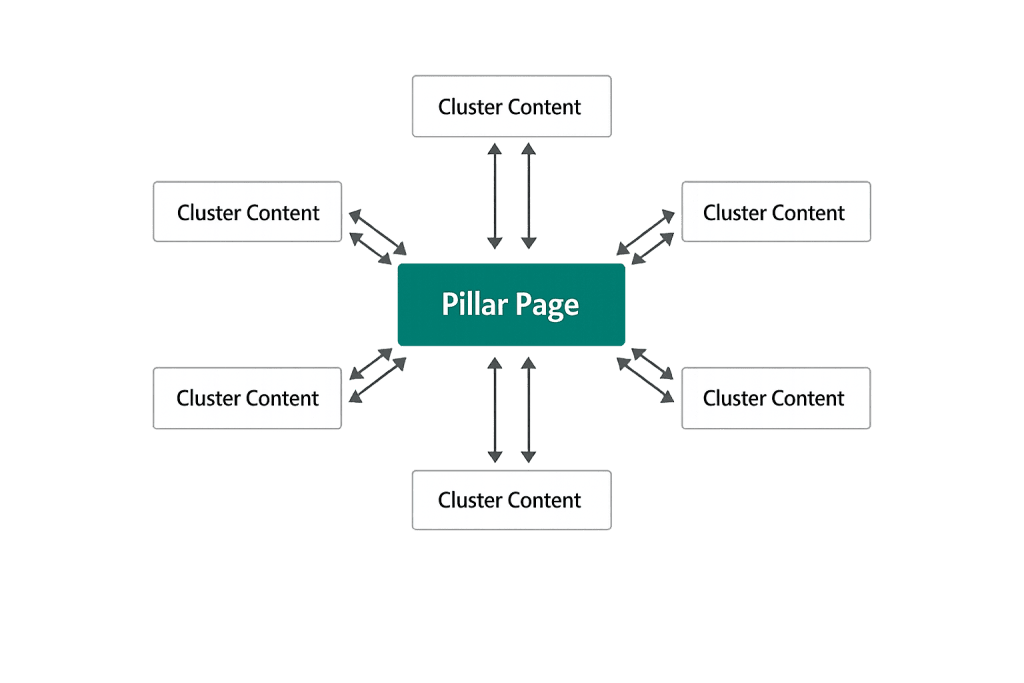
How the Pillar Page / Topic Cluster Model Works
The architecture works through strategic internal linking:
- The pillar page covers every major aspect of a broad topic — enough to be valuable to readers at any stage — but doesn’t go exhaustively deep on every subtopic
- Cluster pages (individual blog posts or deep-dive pages) each target a specific angle, question, or subtopic within the broader subject
- Bidirectional linking — the pillar links to each cluster page, and each cluster page links back to the pillar
- The signal to search engines — this interconnected structure communicates that your site has broad and deep expertise on the topic, building topical authority
A pillar page is typically 3,000–5,000 words (longer than a standard blog post) and structured with clear navigation so readers can jump to the section most relevant to them. Think of it as a well-organized resource guide that functions as the authoritative starting point for a topic.
Purpose & Benefits
1. Building Topical Authority That Compounds Over Time
Search engines increasingly evaluate sites for topical authority — not just individual page relevance. A pillar page with well-developed cluster content signals to Google that your site comprehensively covers a subject. Each new cluster page you add strengthens the entire hub. Our content marketing and SEO work is built around this model because it produces compounding returns as the content library grows.
2. Improved Internal Linking Structure
The pillar/cluster model creates a deliberate, logical internal link architecture. Every cluster page links to the pillar, and the pillar links to every cluster — distributing link equity throughout the topic group and making the pillar page a high-authority hub. This internal linking also helps users navigate from broad overview to specific detail, improving time on site and content discovery.
3. A Single High-Value Asset That Attracts Backlinks
Pillar pages are comprehensive enough to be genuinely useful as standalone resources. This makes them naturally shareable and linkable — other sites will reference and link to a well-built pillar page in ways they wouldn’t link to a shorter blog post. Backlinks pointing to the pillar flow authority to the entire cluster, lifting rankings for all the associated content.
Examples
1. Agency’s WordPress SEO Pillar Page
A web agency creates a pillar page titled “The Complete Guide to WordPress SEO” covering every aspect of optimizing a WordPress site: technical setup, on-page optimization, link building, speed, and local SEO. Each section links to deeper cluster posts: “How to Set Up Yoast SEO,” “WordPress Speed Optimization,” “Local SEO for Service Businesses,” and others. The cluster posts each link back to the pillar. Over 12 months, the pillar page ranks for hundreds of related queries.
2. eCommerce Brand’s Buying Guide Hub
An outdoor equipment retailer builds a pillar page, “How to Choose the Right Camping Gear,” that covers tents, sleeping bags, cooking equipment, navigation tools, and clothing. Each product category section links to a detailed buying guide (the cluster pages). The pillar page ranks for broad queries like “camping gear guide” while individual cluster pages rank for specific queries like “best 3-season tent for beginners.”
3. B2B Software Company’s Product Category Hub
A project management software company creates a content hub titled “Everything You Need to Know About Project Management” as a pillar page. Cluster pages cover methodologies (Agile, Waterfall, Scrum), specific use cases (remote teams, construction projects), and tool comparisons. The pillar anchors the company’s topical authority in the project management space, supporting both organic rankings and lead generation.
Common Mistakes to Avoid
- Creating a pillar page without the cluster content — A pillar page without supporting cluster posts is just a long article. The hub-and-spoke internal linking architecture is what creates topical authority. Plan and build the cluster content in parallel.
- Building clusters that don’t link back to the pillar — Every cluster page must include a clear, natural link back to the pillar page. Missing this breaks the signal. Audit existing cluster posts to ensure the backlinks to the pillar are present.
- Making the pillar too narrow — A genuine pillar page topic should be broad enough to support 10–20 related cluster pages. “WordPress Security Plugins” is too narrow; “WordPress Security” works well as a pillar topic.
- Not updating the pillar page as the cluster grows — As you publish new cluster pages, update the pillar page to reference and link to them. A static pillar page that doesn’t grow with its cluster misses the architectural benefit of the model.
Best Practices
1. Choose Pillar Topics Aligned with Business Goals
The best pillar topics sit at the intersection of what your audience searches for and what your business is most qualified to address. Start by identifying your core service areas or product categories, then validate them with keyword research to confirm search volume. A pillar topic with no search demand, no matter how well-built, won’t drive organic traffic. Internal linking from the pillar to relevant service pages connects the content hub to your conversion path.
2. Structure the Pillar for Navigation, Not Just Reading
Pillar pages are long. Readers rarely read them front-to-back — they scan for the section relevant to their question and jump directly to it. Use clear H2 headings for each major subtopic, include a table of contents with anchor links near the top, and make each section self-contained enough to be useful on its own. This structure also improves the page’s eligibility for featured snippets and People Also Ask appearances.
3. Treat the Pillar as a Living Document
A pillar page isn’t a one-time publication — it’s an asset that should evolve. Update it quarterly: add links to new cluster pages you’ve published, refresh statistics and examples, and expand sections as your understanding of the audience’s questions deepens. Regularly updated pillar pages maintain and grow their rankings; static ones slowly decay. This ongoing work is part of a sustainable content strategy.
Frequently Asked Questions
How long should a pillar page be?
Pillar pages are typically 3,000–5,000 words, though the right length depends on topic breadth and competitive landscape. The goal is to be genuinely comprehensive on the topic — covering enough ground that a reader gets real value and enough structure that they can navigate to the specific subtopic they need. Length for its own sake adds no value; earn every word.
What’s the difference between a pillar page and a cornerstone content page?
These terms are often used interchangeably. Both refer to high-priority, comprehensive content pieces that anchor a topic area. The term “cornerstone content” originated in Yoast’s SEO framework, while “pillar page” and “content hub” are more common in the topic cluster model popularized by HubSpot. The underlying strategy is the same.
Can existing content become a pillar page?
Yes — and this is often the most efficient path. Audit your existing content for a comprehensive, long-form piece that already covers a broad topic. Expand it to pillar depth, structure it for navigation, and then map your existing cluster content to it with bidirectional links. New cluster pages fill the gaps. Repurposing existing content is usually faster than building a pillar from scratch.
How many cluster pages does a pillar need?
Start with five to ten and grow from there. The goal isn’t a specific number but comprehensive coverage of the topic — every significant subtopic should have a corresponding cluster page. HubSpot’s practical test: would this pillar page broadly answer every question a searcher looking for the main keyword might have, and is it broad enough to anchor 20–30 supporting posts? If yes, you have a viable pillar topic.
Do pillar pages work in every industry?
Yes, though the content format and topic selection vary. Industries with complex, research-driven buying processes (B2B, professional services, healthcare, finance) tend to see the strongest returns because searchers consume extensive content before making decisions. Even simpler product categories benefit — any topic where people ask multiple related questions is a pillar page opportunity.
Related Glossary Terms
- Content Strategy
- Topical Authority
- Internal Linking
- Featured Snippet
- People Also Ask
- Anchor Text
- Evergreen Content
How CyberOptik Can Help
Strong content is the foundation of every effective website and marketing strategy. Our team builds content hub frameworks — from topic cluster planning to pillar page writing and cluster content production — that connect your expertise to what your audience is actively searching for. Explore our copywriting services or contact us to discuss your content strategy.


