
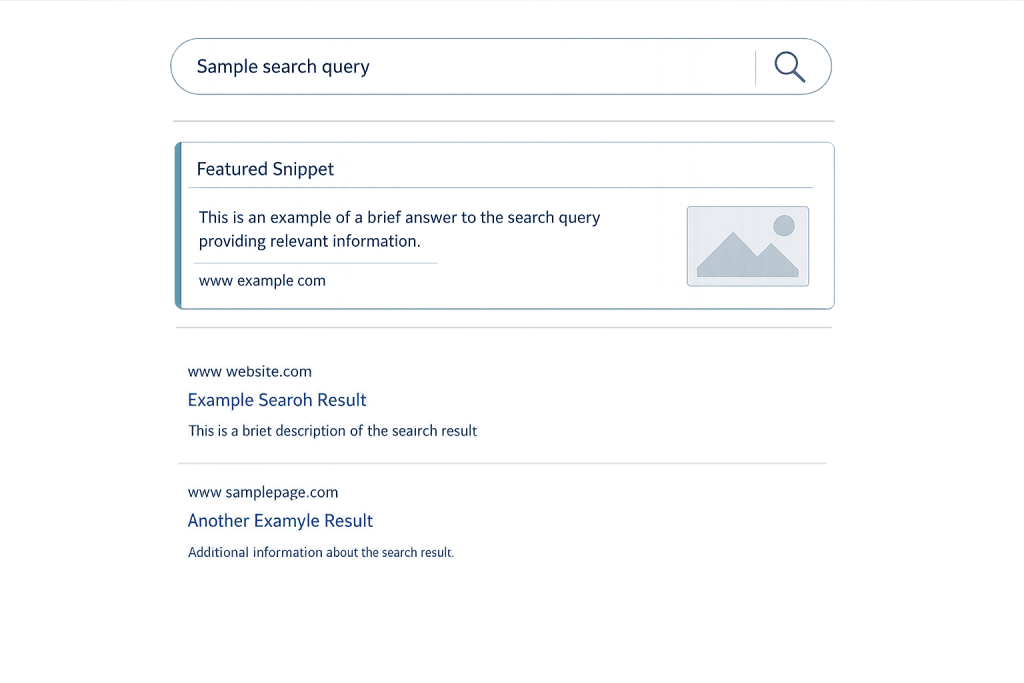
Featured snippet is a highlighted result that appears at the very top of Google’s search engine results page (SERP), positioned above the standard organic results. Also called “position zero,” it displays a direct answer to a search query extracted from a webpage — along with the page’s title and URL. Google pulls this content automatically from pages it considers the most helpful answers to specific queries, without any paid placement or manual submission process.
Featured snippets appear most often for informational queries — questions, how-to searches, definitions, comparisons. When a searcher types “what is an SSL certificate” or “how to set up a WordPress site,” Google may display a snippet block at the top of the results with a concise answer, reducing the need to click through to a full article. For the page that earns the snippet, this visibility is significant: featured snippets have a click-through rate of approximately 43% for the snippet itself — higher than the standard first organic result in many cases.
[Image: Google SERP showing a featured snippet example — the snippet box at the top with answer text, source URL, and an accompanying image, followed by standard organic results below]
Types of Featured Snippets
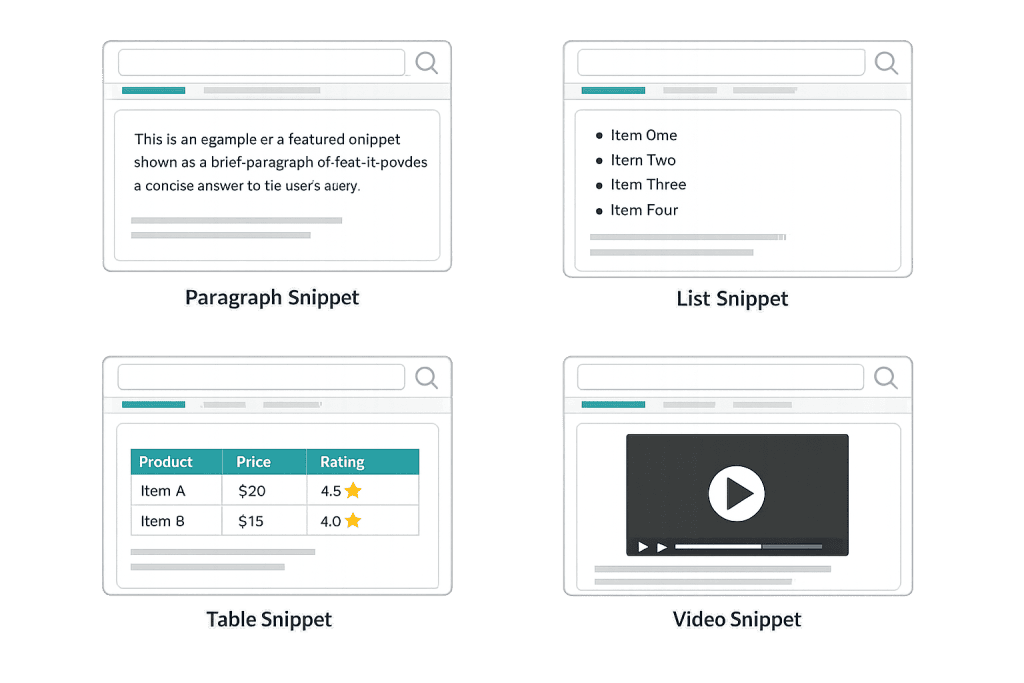
Google displays four main types of featured snippets, each suited to different kinds of queries and content:
Paragraph Snippets
The most common type. A short block of text — typically two to four sentences — that directly answers a question. Google pulls this from a section of a page that concisely addresses the query. Common for “what is,” “who is,” and “why does” type questions. The paragraph is the default format when the answer is best expressed as a short explanation.
List Snippets
Displayed as numbered or bulleted lists. Numbered lists appear for sequential content — steps in a process, rankings, or ordered comparisons (“how to reset a WordPress password”). Bulleted lists appear for non-sequential collections (“types of email marketing campaigns,” “ingredients in X”). List snippets are often pulled from heading-based structures in the source article, not necessarily from an actual HTML list.
Table Snippets
Pulled from HTML tables on a webpage. Google displays a portion of the table — typically the top rows — with an option to expand. Common for comparison queries, pricing tables, and data-heavy topics. Structuring content in actual HTML tables (not just visual table-like layouts) is important for earning this snippet type.
Video Snippets
A YouTube video featured at the top of results, often with a specific timestamp highlighted that addresses the query. Common for how-to and tutorial queries where a visual demonstration is the best answer format. Video snippets make up less than 5% of all featured snippets but can drive significant visibility for the right content and query.
[Image: Four-panel graphic showing one example of each snippet type — paragraph, list, table, and video — as they appear in Google search results]
Purpose & Benefits
1. Significantly Enhanced SERP Visibility
Earning a featured snippet means your content appears at the very top of the results page, above all organic results and typically above other SERP features. Even if your page ranks third or fourth organically for a query, winning the snippet elevates it to the most prominent position on the page. This is particularly valuable for competitive queries where pushing past the second or third organic position is difficult.
2. Increased Traffic for Informational Content
Snippets attract clicks from searchers who want to read more than the snippet provides. For complex topics, procedures, or definitions, the snippet often piques curiosity and drives clicks to the source. The featured snippet position has consistently shown CTRs of 40–43% or higher for the snippet URL — making position zero more valuable than position one in many contexts, especially for long-form informational content. This traffic supports your on-page SEO by increasing engagement signals.
3. Authority and Brand Recognition
When Google displays your content as a featured snippet, it signals to searchers that your site is an authoritative source. This repeated visibility builds brand recognition — even among searchers who don’t click through immediately. For B2B companies, professional services, and authority-driven brands, consistently appearing in snippets reinforces credibility in the minds of a target audience over time.
Examples
1. Glossary Page Earning a Paragraph Snippet
A web agency publishes a glossary of digital marketing terms. Their page on “What is a bounce rate” is structured with a clear definition in the first paragraph of the page body. Google selects this paragraph as the featured snippet for queries like “what is bounce rate” and “bounce rate definition.” The page receives consistent organic traffic from these informational queries — visitors who land on the glossary often continue to related pages, building brand familiarity.
2. How-To Guide Earning a List Snippet
A WordPress tutorial site publishes “How to Add a Custom Font to WordPress” with a numbered step-by-step structure. Each step has a clear heading (H3) and a one-to-two sentence action. Google constructs a numbered list snippet from these headings for the query “how to add custom fonts to WordPress.” The snippet shows steps 1–6 with a “More items” expander, and searchers who want the full explanation click through to the article.
3. Comparison Table Earning a Table Snippet
A software review site creates an HTML comparison table of email marketing platforms showing features, pricing tiers, and subscriber limits across five platforms. Google displays the first four rows of this table as a featured snippet for queries like “email marketing platform comparison” and “Mailchimp vs Klaviyo features.” The snippet drives clicks from commercial-intent searchers who want to make a purchasing decision.
Common Mistakes to Avoid
- Writing for snippets at the expense of the page — Content optimized only for snippets (hyper-condensed, formulaic) often underserves visitors who click through expecting depth. The best approach is to write genuinely helpful, comprehensive content and structure it in a way that makes snippet extraction easy — not to produce thin content designed purely to match snippet format.
- Assuming only top-ranked pages earn snippets — Google can pull featured snippets from pages ranked anywhere in the top 10 (and occasionally beyond). If your page ranks on page one for a query — even in position 7 or 8 — you’re eligible for the snippet. This means lower-ranked pages can leapfrog their competitors in visibility through smart content structuring.
- Not using structured formatting — Google extracts snippets from content with clear structural signals: direct question-and-answer phrasing, HTML heading tags (H2, H3), actual ordered and unordered lists, and genuine HTML tables. Pages with no structural formatting are harder for Google to extract clean snippets from.
- Ignoring snippet opportunity keywords — Questions and comparison queries are the most common triggers for featured snippets. If your keyword research doesn’t include question-format queries (“how to,” “what is,” “why does,” “difference between”), you may be missing a significant volume of snippet opportunities.
Best Practices
1. Structure Content to Directly Answer the Query
The most reliable way to earn featured snippets is to explicitly ask and answer the question your target keyword represents. For a page targeting “what is an exit rate,” include a paragraph that begins directly with the definition. For a “how to” page, use numbered headings. For a comparison, use an actual HTML table. Google’s extraction algorithm rewards content that makes the answer easy to identify and extract without ambiguity.
2. Target Question-Format Queries in Your Content Strategy
Identify the questions your target audience regularly asks that your content can genuinely answer. Use tools like Google’s “People Also Ask” section, keyword research tools, and your own customer-facing Q&A to build a list of question-format queries. Structure content around those questions with clear H2 or H3 headings that mirror the query phrasing. This is the core of an on-page SEO approach that captures snippet positions systematically.
3. Measure and Iterate on Snippet Performance
Track which of your pages earn featured snippets using Google Search Console — look for queries where your page has very high impressions but moderate clicks (a signal that you’re capturing the snippet position). Monitor when snippets are won or lost, and correlate with content changes. When a competitor’s page displaces yours in the snippet, analyze what changed in their content structure and adapt accordingly. SEO at the snippet level is an ongoing competitive exercise.
Frequently Asked Questions
How do I get my page to appear as a featured snippet?
There’s no direct submission process — Google selects snippets algorithmically. You improve your chances by: ranking on page one for a query already, structuring your content with clear headings and direct answers, formatting lists and tables in proper HTML, and targeting queries that commonly trigger snippets (questions, how-to, comparisons). Consistently doing this across your content increases the number of snippets you earn over time.
Does appearing in a featured snippet always increase traffic?
Not always. For very simple queries — like “what year did X happen” or “convert 100 USD to EUR” — the snippet fully answers the question and most users don’t click through. This is part of the broader zero-click search trend (over 58% of Google searches in 2024 resulted in no click). For more complex topics, the snippet drives clicks because it leaves the visitor wanting more detail. Content targeting complex, nuanced questions tends to see better click-through from snippet positions.
Can I opt out of being shown as a featured snippet?
Yes. Google allows publishers to prevent their content from appearing as featured snippets using the nosnippet meta tag or the data-nosnippet HTML attribute on specific sections. Most businesses would not want to opt out — snippet position is generally desirable. But for confidential content, time-sensitive accuracy concerns, or specific competitive reasons, the option exists.
Do featured snippets affect my organic ranking?
Earning a featured snippet doesn’t directly change your standard organic ranking position. The snippet occupies a separate placement above the organic results. If you rank third organically and win the snippet, you effectively appear twice on the page — once in the snippet block (position zero) and once in the organic results at position three. Some studies suggest Google occasionally removes the snippeted page from the standard organic results to avoid duplicate display.
Are featured snippets still relevant with AI Overviews on Google?
Yes, though the landscape is evolving. Google’s AI Overviews (launched in 2024) are a separate SERP feature from traditional featured snippets, and both can appear. Featured snippets remain a meaningful source of visibility for informational queries, particularly those where the AI Overview either doesn’t appear or links out to sources. Optimizing for snippets and optimizing for AI Overview sourcing rely on overlapping strategies: clear structure, direct answers, and authoritative, well-maintained content.
Related Glossary Terms
- SERP Features
- Search Engine Results Page (SERP)
- On-Page SEO
- Keyword
- Schema Markup
- Click-Through Rate (CTR)
- Google Algorithm
How CyberOptik Can Help
Managing featured snippet opportunities effectively is a critical part of any SEO strategy — and it’s something our team handles daily for clients. Whether you need a comprehensive SEO audit to identify snippet opportunities on your existing content or ongoing optimization to compete in the queries that matter to your business, we can help you turn search visibility into measurable results. Contact us for a free website review or learn more about our SEO services.


