
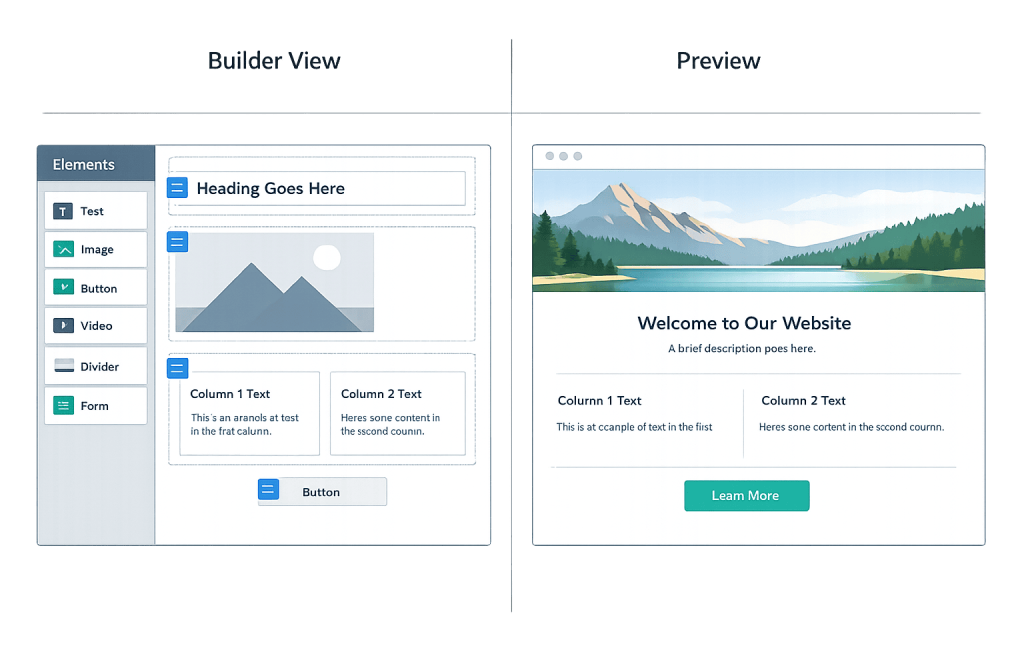
Page builder is a visual editing tool for WordPress that lets you design and arrange page content through a drag-and-drop interface rather than writing code. Instead of editing PHP templates or raw HTML, you add elements — columns, text blocks, images, buttons, forms — by dragging them onto a canvas and adjusting their settings visually. The result is a page layout you can build and preview without developer involvement.
Page builders transformed how WordPress websites are built and managed. Before them, most layout changes required either direct code editing or working within the constraints of a theme’s fixed structure. Today, page builders like Elementor, Divi, Beaver Builder, and WPBakery power a significant share of the web — Elementor alone is active on over 21 million websites, representing approximately 13% of all sites online. For businesses that need to update website content without relying on a developer for every change, page builders make a meaningful operational difference.
[Image: Side-by-side comparison of a drag-and-drop page builder canvas on the left and the rendered front-end page result on the right]
Types of Page Builders
Page builders exist across a spectrum of approaches:
- Classic drag-and-drop builders — Elementor, Divi, WPBakery, and Beaver Builder operate with a dedicated visual editor where you build layouts using their proprietary block and widget systems. They’re powerful but create dependency on the plugin — the content is often stored in their custom format.
- The Block Editor (Gutenberg) — WordPress’s native editor introduced in 2018 is itself a block-based builder. It handles basic page layouts, and more advanced block libraries extend its capabilities closer to traditional builders. See the Block Editor (Gutenberg) page for more detail.
- Full Site Editing (FSE) — WordPress’s newer approach extends block editing to headers, footers, and entire site templates — not just page content. FSE-compatible themes can be edited entirely within the block editor. See Full Site Editing for more detail.
- Theme-native builders — Some premium WordPress themes include their own built-in layout builders that integrate tightly with the theme’s design system.
The right choice depends on your team’s technical comfort level, how much design flexibility you need, and how important it is to stay close to WordPress’s native tools.
Purpose & Benefits
1. Layout Control Without Code
Page builders let non-developers create custom page layouts — multi-column designs, hero sections, pricing tables, testimonial carousels — that would otherwise require custom PHP and CSS. This means business owners, marketing teams, and content managers can make meaningful layout changes independently. Our WordPress development services cover situations where page builder capabilities reach their limits.
2. Faster Prototyping and Publishing
Building a new landing page or service page in Elementor takes hours instead of days of development time. Page builders include pre-built template libraries that provide starting points, and the visual editing process eliminates the back-and-forth of coding a change, saving it, refreshing the browser, and repeating. For businesses that publish landing pages regularly, this speed advantage compounds over time.
3. Consistency Through Reusable Elements
Most page builders let you save sections, rows, or entire page templates as reusable components. A testimonial section you’ve designed once can be dropped onto any new page without recreating it. This enforces visual consistency across the site — which supports both user experience and brand presentation.
Examples
1. Marketing Team Managing Campaign Landing Pages
A company’s marketing team needs to launch a new landing page for a product promotion without waiting for developer availability. Using Elementor, they duplicate an existing landing page template, update the headline, copy, images, and form embed, and publish — no code required. The page maintains the site’s design language because it uses saved global styles from the theme.
2. Service-Based Business Updating Service Pages
A home services company uses Divi to maintain its service pages. When it launches a new service, the operations manager duplicates an existing service page in Divi’s builder, updates the content, and adjusts the layout slightly. The entire process takes 90 minutes and requires no developer time.
3. Agency Building Client Sites With Beaver Builder
A web design agency standardizes on Beaver Builder for client projects. The builder’s clean output, white-label capabilities, and compatibility with FSE themes align with their development standards. When they hand the site off to clients, the builder’s interface is simple enough for clients to make routine content updates independently.
Common Mistakes to Avoid
- Choosing a builder based on feature count rather than fit — More features don’t always mean better results. A builder that a non-technical team can actually use confidently is more valuable than the most powerful option on the market. Consider who will maintain the site day-to-day.
- Nesting too many builder elements — Page builders can generate bloated HTML when used with heavily nested sections and columns. Overly complex layouts slow pages down and make them harder to maintain. Simpler, cleaner layouts almost always perform better.
- Ignoring performance implications — Every page builder adds overhead. Some builders are more code-efficient than others, but all of them add JavaScript and CSS. Regularly test page speed after building pages and optimize images, disable unused builder features, and use a caching plugin.
- Locking yourself in without a content strategy — Page builder content is often stored in proprietary shortcode formats or serialized data. Switching builders later can require rebuilding pages manually. Choose a builder you’re committed to for the medium term.
Best Practices
1. Use Global Styles and Theme Consistency
Most modern page builders let you define global fonts, colors, and spacing that apply site-wide. Configuring these settings before building any pages ensures that new pages automatically inherit the site’s design system. Combined with a well-configured WordPress theme, global styles dramatically reduce the time spent on visual consistency.
2. Learn the Difference Between Builder Content and Theme Structure
A page builder controls the content area of your pages — what appears between the header and footer. Your WordPress theme controls the overall frame: header, footer, sidebar, global typography. Understanding this boundary helps you know which tool to use for which type of change and prevents conflicts between builder and theme settings. Full Site Editing is changing this boundary in newer WordPress setups.
3. Keep Layouts Simple and Purposeful
Every visual element should serve a purpose. Resist the temptation to use page builder features just because they’re available — parallax sections, counter animations, and elaborate hover effects add complexity and load time without always improving user experience. Clean, well-structured layouts built with restraint typically convert better and perform faster than visually elaborate alternatives.
Frequently Asked Questions
Which WordPress page builder is best?
There’s no single best option — it depends on your use case. Elementor has the largest user base and plugin ecosystem. Beaver Builder is known for clean code output and developer-friendliness. Divi is popular for its template library. For newer projects, the native Block Editor and FSE tools are increasingly capable and don’t add third-party dependency. The best builder is the one your team will use effectively.
Do page builders slow down WordPress?
They can, if not used carefully. Page builders add JavaScript and CSS to your pages, and complex layouts with many elements compound this. However, well-configured page builder sites with proper caching, image optimization, and code minification can score well on performance tests. The builder isn’t inherently the problem — unoptimized use of it usually is.
Can I use a page builder with any WordPress theme?
Most page builders work with most themes, but compatibility varies. Some themes are designed specifically to work with a particular builder. Others may conflict with a builder’s styling. If you’re building a new site, choosing a theme and builder that are designed to work together avoids a lot of friction.
Is the Block Editor a page builder?
The Block Editor (Gutenberg) is WordPress’s native block-based editor. In its core form, it handles page content layout at a basic level. Extended with additional block libraries, it approaches the functionality of traditional builders. Full Site Editing capabilities make it capable of controlling the entire site layout — essentially making it a full-featured builder that’s natively integrated with WordPress.
Related Glossary Terms
- Block Editor (Gutenberg)
- Full Site Editing (FSE)
- WordPress Theme
- Page Template
- Shortcode
- Widget
- WordPress Core
How CyberOptik Can Help
Page builders are powerful tools, but getting the most out of them — while keeping performance, accessibility, and maintainability in check — requires experience. We build WordPress sites that use page builders thoughtfully, ensuring your team can make updates independently without sacrificing the quality and performance of the original build. Get in touch to discuss your project or explore our WordPress development services.


