
Parallax scrolling is a web design technique where background elements move at a slower rate than foreground content as a user scrolls down a page, creating an illusion of depth and three-dimensional space. The term comes from the parallax effect in optics — the phenomenon where closer objects appear to shift more than distant ones when your viewpoint changes. On a website, a background image that drifts slowly while the text above it scrolls at normal speed produces that same visual layering effect.
Parallax scrolling has been a popular design trend since the mid-2010s, primarily valued for the visual richness it adds to marketing pages, hero sections, and storytelling experiences. Used well and implemented carefully, it can increase visual interest and engage visitors in ways static pages don’t. Used carelessly, it creates performance problems, accessibility issues, and a confusing mobile experience — making it a technique worth understanding before deploying.
[Image: Split diagram showing a webpage at rest (background and foreground aligned) vs. mid-scroll (background has moved less than the foreground, creating a layered depth effect)]
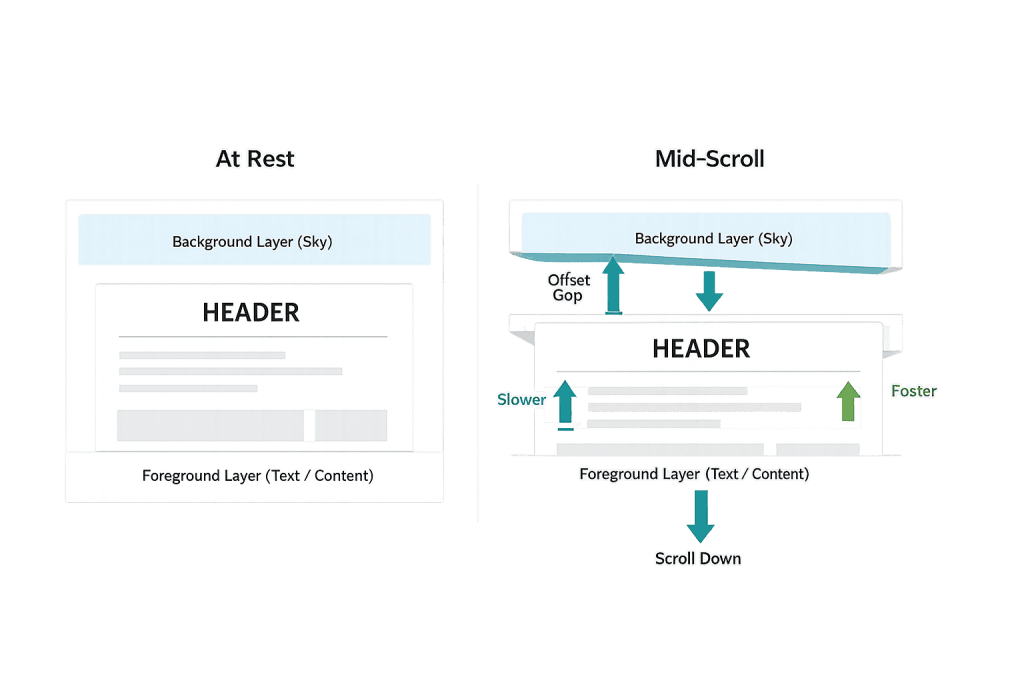
How Parallax Scrolling Works
Parallax effects are typically implemented through CSS or JavaScript:
CSS-based parallax uses the background-attachment: fixed property to hold a background image in place while the page content scrolls over it. This approach is simpler and lighter, but creates limitations — the “fixed” behavior is interpreted differently across browsers and is largely unsupported on iOS.
JavaScript-based parallax uses scroll event listeners or IntersectionObserver API calls to dynamically adjust element positions as the user scrolls. Libraries like ScrollMagic, GSAP, and Rellax simplify implementation. JavaScript parallax offers more control and works more consistently across devices, but it adds script overhead and can cause performance issues if not implemented carefully.
CSS transform: translateY() is a more modern, performance-friendly approach — moving elements along the Y axis using GPU-accelerated transforms instead of modifying layout properties. This reduces the paint operations that slow down scroll performance.
The performance implications vary significantly based on which approach is used and how many parallax layers are active simultaneously on a page.
Purpose & Benefits
1. Visual Depth and Engagement
A well-executed parallax effect adds dimensional quality to otherwise flat page layouts. On a homepage or landing page hero section, subtle background movement can communicate quality and attention to design detail — signaling to visitors that the brand invested in its presentation. In our web design work, parallax is used selectively on specific sections where the visual payoff is worth the implementation complexity.
2. Guided Narrative Scrolling
Parallax is particularly effective in long-form storytelling pages — brand launch sites, case studies, or product showcase experiences — where the scroll creates a sense of progression through a narrative. When the visual motion reinforces the content sequence, it directs attention and creates rhythm in the user’s journey down the page.
3. Visual Differentiation Without Additional Copy
In competitive markets, website aesthetics influence perceived quality and trustworthiness. A parallax effect on a key background section can add sophistication to a design without requiring additional text content. It’s a design-level differentiator that requires no copywriting — though it does require performance-conscious implementation.
Examples
1. Hero Section With Slow-Moving Background
A branding agency’s homepage features a hero section with a high-quality city skyline photograph that drifts upward slowly as visitors scroll. The headline and CTA remain fixed at their natural scroll pace. The effect creates a cinematic quality that reinforces the agency’s positioning without requiring JavaScript-heavy animation. The image is properly optimized to avoid PageSpeed issues.
2. Product Story Landing Page
A consumer product company creates a long-form launch page where scrolling through the page reveals different product features. Background layers depicting ingredients, textures, and settings shift at different scroll rates, creating a layered visual that guides the reader through the product story. Each section transition is tied to scroll position using GSAP for smooth, controlled animation.
3. Service Section Dividers
A consulting firm uses subtle parallax on the background color overlays between service sections on its homepage — each background shifts slightly as the user scrolls into the next section, creating a clean visual separation between content blocks without hard borders. The effect is minimal enough to avoid performance concerns while still adding visual polish.
Common Mistakes to Avoid
- Implementing parallax without performance testing — Every parallax layer adds rendering overhead. Before publishing, run PageSpeed Insights to verify the effect isn’t introducing LCP or CLS problems. A visually impressive section that drops your Core Web Vitals scores is a net negative for SEO.
- Using parallax on mobile without adaptation — CSS
background-attachment: fixeddoesn’t work on iOS at all and performs poorly on most Android browsers. JavaScript-based parallax can also cause laggy, jerky scroll behavior on mobile. Implement parallax for desktop and either simplify or disable it on mobile viewports. - Covering important content with parallax backgrounds — Text placed over shifting background images can become difficult to read if contrast isn’t carefully maintained throughout the scroll motion. Ensure text remains legible at all stages of the parallax movement.
- Over-applying the effect — One or two tasteful parallax sections can enhance a page. Using parallax on every section creates visual noise, slows the page significantly, and makes the effect feel gimmicky rather than refined. Restraint is the defining characteristic of well-executed parallax design.
Best Practices
1. Use Parallax Sparingly and Intentionally
Reserve parallax effects for sections where the visual depth genuinely adds to the experience — hero sections, key storytelling moments, major section dividers. Avoid using it as decoration on every section. The more selectively it’s applied, the more impact it has when it does appear. This principle applies across all animation and motion design decisions.
2. Optimize Everything the Parallax Effect Depends On
If your parallax section uses a background image, compress it aggressively, convert it to WebP format, and size it appropriately. If it uses JavaScript, defer the script load and keep the implementation lightweight. Pair the effect with lazy loading where appropriate so off-screen parallax sections don’t load until needed. Test on actual mobile devices — not just browser emulators.
3. Test for Accessibility and Consider Motion Preferences
Some visitors experience motion sickness or disorientation from scrolling animation effects. The prefers-reduced-motion CSS media query lets you respect users’ OS-level preferences to reduce or eliminate motion. A well-implemented parallax design either disables itself when this preference is active or reduces the motion intensity significantly. This is increasingly expected in accessible web design.
Frequently Asked Questions
Does parallax scrolling hurt SEO?
It can, if implemented poorly. Parallax effects that increase page load times or cause Core Web Vitals failures (particularly LCP or CLS) will negatively affect search rankings. Additionally, content buried within complex JavaScript animations may be harder for search engine crawlers to index. Clean implementation, optimized assets, and performance testing mitigate these risks.
Is parallax scrolling still popular in web design?
It’s more selective than it was at peak trend (around 2014–2018). Today it’s used more subtly — a slight drift on a hero background, a gentle section separator — rather than the deep, whole-page scroll experiences that were common early on. Subtlety, restraint, and performance consciousness define current best practice.
Does parallax scrolling work on mobile?
With limitations. CSS background-attachment: fixed — the simplest parallax implementation — is not supported on iOS and performs poorly on most mobile browsers. JavaScript-based implementations can work on mobile but require careful optimization to avoid janky scroll behavior. Best practice is to disable or simplify parallax effects on mobile viewports.
Can I add parallax scrolling to a WordPress site without coding?
Yes. Many WordPress page builders — Elementor, Divi, Beaver Builder — include built-in parallax options for section backgrounds. These typically add the effect with a single toggle in the section settings. While convenient, built-in page builder parallax options can add JavaScript overhead — always test performance after enabling, especially on mobile.
How does parallax affect user experience?
When well-executed, it adds engagement and visual quality. When overdone or poorly implemented, it creates distraction, difficulty reading content, and motion discomfort for some users. The key variable is intentionality — parallax used to enhance a specific visual goal outperforms parallax used because it was available.
Related Glossary Terms
How CyberOptik Can Help
Parallax and motion design decisions affect how your site looks, how fast it loads, and how it ranks — which means they should be made deliberately, not just because a page builder makes it easy. Our design team applies effects like parallax where they genuinely serve the design, while keeping performance and accessibility in check throughout. See our web design services or contact us to start a project.


