
UX (User Experience) is the discipline of designing digital products and websites so they are intuitive, efficient, and satisfying to use. It encompasses the entire journey a visitor takes — from their first impression of a page to how easily they find what they need, complete a task, and feel about the interaction overall.
Where UI (User Interface) focuses on the visual and interactive elements of a design, UX is the broader framework behind them. UX asks: Does this site work the way users expect it to? Can people navigate it without frustration? Do visitors leave having accomplished their goal? These questions are answered through research, testing, information architecture, and iterative design — long before any visual styling is applied.
For businesses, UX has measurable financial impact. Research by Forrester found that every $1 invested in UX can return up to $100 — a 9,900% ROI. A well-designed experience can boost conversion rates by up to 400%. The inverse is also true: 88% of users are less likely to return to a site after a bad experience.
[Image: Diagram showing UX as an umbrella encompassing research, information architecture, UI, content, and accessibility]
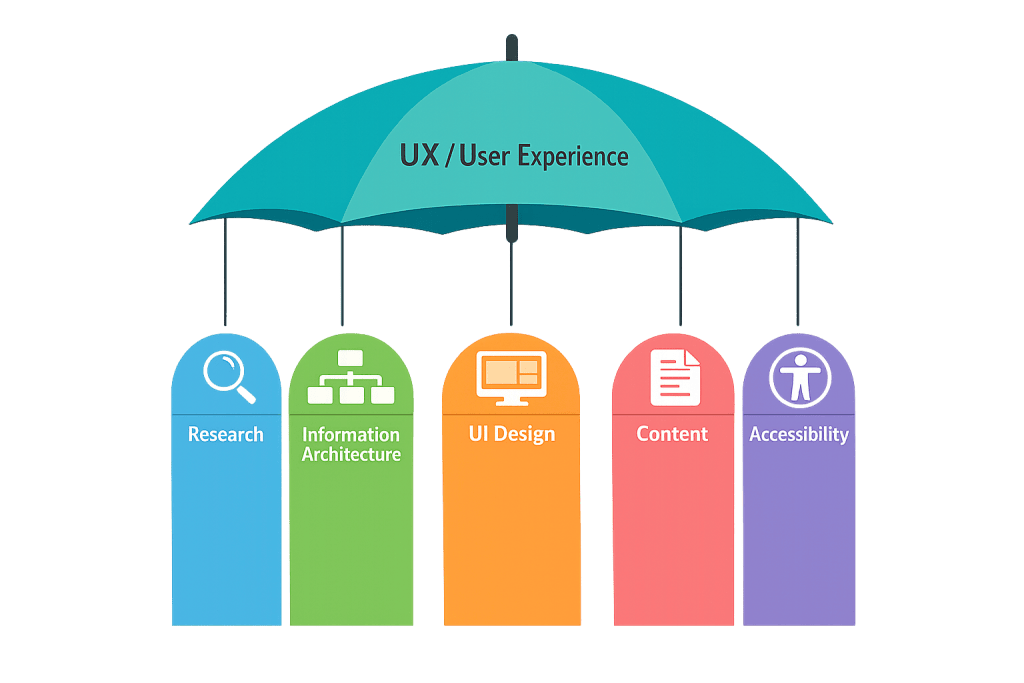
Key Concepts in UX Design
UX is a multi-layered discipline. The main components include:
- User research — Understanding who your users are, what they need, and how they behave. This includes interviews, surveys, analytics review, and usability testing.
- Information architecture (IA) — How content is organized and structured. A clear IA makes navigation intuitive; a poor one forces users to hunt for what they need.
- Interaction design — How users interact with the interface. This includes the logic behind button behaviors, form flows, error states, and feedback mechanisms.
- Usability — The measure of how easily users can accomplish specific tasks. A usable site reduces friction at every step.
- Accessibility — Ensuring the experience works for users with varying abilities, devices, and contexts. Good UX inherently includes accessibility.
- Content strategy — UX considers not just design but whether the right content is in the right place. Confusing copy creates as much friction as confusing navigation.
- Prototyping and testing — UX is iterative. Wireframes, prototypes, and user testing validate decisions before they’re built in code.
The UX process typically starts before any visual design. A UX designer will map user flows, define the site structure, and test interactions with prototypes — so that by the time a visual designer and developer begin their work, the fundamental experience has already been validated.
Purpose & Benefits
1. Higher Conversion Rates
Every friction point in a user’s journey is a potential exit. UX design systematically identifies and removes those friction points — simplifying checkout flows, clarifying calls to action, reducing form fields, and ensuring visitors always know what to do next. Our web design services incorporate UX thinking at every stage to ensure sites convert, not just impress.
2. Reduced Bounce Rates and Longer Engagement
When visitors land on a site and can’t quickly find what they’re looking for, they leave. Good UX design — clear navigation, logical page structure, and relevant content in the right places — keeps visitors engaged longer. This signals quality to search engines and increases the chances that a visitor becomes a lead or customer.
3. Lower Support Costs and Fewer User Errors
A site that’s easy to use generates fewer support questions, fewer order errors, and fewer frustrated phone calls. The upfront investment in UX pays dividends in operational efficiency. For WooCommerce stores especially, a well-designed checkout experience directly reduces cart abandonment and customer service volume.
Examples
1. B2B Services Website
A professional services firm noticed their website had strong traffic but low contact form submissions. A UX audit revealed that visitors had to navigate through three levels of menus to find the contact page, and the form itself asked for ten fields upfront. Restructuring the navigation and simplifying the form to four fields increased submissions substantially — the same traffic, a better experience.
2. E-Commerce Checkout Flow
An online retailer’s analytics showed a steep drop-off between the cart page and order completion. UX research identified that the checkout required account creation before purchase — a well-documented conversion killer. Adding guest checkout and rearranging the step sequence improved completion rates. A single UX decision changed revenue.
3. Mobile Content Prioritization
A restaurant’s website was designed desktop-first. On mobile — where most visitors were arriving — the menu PDF required several taps to find, the phone number wasn’t click-to-call, and the hours were buried in the footer. Redesigning the mobile experience around what users actually needed on mobile (call, hours, menu) dramatically improved the experience for the majority of visitors.
Common Mistakes to Avoid
- Skipping user research — Designing based on assumptions about what users want instead of actual user behavior leads to interfaces that look right to internal teams but frustrate real visitors. Even lightweight testing reveals surprising gaps.
- Confusing activity with results — High page views or long session durations don’t always indicate good UX. A visitor spending ten minutes on a site because they can’t find the contact page is not a success. Measure task completion and conversion, not just traffic.
- Treating UX as a one-time project — UX needs evolve as your audience, content, and business change. Sites that get a UX overhaul and are never re-evaluated gradually accumulate friction over time.
- Separating UX from content — Unclear headings, jargon-heavy copy, and missing information create as much friction as poor layout. UX and content strategy need to work together.
Best Practices
1. Start with User Research Before Visual Design
Define who your visitors are and what they’re trying to accomplish before making any layout or design decisions. Even reviewing analytics — which pages visitors land on, where they exit, how long they spend — provides a foundation for UX decisions that are grounded in reality rather than assumptions.
2. Map User Flows for Key Tasks
Identify the two or three most important things a visitor needs to do on your site — contact you, request a quote, make a purchase — and trace the exact steps required to complete each one. Every unnecessary step is a potential dropout. Streamlining these core flows is typically the highest-value UX work you can do.
3. Test Before You Build, Then Test Again
Wireframes and low-fidelity prototypes exist so you can validate structure and flow before investing in visual design and development. After launch, tools like heatmaps, session recordings, and analytics help identify where real users are struggling. UX is an ongoing practice, not a one-time deliverable.
Frequently Asked Questions
What’s the difference between UX and UI?
UX (User Experience) is the broader discipline — encompassing research, structure, flow, and strategy. UI (User Interface) is the visual and interactive layer that makes the experience tangible. You can have beautiful UI with poor UX (a visually polished site that’s hard to navigate), and you can have sound UX with poor UI (a logical structure that looks unprofessional). The best sites have both.
How does UX affect SEO?
Google’s ranking algorithms increasingly measure signals tied to user experience — page load speed, Core Web Vitals, and engagement metrics like bounce rate and time on page. A site with poor UX tends to have higher bounce rates and lower engagement, which can negatively affect rankings. Strong UX and strong SEO reinforce each other.
Do small business websites need UX design?
Yes. The principles apply regardless of site size — small businesses just apply them with proportionally less complexity. A four-page service site still needs clear navigation, a logical contact path, and content prioritized for what visitors actually need. The return on UX investment is often higher for smaller sites, because the competition for attention is the same but the site is simpler to improve.
What does a UX audit involve?
A UX audit reviews an existing site against usability best practices, typically covering navigation structure, information hierarchy, mobile experience, form design, page load performance, and content clarity. It may also involve analytics review, heatmap analysis, or user testing. The output is a prioritized list of issues and recommendations.
How long does UX work take?
It depends on scope. Lightweight UX review for a small site can be completed in a week. A full UX engagement for a complex website — including research, information architecture, wireframing, and testing — can take four to eight weeks before visual design begins. The upfront investment consistently reduces costly revisions later.
Related Glossary Terms
- UI (User Interface)
- Wireframe
- Usability
- Accessibility
- Whitespace
- Above the Fold
- Conversion Rate Optimization (CRO)
- PageSpeed
How CyberOptik Can Help
Great design is about more than aesthetics — it’s about creating experiences that work. Our team brings UX thinking to every website we build, from initial information architecture through testing and launch. Whether you’re redesigning a site that isn’t converting or building something new, we design experiences that serve your visitors and support your business goals. See our web design services or contact us to start a project.


