Severity: Minor · Fix time: 5–15 min · Skill level: Intermediate
Sidebar Below Content is a WordPress layout error where the sidebar drops below the main content column instead of sitting beside it. The layout looks correct in the theme’s design but breaks on the live site — usually because of unbalanced HTML This is a visual-only error: no content is lost, no back-end functions are affected, and search engines can still read the page. The urgency is proportional to how prominently the sidebar features in your design — for sites where the sidebar contains navigation, calls to action, or lead generation forms, a broken layout is a conversion problem worth resolving immediately. Need a quick map of every WordPress error? See our 70+ WordPress Errors Guide → for a categorized reference of every common WordPress issue. [Image: Side-by-side comparison of a correct two-column WordPress layout (content + sidebar) versus the same layout broken with the sidebar pushed below all content] In most WordPress themes, the content area and the sidebar are two For many business websites, the sidebar contains the most conversion-focused content: contact forms, phone numbers, social proof, calls to action, or navigation links. When the sidebar drops below all page content, visitors do not see it — especially on mobile, where they may never scroll far enough down. A broken sidebar layout is not just a cosmetic issue; it is a user experience and lead generation problem. Our web design services build layouts with robust HTML structure that prevents this class of error. A sidebar that broke after a theme update will break again the next time the theme is updated — unless you are using a child theme and the fix is applied there. Similarly, a plugin-caused CSS conflict will reappear after the plugin updates if the conflict is not reported and resolved upstream. Identifying the exact cause allows you to apply a permanent fix rather than a workaround that disappears on the next update. Running your page through an HTML validator when diagnosing a sidebar issue often reveals additional unclosed tags, deprecated attributes, or structural problems that were not visually apparent but could affect how browsers render the page. A few minutes of HTML validation as part of this diagnosis is time well spent — it commonly surfaces two or three additional issues alongside the one causing the sidebar problem. A client reported their sidebar had dropped below the content on all blog post pages after a developer made a small edit to Adding the missing A site’s theme had a content area set to This type of fix belongs in a child theme stylesheet rather than the parent theme, so it persists through theme updates. A client installed a review plugin that added star ratings inside the content area. The rating widget used Adding a clearfix to the content container resolved the layout: This approach is safer than modifying the plugin’s CSS directly, since the plugin would overwrite that on update. The fix in the child theme’s stylesheet persists regardless of plugin updates. When the sidebar breaks unexpectedly, run the affected page through the W3C HTML Validator at validator.w3.org. Paste the page URL or the source HTML. The validator identifies every unclosed Any edit to a WordPress theme’s PHP template files should be made in a child theme, not the parent theme. If a sidebar layout breaks after a theme update, it is often because a parent theme template was edited directly and the update overwrote the change. Child theme templates override the parent and survive updates. This single practice prevents the majority of recurring layout problems on WordPress sites. A new plugin that adds CSS to the front end can break layout elements it was never designed to interact with. After installing any new plugin, do a quick front-end visual check of your key page types — homepage, blog post, service page — before assuming the installation is clean. This takes 60 seconds and catches plugin-introduced layout regressions immediately rather than days later. When the sidebar is mispositioned and you suspect a CSS width issue, open Chrome DevTools (F12), click on the content area element, and look at the “Computed” tab on the right. This shows the exact rendered width, height, margin, padding, and border values. You can see immediately whether the content column is wider than it should be, which tells you whether an HTML structural issue or a CSS value issue is the cause. If your theme uses An unclosed If you do not have SFTP or file manager access, you can use the WordPress Theme Editor (Appearance → Theme File Editor) to edit theme files from the dashboard — though this is not recommended for production sites. A better option is to install a child theme and make the fix there. For CSS-only issues, the WordPress Customizer’s Additional CSS section can apply a width correction without touching template files. The sidebar below content error does not directly affect how search engines index your content — the text and links are still present in the HTML. The indirect impact comes from a degraded user experience: visitors who cannot find navigation or CTAs in the expected location may bounce faster, and a lower-quality browsing experience can influence engagement signals over time. Fix it promptly on any page that contains important internal links or conversion elements. Theme updates replace the parent theme’s template files. If you had made edits directly to parent theme files (like It depends on how the sidebar is handled at mobile breakpoints. Most themes stack the sidebar below content intentionally on small screens via responsive CSS. If the sidebar is visually below content on desktop but the CSS is meant to display it side by side, the fix is to the desktop layout. On mobile, a sidebar appearing below content may be entirely intentional and correct behavior from the responsive design. Still broken? Our team fixes WordPress errors like this in under 30 minutes for maintenance clients. Sidebar layout issues that stem from theme template structure require both HTML debugging and CSS understanding — and the fix needs to be applied in the right place (a child theme) to be permanent. Our WordPress maintenance services include template troubleshooting and layout repair, and our web design team builds sites with clean, maintainable HTML structure that avoids this class of issue from day one. Contact us to discuss your site and we will get the layout sorted quickly.
htaccess is a configuration file used by Apache web servers to control how the server handles requests for a specific directory and all its subdirectories...
Severity: Minor · Fix time: Under 5 min · Skill level: Beginner"Another update is currently in progress" is a WordPress error message that appears in the Updates section of the dashboard when WordPress believes an update is already running — and therefore won't allow a new one to start...
Severity: Major · Fix time: Under 5 min · Skill level: Beginner"Briefly unavailable for scheduled maintenance...
Severity: Major · Fix time: 5–15 min · Skill level: Intermediate"Sorry, you are not allowed to access this page" is a WordPress application-level capability check failure — not a server-generated 403, but a denial generated by WordPress itself when a logged-in user attempts to reach an admin page their current role doesn't permit...
Severity: Critical · Fix time: 15–60 min · Skill level: Intermediate"There has been a critical error on this website" is a WordPress error message introduced in version 5...
Severity: Minor · Fix time: Under 5 min · Skill level: Beginner"This block contains unexpected or invalid content" is a Gutenberg block editor error that appears when WordPress cannot validate a block's stored HTML against the block's current definition...
Severity: Critical · Fix time: 15–60 min · Skill level: Advanced"This site can't provide a secure connection" is Chrome's human-readable heading for any TLS handshake failure that prevents an encrypted HTTPS connection from being established...
Severity: Critical · Fix time: 15–60 min · Skill level: Advanced"Your PHP installation appears to be missing the MySQL extension which is required by WordPress" is a critical startup error that prevents WordPress from initializing its database connection entirely...
Two-factor authentication (2FA) is a security process that requires users to verify their identity using two distinct methods before gaining access to an account or system...
A 301 redirect is a permanent HTTP status code that automatically forwards users and search engines from one URL to another...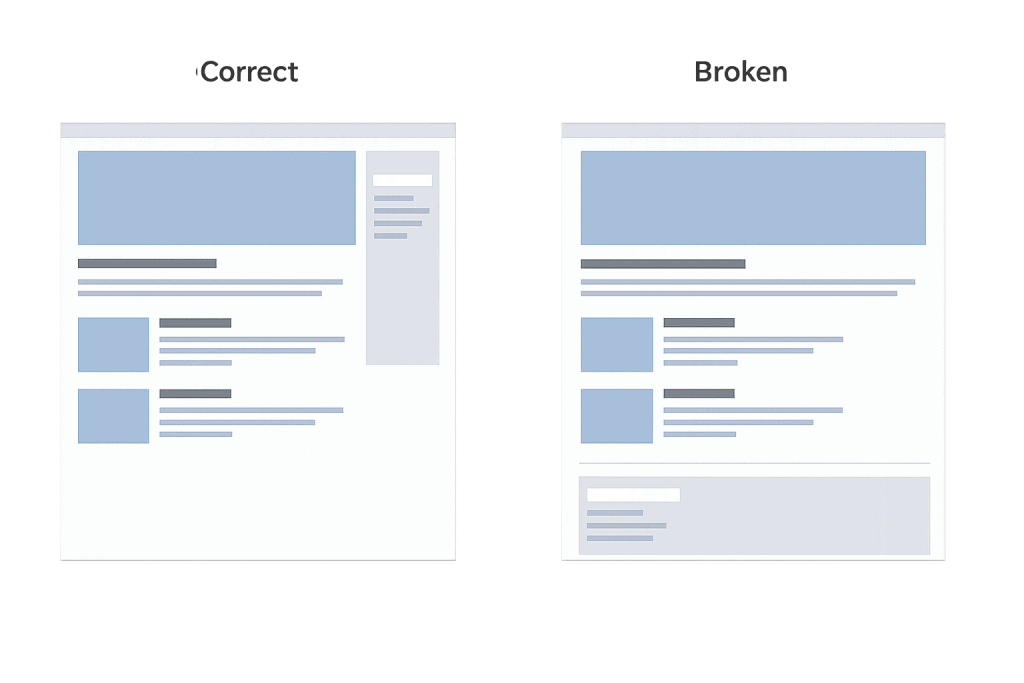
How Sidebar Below Content Works
float, display, or width properties on layout-critical selectors can displace a sidebar without any template changes.Check This First — 2-Minute Diagnostic
Purpose & Benefits
1. A Broken Sidebar Directly Impacts Conversions
2. Finding the Root Cause Prevents Recurrence After Updates
3. HTML Validation Catches More Than One Bug at a Time
Examples
1. Unclosed
single.php. Inspecting the page source revealed that the content wrapper <!-- Broken: content div is never closed, sidebar becomes its child -->
<div class="content-area">
<main>
<?php the_content(); ?>
</main>
<!-- Missing: </div> closing the content-area -->
<div class="sidebar-area">
<?php get_sidebar(); ?>
</div>
<!-- Fixed: content div properly closed before sidebar -->
<div class="content-area">
<main>
<?php the_content(); ?>
</main>
</div>
<div class="sidebar-area">
<?php get_sidebar(); ?>
</div>2. CSS Width Values Exceeding Available Space
width: 68% and a sidebar set to width: 33%. Together these totaled 101% — just enough to push the sidebar to the next line. The issue had always existed but became visible after a browser update changed how rounding errors in percentage widths were handled. The fix was reducing one value to ensure the combined width plus any margins stayed under 100%./* Broken: combined widths exceed 100% */
.content-area {
width: 68%;
float: left;
}
.sidebar-area {
width: 33%; /* 68 + 33 = 101% — sidebar wraps */
float: right;
}
/* Fixed: widths leave room for the browser's rendering calculations */
.content-area {
width: 67%;
float: left;
}
.sidebar-area {
width: 30%; /* 67 + 30 = 97% — sidebar stays in row */
float: right;
}3. Plugin Adding Floated Content Without Clearfix
float: left without a clearfix — meaning the parent content container collapsed to zero height because its only floated child had no container-clearing sibling. This zero-height container caused the sidebar (which came after the content column in the HTML) to position itself next to the collapsed container rather than beside the full-height content./* Add clearfix to the content wrapper to contain floated children */
.content-area::after {
content: "";
display: table;
clear: both;
}Common Mistakes to Avoid
width: 65% plus margin-right: 5% actually occupies 70% of the row. Calculate the full box model (width + margin + padding + border) before adjusting values.Best Practices
1. Use an HTML Validator to Find Unclosed Tags
2. Make All Template Edits in a Child Theme
3. Test Layout After Every Plugin Installation
4. Use Browser DevTools to Inspect the Box Model
5. Apply a CSS Clearfix to Float-Based Layouts
float: left and float: right to position the content column and sidebar (as opposed to flexbox or CSS grid), make sure the parent container has a clearfix applied. Without it, adding any floated element inside the content area can collapse the container and break the layout. The modern clearfix using ::after with clear: both is the most reliable approach and does not affect the visual output.Frequently Asked Questions
What causes sidebar below content most often?
How do I fix sidebar below content when I can’t edit theme files?
Can this error hurt my SEO?
Why did the sidebar break after a theme update?
single.php or page.php), those edits are overwritten on update. The update itself is not the problem — editing the parent theme instead of a child theme was. Restore your edits in a child theme template after this update, and all future updates will leave your customizations intact.Does this error affect mobile layouts too?
Related Glossary Terms
How CyberOptik Can Help
.htaccess
“Another update is currently in progress”
“Briefly unavailable for scheduled maintenance. Check back in a minute.”
“Sorry, you are not allowed to access this page”
“There has been a critical error on this website”
“This block contains unexpected or invalid content”
“This site can’t provide a secure connection”
“Your PHP installation appears to be missing the MySQL extension which is required by WordPress”
2FA
301 Redirect
Latest Articles