
WordPress Multisite (also called MU, short for “Multi-User”) is a built-in WordPress feature that lets you run a network of multiple websites from a single WordPress installation. Instead of installing WordPress separately for each site, a Multisite network shares one codebase, one database, and one set of theme and plugin files — while giving each site its own content, settings, and administrators.
WordPress.com is the most prominent example of a Multisite network — it runs millions of blogs from a single WordPress installation. But Multisite isn’t just for massive platforms. Organizations with multiple brands, franchise networks, university departments, or agencies managing many client sites can all benefit from the network model. The key trade-off is that Multisite introduces administrative complexity that a standard single-site WordPress installation doesn’t have.
[Image: Diagram showing one WordPress installation with a network hub connecting to three separate site nodes (Site A, Site B, Site C)]
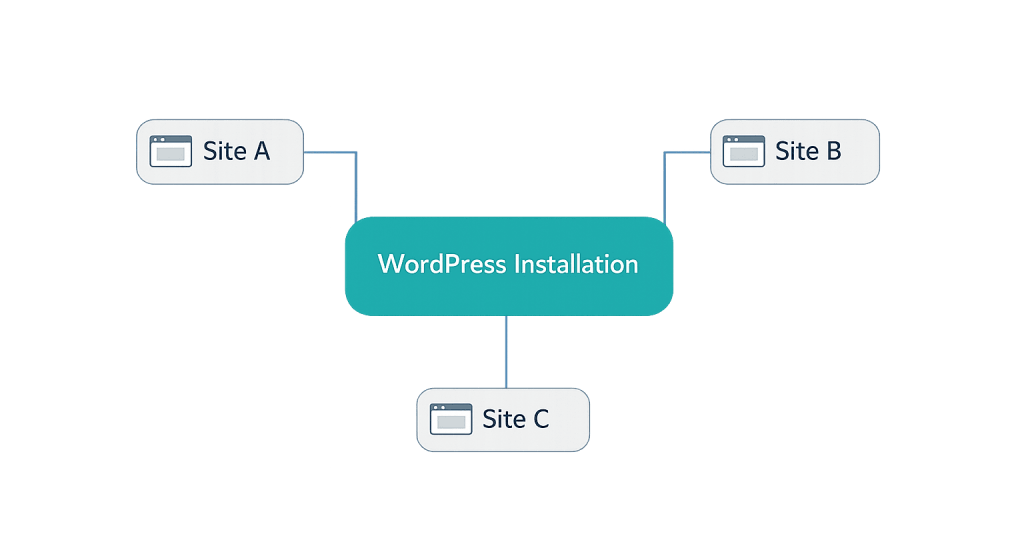
How WordPress Multisite Works
Activating Multisite transforms a standard WordPress installation into a network. The WordPress dashboard gains a new “Network Admin” area that sits above the individual site dashboards. From Network Admin, a super administrator manages the entire network.
Key concepts in a Multisite network:
- Network Admin — A special administrative layer above all sites. Only network super admins have access. From here, you install plugins and themes, manage users across the network, and configure network-wide settings.
- Super Admin — The highest user role in a Multisite network. Can manage all sites, install plugins/themes, and configure network settings. Standard admins on individual sites have limited capabilities compared to a standalone WordPress site.
- Sub-sites — Each individual site in the network. Each has its own URL, content, and site-level administrators, but cannot install their own plugins or themes (that’s controlled at the network level).
- URL structure — Multisite networks use either subdirectories (
example.com/site-one/,example.com/site-two/) or subdomains (site-one.example.com,site-two.example.com). The structure must be chosen during setup and is difficult to change later.
Plugins and themes activated at the network level are available to all sites. Network admins can also “force activate” specific plugins across every site on the network.
Purpose & Benefits
1. Centralized Management Across Multiple Sites
For organizations managing many websites — a franchise with 20 locations, a university with 50 department sites, or a digital agency handling client networks — Multisite centralizes the administrative work. Plugin updates, WordPress core updates, and theme management happen once at the network level rather than individually for each site. This reduces maintenance overhead significantly.
2. Shared Resources Reduce Hosting Costs
Because all sites in a Multisite network share a single WordPress installation, you’re not paying for separate hosting accounts, WordPress licenses (it’s free, but separate installations have separate server requirements), or redundant plugin licenses. One server environment, one set of plugin licenses, one backup system — the economies of scale add up as the number of sites grows.
3. Consistent Branding and User Management
Multisite allows user roles to span the network — a user registered on one site can be granted access to other sites without re-registering. Network-wide themes enforce consistent design standards. For organizations that need brand consistency across multiple properties, Multisite provides a framework to manage it from the top down.
Examples
1. University Department Network
A large university runs a Multisite network with the main university website as the root site, plus sub-sites for each academic department, research center, and student organization. The IT department manages plugins and core updates once for the entire network. Individual department staff have admin access to their own sub-sites but can’t break the network by installing unapproved plugins.
2. Franchise Brand Network
A franchise business with 30 locations uses Multisite to give each franchisee their own site at locations.franchisebrand.com/cityname. The parent company controls the theme (ensuring brand consistency) and installs SEO and review management plugins network-wide. Each franchisee edits their own content — hours, promotions, local photos — through their site’s dashboard.
3. Digital Agency Client Network
A web agency runs client sites on a Multisite network to streamline maintenance. WordPress core updates, security patches, and plugin updates are applied once and propagate across all client sites. Each client has admin access to their own sub-site and sees only their content. The agency monitors the network from a single dashboard.
Common Mistakes to Avoid
- Choosing Multisite for the wrong reasons — If you’re running two or three mostly unrelated websites, separate WordPress installations are simpler and safer. Multisite adds complexity that only pays off when you’re managing a larger number of closely related or organizationally connected sites.
- Installing incompatible plugins — Not all WordPress plugins are Multisite-compatible. Some store data in ways that conflict with the shared database structure. Always check plugin compatibility before deploying to a network, especially for membership, e-commerce, or custom post type plugins.
- Underestimating super admin responsibility — In a Multisite network, the super admin has complete control over every site. A misconfigured plugin activated at the network level affects all sites simultaneously. Mistakes at the network level propagate broadly — take care with network-wide changes.
- Incorrect domain mapping — Giving each sub-site a unique domain (rather than a subdirectory or subdomain) requires domain mapping configuration. This is achievable but adds a layer of DNS and hosting configuration that needs to be maintained as domains renew and change.
Best Practices
1. Evaluate Whether Multisite Is the Right Tool
Before setting up a Multisite network, clarify your use case. If sites are truly independent — different audiences, different plugins, different billing — separate installations give each site more flexibility and isolate problems. Multisite is ideal when sites share a common purpose, need centralized management, or benefit from shared plugin licensing. In our experience, the decision often comes down to how many sites you’re managing and how tightly they’re organizationally related.
2. Plan Your URL Structure Before Setup
The choice between subdirectory (domain.com/site/) and subdomain (site.domain.com) structures must be made at setup and is very difficult to change later. Subdirectories are simpler to configure and don’t require wildcard DNS. Subdomains require wildcard DNS configuration at the hosting level and are preferred when sub-sites need to feel like distinct entities. Think through your long-term URL strategy before activating the network.
3. Test Plugin Compatibility on a Staging Network
Before deploying plugins to a live Multisite network, test them on a staging environment configured as a Multisite installation. A plugin that works perfectly on a single-site installation may behave unpredictably on a network — particularly around user management, custom tables, and media handling. Testing in staging prevents network-wide disruptions.
Frequently Asked Questions
Can I convert an existing WordPress site to Multisite?
Yes, WordPress supports converting a single installation to a Multisite network. However, the process requires editing wp-config.php and your server’s rewrite rules, and it can cause issues if done carelessly. Plugins, themes, and some settings may need reconfiguration post-conversion. A full backup before proceeding is essential.
Can users on one site in a network access other sites?
By default, no — users have access only to the sites they’ve been assigned to. A network admin can grant a user access to additional sites from the Network Admin Users screen. A super admin has access to all sites by default.
Do all sites in a Multisite network share the same domain?
Not necessarily. By default, sub-sites use the network’s main domain with subdirectories or subdomains. With domain mapping (either through WordPress’s built-in feature or a plugin like Mercator), individual sub-sites can use entirely different domains that point to the same network.
Can each site in a Multisite network use different themes?
Yes. The super admin installs themes at the network level, and individual site admins can choose from the available (network-enabled) themes. The super admin can also restrict theme choice or force a single theme across all sites.
Is Multisite harder to back up?
A Multisite backup requires capturing the entire shared installation — code, database, and uploads directory — to restore any single site. Some backup plugins handle Multisite natively; others require specific configuration. The backup strategy is more complex than for individual sites, but one well-configured backup covers the entire network.
Related Glossary Terms
- WordPress Core
- Dashboard
- User Roles (Administrator, Editor, etc.)
- Staging Site
- WordPress Maintenance
- Plugin
How CyberOptik Can Help
Understanding how WordPress works under the hood helps you make better decisions about your site — including whether Multisite is right for your organization. Our team manages WordPress networks for clients every day, from initial configuration to plugin management and ongoing maintenance. Get in touch to discuss your project or explore our WordPress development services.


