
WP_Query is a PHP class built into WordPress that allows developers to retrieve posts, pages, and other content from the WordPress database using a flexible set of parameters. Rather than writing raw SQL, a developer creates an instance of WP_Query with an array of arguments — specifying what content to fetch, in what order, filtered by which criteria — and WordPress handles the database query automatically. The result is a structured object containing the matching content, ready to loop through and display.
Nearly every dynamic WordPress site relies on WP_Query in some form. The main blog listing, category archives, search results pages, and custom content sections all use WP_Query (or functions built on top of it) to determine what gets shown. For developers building anything beyond a basic WordPress site — portfolio sections, event listings, featured post carousels, filtered content archives — understanding WP_Query is essential.
How WP_Query Works
WP_Query accepts an array of arguments that define exactly what content to retrieve. When you instantiate the class, WordPress translates those arguments into a database query, runs it, and returns matching content as post objects you can iterate through.
The typical workflow:
- Define your arguments — Set criteria like post type, taxonomy filters, date ranges, custom field values, and display order.
- Instantiate the query — Create a
new WP_Query( $args )object. - Loop through results — Use
have_posts()andthe_post()to step through each result and output content. - Reset post data — Call
wp_reset_postdata()after the loop to restore the global$postvariable to the main query.
[Image: Flow diagram showing Arguments Array → WP_Query Instance → MySQL Database Query → Results Array → Loop → wp_reset_postdata()]
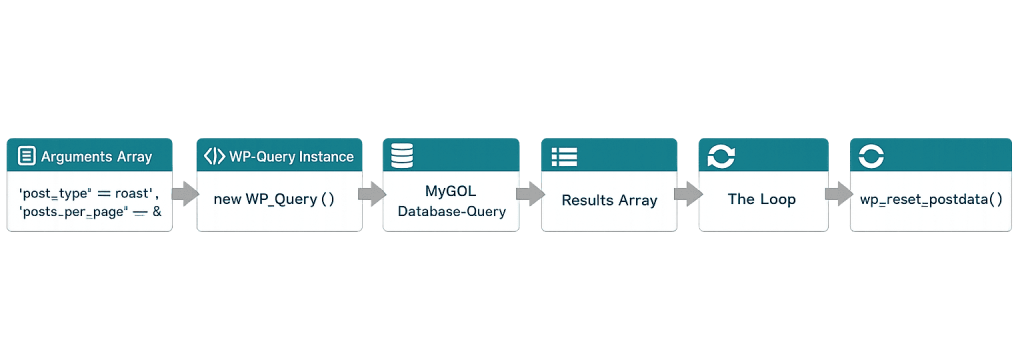
WP_Query supports an extensive list of parameters covering virtually every dimension of WordPress content: post type, status, author, category, tag, custom taxonomy, custom fields (meta queries), date ranges, search terms, pagination, and ordering. Parameters can be combined to build highly targeted queries.
Purpose & Benefits
1. Custom Content Retrieval Beyond Default WordPress Output
By default, WordPress displays content based on the current URL — a category page shows posts in that category, an archive shows posts by date. WP_Query lets you break out of that default logic entirely. You can display the three most recent posts from a specific custom post type anywhere on the site, pull in posts from multiple categories, or surface content based on a custom field value — all without modifying the main query. Our WordPress development work uses WP_Query constantly for this kind of flexibility.
2. Enables Dynamic, Data-Driven Page Templates
Complex page layouts — a homepage with a featured post section, a recent news row, and a service highlights area — each pulling different content — are built with multiple WP_Query instances. Each query targets a different slice of the site’s content and renders it in the appropriate part of the layout. This is the foundation of how professionally built WordPress sites achieve their structured, content-rich designs.
3. Performance Control Through Targeted Queries
WP_Query gives developers direct control over what gets fetched. You can limit results to only post IDs when you don’t need full post objects, disable pagination counting when you don’t need it, and exclude content you know should never appear. These targeted queries reduce the data WordPress retrieves and processes, which contributes to better page load times — a factor that directly affects PageSpeed scores.
Examples
1. Displaying Recent Posts from a Specific Category
A homepage section showing the three most recent posts in the “Case Studies” category:
// Fetch the 3 most recent posts from the 'case-studies' category
$args = array(
    'post_type'      => 'post',
    'posts_per_page' => 3,
    'category_name'  => 'case-studies',
    'orderby'        => 'date',
    'order'          => 'DESC',
);

$case_studies = new WP_Query( $args );

if ( $case_studies->have_posts() ) :
    while ( $case_studies->have_posts() ) : $case_studies->the_post();
        the_title( '<h3>', '</h3>' );
        the_excerpt();
    endwhile;
    wp_reset_postdata(); // Always reset after a custom loop
endif;
This query retrieves the three newest posts tagged with the “case-studies” category and renders each title and excerpt. The wp_reset_postdata() call at the end is essential — without it, subsequent template functions will return data from this custom query instead of the main page.
2. Querying a Custom Post Type with Meta Filtering
Retrieving team members for a company who are in a specific department, using a custom post type and a custom field value:
// Fetch team members in the 'Engineering' department
$args = array(
    'post_type'      => 'team_member',
    'posts_per_page' => -1, // Get all results
    'orderby'        => 'title',
    'order'          => 'ASC',
    'meta_query'     => array(
        array(
            'key'     => 'department',
            'value'   => 'Engineering',
            'compare' => '=',
        ),
    ),
);

$team = new WP_Query( $args );
The meta_query parameter filters results by a custom field stored in the post metadata table. This pattern is used for event filtering by date, real estate listings by price range, or any scenario where content is differentiated by stored data values.
3. Efficient Query Optimization for Large Result Sets
When you only need post IDs (to pass to another function or check existence), requesting full post objects is wasteful. Using 'fields' => 'ids' and 'no_found_rows' => true creates a significantly lighter query:
// Efficient query for post IDs only — no pagination counting needed
$args = array(
    'post_type'        => 'product',
    'posts_per_page'   => 50,
    'fields'           => 'ids',        // Return IDs only, not full post objects
    'no_found_rows'    => true,          // Skip the COUNT() query for pagination
    'update_post_meta_cache' => false,   // Don't pre-fetch post meta
    'update_post_term_cache' => false,   // Don't pre-fetch term data
);

$product_ids = new WP_Query( $args );
// $product_ids->posts is now a simple array of integers
These parameters tell WordPress to skip the extra database lookups it normally performs for pagination and caching. On large result sets, this can reduce query execution time considerably.
Common Mistakes to Avoid
- Forgetting
wp_reset_postdata()— After every WP_Query loop, call this function to restore the global$postvariable. Without it, template tags likethe_title(),the_content(), andget_the_ID()will return data from your custom query instead of the correct post in other parts of the page. - Using
query_posts()instead of WP_Query —query_posts()modifies the main WordPress query and causes unpredictable side effects with pagination, conditionals, and plugins. Always usenew WP_Query()for custom content retrieval. - Not limiting results with
posts_per_page— Omitting this parameter defaults to the Reading Settings value, which could be 10 or 100 depending on site configuration. On large sites with thousands of posts, an unlimited query can cause serious performance problems. - Running too many independent queries per page — Each WP_Query instance is a separate database call. A page template with 8–10 separate queries adds up. Consolidate where possible, or use the Transients API and object caching to store results temporarily.
Best Practices
1. Always Reset Post Data After Custom Loops
This isn’t optional. After every while ( $query->have_posts() ) loop that uses the_post(), call wp_reset_postdata(). If you’re using a standard foreach loop over $query->posts without calling the_post(), use wp_reset_query() instead. The distinction matters.
// After any loop using the_post():
wp_reset_postdata();
2. Request Only What You Need
WP_Query fetches more data than you might realize by default — full post objects, post meta, term caches. Use parameters like 'fields' => 'ids', 'no_found_rows' => true, 'update_post_meta_cache' => false, and 'update_post_term_cache' => false when you don’t need that data. The performance difference on large sites is real, and it’s a habit that distinguishes clean code from resource-heavy code.
3. Cache Expensive or Repeated Queries
For content that doesn’t change frequently — featured posts, sidebar queries, “popular products” — cache the query results using the WordPress Transients API. This stores the results temporarily in the database (or an object cache like Redis), so the query runs once every few hours instead of on every page load.
// Check for cached results before running the query
$cached = get_transient( 'featured_posts_cache' );

if ( false === $cached ) {
    $args  = array( 'post_type' => 'post', 'posts_per_page' => 5 );
    $query = new WP_Query( $args );
    set_transient( 'featured_posts_cache', $query->posts, HOUR_IN_SECONDS );
}
Frequently Asked Questions
What is the difference between WP_Query and get_posts()?
Both retrieve posts from the database, but they serve different purposes. get_posts() is a simpler wrapper around WP_Query that returns a plain array of post objects — better for quick retrievals where you don’t need pagination or the full query loop. WP_Query returns a full query object with pagination support, conditional methods, and the ability to use template tags like the_title() and the_content() inside a loop.
Can WP_Query slow down my website?
Yes, if used without care. Each instance is a database query. Complex meta queries on unindexed custom fields, queries with no result limit, and running many queries per page can measurably impact PageSpeed. The optimization parameters in Example 3 above address most of the common performance pitfalls.
Should I use WP_Query or the WordPress REST API?
Use WP_Query for server-side rendering inside PHP templates — it’s faster and more direct for that use case. Use the WordPress REST API when you’re making client-side requests from JavaScript, building a decoupled or headless front-end, or need to expose content to an external application.
How do I debug a WP_Query that isn’t returning what I expect?
Enable WP_DEBUG and inspect $query->request to see the raw SQL that was generated from your arguments. This quickly reveals issues with parameter names, taxonomy slugs, or meta key mismatches. Plugins like Query Monitor also display all queries run on a page with their arguments and execution time.
What is $wp_query vs. a custom WP_Query?
$wp_query is a global variable that holds the main query — the one WordPress automatically runs based on the current URL. When you use new WP_Query( $args ) with your own arguments, you’re creating a secondary, independent query. The main query is always available via the global; your custom queries are local to where you instantiate them.
Related Glossary Terms
How CyberOptik Can Help
As a WordPress-focused agency, WP_Query is part of our daily development toolkit. Whether you need a custom content archive, a dynamically filtered listing page, a performance audit of existing queries, or a complex template built from scratch, our developers know how to use WP_Query efficiently and correctly. You don’t need to write this code yourself — that’s what we’re here for. Get in touch to discuss your project or explore our WordPress development services.


