
VPS hosting (Virtual Private Server) is a type of web hosting where a physical server is divided into multiple isolated virtual environments, each operating independently with its own dedicated allocation of CPU, RAM, and storage. Unlike shared hosting — where many websites compete for the same pool of resources — a VPS gives your site its own private slice of the server, unaffected by what other users on the same machine are doing.
VPS sits in the middle of the hosting spectrum: more powerful and configurable than shared hosting, less expensive than a fully dedicated server. For businesses that have outgrown entry-level hosting but don’t yet need (or want to pay for) an entire physical server, VPS is typically the right next step. It’s widely used for WordPress sites experiencing growing traffic, eCommerce stores with performance demands, development environments, and applications that require custom server configurations.
[Image: Diagram showing a single physical server divided into three isolated VPS environments, each with its own OS, CPU, RAM, and storage allocation]
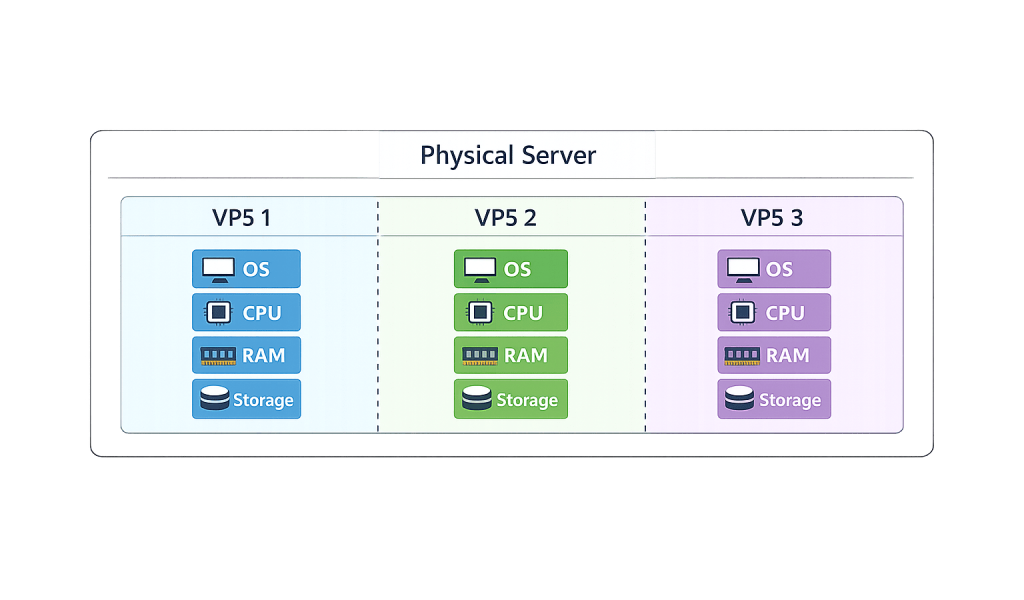
How VPS Hosting Works
A VPS is created using virtualization technology — specifically, software called a hypervisor that partitions a physical server into multiple independent virtual machines. Each virtual machine:
- Runs its own operating system (typically Linux or Windows)
- Has a fixed allocation of CPU cores, RAM, and disk space that isn’t shared with neighboring VPS instances
- Can be rebooted independently without affecting others on the same hardware
- Provides root access, meaning you have full administrative control over your environment
Two common types of VPS are worth understanding:
Managed VPS — The hosting provider handles server setup, security patches, software updates, monitoring, and technical support. This is the appropriate choice for businesses focused on running their website rather than managing server infrastructure.
Unmanaged VPS — The client is responsible for all server administration. More control, lower cost, but requires genuine technical expertise to configure and maintain safely. Not recommended without dedicated technical staff.
Most WordPress-focused VPS environments are managed or semi-managed, often including control panels like cPanel or Plesk to simplify common server tasks.
Purpose & Benefits
1. Dedicated Resources and Consistent Performance
On shared hosting, a traffic spike from a neighboring website can slow your site down. On a VPS, your CPU, RAM, and storage allocations are guaranteed — they don’t fluctuate based on what other users are doing. This isolation translates to predictable, consistent page load speeds, which directly affects both user experience and search engine rankings. For WordPress sites where page speed is a critical performance metric, this reliability is a meaningful upgrade from shared hosting. Our managed hosting solutions are built around this principle.
2. Scalability Without Migration
As your business grows, a VPS can grow with it. Adding RAM, CPU cores, or storage is typically done within your existing hosting environment — no domain transfer, no re-platforming, no site migration required. This scalability is particularly valuable for eCommerce stores or content-heavy sites where traffic can spike seasonally. You scale when you need to, and only pay for what you actually use.
3. Greater Security and Isolation
VPS isolation means that security issues affecting neighboring virtual servers don’t reach yours. On shared hosting, a vulnerability in one account can sometimes expose others on the same machine. On a VPS, each environment is contained. This isolation also allows you to implement custom security configurations — firewalls, access rules, security software — tailored to your site’s specific requirements, supporting the broader goal of WordPress hardening.
Examples
1. Growing eCommerce Store
An online retailer starts on shared hosting but begins experiencing slow load times during promotions and checkout errors during traffic spikes. Moving to a managed VPS provides dedicated resources that handle peak loads smoothly, supports the SSL configuration and custom payment gateway integrations required, and delivers the consistent performance that keeps customers from abandoning checkout.
2. Agency Hosting Multiple Client Sites
A web agency manages 15 client websites and needs reliable hosting with enough control to configure each environment appropriately. A VPS lets them host multiple WordPress installations on a single plan, apply custom caching and performance configurations, manage backups independently for each client, and maintain the isolation that prevents one site’s issues from affecting others.
3. Staging and Development Environment
A development team uses a VPS to run a staging environment that mirrors their production server. New plugins, theme updates, and code changes are tested on the staging VPS before being pushed live. The identical server environment means that if something works in staging, it will work in production — eliminating the common problem of updates behaving differently on a developer’s local machine versus the live site.
Common Mistakes to Avoid
- Choosing unmanaged VPS without the technical resources to manage it — An unmanaged VPS requires real server administration knowledge. Without proper security hardening, patch management, and monitoring, an unmanaged server can quickly become a liability. If your team doesn’t include a sysadmin, managed hosting is almost always the right choice.
- Underprovisioning resources — Starting with the minimum VPS tier and expecting it to handle significant traffic leads to the same performance problems you were trying to escape from shared hosting. Provision resources based on your realistic traffic and application requirements.
- Neglecting backups — Root access and a controlled environment don’t automatically mean your data is protected. Configure automated backups to an off-server location as a baseline requirement, not an afterthought.
- Ignoring server-level security after initial setup — VPS environments require ongoing security attention: keeping the OS and installed software updated, reviewing access logs, managing firewall rules. Security is not a one-time setup task.
Best Practices
1. Choose Managed Hosting Unless You Have Dedicated Server Expertise
For most small to mid-size businesses, managed VPS — where the host handles OS updates, security patches, server monitoring, and support — is the right balance of control and practicality. The cost difference between managed and unmanaged is modest compared to the time and risk involved in managing a server independently. Pair this with a caching configuration optimized for WordPress and you have a solid performance foundation.
2. Match Resources to Your Actual Workload
Before selecting a VPS tier, audit your current traffic, the demands of your specific application (a high-traffic WooCommerce store needs more RAM than a static brochure site), and your expected growth. Review server metrics at 90-day intervals and scale up before you hit resource ceilings — reactive scaling during a traffic event is always more disruptive than proactive planning.
3. Use a Staging Environment for Updates
One of the key advantages of VPS is the ability to run a proper staging environment alongside your production site. Always test WordPress core updates, plugin updates, and theme changes in staging before pushing them live. Combined with automated backups, this workflow dramatically reduces the risk of production incidents from routine maintenance.
Frequently Asked Questions
When should I upgrade from shared hosting to VPS?
The clearest signals are: your site is loading slowly during normal traffic and the host confirms resource limits are being hit, you’re experiencing errors related to memory or CPU limits, you need to install software not available on shared hosting, or you have security requirements that demand isolation. If your business is growing and your site performance matters to conversions, VPS is often the right move before problems become critical.
Is VPS hosting more secure than shared hosting?
In practice, yes. The isolation between VPS environments prevents cross-account vulnerabilities that are possible on shared hosting. You also have control over your own security configuration rather than relying entirely on shared server policies. That said, a VPS is only as secure as how well it’s managed — an unpatched, poorly configured VPS can be less secure than a well-managed shared environment.
What is the difference between VPS and cloud hosting?
VPS typically refers to a virtual server on a single physical machine with fixed resources. Cloud hosting distributes your workload across a network of interconnected servers, offering more flexible, on-demand scaling and higher redundancy. Cloud environments are better suited for highly variable traffic or applications requiring maximum uptime. Many modern “VPS” products from major providers blur the line by running on cloud infrastructure with VPS-style pricing.
Do I need technical knowledge to use VPS hosting?
For unmanaged VPS, yes — meaningful server administration experience is required. For managed VPS, much less so. With managed hosting, the provider handles the server-level work, and you interact primarily through a control panel to manage your site. Most WordPress-focused managed VPS products are designed to be accessible without deep server knowledge.
How much does VPS hosting cost?
Entry-level managed VPS plans typically range from $20–$60 per month, depending on the resource allocation and the provider’s management level. Higher-tier plans with more RAM, storage, and CPU scale upward from there. Compared to dedicated hosting, which starts at several hundred dollars per month, VPS is significantly more accessible for growing businesses that need more than shared hosting can offer.
Related Glossary Terms
- Shared Hosting
- Dedicated Hosting
- WordPress Hosting
- Caching
- SSL Certificate
- Staging Site
- Backup
- WordPress Hardening
How CyberOptik Can Help
Site performance directly affects your search rankings, user experience, and conversions. We offer managed WordPress hosting and speed optimization services designed to keep your site fast, secure, and reliable — without requiring you to become a server administrator. If you’re dealing with slow load times, outgrowing your current host, or just want a hosting environment that’s properly managed, we can help. Learn about our hosting solutions or our speed optimization services.


