
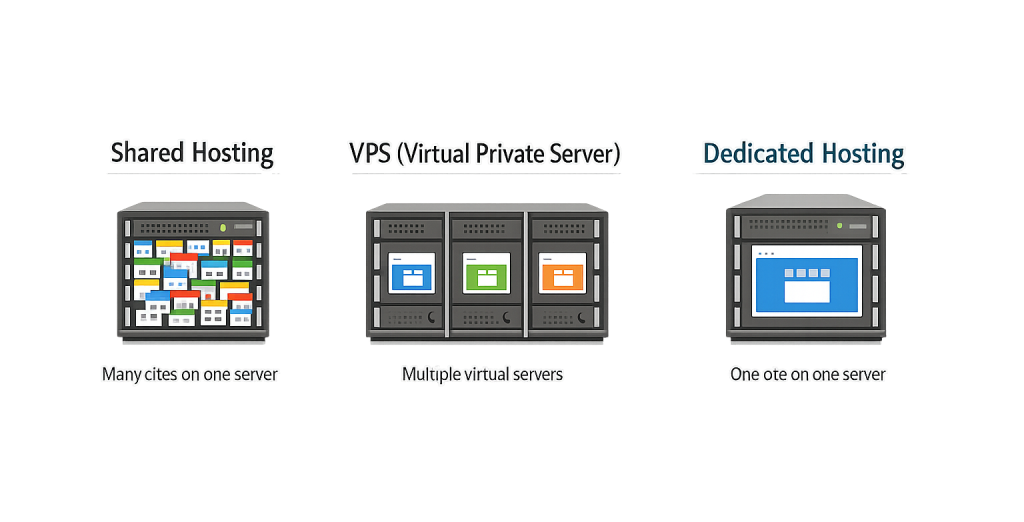
Dedicated hosting is a web hosting arrangement in which an entire physical server is reserved exclusively for one client. No other websites or applications share the hardware — all of the server’s CPU, RAM, storage, and bandwidth belong to you. This stands in direct contrast to shared hosting, where dozens or hundreds of sites compete for the same pool of resources, or VPS hosting, where a physical server is partitioned into isolated virtual environments.
For businesses with high-traffic websites, strict security requirements, or resource-intensive applications, dedicated hosting provides a level of performance and control that virtualized environments cannot match. When every CPU cycle and gigabyte of RAM is yours alone, your site responds consistently regardless of what load conditions exist elsewhere on the internet.
[Image: Diagram comparing shared hosting (many sites on one server), VPS (partitioned segments), and dedicated hosting (one site, one server)]
Types of Dedicated Hosting
Dedicated hosting comes in two primary configurations:
- Unmanaged dedicated hosting — You receive the physical server and are responsible for its configuration, software installation, security hardening, and maintenance. This option suits businesses with in-house technical staff or those who need maximum control over the environment.
- Managed dedicated hosting — The hosting provider handles server management tasks: OS updates, security patches, monitoring, and support. You control your applications while the provider maintains the underlying infrastructure. This is the more common choice for businesses without dedicated IT teams.
Within those categories, providers also offer choices around hardware specifications (CPU cores, RAM, storage type) and bandwidth allocation, allowing you to size the server to your actual requirements rather than a predetermined tier.
Purpose & Benefits
1. Consistent, Predictable Performance
With dedicated hosting, your site’s performance is not affected by traffic spikes or resource consumption on other tenants’ websites — because there are no other tenants. This translates directly to faster page loads and more stable uptime, both of which affect search rankings and conversion rates. Businesses running high-traffic WordPress hosting environments often reach a point where shared infrastructure simply can’t keep up.
2. Greater Security Isolation
Because no other clients share your hardware, your exposure to cross-site vulnerabilities is eliminated. You can implement custom firewalls, strict access controls, and server-level security policies that shared or VPS environments often restrict. For businesses handling sensitive customer data, payment information, or regulated records, this isolation is often a compliance requirement rather than a preference.
3. Full Configuration Control
Dedicated hosting gives you root-level access to the server environment. You can install specific software, configure server settings to match your application’s needs, and optimize the stack without restrictions. This flexibility matters for businesses running custom applications, high-volume email, or specialized workloads that don’t fit neatly into a shared infrastructure.
Examples
1. High-Traffic eCommerce Store
An online retailer running a WooCommerce store that handles thousands of daily transactions needs consistent performance during peak periods — product launches, promotions, and seasonal surges. On shared hosting, a spike in traffic from another tenant can slow their checkout experience. On a dedicated server, all resources are available on demand, keeping the store fast when it matters most.
2. Healthcare or Financial Application
A business operating a patient portal or client-facing financial application often has regulatory obligations around data privacy and security. Dedicated hosting enables them to configure the server to meet compliance requirements — HIPAA, PCI DSS, or similar standards — with full control over access, encryption, and network policies that shared environments cannot provide.
3. Agency Managing Multiple Client Properties
A web agency running multiple high-traffic client websites under a single managed server can consolidate those sites onto a dedicated environment, giving them root-level control over performance tuning, caching, and security configurations without the constraints of a shared hosting plan.
Common Mistakes to Avoid
- Choosing dedicated hosting before you need it — Dedicated servers are a significant cost jump from shared or VPS plans. Most small business websites don’t require dedicated resources. Review your actual traffic, resource utilization, and security requirements before upgrading.
- Opting for unmanaged hosting without the technical resources — Unmanaged dedicated servers require active administration. If your team doesn’t have server management experience, an unmanaged plan can leave you with a vulnerable, under-optimized environment.
- Neglecting backups on a single-tenant server — Dedicated hosting doesn’t automatically mean your data is protected. Regular backup procedures are still essential — hardware fails regardless of how exclusive the environment is.
- Undersizing the initial configuration — Ordering a server with insufficient RAM or CPU to handle growth means either paying for a migration or accepting degraded performance as you scale.
Best Practices
1. Match Server Specs to Actual Workload
Before provisioning a dedicated server, audit your current resource usage — peak CPU, RAM consumption, and bandwidth requirements. Size the server to handle your expected peak load with headroom for growth, not just your current baseline. A server provisioned too lean will require disruptive upgrades; one provisioned too generously wastes budget.
2. Use Managed Hosting Unless You Have In-House Expertise
For most business owners, managed dedicated hosting is the practical choice. The hosting provider handles OS security patches, monitoring, and support escalation, which keeps the server secure without requiring your team to maintain that expertise. Pair this with WordPress maintenance for the application layer.
3. Implement Server-Level Caching and a CDN
Even on dedicated hardware with abundant resources, combining server-level caching with a content delivery network (CDN) reduces the load your server needs to handle directly. Static assets served through a CDN reach users faster regardless of their geography, while caching reduces database and PHP processing overhead for dynamic content.
Frequently Asked Questions
What is the difference between dedicated hosting and VPS hosting?
VPS hosting partitions a physical server into isolated virtual environments — you have guaranteed resources, but still share hardware with other users. Dedicated hosting gives you an entire physical server. VPS is more affordable and easier to scale; dedicated hosting offers more raw performance, greater security isolation, and full hardware control.
How much does dedicated hosting cost?
Dedicated hosting typically ranges from $70 to $500+ per month depending on hardware specifications, managed vs. unmanaged service, and the provider. That’s significantly more than shared hosting ($5–$30/month) or VPS plans ($20–$100/month). The cost is justified for businesses where performance and security directly impact revenue.
Do I need dedicated hosting for my WordPress site?
Most WordPress sites don’t need it. Shared hosting handles most small business sites, and a well-configured VPS handles most medium-traffic sites. Dedicated hosting becomes relevant when you have sustained high traffic, strict security or compliance requirements, or resource-intensive applications that consistently exhaust shared infrastructure.
Is dedicated hosting the same as a dedicated IP address?
No. A dedicated IP address is a single IP assigned exclusively to your domain — available on many hosting types. Dedicated hosting refers to a dedicated physical server. You typically get one or more dedicated IPs with a dedicated server, but a dedicated IP alone doesn’t mean you have a dedicated server.
What happens if the dedicated server hardware fails?
Hardware failure is a real risk with any physical server. Reputable managed hosting providers build in redundancy (RAID storage, redundant network connections) and maintain hardware replacement SLAs. Regular off-server backups are essential regardless — never rely solely on the server itself to protect your data.
Related Glossary Terms
- Shared Hosting
- VPS Hosting (Virtual Private Server)
- WordPress Hosting
- Caching
- Content Delivery Network (CDN)
- Firewall
- Backup
- SSL Certificate
How CyberOptik Can Help
Site performance directly impacts your search rankings, user experience, and bottom line. We help businesses evaluate their hosting requirements, select the right infrastructure for their needs, and keep that infrastructure running at its best. Whether you’re outgrowing shared hosting or need guidance on what tier makes sense for your traffic and security requirements, we can help you make the right call. Learn about our hosting solutions or contact us to discuss your site’s needs.


