
User permissions in WordPress are the individual capabilities that determine exactly what a logged-in user can and cannot do on a website. Each permission corresponds to a specific action — such as publish_posts, edit_others_pages, install_plugins, or manage_options — and WordPress grants or restricts access to dashboard features based on which permissions a user holds.
Permissions are the building blocks beneath WordPress’s user roles system. While roles like Editor or Author bundle a pre-defined set of permissions together, individual capabilities can be adjusted independently through plugins or custom code. For site owners managing a team, understanding permissions means understanding exactly which doors are open to each person who logs in.
How User Permissions Work in WordPress
WordPress uses a role-based access control model. Every user is assigned a role — Administrator, Editor, Author, Contributor, Subscriber — and each role carries a defined set of capability flags. When a user attempts an action, WordPress checks whether their assigned role includes the relevant capability.
Capabilities are stored in the WordPress database as part of the user’s meta data. They’re evaluated at runtime whenever a user accesses the dashboard or submits a request. Some key capabilities include:
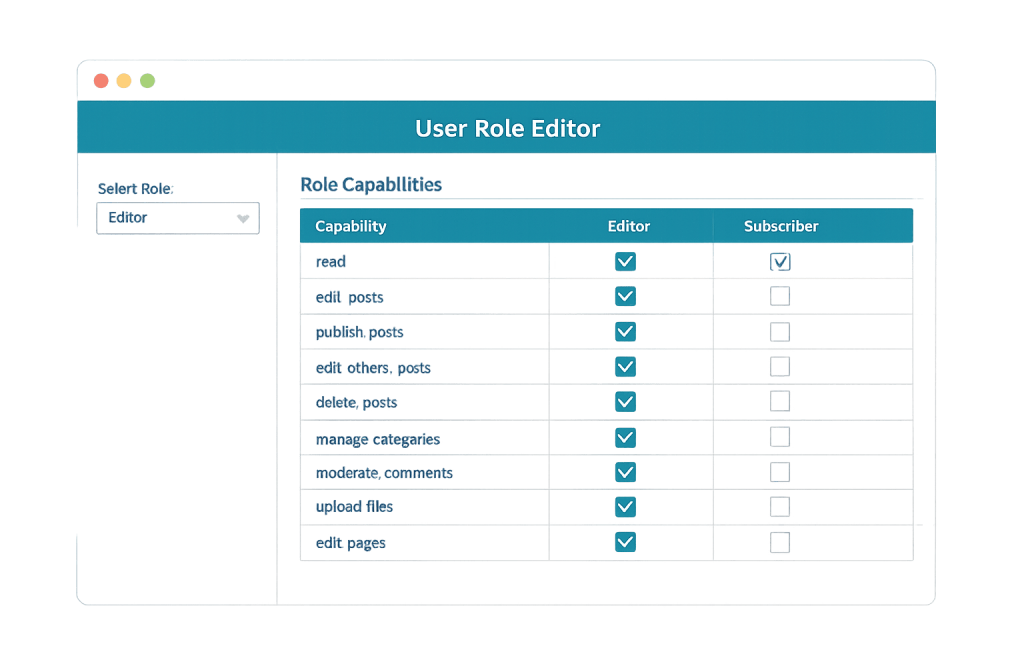
read— The baseline; grants access to the dashboard. Every role includes this.edit_posts— Allows creating and editing the user’s own posts.publish_posts— Allows publishing content without requiring review.edit_others_posts— Allows editing posts created by other users (Editor-level and above).manage_options— Grants access to WordPress settings panels; exclusive to Administrators.install_plugins— Allows adding new plugins; Administrators only by default.upload_files— Allows uploading to the Media Library.
Plugins like WooCommerce introduce additional capabilities specific to their functionality — for example, manage_woocommerce or view_woocommerce_reports.
[Image: Screenshot of WordPress User Role Editor plugin showing a grid of capability checkboxes for a selected role]
Purpose & Benefits
1. Site Security Through Access Control
Limiting what each user can access reduces the attack surface of your site. If a Contributor account is compromised, the attacker can only draft posts — not install plugins or change settings. Following the principle of least privilege — giving each user only what they need to do their job — is one of the most practical security measures a WordPress site can implement, and it pairs well with two-factor authentication and WordPress hardening.
2. Safer Team Collaboration
When you run a site with writers, editors, developers, and clients all needing access, permissions prevent accidental (or intentional) changes outside someone’s scope of responsibility. A freelance writer doesn’t need access to plugin settings. A client reviewing their draft doesn’t need the ability to delete pages. Clean permission management makes WordPress maintenance far less stressful when multiple people are involved.
3. Custom Workflows for Specific Needs
Default roles don’t cover every scenario. A business might need a “Client Editor” who can update their own service pages but can’t touch plugin settings, or a “Shop Manager” role specific to their WooCommerce store. Custom permissions — set via plugins like User Role Editor or Members — let you build roles precisely matched to your team’s structure without resorting to giving everyone Administrator access.
Examples
1. Freelance Writer Setup
A marketing agency brings on a freelance blogger. They create an Author account, which grants the writer permission to create, edit, publish, and delete their own posts and upload images — but nothing else. The writer has no access to other users’ content, plugin settings, or the WordPress customizer. This keeps their contribution contained to exactly what they were hired to do.
2. Client Content Access
A web agency builds a site for a client who wants to update their blog and a few landing pages. Rather than granting full Administrator access, the agency creates a custom Editor-level role with edit_pages and edit_posts enabled, but install_plugins, switch_themes, and edit_theme_options removed. The client can manage their content without the risk of accidentally breaking the site.
3. WooCommerce Shop Manager
A business owner wants their store manager to handle orders, products, and inventory, but not website design or plugin management. WooCommerce’s built-in Shop Manager role provides capabilities like manage_woocommerce and edit_products while excluding the deeper administrative capabilities reserved for the site Administrator. The result is a clean separation of responsibilities.
Common Mistakes to Avoid
- Assigning Administrator to everyone — It’s tempting to avoid thinking about access levels by just making everyone an admin. This dramatically increases your risk profile. A single compromised or careless admin account can wipe a site entirely.
- Not revoking access when people leave — Former employees, contractors, and clients should have their accounts deactivated or deleted promptly. Lingering access credentials are a common security vulnerability.
- Overlooking plugin-specific permissions — Many plugins add their own capability sets that aren’t obvious in the default WordPress user management interface. After installing a major plugin, review whether it has introduced new capabilities that need to be restricted.
- Relying on role names alone — Different installations may have modified what capabilities are attached to a given role name. Always verify what a role actually permits rather than assuming defaults are intact.
Best Practices
1. Follow the Principle of Least Privilege
Assign each user the minimum access they need to complete their work. Before adding a new user, ask: what specific tasks do they need to perform? Find the role that covers exactly those tasks, or create a custom role that does. This discipline applies to every account — developers, editors, clients, and contractors alike.
2. Audit User Accounts Regularly
Review your user list at least quarterly. Remove accounts for people who no longer work with your site, and check whether any roles have been elevated inappropriately. Pair this with two-factor authentication (2FA) for all accounts that have publishing access or higher. Regular audits are a core component of WordPress hardening.
3. Use a Role Management Plugin for Custom Needs
If default roles don’t match your team’s structure, plugins like User Role Editor or Members by MemberPress let you create and modify roles through a visual interface without writing custom code. Document any custom roles clearly so future administrators understand the site’s access structure.
Frequently Asked Questions
What is the difference between user permissions and user roles in WordPress?
A user role is a named bundle of permissions — like “Editor” or “Author.” A permission (or capability) is a single, specific action, like publish_posts or install_plugins. Roles make access management practical by grouping permissions together. You assign a role, and WordPress applies all the capabilities that role includes.
Can I give one user two different roles in WordPress?
WordPress core assigns one role per user on a standard site. However, plugins like Members and PublishPress Capabilities can layer multiple roles onto a single user, combining their capability sets. This is useful when the responsibilities of a user span more than one role without quite reaching the next level.
What happens if a user has a permission removed?
The relevant feature or action simply becomes inaccessible to them. Removing install_plugins from a role means affected users won’t see the Plugins menu in their dashboard. WordPress handles permission checks gracefully — there’s no crash, just a restricted view.
Do plugins add their own permissions?
Yes. Plugins like WooCommerce, MemberPress, and many LMS tools register custom capabilities that control access to their own features. It’s worth reviewing what new capability strings a major plugin introduces so you can assign or restrict them deliberately through role management.
Is it safe to give a developer full Administrator access?
For an active project, yes — developers often need full access to do their work. Once the project is complete, it’s best practice to either remove their account or downgrade it to a role that only covers ongoing needs. Active Administrator credentials that are no longer needed represent unnecessary risk.
Related Glossary Terms
- User Roles (Administrator, Editor, etc.)
- WordPress Dashboard
- Two-Factor Authentication (2FA)
- WordPress Hardening
- WordPress Maintenance
- Media Library
- Plugin
- Multisite
How CyberOptik Can Help
Understanding and configuring user permissions correctly is part of running a well-managed WordPress site. Our team sets up access controls for clients regularly — whether that means creating custom roles, auditing existing user accounts, or locking down an installation that has accumulated unnecessary access over time. If your site has more admins than it needs, or you’re not sure who has access to what, we can help you get organized. Get in touch to discuss your project or explore our WordPress support services.


