
User roles in WordPress are predefined access levels assigned to each person with an account on your site. Each role carries a specific set of capabilities that determine which areas of the dashboard that person can see, which actions they can take, and what content they can create, edit, or delete. WordPress ships with six default roles: Super Admin, Administrator, Editor, Author, Contributor, and Subscriber.
The role system exists to give site owners precise control over who can do what. A business owner running a multi-author blog doesn’t want every writer to have access to plugin settings. A client logging in to review a draft doesn’t need the ability to change the site’s theme. Roles create a structured, secure working environment by matching access levels to actual job responsibilities — without requiring custom code for most use cases.
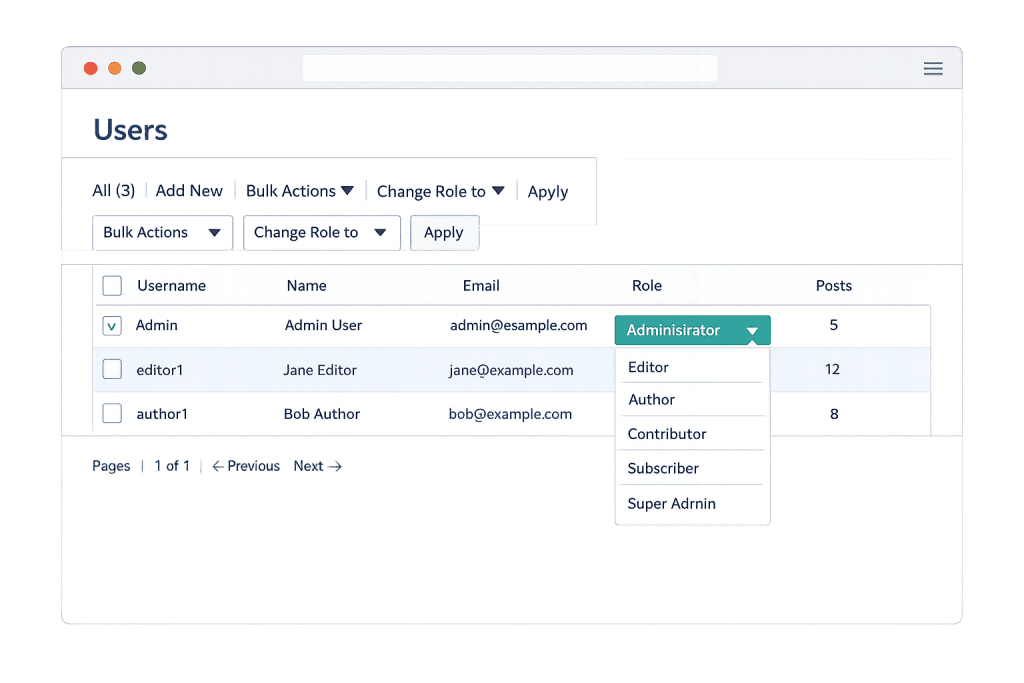
[Image: WordPress Users screen showing the role dropdown with all six default options visible]
Types of WordPress User Roles
WordPress’s six default roles form a hierarchy, with each higher role including the capabilities of those below it:
Super Admin is exclusive to WordPress Multisite networks. A Super Admin has complete control over every site in the network — including the ability to install themes and plugins network-wide and manage all users across all sites. Standard single-site installs don’t use this role.
Administrator is the highest role on a single WordPress site. Administrators can install and activate plugins and themes, manage all users and their roles, access all settings, edit all content, and perform WordPress core updates. This role should be reserved for the site owner and trusted technical staff only.
Editor has full control over content — but no access to site settings, plugins, or themes. Editors can create, edit, publish, and delete any post or page on the site, regardless of who wrote it. They can also moderate comments, manage categories and tags, and upload to the media library. This is the appropriate role for a senior content manager or editorial lead.
Author can create, edit, publish, and delete their own posts, and upload media files. They cannot touch content created by other users or access any site settings. Authors work well for regular contributors who publish independently.
Contributor can write and edit their own posts but cannot publish them or upload media. Their content requires review and approval by an Editor or Administrator before going live. This role is well-suited for guest writers or new team members whose work needs a review step.
Subscriber has the most limited access — they can only manage their own profile. Subscribers typically appear when a site requires account creation for commenting or accessing gated content.
Purpose & Benefits
1. Security Through Access Limitation
Every user account is a potential entry point. By assigning roles that match actual responsibilities, you limit the damage a compromised or careless account can cause. If a Contributor’s login is phished, the attacker can only draft posts — not install malware via a plugin. Proper role assignment works alongside WordPress hardening and two-factor authentication as a core layer of site security. Our team manages WordPress maintenance for clients with precisely this discipline in mind.
2. Efficient Team Workflows
The right roles eliminate bottlenecks. Authors publish their own posts without waiting on an admin to approve every piece. Editors manage the full content pipeline without touching plugin settings they don’t need. Subscribers access members-only content without seeing the dashboard at all. Role structure turns a potentially chaotic multi-user site into an organized operation — especially valuable as teams grow.
3. Client and Contractor Access Control
Agencies and freelancers often need to give clients limited access to their own site — enough to update content, but not enough to break things. Similarly, a developer or SEO consultant may need specific access that doesn’t require full Administrator privileges. Custom or adjusted roles, built using plugins like User Role Editor, let you give exactly the right access to exactly the right people. Explore our WordPress development services for help configuring site access for complex team structures.
Examples
1. Marketing Team Structure
A company runs a blog with three writers, one editor, and an in-house developer. Writers are assigned the Author role — they publish their own content independently. The editor gets the Editor role to oversee all content, manage comments, and handle scheduling. The developer has Administrator access to manage plugins and theme updates. Nobody has more access than their role requires.
2. Client Handoff
A web agency completes a site build and needs to hand content management over to the client. Rather than leaving the client as an Administrator, they assign an Editor role. The client can update pages, create new posts, and manage their media library. Plugin updates, theme changes, and user management remain with the agency account — protecting the site’s stability long after launch.
3. Membership Site
A coaching business uses a membership plugin to sell access to a course library. Paying members receive the Subscriber role, which unlocks their access to restricted content via the plugin. Free visitors can see only public pages. This setup requires zero custom code — it’s all managed through role assignments and plugin rules.
Common Mistakes to Avoid
- Making everyone an Administrator — Full admin access granted “just to keep it simple” creates serious security risk. One compromised admin account can take down an entire site. Assign the lowest role that covers someone’s actual needs.
- Forgetting to remove access — When a contractor finishes a project or an employee leaves, their user account remains active until manually removed or deactivated. Periodic user audits should be part of every site’s maintenance routine.
- Misunderstanding Editor vs. Author — Authors can only manage their own posts; Editors manage everyone’s. This distinction matters when setting up a multi-author blog. Assigning Author to someone who needs to edit all content creates unnecessary friction.
- Assuming default roles are unchanged — Plugins sometimes modify default role capabilities, and custom roles created by plugins may have unexpected permissions. Review what a role actually allows rather than relying on its name.
Best Practices
1. Assign Roles Before Users Start Working
Set up your role structure before onboarding new team members or clients. Define which role covers each job function, and resist the urge to “upgrade” someone’s role as a shortcut. Having this structure in place from the beginning keeps access patterns clean and auditable throughout the life of the site.
2. Use Plugins for Custom Role Requirements
When default roles don’t map cleanly to your team structure, plugins like User Role Editor or Members by MemberPress let you create custom roles or modify existing ones without writing code. This is often the right call for agencies managing client sites, businesses with specialized workflows, or WooCommerce stores needing custom shop staff roles.
3. Review User Accounts Quarterly
Run through your Users screen at least every quarter. Remove accounts that are no longer needed, verify that roles still match current responsibilities, and ensure all admin-level accounts have two-factor authentication enabled. These user permission hygiene practices take minutes but prevent real problems.
Frequently Asked Questions
What’s the safest role to give a contractor or freelancer?
It depends on what they need to do. A writer should get Contributor (drafts only) or Author (self-publishing). A developer working on the site actively may need Administrator access, but that should be revoked or downgraded once the project wraps. Never leave admin credentials with someone who no longer needs them.
Can I change a user’s role after they’ve already been added?
Yes. Go to Users in your WordPress dashboard, click on the user’s name, and change the role from the dropdown. You can also select multiple users from the Users list and bulk-change their roles. Only Administrators can change user roles.
What’s the difference between an Editor and an Administrator?
Editors control all content — they can create, edit, publish, and delete any post or page by any user, and they moderate comments. But they can’t touch plugins, themes, WordPress settings, or user accounts. Administrators have all of that plus full site control. For most content managers, Editor is the appropriate role.
Does WordPress have a role for developers?
There’s no built-in “Developer” role. Developers typically need Administrator access while working on a site. Some teams create a custom role using a plugin that grants access to specific admin areas without full top-level control — useful for ongoing maintenance relationships where a developer needs regular access but shouldn’t have unrestricted authority.
What is the Super Admin role and do I need it?
Super Admin is only relevant on WordPress Multisite networks — installations running multiple sites under one WordPress install. If you’re running a single site, you’ll never encounter or need this role. On a network, the Super Admin has authority over all sites and all users across the entire installation.
Related Glossary Terms
- User Permissions
- WordPress Dashboard
- Two-Factor Authentication (2FA)
- WordPress Hardening
- Multisite
- Media Library
- Plugin
- WordPress Core
How CyberOptik Can Help
Getting user roles right is one of the most practical things you can do for your site’s security and workflow. Our team configures access levels for every client site we manage — from clean initial setups to auditing and cleaning up sites that have accumulated too many admins over the years. If you’re handing a site over to a client, onboarding a new team, or just not sure who has access to what, we can help. Get in touch to discuss your project or explore our WordPress development services.


