
jQuery is a fast, lightweight JavaScript library designed to simplify common web development tasks — particularly interacting with HTML elements, handling events, creating animations, and making AJAX requests. Where raw JavaScript can be verbose and browser-inconsistent, jQuery provides a concise, readable syntax that abstracts away the differences between browsers. Its hallmark is the $() function, which selects elements and applies actions to them in a single, readable line.
WordPress has bundled jQuery as a core dependency since version 1.2.1. This means jQuery is available on virtually every WordPress site, and a vast number of themes and plugins use it for their interactive features — from dropdown menus and lightboxes to contact forms and dynamic content loading. As a business owner, you’re likely benefiting from jQuery-powered functionality without realizing it. As a developer, understanding how WordPress manages jQuery is essential to avoiding common conflicts.
How jQuery Works in WordPress
Unlike standard websites where you might load jQuery from any CDN, WordPress manages jQuery through its script registration system. jQuery is registered as a built-in script handle (jquery) and queued by WordPress core when any plugin or theme declares it as a dependency.
Key points about jQuery in WordPress:
- WordPress bundles its own version of jQuery — as of WordPress 5.6+, this is jQuery 3.x, which brought significant changes from the older jQuery 1.x era
- Plugins and themes should declare
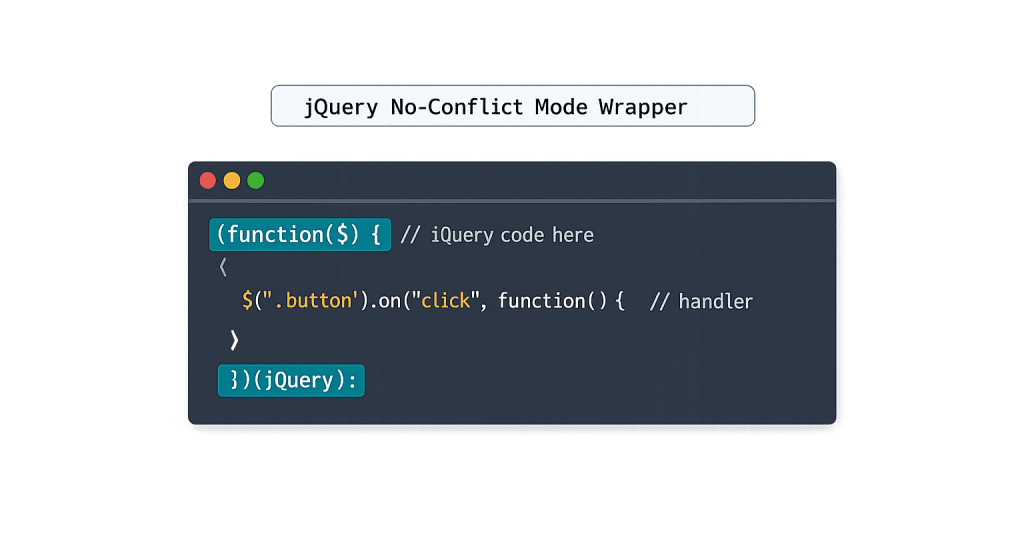
jqueryas a dependency inwp_enqueue_script()rather than loading their own copy — loading multiple jQuery versions causes conflicts - WordPress loads jQuery in no-conflict mode by default, which means
$is not globally available. UsejQueryinstead of$, or wrap code in a function that passes jQuery as$
[Image: Code illustration showing jQuery no-conflict mode wrapper pattern for WordPress development]
Purpose & Benefits
1. Simplified DOM Manipulation
jQuery’s primary strength is selecting and manipulating HTML elements with minimal code. Tasks that require multiple lines of vanilla JavaScript can often be accomplished in a single jQuery statement. This readability made jQuery the dominant JavaScript library for a decade and is why so much legacy code in WordPress themes and plugins still relies on it. Understanding jQuery helps you communicate with developers about theme customizations and plugin behavior.
2. Cross-Browser Compatibility (Historical)
jQuery was originally created to solve a real problem: the same JavaScript code behaved differently across Internet Explorer, Firefox, Safari, and Chrome. jQuery abstracted these differences into a unified API that worked consistently everywhere. While modern browsers have largely standardized their JavaScript support — reducing this need — the codebase built on jQuery during that era still powers countless WordPress sites in production today.
3. AJAX Interactions in WordPress
jQuery’s $.ajax() and shorthand methods ($.get(), $.post()) are widely used in WordPress for AJAX requests — submitting forms, loading more posts, updating cart quantities, and triggering server-side actions without page reloads. WordPress provides a standardized AJAX handler at /wp-admin/admin-ajax.php, and many plugins use jQuery to interact with it. Our WordPress development services include building and debugging these interactions regularly.
Examples
1. Toggle Element Visibility on Click
A common use case: showing and hiding content when a user clicks a button.
// WordPress no-conflict wrapper for jQuery
jQuery(document).ready(function($) {
    // Toggle an accordion panel on click
    $('.accordion-header').on('click', function() {
        $(this).next('.accordion-content').slideToggle(300);
        $(this).toggleClass('is-open');
    });
});
The jQuery(document).ready() wrapper ensures the code runs after the DOM is fully loaded. The $ shorthand works inside this wrapper because jQuery is passed as a parameter named $.
2. AJAX Request to Load More Posts
Loading additional blog posts without a page reload:
jQuery(document).ready(function($) {
    var currentPage = 1;

    $('#load-more').on('click', function() {
        currentPage++;
        $.ajax({
            url: cyberoptik_vars.ajax_url,
            type: 'POST',
            data: {
                action: 'load_more_posts',
                page: currentPage,
                nonce: cyberoptik_vars.nonce
            },
            success: function(response) {
                if (response.success) {
                    $('#posts-container').append(response.data);
                } else {
                    $('#load-more').hide();
                }
            }
        });
    });
});
The cyberoptik_vars object is passed from PHP using wp_localize_script(), providing the AJAX URL and security nonce to the JavaScript context.
3. Form Validation Before Submission
Simple client-side form validation to check required fields before the form submits:
jQuery(document).ready(function($) {
    $('#contact-form').on('submit', function(e) {
        var name = $('#field-name').val().trim();
        var email = $('#field-email').val().trim();

        if (!name || !email) {
            e.preventDefault(); // Stop form submission
            $('.form-error').text('Please fill in all required fields.').show();
        }
    });
});
This prevents form submission when required fields are empty, improving the user experience without requiring a server round-trip for basic validation.
Common Mistakes to Avoid
- Using
$directly instead of jQuery’s no-conflict syntax — In WordPress,$isn’t automatically available because jQuery runs in no-conflict mode. Code that uses$()outside of a no-conflict wrapper will throw an error. Always usejQuery()or wrap code injQuery(function($) { ... }). - Loading jQuery twice — Plugins or themes that include their own copy of jQuery alongside WordPress’s bundled version cause version conflicts and unpredictable behavior. Always declare
jqueryas a dependency inwp_enqueue_script()rather than loading a separate copy. - Using deprecated jQuery methods on newer versions — The upgrade from jQuery 1.x to 3.x in WordPress 5.6 broke code that used deprecated methods like
.live(),.die(),.success(), and.error(). If you inherited an older site, check for console errors related to these deprecated calls. - Not using
document.ready()— Running jQuery code before the DOM is fully loaded causes “cannot read property of null” errors because the elements the code targets don’t exist yet. Always wrap DOM-manipulation code in a document ready handler.
Best Practices
1. Declare jQuery as a Dependency, Not a Script Include
Register your scripts correctly through WordPress’s enqueue system and declare jQuery as a dependency:
// Register and enqueue your script with jQuery as a dependency
function my_theme_scripts() {
    wp_enqueue_script(
        'my-script',
        get_template_directory_uri() . '/js/my-script.js',
        array( 'jquery' ),  // jQuery declared as dependency
        '1.0.0',
        true                // Load in footer
    );
}
add_action( 'wp_enqueue_scripts', 'my_theme_scripts' );
WordPress ensures jQuery loads before your script, eliminating dependency order errors.
2. Consider Whether jQuery Is Still Needed
Modern JavaScript (ES6+) natively supports element selection (document.querySelector()), event listeners (.addEventListener()), and fetch requests (fetch()). For new custom scripts where you control the entire codebase, vanilla JavaScript may achieve the same result without the overhead of loading jQuery. That said, jQuery is already loaded on most WordPress sites through core or other plugins — if it’s already present, using it adds no additional weight.
3. Test Across WordPress Updates
WordPress periodically updates its bundled jQuery version. When a major version update ships (like the 1.x to 3.x transition), it can break code that relied on deprecated methods. Maintain a staging site where you test plugin and theme code against WordPress updates before applying them to production.
Frequently Asked Questions
Is jQuery still relevant in modern web development?
For new projects outside WordPress, jQuery has largely been superseded by modern JavaScript and frameworks like React and Vue. Within the WordPress ecosystem, it remains highly relevant — it’s bundled in core, used by thousands of plugins and themes, and essential knowledge for anyone maintaining or building on legacy WordPress codebases. Understanding jQuery is still a practical requirement for WordPress developers.
What’s the difference between jQuery and JavaScript?
JavaScript is the programming language. jQuery is a library written in JavaScript. Think of JavaScript as the language and jQuery as a toolkit built with that language that makes certain common tasks easier and more concise. You can do anything jQuery does in plain JavaScript — jQuery just provides a more streamlined API for it.
Why does WordPress use jQuery in no-conflict mode?
WordPress loads jQuery in no-conflict mode (.noConflict()) because other JavaScript libraries also use $ as a shorthand. By releasing the $ variable, WordPress prevents conflicts between jQuery and other libraries that a plugin might load. This is why WordPress code always uses jQuery (capitalized and full) or wraps code in a no-conflict function.
How do I debug a jQuery conflict on my WordPress site?
Open your browser’s developer console (F12) and look for JavaScript errors. The most common jQuery conflicts produce errors like “$ is not a function,” “$(…).someMethod is not a function” (deprecated method), or “jQuery is not defined.” Deactivate plugins one at a time to isolate the conflicting script, then review which script is loading jQuery incorrectly.
Can I update jQuery on my WordPress site independently?
WordPress controls the version of jQuery bundled with core — site owners shouldn’t manually update it independently, as this can cause unexpected conflicts with core functionality. Instead, keep WordPress core up to date, which includes the bundled jQuery updates that Automattic tests against core features. Plugins that ship their own jQuery copy should be updated by their authors.
Related Glossary Terms
- JavaScript
- AJAX (Asynchronous JavaScript and XML)
- wp_enqueue
- Hook
- Frontend Development
- Staging Site
- Plugin
How CyberOptik Can Help
As a WordPress-focused agency, we work with jQuery on every project we build — from theme customizations to AJAX-powered functionality to resolving script conflicts inherited from older codebases. Whether you need a jQuery conflict diagnosed, custom JavaScript functionality built, or a legacy site updated to work with current WordPress versions, our developers can help. Get in touch to discuss your project or explore our WordPress development services.