
wp_enqueue refers to a family of WordPress functions — most commonly wp_enqueue_script() and wp_enqueue_style() — that register and load JavaScript files and CSS stylesheets on a WordPress site in a controlled, conflict-free way. Rather than dropping <script> or <link> tags directly into HTML templates, developers use these functions to let WordPress manage when, where, and how assets load.
WordPress maintains a dependency registry for all scripts and styles. When you enqueue an asset, you tell WordPress its handle (a unique name), its file location, any dependencies it requires, and where it should appear on the page. WordPress resolves the dependency order automatically and outputs the correct tags in the correct locations. This system is what keeps dozens of plugins and a theme from stepping on each other’s JavaScript files.
[Image: Diagram showing wp_enqueue_script flow — functions.php → wp_enqueue_scripts hook → WordPress asset queue → rendered HTML head/footer]
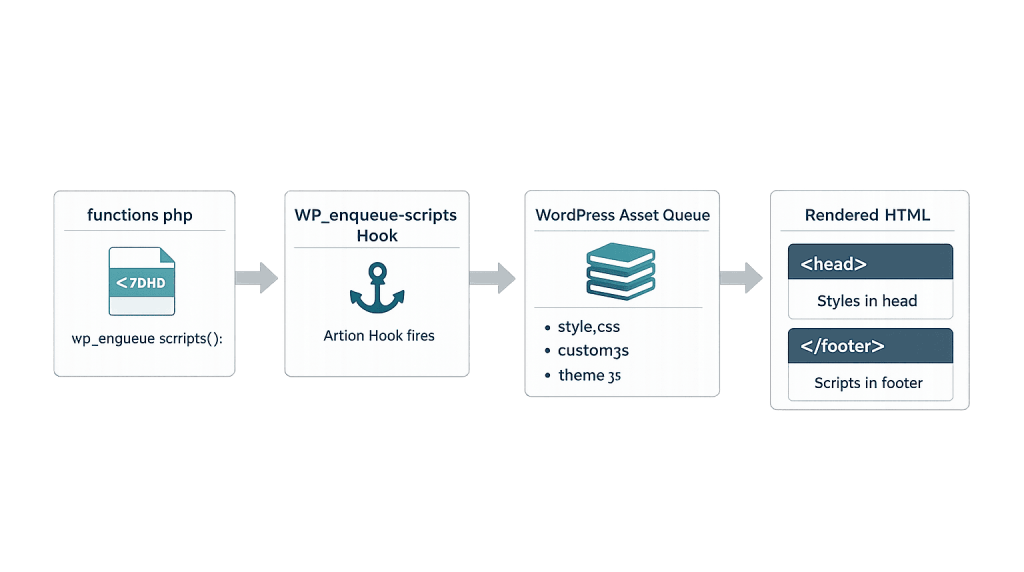
How wp_enqueue Works
The enqueue system is built around two action hooks:
wp_enqueue_scripts— for front-end assets (what site visitors see)admin_enqueue_scripts— for assets loaded in the WordPress dashboardlogin_enqueue_scripts— for assets on the login page
The two primary functions are:
wp_enqueue_script( $handle, $src, $deps, $ver, $args )— loads a JavaScript filewp_enqueue_style( $handle, $src, $deps, $ver, $media )— loads a CSS stylesheet
Each function accepts a handle (a unique string identifier), the file URL, an array of dependencies, a version number for cache-busting, and additional arguments like whether the script should load in the footer. WordPress resolves dependencies automatically — if your script depends on jQuery, WordPress ensures jQuery loads first.
In WordPress 6.3 and later, the $args parameter was expanded to support modern loading strategies: defer (download in parallel, execute after HTML parsing) and async (download in parallel, execute immediately).
Purpose & Benefits
1. Prevents Script Conflicts Between Plugins and Themes
Without the enqueue system, two plugins could load different versions of jQuery simultaneously, causing JavaScript errors across the site. By routing all asset loading through WordPress’s dependency manager, the enqueue system ensures each library loads exactly once, in the right order. This is especially important on sites running plugins from multiple vendors.
2. Controls Asset Loading for Better Performance
Enqueuing gives you precise control over where assets load. Loading scripts in the footer with 'in_footer' => true keeps them from blocking page rendering — a technique that directly improves PageSpeed scores. Modern strategies like defer and async let you load non-critical scripts without blocking the rest of the page, which our WordPress development services team applies on every build.
3. Enables Conditional Loading
You can wrap enqueue calls in conditional logic to load assets only when needed — on a specific page template, only for logged-in users, or only when a particular shortcode is present. Loading fewer assets means faster pages, which matters for both user experience and search rankings.
Examples
1. Enqueueing a Custom Script and Style in a Theme
The standard pattern for loading theme assets inside functions.php:
// Enqueue theme stylesheet and custom JavaScript
function mytheme_enqueue_assets() {
    // Load main stylesheet
    wp_enqueue_style(
        'mytheme-style',
        get_stylesheet_uri(),
        array(),
        '1.0.0'
    );

    // Load custom script, dependent on jQuery, in footer
    wp_enqueue_script(
        'mytheme-main',
        get_template_directory_uri() . '/js/main.js',
        array( 'jquery' ),
        '1.0.0',
        array( 'in_footer' => true )
    );
}
add_action( 'wp_enqueue_scripts', 'mytheme_enqueue_assets' );
This loads the stylesheet in the <head> and the custom script in the footer after jQuery. The array( 'jquery' ) dependency ensures jQuery is loaded first, even if jQuery wasn’t otherwise queued.
2. Conditional Loading on a Specific Page Template
Load a heavy slider library only on pages that actually use it:
// Load slick slider only on the homepage
function mytheme_conditional_scripts() {
    if ( is_front_page() ) {
        wp_enqueue_style(
            'slick-css',
            'https://cdn.jsdelivr.net/npm/slick-carousel/slick/slick.css',
            array(),
            '1.8.1'
        );
        wp_enqueue_script(
            'slick-js',
            'https://cdn.jsdelivr.net/npm/slick-carousel/slick/slick.min.js',
            array( 'jquery' ),
            '1.8.1',
            array( 'in_footer' => true )
        );
    }
}
add_action( 'wp_enqueue_scripts', 'mytheme_conditional_scripts' );
This keeps the slider library off every other page — reducing load time site-wide while still delivering the feature where it belongs.
3. Using defer for Non-Critical Scripts (WordPress 6.3+)
// Load analytics script with defer strategy
function mytheme_deferred_script() {
    wp_enqueue_script(
        'my-analytics',
        get_template_directory_uri() . '/js/analytics.js',
        array(),
        '2.1.0',
        array(
            'in_footer' => true,
            'strategy'  => 'defer',
        )
    );
}
add_action( 'wp_enqueue_scripts', 'mytheme_deferred_script' );
The defer strategy tells the browser to download the script without blocking HTML parsing and execute it only after the page has fully loaded — a meaningful performance gain for non-interactive scripts like analytics or tracking pixels.
Common Mistakes to Avoid
- Adding scripts directly to header.php — Placing
<script>tags directly in theme templates bypasses the dependency system entirely. This often causes duplicate script loading and JavaScript conflicts with plugins, and it breaks the functions.php workflow that keeps themes maintainable. - Enqueuing outside the correct hook — Calling
wp_enqueue_script()at the top level offunctions.phpinstead of inside thewp_enqueue_scriptshook can load scripts at the wrong time, cause admin conflicts, or fail silently without any error message. - Forgetting version numbers — Omitting a version parameter or always using
falsemeans WordPress appends its own version number. When you update a file, visitors may see the cached old version. Pass a custom version string or usefilemtime()to generate a cache-busting timestamp automatically. - Ignoring unmet dependencies — WordPress silently skips scripts with unmet dependencies (no warning, no error). If a script fails to load on the front end, check that all listed dependencies are correctly registered.
Best Practices
1. Always Hook Into wp_enqueue_scripts
Never call enqueue functions directly — always attach them to the appropriate action hook. Use wp_enqueue_scripts for front-end assets, admin_enqueue_scripts for dashboard assets, and login_enqueue_scripts for the login screen. This keeps asset loading predictable and prevents scripts from appearing where they shouldn’t.
2. Use Meaningful, Unique Handles
Choose handles that reflect your plugin or theme’s namespace — for example, mytheme-slider rather than just slider. Generic handles can collide with another plugin’s registration. If two plugins register different files under the same handle, only the first one wins — and the second fails silently.
3. Load Scripts in the Footer When Possible
Pass 'in_footer' => true for any script that doesn’t need to block page rendering. Scripts in the <head> delay the browser from displaying page content until they download and execute. Deferring scripts to the footer — or using the defer strategy — can measurably improve your PageSpeed score and reduce time-to-first-paint for visitors.
// Prefer footer loading for non-critical scripts
wp_enqueue_script( 'my-handle', $src, $deps, $ver, array( 'in_footer' => true ) );
Frequently Asked Questions
What is the difference between wp_register_script and wp_enqueue_script?
wp_register_script() reserves a handle in WordPress’s asset registry without actually loading the file. wp_enqueue_script() does both — it registers and queues the file for output. Use wp_register_script() first only when you need to conditionally enqueue the same asset in multiple places; for most cases, wp_enqueue_script() alone is all you need.
Can I use wp_enqueue to load Google Fonts?
Yes. wp_enqueue_style() works with any publicly accessible CSS URL, including Google Fonts. Enqueue it with a unique handle and the full Google Fonts URL as the source. This is cleaner than adding a <link> directly to your template and keeps the font loading in the proper WordPress asset queue.
Does enqueuing scripts affect page speed?
It can — in both directions. Properly using 'in_footer' => true and the defer or async strategies improves speed by avoiding render-blocking. Carelessly loading large JavaScript libraries on every page, even where not needed, slows things down. Conditional enqueuing (loading assets only on the pages that need them) is one of the most effective performance optimizations a WordPress developer can make.
What happens if two plugins use the same script handle?
Whichever plugin registers the handle first wins. The second plugin’s registration attempt is silently ignored. This is intentional — it prevents duplicate loading — but it can cause problems if the two plugins registered different file versions. Good plugin and theme developers namespace their handles to avoid collisions.
Do I need to understand wp_enqueue as a site owner?
You don’t need to write this code yourself, but understanding what it does helps you communicate with your development team. If your site has JavaScript errors or slow load times, knowing that assets are loaded through the enqueue system is useful context — it means the fix lives in code, not a settings panel.
Related Glossary Terms
How CyberOptik Can Help
As a WordPress-focused agency, we work with wp_enqueue on every project we build. Proper asset management is one of the most impactful ways to keep a WordPress site fast, conflict-free, and maintainable — and it requires getting the details right. Whether you need custom development, a theme built from scratch, or troubleshooting JavaScript conflicts on an existing site, our developers can help. Get in touch to discuss your project or explore our WordPress development services.


