
Goals / Events in GA4 are the mechanisms Google Analytics 4 uses to track meaningful user actions on a website — replacing the separate Goals system that existed in Universal Analytics (UA). In GA4, everything is an event: a page view, a button click, a form submission, a video play. When you designate a specific event as important to your business — a purchase, a lead form submission, a phone call click — you mark it as a “key event” (what GA4 calls conversions). These key events are the GA4 equivalent of Universal Analytics goals.
The shift matters for anyone who managed a website before GA4 took over. In Universal Analytics, goals were a distinct configuration layer — you set up goals separately from events. In GA4, Google simplified and unified the system: all conversions are just events that you’ve flagged as important. This gives more flexibility (any event can become a conversion) but also requires relearning how the system works. Universal Analytics stopped processing new data on July 1, 2023, making GA4 the current standard for all website analytics. Understanding how events and key events work in GA4 is now essential for measuring what matters on your site.
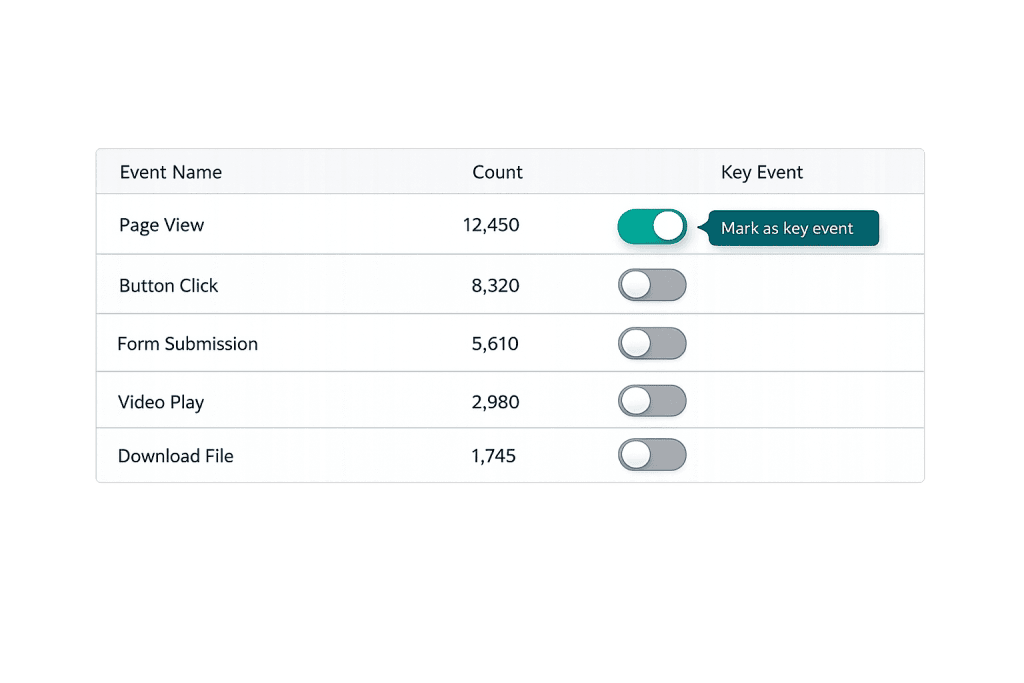
[Image: Screenshot of GA4 Events interface showing the “Mark as key event” toggle]
How Events and Key Events Work in GA4
GA4 automatically tracks certain events out of the box — these include:
- Automatically collected events —
page_view,session_start,first_visit(always active) - Enhanced measurement events —
scroll,click,file_download,video_start,form_submit(enabled with a toggle in GA4) - Recommended events —
purchase,sign_up,login(structured events you configure for specific use cases) - Custom events — Any event you define yourself via Google Tag Manager or directly in GA4
To mark an event as a key event (conversion), you navigate to Configure → Events in GA4 and toggle “Mark as key event” on for the relevant event. That’s it — no separate goal setup required.
One behavioral difference from Universal Analytics: in UA, a goal was counted only once per session. In GA4, a key event is counted every time the triggering action occurs within a session. If a user submits a contact form twice in one session, GA4 counts two conversions. For events that can only happen once (like a purchase on a thank-you page), this distinction rarely matters. For repeatable events, it can produce numbers significantly higher than UA equivalents.
Purpose & Benefits
1. Measures What Actually Matters to Your Business
Without conversion tracking, you know people visited your site but not whether they did anything valuable. Marking key events in GA4 connects traffic data to business outcomes. A law firm tracks phone call clicks and form submissions. An e-commerce store tracks purchases and add-to-carts. A SaaS company tracks demo requests and free trial sign-ups. These events become the performance indicators that justify marketing spend and guide optimization decisions. Our team sets these up as part of every digital marketing engagement.
2. Enables GA4’s Machine Learning Capabilities
GA4’s AI-powered features — predictive audiences, purchase probability, churn probability — rely on having well-configured key events. With accurate conversion data, GA4 can identify users most likely to convert and allow you to build audiences around those predictions. This feeds directly into more effective Google Ads campaigns and remarketing strategies.
3. Unified Tracking Across Web and App
Unlike Universal Analytics, GA4 tracks both website and app activity in a single property using the same event model. For businesses with a website and a mobile app, this means a single source of truth for user behavior across platforms — with consistent event names and conversion definitions. This cross-platform view connects to conversion rate analysis across the full customer journey.
Examples
1. Contact Form Submission as a Key Event
A professional services firm wants to track every time a visitor submits their contact form. Using Google Tag Manager, they set up a custom event (form_submit) that fires when the confirmation page loads after a form submission. In GA4, they mark this event as a key event. Now the Conversions report shows how many leads came from which traffic sources — enabling budget allocation decisions between SEO, paid search, and social media.
2. E-Commerce Purchase Tracking
An online retailer implements GA4’s recommended purchase event with enhanced e-commerce parameters: transaction ID, revenue, item names, and quantities. Every completed checkout fires this event. In GA4, it’s automatically treated as a key event. The result: a complete view of revenue by traffic source, campaign, and product — directly connecting Google Analytics 4 data to business revenue.
3. Engagement Events as Micro-Conversions
A content publisher tracks video plays, PDF downloads, and scroll depth as enhanced measurement events. While these aren’t key events (primary conversions), they’re marked as micro-conversions to understand engagement patterns. Visitors who watch videos and download resources are more likely to eventually become customers — tracking these behaviors helps build remarketing audiences and understand the content that drives pipeline.
Common Mistakes to Avoid
- Not recreating UA goals in GA4 — When Universal Analytics shut down, many businesses lost their conversion tracking because they hadn’t configured equivalent key events in GA4. If you’re seeing conversion data as zero or blank in GA4, this is likely the cause.
- Marking too many events as key events — GA4 limits properties to 30 key events. Marking every minor interaction as a conversion dilutes the usefulness of conversion data. Focus on events that represent genuine business outcomes — leads, purchases, sign-ups, calls.
- Comparing GA4 key event numbers directly to UA goal numbers — Due to GA4’s per-event-occurrence counting vs. UA’s per-session counting, the numbers won’t match even for the same time period. Treat GA4 as a fresh baseline rather than trying to reconcile it against historical UA data.
- Skipping Google Tag Manager — While GA4 allows some event configuration directly in the interface, using Google Tag Manager gives you more control, cleaner tag management, and the ability to update tracking without modifying your site’s code.
Best Practices
1. Define Your Key Events Before Setting Them Up
Before opening GA4, document which actions represent business value on your site. For lead generation: form submissions, phone clicks, chat initiations. For e-commerce: purchases, add-to-carts, checkout initiations. For content: email sign-ups, resource downloads. Having a clear list prevents ad hoc setup that misses important conversions or marks trivial interactions as conversions.
2. Test Events Before Marking as Key Events
Use GA4’s DebugView (real-time event testing) and Google Tag Manager’s Preview mode to verify events are firing correctly before marking them as conversions. A misconfigured key event — for example, one that fires on every page load rather than just the thank-you page — produces inflated conversion numbers that make performance data unreliable. Testing takes a few minutes; cleaning up bad data takes much longer.
3. Align GA4 Events with Your Google Ads Conversions
GA4 key events can be imported directly into Google Ads as conversion actions, which powers smart bidding strategies. Keeping these in sync — rather than managing separate conversion tracking in GA4 and Google Ads — simplifies reporting and ensures bidding algorithms are optimizing for the same actions your business cares about. This alignment is fundamental to effective conversion tracking.
Frequently Asked Questions
What happened to Universal Analytics goals?
Universal Analytics stopped processing data on July 1, 2023 (July 1, 2024 for 360 properties). Goals in UA are no longer collecting new data. All conversion tracking must now be done in GA4 using key events. If you were relying on UA goal data, those historical numbers remain accessible for some time, but new data only flows into GA4 properties.
How do I mark an event as a key event in GA4?
Navigate to Configure → Events in your GA4 property. Find the event you want to mark as a conversion and toggle the “Mark as key event” switch on the right side of the row. The event will begin appearing in your Conversions reports from that point forward. Note that GA4 does not retroactively show historic data for newly marked key events.
How many key events can I have in GA4?
GA4 allows up to 30 key events per property. This is sufficient for most businesses when limited to genuinely meaningful conversion actions. If you find yourself needing more, you likely have micro-interactions marked as conversions that would be better tracked as regular events and used for building audiences or funnel analysis.
Can I still see bounce rate in GA4?
Not in the traditional sense. GA4 replaced bounce rate with “engagement rate” — the percentage of sessions that were engaged (lasted more than 10 seconds, had a key event, or had 2+ page views). You can calculate a proxy for bounce rate as 100% minus engagement rate, but the definitions are different enough that the numbers won’t match historical UA bounce rate data.
What’s the difference between an event and a key event in GA4?
An event is any interaction tracked in GA4 — page views, clicks, scrolls, purchases. A key event is an event you’ve specifically designated as a conversion because it represents meaningful business value. All key events are events, but not all events are key events. The Events report shows all events; the Key Events (Conversions) report shows only those you’ve marked as important.
Related Glossary Terms
How CyberOptik Can Help
Getting conversion tracking right in GA4 is one of the most impactful things you can do for your digital marketing — and one of the most commonly overlooked. Our team sets up and audits GA4 event tracking for clients, ensuring your key events accurately reflect business outcomes and connect properly to your Google Ads campaigns. Whether you’re starting from scratch or cleaning up a messy implementation, we can help. Explore our marketing services or get in touch.


