
Email segmentation is the practice of dividing your email list into smaller, more targeted groups — called segments — based on shared characteristics, behaviors, or demographics, and then sending each group messages tailored to their specific situation. Rather than sending one email to your entire list, segmentation allows you to send the right message to the right subscriber at the right time.
The impact of segmentation is well-documented: segmented campaigns generate 760% higher revenue compared to broadcast sends, and segmented lists see 14.31% higher open rates and nearly 101% higher click rates than non-segmented ones. For businesses using email marketing, segmentation is the single most reliable lever for improving performance without growing the list itself.
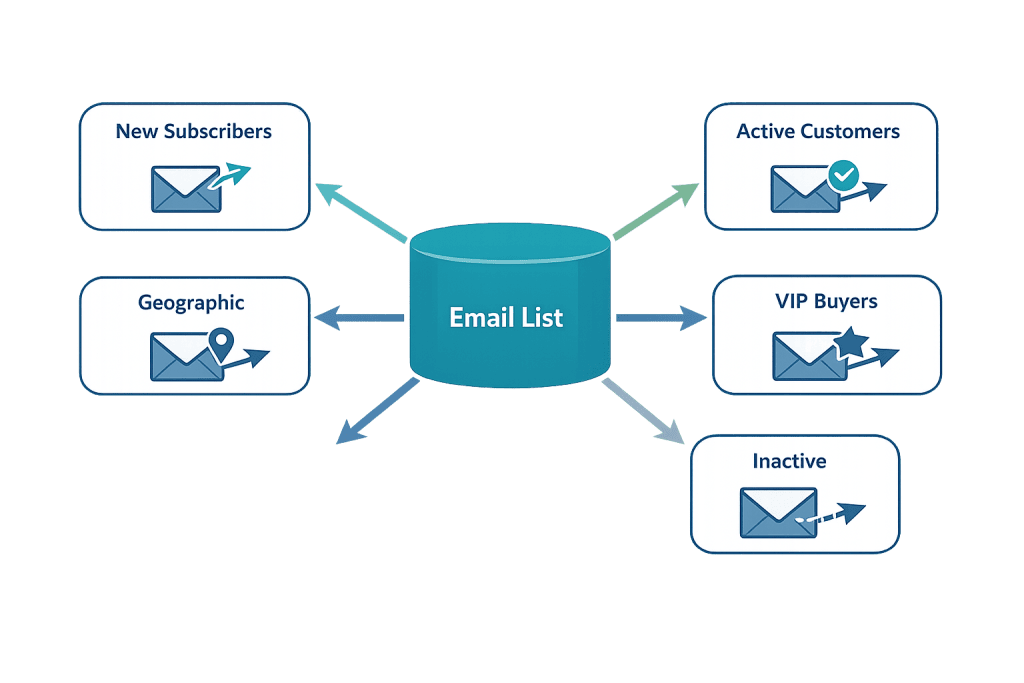
[Image: Email list divided into labeled segments — new subscribers, active customers, VIP buyers, inactive, geographic — with arrows showing different emails going to each]
How Email Segmentation Works
Segmentation starts with data. Every subscriber interaction — how they joined your list, what they’ve opened, what they’ve clicked, what they’ve purchased — becomes a signal you can use to group them meaningfully.
Common segmentation criteria include:
- Demographic data — Age, job title, company size, industry
- Geographic data — Location or time zone (useful for send-time optimization)
- Behavioral data — Pages visited, links clicked, emails opened, purchase history
- Engagement level — Active (opened recently), dormant (haven’t opened in 90+ days), churned
- Customer lifecycle stage — New subscriber, first-time buyer, repeat customer, lapsed customer
- Interest or preference — Product category interest, content type preferences, self-reported interests via a preference center
- Source — How the subscriber joined (lead magnet, checkout, event sign-up)
Most email automation platforms support tagging and segmentation natively. As subscribers take actions, their tags update automatically — a subscriber who makes a purchase moves from “prospect” to “customer” without manual intervention.
Purpose & Benefits
1. Higher Engagement Across Every Metric
Relevance drives engagement. When subscribers receive emails that actually apply to their situation — rather than a generic blast — they open more, click more, and buy more. In our experience working with client email programs, even basic segmentation (separating active customers from new subscribers) produces immediate, measurable improvements in open rate and click-through rate.
2. Reduced Unsubscribes and Spam Complaints
Irrelevant email is the primary reason people unsubscribe. When someone who bought a product for the first time receives the same re-engagement campaign meant for dormant subscribers, it feels tone-deaf. Proper segmentation ensures each group only receives messages that make sense for them — keeping your list healthier and your sender reputation intact.
3. Smarter Revenue Attribution and Testing
Segmented campaigns make it easier to measure what’s actually working. When you send a promotional offer only to subscribers who’ve purchased from a specific category, you can attribute revenue directly to that segment and that offer — not average it across your whole list. This precision supports better business decisions and cleaner A/B testing. Conversion rate data becomes much more actionable when it’s tied to a clearly defined audience.
Examples
1. eCommerce Store Segmenting by Purchase History
An online apparel retailer segments customers into: first-time buyers, 2–3 time buyers, and VIP customers (5+ purchases). New buyers get a post-purchase onboarding sequence designed to drive a second purchase within 30 days. Repeat buyers receive new arrival alerts. VIPs get early access to sales and a loyalty offer. Each group’s email experience reflects their relationship with the brand — and each segment converts at a significantly higher rate than a single, undifferentiated campaign.
2. B2B Service Firm Segmenting by Lead Source and Stage
A professional services firm separates subscribers into three segments: people who downloaded an educational guide (early-stage leads), people who attended a webinar (warmer leads), and existing clients. Each segment receives a different email cadence and message type. Webinar attendees receive case studies and a soft offer; guide downloaders receive a longer nurture sequence. This keeps the message proportional to where each subscriber actually is in their decision process.
3. Service Business Re-Engaging Dormant Subscribers
A home services company identifies subscribers who haven’t opened an email in six months. Rather than continuing to send them the same weekly newsletter — and dragging down engagement metrics — they send a targeted three-email re-engagement campaign: “Are we still a good fit?” If the subscriber doesn’t engage with any of the three emails, they’re removed from the active email list to protect deliverability. This keeps the list healthy and metrics accurate.
Common Mistakes to Avoid
- Over-segmenting with too little data — Creating dozens of tiny segments without enough subscribers in each results in campaigns that are too small to be statistically meaningful. Start with broad, high-impact segments before getting granular.
- Building segments and never updating them — Subscribers change. Someone who was a new subscriber six months ago is no longer new. Make sure your segments are dynamic — updating automatically based on current behavior — rather than static snapshots.
- Treating all segments as permanent — A dormant segment should be re-engaged, not ignored indefinitely. Have a plan for each segment: what do you send them, and what happens if they don’t engage?
- Segmenting without personalizing the message — Segmentation tells you who to email; it doesn’t automatically personalize the message. Sending the same generic email to a smaller group isn’t true segmentation. The message itself should reflect what you know about that group.
Best Practices
1. Start with Lifecycle Stage Segmentation
If you’re new to segmentation, begin with the most impactful distinction: where someone is in their relationship with your business. New subscribers need orientation; active customers need retention and upsell messaging; lapsed customers need re-engagement. These three segments alone — when sent genuinely different content — will immediately improve your email marketing results.
2. Use Behavioral Triggers to Keep Segments Current
Static segments go stale. Set up your email platform so that tags and segment membership update automatically based on behavior: a subscriber who clicks a link about a specific product gets tagged with that interest; a subscriber who makes a purchase moves from “prospect” to “customer” immediately. This keeps your segmentation accurate without manual maintenance. Email automation makes this possible without any ongoing effort.
3. Align Content to Each Segment’s Specific Need
The goal of segmentation isn’t just to send fewer emails to some people — it’s to send more relevant ones to everyone. Before creating a segment, ask: what does this group specifically need to know, and what action do I want them to take? A segment of subscribers who abandoned a cart needs a different message than a segment who just made their third purchase. Map the content to the segment’s actual situation.
Frequently Asked Questions
What data do I need to start segmenting?
You don’t need much to begin. Even basic data — how someone joined your list, whether they’ve made a purchase, and when they last opened an email — is enough to create meaningful segments. Start with what your email platform already captures automatically, then layer in additional data points as your program matures.
How is email segmentation different from email personalization?
Segmentation divides your list into groups so you can send different campaigns to each group. Personalization customizes the content within a single email for each recipient — using their name, referencing their location, or showing products based on their history. The two work together: segmentation determines who gets what email; personalization makes each email feel individually relevant.
Does segmentation work for small lists?
Yes, but the approach should match your list size. If you have 500 subscribers, creating 20 segments means most segments will have fewer than 30 people — too small for meaningful data. Instead, focus on two or three high-impact segments (new vs. returning, customers vs. non-customers) and expand as your list grows.
How often should I review and update my segments?
Review your segments at minimum quarterly. Check whether segment definitions still match your current subscriber behavior, whether any segments have grown or shrunk significantly, and whether your messaging for each segment still aligns with what that group needs. Update the messaging — and the segment criteria — when they no longer reflect reality.
Related Glossary Terms
- Email List / Mailing List
- Email Marketing
- Email Automation
- Autoresponder
- Open Rate
- Conversion Rate
- Drip Campaign
How CyberOptik Can Help
Email segmentation is the kind of strategy that sounds simple but requires the right setup to execute well — the right platform configuration, the right tagging logic, and messaging that actually reflects each segment’s needs. Our team can help you build a segmentation strategy that makes your email program measurably more effective. Contact us to discuss your email strategy or learn about our marketing services.