
Email automation is the use of software to send targeted, pre-written emails to contacts automatically — triggered by specific actions they take, conditions they meet, or schedules you define — without requiring manual send decisions for each message. Rather than composing and sending emails one at a time, you configure the rules once and the system executes them continuously: welcoming new subscribers, following up after a purchase, nurturing leads through a sales process, or re-engaging contacts who have gone quiet.
Email remains one of the highest-ROI channels in digital marketing. Industry data consistently shows email generates approximately $36–42 for every dollar spent. What automation adds is scale and precision: the ability to send the right message to the right person at the right moment — personalized based on their behavior and attributes — at a volume no manual process could sustain. Automated emails generate roughly 320% more revenue than non-automated campaigns, reflecting the outsized impact of timing and relevance.
How Email Automation Works
Email automation platforms connect to your contact list and monitor for defined conditions. When a condition is met, the platform executes the corresponding action — typically sending an email, but also potentially updating a contact’s tags, moving them between lists, notifying your sales team, or triggering a sequence of follow-up messages.
Trigger types:
– Time-based — Send after a set interval: 1 day after signup, 7 days after purchase
– Event-based — Send when a specific action occurs: someone fills out a form, makes a purchase, or visits a specific page
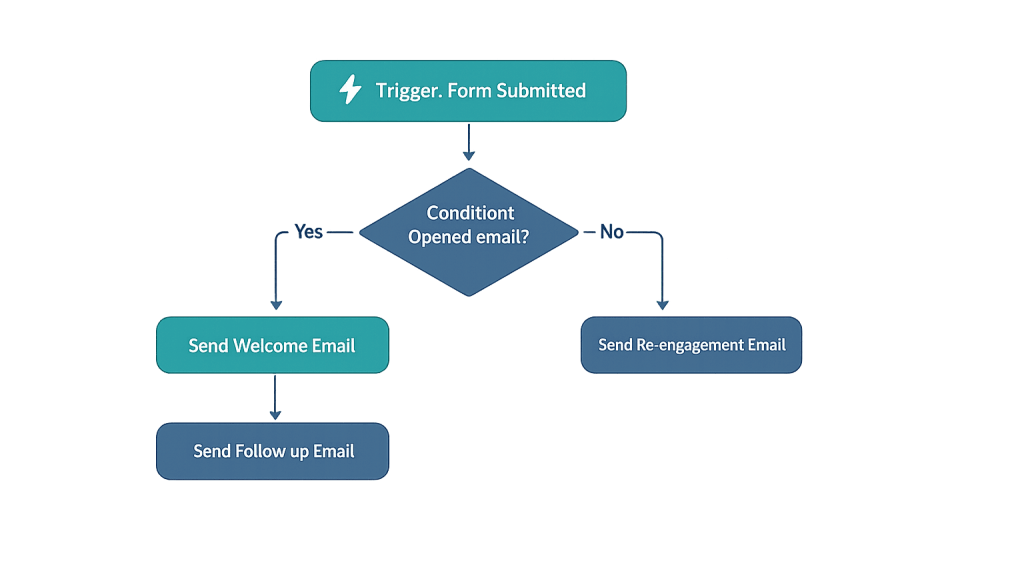
– Behavioral — Send based on engagement: a contact opens an email, clicks a link, or fails to open three emails in a row
– Date-based — Send on or near a specific date: a birthday, an anniversary, a subscription renewal date
– Property-based — Send when a contact attribute meets a condition: they’re tagged as a high-value lead, their location matches a segment
Common automation types:
– Welcome sequences — Onboarding new subscribers or customers
– Drip campaigns — Multi-step nurture sequences triggered by a single action
– Autoresponders — Immediate replies confirming an action (form submission, purchase)
– Abandoned cart emails — Recovery sequences for WooCommerce or other e-commerce stores
– Re-engagement campaigns — Targeting inactive contacts before removing them from your list
– Post-purchase sequences — Upsell, review requests, and loyalty-building after a transaction
[Image: Screenshot of a visual email automation workflow builder showing trigger → condition → email action → branching logic based on opens]
Purpose & Benefits
1. Scale Personalized Communication
Manual email marketing means choosing between volume and personalization — you can send the same message to everyone, or personalize carefully for small groups. Automation removes that trade-off. A well-configured system can send thousands of individualized emails daily, each timed and customized based on what the recipient has done and what they care about. Our marketing services include email automation strategy and setup.
2. Consistent Follow-Up Throughout the Funnel
Most leads don’t convert on first contact — they need multiple touchpoints over days or weeks before they’re ready to engage. Automation maintains that contact consistently, ensuring no lead falls through the cracks because someone forgot to follow up. An automated nurture sequence that runs for 30 days reaches every new contact the same way, regardless of how many you’re onboarding simultaneously. This supports a well-functioning conversion funnel.
3. Revenue from Triggered Behavioral Emails
Behavioral emails — sent in response to specific actions — consistently outperform scheduled campaigns. Welcome automations have open rates near 50%. Abandoned cart sequences recover 5–15% of lost transactions. Re-engagement campaigns win back roughly 14% of inactive subscribers. These aren’t marginal improvements — they’re high-value programs that run continuously with minimal ongoing effort once configured.
Examples
1. New Lead Nurture Sequence
A professional services firm generates leads through a free downloadable resource. When someone downloads the resource, automation triggers:
– Immediate: Confirmation email with download link
– Day 2: Follow-up email with a related case study
– Day 5: Educational email addressing a common challenge in their industry
– Day 10: Invitation to schedule a consultation, with social proof
Each message advances the relationship without requiring manual intervention. Contacts who click “Schedule” are tagged as high-priority and transferred to direct sales follow-up.
2. WooCommerce Post-Purchase Sequence
A product-based business configures automation to activate after a first purchase:
– Immediately: Order confirmation (transactional autoresponder)
– Day 3: Shipping update and product care tips
– Day 10: Request for a review with a direct link
– Day 30: “Are you ready for more?” email with related product recommendations
This sequence builds loyalty, generates social proof through reviews, and drives repeat purchases — all automatically.
3. Re-Engagement Campaign for Inactive Contacts
Contacts who haven’t opened an email in 90 days enter a re-engagement automation. Three emails are sent over two weeks:
1. “We miss you” email with a compelling subject line and high-value content
2. “Is this still useful to you?” with a direct yes/no CTA
3. “We’ll remove you from our list unless you’d like to stay” — final confirmation request
Contacts who click stay engaged; those who don’t are removed or suppressed, improving list health and deliverability for active subscribers.
Common Mistakes to Avoid
- Over-automating without personalization — Automation that feels mechanical — the same timing, the same message structure, obvious template language — erodes trust. Personalization beyond first name (referencing specific actions, relevant content, appropriate timing) dramatically improves results.
- Building sequences without testing — Sending untested automations to your full list at scale means errors in timing, broken links, or unintended logic reach every contact before you catch them. Test sequences thoroughly with a seed list before activating.
- Neglecting list hygiene — Automated sequences that send repeatedly to unengaged or invalid addresses hurt deliverability for your entire program. Build in regular cleaning: suppress hard bounces immediately, and remove or suppress contacts with prolonged inactivity.
- No exit conditions or suppression logic — An automation that doesn’t stop when a contact converts — continuing to send nurture emails after someone has already become a customer — is dissonant and signals poor management. Every sequence needs clear exit and suppression rules.
Best Practices
1. Start with High-Impact, Low-Complexity Automations
The welcome sequence, the abandoned cart recovery, and the post-purchase follow-up are the three highest-ROI automations for most businesses — and they’re not technically complex. Build and optimize these before investing in more sophisticated branching sequences. A well-executed welcome series alone can meaningfully lift overall list engagement.
2. Use Behavioral Triggers Over Time-Based Schedules Wherever Possible
Emails sent in response to something a contact just did perform dramatically better than emails sent on a generic schedule. A follow-up sent one hour after someone downloads your guide is far more timely than the same email sent seven days later simply because it’s “day seven” in a sequence. When your platform supports behavioral triggers, prioritize them.
3. Monitor Deliverability Alongside Engagement Metrics
High open rates mean nothing if your emails are landing in spam folders. Monitor your sender reputation, spam complaint rates, and inbox placement regularly — especially for automations that send at high volume. Maintain DKIM and DMARC authentication, keep your list clean, and avoid practices that trigger spam filters. Deliverability is the foundation everything else rests on.
Frequently Asked Questions
What’s the difference between email automation and email marketing?
Email marketing is the broader practice of using email to communicate with your audience. Email automation is a subset — the specific capability to send emails automatically based on triggers and conditions, rather than manually scheduling sends. You can do email marketing without automation; automation makes it scale and become more precisely timed.
What platforms support email automation?
Most modern email marketing platforms include automation capabilities: Klaviyo (especially strong for e-commerce), ActiveCampaign (strong for B2B and complex logic), HubSpot (integrated with CRM), Mailchimp (good for simpler automations), and Drip (e-commerce focused). The right platform depends on your business model, list size, and the complexity of sequences you need.
Is email automation the same as a drip campaign?
Not exactly. A drip campaign is a specific type of email automation — a pre-written sequence sent on a schedule or triggered by a single event. Email automation is the broader capability that encompasses drip campaigns plus other automation types: transactional emails, behavioral responses, date-triggered sends, and conditional logic sequences.
How long does it take to set up email automation?
A basic welcome sequence or autoresponder can be configured in a few hours. A full multi-stage nurture sequence with branching logic, behavioral triggers, and personalization might take days or weeks to plan, write, and test properly. The planning and copywriting take longer than the technical setup for most businesses.
Can email automation work for service businesses (not just e-commerce)?
Absolutely. Service businesses benefit enormously from automation: lead nurture sequences that follow up consistently after an inquiry, proposal follow-up reminders, onboarding sequences for new clients, re-engagement for past clients, and educational sequences that demonstrate expertise over time. The conversion trigger is different from e-commerce — a booked consultation instead of a purchase — but the underlying logic is identical.
Related Glossary Terms
- Autoresponder
- Drip Campaign
- Conversion Funnel
- DKIM (DomainKeys Identified Mail)
- DMARC
- Click-Through Rate (CTR)
- Conversion Rate
How CyberOptik Can Help
Email remains one of the highest-ROI channels in digital marketing, and getting automation right is key to making it work at scale. Our team can help you build automation sequences that reach the right people with the right message — from mapping your customer journey to writing the copy to configuring the platform logic. Contact us to discuss your email strategy or learn about our marketing services.


