
MySQL is an open-source relational database management system (RDBMS) that WordPress uses to store and retrieve all of its data. Every post, page, comment, user account, plugin setting, and site configuration lives in a MySQL database. When someone visits your WordPress site, PHP queries that database dozens of times to assemble the page — pulling post content, navigation menus, widget settings, and more — all within milliseconds.
MySQL uses Structured Query Language (SQL) to interact with data organized in tables with rows and columns, similar to a spreadsheet. WordPress ships with 12 core database tables out of the box, each with a specific purpose. Plugins and themes can add additional tables as needed. Most WordPress site owners will never write SQL directly — WordPress handles database operations through its built-in APIs — but understanding that MySQL is the engine behind your content helps explain why database performance matters so much to site speed.
[Image: Diagram showing WordPress PHP layer querying MySQL database tables (wp_posts, wp_options, wp_users) and returning data to the browser]
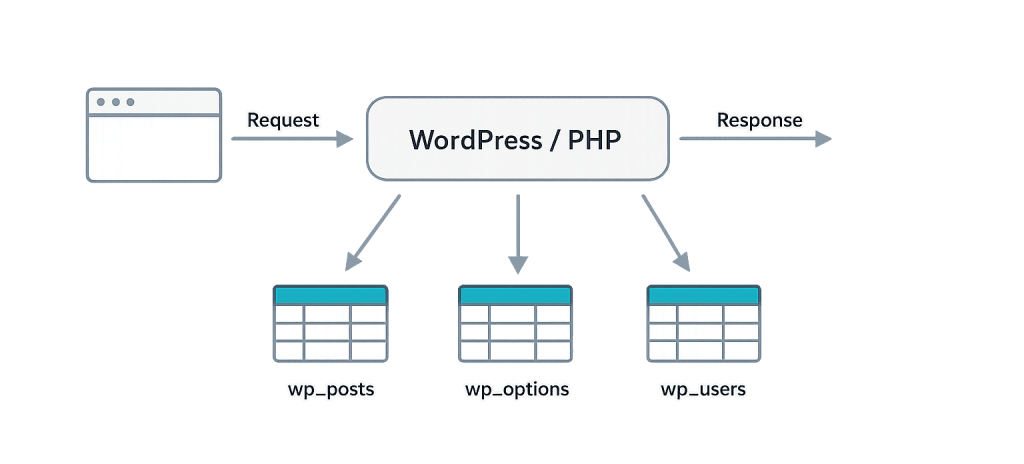
How WordPress Uses MySQL
WordPress stores different types of data in dedicated tables:
wp_posts— All posts, pages, custom post types, and revisionswp_postmeta— Custom fields and metadata associated with posts (featured images, SEO data, custom field values)wp_users— Registered user accountswp_options— Site settings, plugin configuration, theme options, widget settingswp_commentsandwp_commentmeta— User comments and related metadatawp_terms,wp_taxonomy,wp_term_relationships— Categories, tags, and custom taxonomies
Every page load sends multiple queries to the database. A simple WordPress page might execute 30–50 database queries. A complex page with multiple custom post type loops, large numbers of active plugins, and dynamic content can easily exceed 100 queries — which is why database optimization and object caching are critical for high-traffic sites.
WordPress also has a closely related alternative: MariaDB. MariaDB is a community-developed fork of MySQL that is fully compatible with WordPress and is the default database on many modern hosting platforms.
Purpose & Benefits
1. Reliable, Structured Data Storage
MySQL’s relational structure ensures data is stored consistently and can be queried with precision. WordPress can reliably retrieve “the three most recent posts in the Announcements category authored by User X” because the data is organized with clear relationships between tables. This structure is what makes WordPress’s content management capabilities possible at any scale.
2. Enables Dynamic Content
Without MySQL, WordPress would be a static file system. Every time a visitor loads a page, WordPress queries the database to get the current version of the content — meaning an update you publish is immediately live. Comments, search results, user dashboards, WooCommerce orders — all of these require real-time database reads and writes that MySQL handles efficiently.
3. Foundation for Performance Optimization
Because MySQL handles every dynamic request, its performance directly determines your site’s speed. Understanding that WordPress is database-driven explains why tools like object caching (storing query results in memory to avoid repeating the same queries) and database optimization (removing bloat from post revisions, transients, and autoloaded options) produce measurable speed improvements. These hosting and infrastructure optimizations target MySQL efficiency directly.
Examples
1. Publishing a New Blog Post
When you click “Publish” in the WordPress editor, WordPress inserts a new row into the wp_posts table with the post’s title, content, status, author ID, and publication date. Associated metadata (featured image ID, SEO title, custom fields) gets inserted into wp_postmeta. When a visitor loads that post, WordPress queries both tables to assemble the full page.
2. Plugin Storing Settings
When you configure a caching plugin, it saves its settings (cache duration, exclusion rules, etc.) as a serialized array in the wp_options table. Every time WordPress loads, it reads the wp_options table to know how to behave. Plugins that store excessive data in wp_options — or that autoload large datasets on every page — can slow down site performance regardless of how well the rest of the site is optimized.
3. Database Bloat from Revisions
A site has been running for five years. Every time an editor updated a post, WordPress saved a revision in wp_posts. Over five years, 200 posts have accumulated 3,000 revision rows. A query that retrieves posts now has to scan a much larger table. Cleaning up old revisions — either via phpMyAdmin or a plugin — reduces table size and speeds up queries.
Common Mistakes to Avoid
- Editing the database directly without a backup — Direct MySQL edits via phpMyAdmin are powerful and irreversible. A wrong query can corrupt your data. Always back up the database before making any direct edits.
- Ignoring database maintenance — Post revisions, spam comments, transients, and orphaned metadata accumulate over time. Most WordPress sites benefit from periodic database cleanup. Plugins like WP-Optimize or WP-Sweep automate this.
- Choosing a host with slow MySQL servers — Not all shared hosting environments give WordPress adequate database performance. On oversold shared servers, slow MySQL response times add 200–500ms to every page load regardless of other optimizations.
- Not using object caching on high-traffic sites — Sites running without object caching repeat the same database queries on every page load. Installing Redis or Memcached eliminates redundant queries and is one of the most impactful performance improvements available for WordPress.
Best Practices
1. Use Object Caching to Reduce Database Load
Object caching with Redis or Memcached stores the results of database queries in server memory. When the same query runs again, WordPress retrieves the cached result instead of hitting the database. For sites with significant traffic or complex queries, this can reduce page load times dramatically. Many managed WordPress hosts include object caching as part of their hosting stack.
2. Keep Your Database Clean
Schedule periodic database optimization to remove accumulated clutter: post revisions (limit to 3–5 per post), auto-draft posts, trashed items, spam comments, and expired transients. Most optimization plugins handle this automatically on a schedule. A leaner database runs faster queries and is smaller to back up.
3. Back Up Your Database Regularly
Your MySQL database contains everything that can’t be replaced: your content, your user accounts, your settings. Files can be restored from backups or re-uploaded, but a corrupt database with no backup means losing all your content. Automated daily backups stored off-server (not just on your web host) are a non-negotiable baseline for any business website.
Frequently Asked Questions
Do I need to know SQL to run a WordPress site?
No. WordPress handles database operations through its own APIs, and most tasks — creating content, managing users, configuring plugins — are done through the admin dashboard. You’d only need SQL knowledge for advanced tasks like bulk data manipulation, custom queries, or troubleshooting specific database issues — situations where a developer’s help is appropriate.
What’s the difference between MySQL and phpMyAdmin?
MySQL is the database system — the engine that stores and retrieves data. phpMyAdmin is a web-based graphical interface that lets you browse, edit, and query your MySQL database without writing raw SQL commands. Most hosting control panels include phpMyAdmin for direct database access when needed.
What’s the difference between MySQL and MariaDB?
MariaDB is a fork of MySQL, created by MySQL’s original developers after Oracle acquired MySQL. MariaDB is fully compatible with WordPress and offers some performance and feature improvements. Many hosting providers now use MariaDB by default. For WordPress purposes, they’re interchangeable.
Can my WordPress site use a different database?
WordPress is architected around MySQL/MariaDB. There are experimental projects for PostgreSQL support, but they’re not production-ready for most use cases. Effectively, MySQL or MariaDB is the database for WordPress.
How do I know if my database is causing slow page loads?
Tools like Query Monitor (a WordPress plugin) show you exactly how many database queries each page is running, which queries are slowest, and which plugin is responsible for each query. If you’re seeing 100+ queries per page or individual queries taking over 100ms, database optimization or caching is likely a meaningful opportunity.
Related Glossary Terms
How CyberOptik Can Help
Site performance directly impacts your search rankings and user experience. We offer managed WordPress hosting and speed optimization services — including database optimization, object caching configuration, and query profiling — to keep your site fast and reliable. Learn about our hosting solutions or contact us to discuss your site’s performance.


