
A WordPress block theme is a type of WordPress theme built entirely on the block editor architecture, enabling Full Site Editing (FSE) — the ability to visually edit every part of a website, including headers, footers, sidebars, and templates, directly inside the WordPress editor. Unlike classic themes, which relied on PHP template files and the Customizer, block themes use HTML template files, a configuration file called theme.json, and reusable block patterns to define both layout and design.
Block theme support was introduced with WordPress 5.9 in early 2022, and the approach has been steadily maturing since. Every default WordPress theme since Twenty Twenty-Two has been a block theme. A 2025 poll by WP Engine found that 68% of WordPress professionals now prefer native FSE themes over traditional themes or page builder solutions — a sign that block themes have moved from early adopter territory into mainstream practice.
[Image: WordPress Site Editor showing a block theme with header, content area, and footer all editable as blocks]
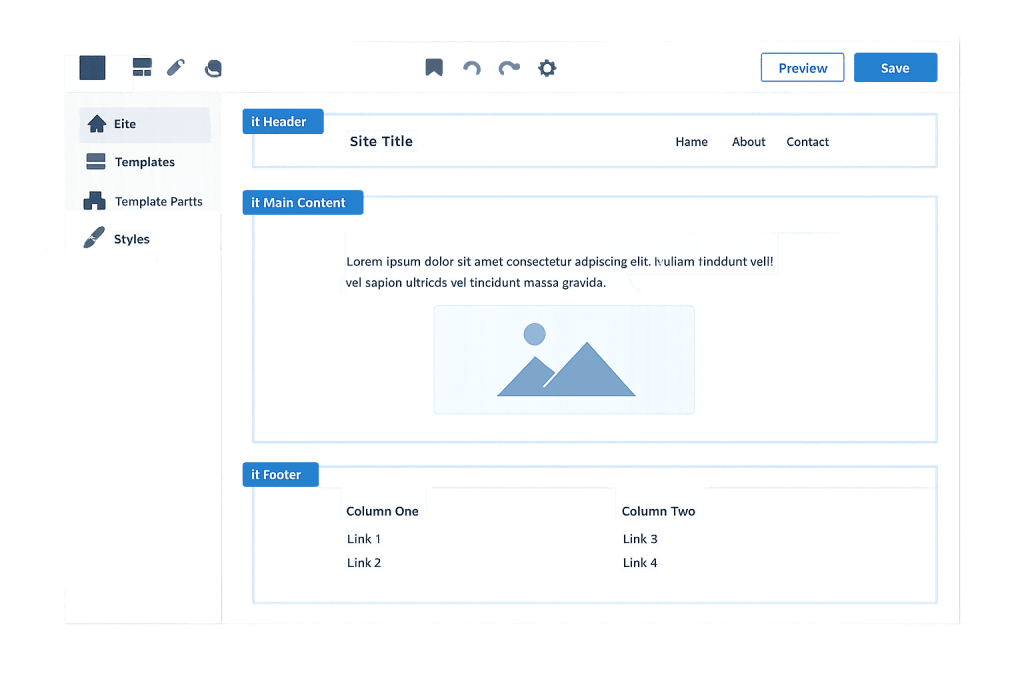
How Block Themes Work
The architecture of a block theme differs fundamentally from classic themes:
theme.json— A central configuration file that defines global design settings: color palettes, typography, spacing, and layout constraints. It replaces the scatteredadd_theme_support()calls infunctions.phpthat classic themes relied on.- HTML template files — Instead of PHP files like
header.phporsingle.php, block themes store templates as HTML files containing block markup. These live in thetemplates/andparts/directories. - Template parts — Reusable sections like headers and footers are stored as separate files in
parts/and can be edited visually inside the Site Editor. - Block patterns — Pre-designed layout sections made of grouped blocks, available in the block inserter. Block themes typically ship with a library of patterns to help users build pages quickly.
- Global Styles — A visual panel in the Site Editor where non-technical users can change colors, fonts, and spacing globally across the entire site without editing any files.
The minimum viable block theme requires only three items: a style.css metadata file, a theme.json configuration file, and a templates/index.html fallback template. From there, developers layer in additional templates and parts as needed.
Purpose & Benefits
1. Visual Control Without a Page Builder
Block themes give site owners and designers direct control over every part of the site — headers, footers, archive pages, single post layouts, 404 pages — all from within WordPress itself. No third-party page builder required. This reduces plugin dependencies and keeps the site leaner, which is a real performance advantage that our web design services leverage when building modern sites.
2. Consistent Design Through Global Styles
The Global Styles system in theme.json means design changes — switching a brand color, updating a font, adjusting spacing — propagate across the entire site instantly. There’s no hunting through CSS files or page-builder settings panels. This consistency makes ongoing design maintenance significantly easier, especially for non-technical site owners.
3. Future-Proof Foundation
Block themes are WordPress’s stated direction for theme development. The Gutenberg project roadmap has been pointing toward full site editing as the long-term standard since 2018. Sites built on block themes today are aligned with where the platform is heading — meaning less technical debt, better compatibility with future WordPress core updates, and access to new block features as they’re released. Our WordPress development services increasingly use block themes as the starting point for new builds.
Examples
1. Business Website Built on a Block Theme
A professional services firm launches its website using a block theme. The designer uses the Site Editor to build a custom homepage template — a hero section using a Cover block, a three-column services grid using Group and Columns blocks, and a testimonials section using a custom block pattern. The header and footer are edited as template parts. No PHP is touched; the entire layout is managed visually.
2. Switching Brand Colors Across a Site
A company rebrands and needs to update its primary color across 50+ pages. With a block theme, a developer updates a single color value in theme.json. That change cascades automatically to every button, heading, and accent element across the site in seconds — something that would require manual page-by-page edits in many page builder setups.
3. Custom Archive Template for a Blog
A publishing site wants its category archive pages to display a magazine-style grid layout rather than the default list. In a block theme, the developer creates a new templates/archive.html file using block markup, defines the layout visually in the Site Editor, and saves it as the archive template. No custom PHP required; the template is portable and editable by non-developers after the fact.
Common Mistakes to Avoid
- Confusing “block-ready” with “block theme” — A theme that supports blocks for post and page content is not necessarily a block theme. A true block theme enables the Site Editor and supports Full Site Editing across all areas of the site.
- Editing template files directly and bypassing the Site Editor — Changes made directly in template HTML files may conflict with modifications saved through the Site Editor. When using a block theme, treat the Site Editor as the source of truth for template-level design decisions.
- Skipping
theme.jsonand hardcoding styles in CSS — Writing custom CSS to override block styles instead of usingtheme.jsoncreates specificity conflicts and makes the theme harder to maintain. Establish design tokens intheme.jsonfirst, then use CSS only for what can’t be handled there. - Assuming all plugins are FSE-compatible — Some plugins that hook into classic theme templates or the Customizer don’t work correctly with block themes. Test plugin compatibility before committing to a block theme for a complex build.
Best Practices
1. Use theme.json for Design Tokens First
Before writing any CSS, define your color palette, type scale, spacing, and layout settings in theme.json. This ensures the block editor reflects your design decisions in real time and gives non-technical users accurate style options to work with. CSS should handle edge cases and components not covered by the JSON configuration.
2. Build Template Parts for Repeatable Sections
Any section that appears on multiple pages — navigation, headers, footers, call-to-action strips — should be a template part. This makes global updates simple: edit the part once and the change applies everywhere it’s used. Block patterns serve a similar role for layout sections that appear frequently but don’t need to stay in sync across the site.
3. Test With Real Content Before Going Live
Block themes rely on the block editor’s rendering engine, which means visual output depends on how blocks are structured. Test your templates with real, varied content — short titles, long titles, posts with and without featured images — to catch layout issues that only surface with actual data. A staging site is the right environment for this.
Frequently Asked Questions
Do block themes replace classic themes?
Block themes are the future direction of WordPress theme development, but classic themes haven’t been deprecated. Both work in current WordPress versions. New projects increasingly start with block themes because of the Site Editor’s capabilities, but classic themes remain fully supported for existing sites.
Can I use a block theme with WooCommerce?
Yes. WooCommerce has introduced block-based templates for cart, checkout, and product pages that integrate with the Site Editor. As of WooCommerce 8.3 and later, block templates are the default for new store installations. Some older WooCommerce extensions may have compatibility limitations, so testing is advisable for complex stores.
Is Full Site Editing the same thing as a block theme?
Full Site Editing is the capability — the ability to edit all parts of a site visually. A block theme is what enables that capability. You need a block theme installed for Full Site Editing to work. Not all WordPress themes support FSE; only themes built to the block theme standard do.
Are block themes harder to develop than classic themes?
The learning curve is different rather than steeper. Developers already familiar with the block editor will adapt quickly. The main shift is from PHP-based templates to HTML block markup and theme.json configuration. For non-developers, block themes are often easier to manage day-to-day because of the visual Site Editor.
What happened to the WordPress Customizer with block themes?
The Customizer is not available in block themes. Its functions — changing site title, logo, colors, menus — are handled through the Site Editor and Global Styles panel. Some classic-theme-only plugins may lose functionality when you switch to a block theme if they depended on the Customizer.
Related Glossary Terms
- Full Site Editing (FSE)
- WordPress Theme
- Block Editor (Gutenberg)
- Template Part
- Block Pattern
- WordPress
- Child Theme
- WooCommerce Template
How CyberOptik Can Help
Block themes represent a meaningful shift in how WordPress sites are built and managed — and staying current with that shift matters for the long-term health of your site. As a WordPress-focused agency, we build with block themes on new projects and help existing sites evaluate whether a migration makes sense. Whether you need a custom block theme built from scratch or guidance on web design for a modern WordPress site, our team can help. Get in touch to discuss your project or explore our WordPress development services.


