
A wireframe is a low-fidelity visual blueprint of a web page or digital interface that maps out the structure, layout, and placement of key elements — before any colors, typography, imagery, or final design are applied. Think of it as the architectural plan for a website: it shows what goes where and how users will move through the page, without the distraction of aesthetics.
Wireframes are one of the most practical tools in the web design process. They help everyone involved — designers, developers, business owners, and stakeholders — agree on how a page should function before any significant development work begins. Catching a navigation problem or missing call-to-action at the wireframe stage takes minutes to fix. Catching it after the site is built can take days.
Types of Wireframes
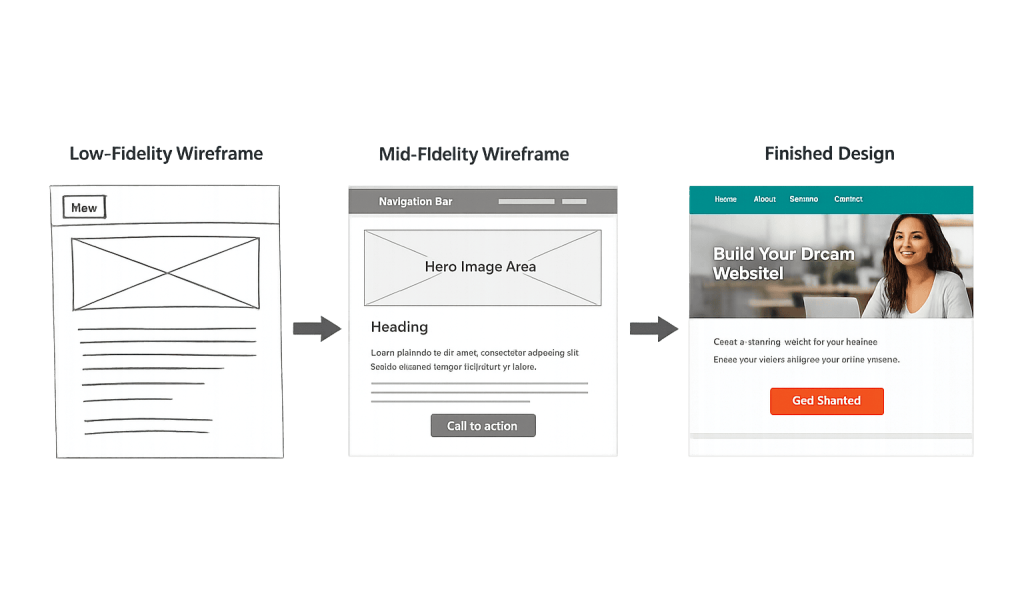
Wireframes exist on a spectrum of detail and fidelity:
- Low-fidelity wireframes — Rough sketches (sometimes literally on paper) that outline basic page regions and content blocks. Fast to create, easy to revise, useful for early brainstorming and stakeholder alignment.
- Mid-fidelity wireframes — More structured digital wireframes with accurate proportions, real navigation labels, and placeholder text. These communicate layout decisions clearly without spending time on visual design.
- High-fidelity wireframes — Detailed, annotated wireframes close to the final design in structure. They may include real copy, interaction notes (what happens when a button is clicked), and specific spacing guidelines for developers.
Tools commonly used to create wireframes include Figma, Adobe XD, Balsamiq, and Sketch. For simpler projects, even a whiteboard sketch serves the same purpose.
[Image: Side-by-side comparison of a low-fidelity wireframe sketch, a mid-fidelity digital wireframe, and the finished web page design]
Purpose & Benefits
1. Aligns Everyone Before Development Starts
Wireframes create a shared visual reference that bridges the gap between a client’s description of what they want and what a designer or developer actually builds. When everyone reviews and approves a wireframe first, the web design process moves faster with fewer surprises. Misaligned expectations are far cheaper to resolve at this stage than after code has been written.
2. Surfaces Usability Issues Early
A wireframe makes it easy to spot problems with user flow — is the primary call-to-action visible above the fold? Does the navigation structure make sense? Are there too many competing elements on a page? These are layout and UX questions best answered before any design decisions lock them in. Identifying issues early reduces rework later and protects both budget and timeline.
3. Focuses the Conversation on Function, Not Aesthetics
One of the most practical benefits of wireframing is that it removes the distraction of visual design. When a stakeholder reviews a wireframe, they’re forced to focus on whether the content hierarchy is right, whether the user journey makes sense, and whether all the necessary elements are present — not whether they like the color scheme. That conversation happens at the right time.
Examples
1. Wireframing a Service Page
A professional services firm needs a new “Services” page. Before any design work, the team creates a wireframe mapping out the hero section with a headline and inquiry form, followed by individual service blocks with titles and short descriptions, then a testimonial row, and finally a contact CTA. The client reviews the wireframe, requests moving the inquiry form to the bottom, and the change takes five minutes to implement — rather than redesigning a completed page.
2. Wireframing an eCommerce Product Page
A WooCommerce store planning a redesign wireframes the product page layout first: product images on the left, price and add-to-cart button on the right, product description below, and related products at the bottom. Testing this wireframe with a few real users reveals they want to see shipping information before the description — a small structural change that improves the purchase experience before a single line of CSS is written.
3. Wireframing a Mobile Navigation Flow
A business with a content-heavy website uses wireframes specifically to map out the mobile navigation experience. On mobile, the full desktop menu collapses to a hamburger menu. The wireframe shows how the dropdown categories will expand, what gets prioritized in the condensed menu, and how a user reaches a deep service page from the homepage in three taps or fewer. Responsive design decisions like these benefit enormously from wireframe planning.
Common Mistakes to Avoid
- Skipping wireframes on “simple” projects — Even a five-page website benefits from a quick wireframe review. The pages that seem simple often have the most assumptions baked in. A 30-minute wireframe review prevents days of revision cycles after launch.
- Getting too detailed too early — High-fidelity wireframes before the basic structure is agreed upon waste time. Start low-fidelity, confirm direction, then add detail. Jumping straight to polished designs without alignment is a common source of project friction.
- Treating wireframes as final — A wireframe is a thinking tool, not a finished product. Expect them to change. Teams that treat early wireframe approvals as locked-in specs often end up in difficult conversations when real content or user testing reveals the need for layout changes.
- Ignoring mobile wireframes — Wireframing only the desktop view and treating mobile as an afterthought leads to poor responsive design. Mobile should be wireframed in parallel — or first — especially for content-heavy pages.
Best Practices
1. Start with User Goals, Not Page Layouts
Before drawing anything, identify what a visitor needs to accomplish on each page and what action you want them to take. The wireframe should be a direct answer to those needs. A page that starts from user goals will have a clearer hierarchy and more purposeful layout than one that starts by filling in sections.
2. Annotate Wireframes with Interaction Notes
Even simple wireframes become significantly more useful when you add notes explaining behavior: “This button opens a modal form,” “This section loads dynamically,” or “On mobile, this two-column layout stacks vertically.” Annotations remove ambiguity for developers and create a more accurate shared understanding of what’s being built. This is especially important when working with a WordPress development team.
3. Review Wireframes with Real Stakeholders Before Moving Forward
A wireframe that only the designer reviews isn’t doing its full job. Walk the business owner or client through key pages — especially the homepage, primary service or product pages, and contact page — before any design work begins. Their feedback at this stage is inexpensive to act on and prevents costly revisions later.
Frequently Asked Questions
What is the difference between a wireframe and a mockup?
A wireframe focuses on structure and layout — it’s a blueprint. A mockup is a high-fidelity visual representation that includes actual design elements: colors, fonts, images, and branding. Wireframes come first; mockups show what the finished design will look like. After mockup approval, development begins.
Do I need wireframes for a small website?
For a brochure site with a few standard pages, you can often move quickly. But even a simple homepage benefits from mapping out the sections before design starts. The more decisions that need stakeholder input — navigation structure, content priority, CTA placement — the more value a wireframe provides. It doesn’t need to be elaborate.
How long does wireframing take?
It depends on the scope of the project. A simple informational site might need a half-day of wireframe work. A complex eCommerce store or content platform could require a week or more, covering dozens of page types, user flows, and interaction states. In either case, the time spent wireframing is recouped many times over in reduced revision cycles during design and development.
Are wireframes shown to clients?
Yes — in most professional web design processes, wireframes are a key deliverable shared with the client for review and approval. They’re presented with context: “Here’s the layout we’re proposing for your homepage — this is about structure, not colors yet.” Getting client sign-off on wireframes before moving to visual design prevents late-stage structural changes.
What tools do designers use to create wireframes?
Figma is the most widely used professional wireframing tool, followed by Adobe XD, Sketch, and Balsamiq (which is purpose-built for wireframes with its low-fidelity sketch aesthetic). For quick ideation, pen and paper or a whiteboard works well. The tool matters less than the clarity of the output.
Related Glossary Terms
- User Experience (UX)
- User Interface (UI)
- Responsive Design
- Call to Action (CTA)
- Whitespace
- Usability
- Above the Fold
How CyberOptik Can Help
Great design starts with a clear plan. Our design process includes wireframing for every project we take on — it’s how we ensure the layout decisions we make are grounded in your goals and your users’ needs before any visual design work begins. Whether you’re starting from scratch or redesigning an existing site, we build the structure first so the design has something solid to stand on. See our web design services or contact us to start a project.


