
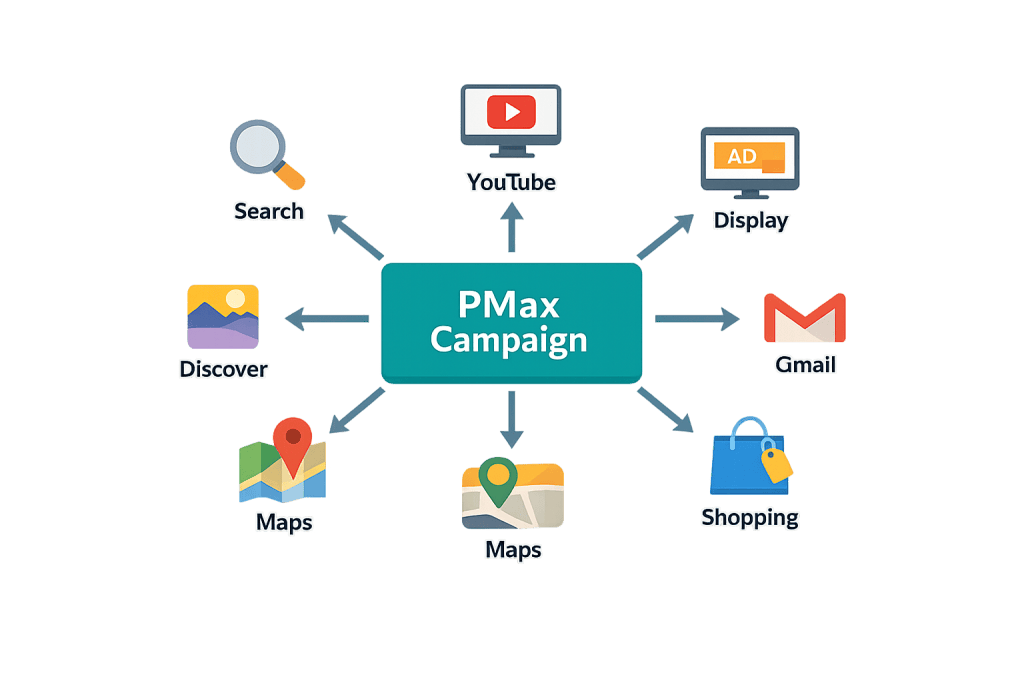
Performance Max (PMax) is a goal-based Google Ads campaign type that gives advertisers access to all of Google’s advertising inventory — Search, Display, YouTube, Gmail, Discover, Maps, and Shopping — from a single campaign. Rather than running separate campaigns for each channel and managing bids manually, PMax uses Google’s AI to automatically allocate budget, select placements, set bids in real time, and assemble ads from the creative assets you provide.
Launched broadly in 2021, Performance Max represents Google’s most automated campaign format and is now the default recommendation for most conversion-focused advertisers. It’s designed to complement keyword-based Search campaigns by finding additional converting customers across all Google channels that traditional campaign types might miss. Advertisers using PMax see an average 18% increase in total conversions at a similar cost per action, according to Google’s published benchmarks.
How Performance Max Works
PMax operates on a combination of your inputs and Google’s machine learning:
What you provide:
– Asset groups — Collections of text headlines, descriptions, images, logos, and videos that Google assembles into ads
– Audience signals — Data about your likely customers (customer lists, website visitors, custom intent segments) to guide the AI
– Conversion goals — The actions you want to optimize for (purchases, form submissions, calls)
– Budget and bidding strategy — Maximize conversions or maximize conversion value, with optional target CPA or target ROAS
What Google’s AI does:
– Tests combinations of your assets to find top performers
– Decides which channels, placements, and audiences to prioritize
– Sets bids in real time at each auction based on conversion probability
– Reallocates budget across channels as performance data accumulates
Unlike traditional Search campaigns where you choose keywords, PMax uses audience signals and search themes to determine when to show your ads.
[Image: Diagram showing PMax campaign feeding into all Google channels: Search, YouTube, Display, Gmail, Discover, Maps, Shopping]
Purpose & Benefits
1. Unified Access to All Google Inventory
Instead of managing separate Search, Display, YouTube, and Shopping campaigns — each with its own budget, bids, and creative — PMax consolidates everything into one campaign. This simplifies campaign management and ensures budget flows to the channels generating the best results, rather than being siloed within individual campaign types. This is one reason our digital marketing team recommends PMax for clients with broad conversion goals.
2. AI-Driven Optimization Across the Full Funnel
PMax campaigns reach customers at every stage — from awareness (YouTube, Display) to consideration (Search, Discover) to conversion (Shopping, Search with high intent). Google’s AI optimizes across this entire funnel simultaneously, using conversion data to refine targeting. For advertisers with solid conversion tracking in place, PMax can surface demand that individual campaigns never reached.
3. Reduces Manual Management Overhead
For businesses that don’t have a dedicated Google Ads manager with time to optimize multiple campaigns daily, PMax’s automation handles a significant portion of the optimization work. Smart bidding strategies like Target ROAS and Target CPA work continuously across all channels — adjusting bids in real time based on signals no human could process at that scale. This pairs well with strong bid strategy planning.
Examples
1. eCommerce Retailer Replacing Multiple Campaigns
An online clothing retailer previously ran a Shopping campaign, a remarketing Display campaign, and a Brand Search campaign separately. After consolidating into a single PMax campaign with asset groups organized by product category, they saw 22% more conversions at a similar total ad spend — because the AI could allocate budget dynamically between channels based on real-time performance data.
2. Local Service Business Generating Leads
A home services company sets up a PMax campaign with a goal of phone call and form submissions. They upload location assets, service description headlines, customer testimonial images, and a short video. Google runs ads across Search, Maps, YouTube pre-roll, and Gmail sponsored promotions — allocating most budget to the channels generating the most booked appointments.
3. B2B Company Testing PMax Alongside Search
A software company runs PMax alongside their existing keyword-based Search campaign. The PMax campaign captures conversions from YouTube and Display (where prospects encounter the brand early in their research) that the Search campaign can’t reach. Total pipeline from Google Ads increases without cannibalizing Search campaign performance.
Common Mistakes to Avoid
- Uploading minimal assets — PMax needs a rich mix of headlines, descriptions, images (multiple aspect ratios), and ideally video to perform across all channels. Campaigns with only 2–3 headlines and a single image have significantly less optimization surface for the AI to work with.
- Not providing audience signals — While optional, audience signals dramatically accelerate the AI’s learning. Without them, PMax starts optimizing with no directional guidance, which can lead to wasted spend during the learning phase.
- Setting a target CPA or ROAS too aggressively from day one — PMax needs conversion data to optimize effectively. Starting with Maximize Conversions bidding (no target) for the first 4–6 weeks lets the campaign collect data before adding CPA/ROAS constraints.
- Ignoring the campaign during the learning period — PMax has a learning phase of roughly 4–6 weeks. Making frequent budget or bidding changes during this window resets learning. Let the campaign stabilize before evaluating performance.
Best Practices
1. Organize Asset Groups by Theme or Audience
Each asset group should represent a coherent product, service, or audience segment — not a mix of everything. A home services company might have separate asset groups for “plumbing,” “electrical,” and “HVAC,” each with tailored headlines and images. This gives Google’s AI more relevant combinations to test for each audience context and makes performance analysis cleaner.
2. Provide Video Assets Even If Imperfect
YouTube placements are part of PMax, but if you don’t provide video assets, Google will auto-generate video from your images and text — often with poor results. Even a simple, professionally recorded short video (30–60 seconds) significantly improves PMax’s coverage. This is especially important given YouTube’s growing share of advertising inventory and the value of display advertising reach.
3. Maintain Keyword-Based Search Campaigns Alongside PMax
PMax is designed to complement, not replace, well-structured keyword Search campaigns. Your brand terms and highest-intent product/service keywords should still have dedicated Search campaigns with precise match types and bid strategies. PMax works best as an expansion layer — finding customers beyond what keyword targeting can reach.
Frequently Asked Questions
How is Performance Max different from Smart campaigns?
Smart campaigns are simplified, limited to Google Search and Maps, and require almost no configuration. Performance Max is more sophisticated — it runs across all Google channels, supports richer asset types including video, provides detailed asset group reporting, and is designed for advertisers who have conversion tracking set up and meaningful conversion volume. PMax gives much more control and insight than Smart campaigns.
Do I still need Google Shopping campaigns if I use PMax for eCommerce?
Google has largely replaced Standard Shopping campaigns with PMax for Shopping advertisers. PMax campaigns with a product feed cover Shopping placements along with all other Google channels. Most eCommerce advertisers running PMax no longer need separate Shopping campaigns, though some advanced advertisers maintain both for specific optimization reasons.
How much budget does Performance Max need to work?
PMax campaigns optimize better with more conversion data. Google recommends a budget that can support at least 50–100 conversions per month for effective learning. Campaigns with fewer conversions will optimize more slowly, but PMax can still perform at lower volumes — it just takes longer to exit the learning phase.
Can I target specific keywords with Performance Max?
Not directly in the traditional sense. PMax uses search themes (broad descriptions of what you’re advertising) rather than specific match-type keywords. For precise keyword targeting, use a standard Search campaign alongside PMax. PMax is not designed to replace tight keyword control — it’s designed to expand beyond it.
Is Performance Max right for every business?
PMax works best for businesses with clear conversion goals, working conversion tracking, and enough monthly budget to generate meaningful data. It’s particularly effective for eCommerce and lead generation. It can underperform for very niche B2B businesses with long sales cycles and limited conversion events, where manual bidding and keyword control in Search campaigns may outperform automation.
Related Glossary Terms
- Google Ads
- Bid Strategy
- Display Advertising
- Conversion Tracking
- PPC (Pay-Per-Click)
- Ad Group
- Attribution Model
How CyberOptik Can Help
Getting Performance Max right takes strategy, well-structured creative assets, and clear measurement — not just turning the campaign on. Our marketing team manages Google Ads campaigns for clients, including PMax strategy, asset creation, audience signal setup, and performance reporting. Whether you’re starting fresh or trying to improve results from existing PMax campaigns, we can help. Explore our marketing services or get in touch.


