
Minification is the process of removing unnecessary characters from code files — including whitespace, line breaks, comments, and redundant formatting — without changing how the code functions. The result is a smaller file that loads faster. Minification is commonly applied to CSS, JavaScript, and HTML files.
A JavaScript file a developer writes for readability might include descriptive variable names, spacing between blocks, and lines of comments explaining the logic. That same file, once minified, might shrink by 30–60% in size. A 1MB JavaScript library can become 300–400KB after minification. On a page with multiple scripts and stylesheets, those savings add up quickly — and faster-loading pages rank better and convert more visitors.
How Minification Works
Minification tools process your source code and strip everything that isn’t required for the browser to execute it correctly:
- Whitespace removal — All extra spaces, tabs, and blank lines are removed
- Comment removal — Developer comments (useful for reading code, invisible to users) are stripped
- Variable name shortening — Long variable names like
navigationMenuElementbecomeaorb - Redundant character removal — Duplicate CSS rules get merged; unnecessary semicolons and brackets are removed
The original “unminified” source file is preserved for development. The minified version — usually denoted with .min.css or .min.js in the filename — is what gets served to browsers.
On WordPress sites, minification is almost always handled automatically by performance and caching plugins rather than manually. Tools like WP Rocket, LiteSpeed Cache, and W3 Total Cache include built-in minification options that process your files on the fly or generate minified versions during setup.
[Image: Side-by-side code comparison showing readable CSS vs. minified CSS output]
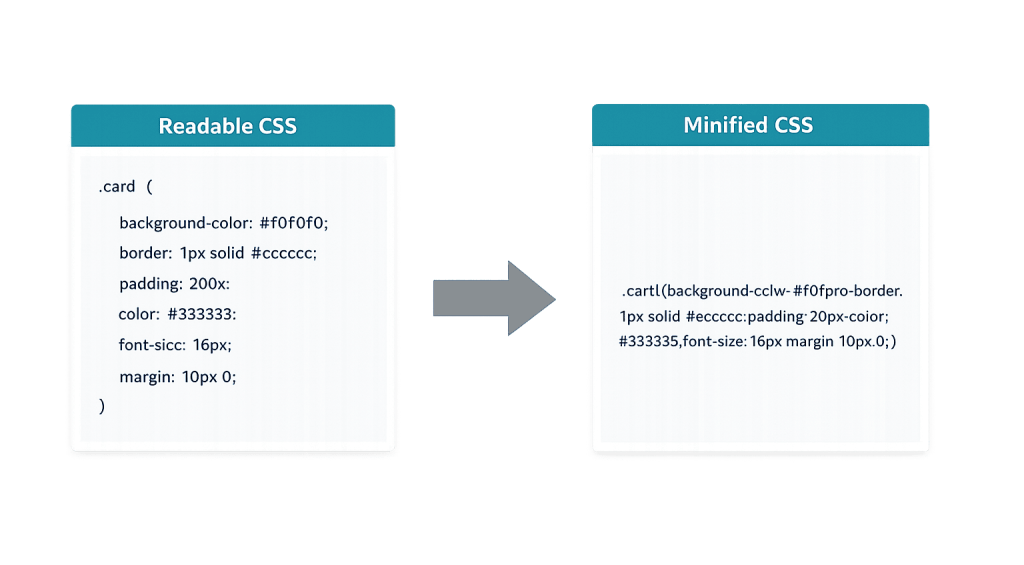
Purpose & Benefits
1. Faster Page Load Times
Smaller files download faster. When a browser requests your CSS and JavaScript files, minified versions transfer in less time — especially on mobile connections where bandwidth is limited. This directly improves metrics like PageSpeed scores, Largest Contentful Paint (LCP), and overall perceived load speed. Faster sites retain more visitors and support better search rankings.
2. Reduced Bandwidth Usage
Every byte saved reduces the amount of data transferred between your server and your visitors’ browsers. For sites with high traffic, minification reduces hosting bandwidth consumption meaningfully. When combined with caching and a content delivery network, minified files can dramatically reduce server load and hosting costs.
3. Improved Core Web Vitals and SEO
Google’s ranking algorithm uses page speed signals, including file size and load time, as ranking factors. Minification is one of the optimizations Google’s PageSpeed Insights tool explicitly recommends. Sites that pass Core Web Vitals benchmarks tend to rank better and experience lower bounce rates — both of which benefit long-term SEO performance.
Examples
1. WordPress Caching Plugin Minification
A business running a WordPress site installs WP Rocket. Within the settings, they enable CSS and JavaScript minification. The plugin automatically generates minified versions of the site’s stylesheets and scripts, reducing total page weight by 200KB — without the site owner needing to touch any code directly.
2. Combined Minification and Compression
A developer exports minified CSS files (removing whitespace and comments), then runs them through GZIP compression on the server. The two techniques work together: minification reduces file size at the content level, compression reduces it further during transfer. The combined reduction can reach 70–90% compared to the original uncompressed, unminified source file.
3. Third-Party JavaScript Libraries
Popular JavaScript libraries like jQuery ship with both a full development version and a .min.js production version. jQuery’s full library is around 290KB; the minified version is approximately 90KB. Any site loading jQuery directly should reference the .min.js version. Most modern WordPress installations load the minified version automatically.
Common Mistakes to Avoid
- Minifying files that conflict — Poorly written CSS or JavaScript can break when minified if it has syntax errors or depends on specific formatting. Always test your site after enabling minification, especially if you’re using third-party plugins whose scripts weren’t written with minification in mind.
- Minifying without caching — Minification on its own requires the server to process files on each request if no caching is in place. Pair minification with proper caching so minified files are stored and reused rather than regenerated.
- Combining incompatible scripts — Some minification tools also offer file combining (merging multiple scripts into one). This can cause JavaScript execution errors if scripts depend on load order. Enable combining carefully and test thoroughly.
- Forgetting to exclude critical third-party scripts — Some scripts, like certain tracking or chat widgets, should not be minified or combined as it can break their functionality. Most WordPress plugins allow you to exclude specific scripts from minification.
Best Practices
1. Use a Trusted WordPress Performance Plugin
Rather than attempting manual minification, use a well-supported plugin that handles minification as part of a broader performance optimization suite. WP Rocket, LiteSpeed Cache, and Autoptimize are commonly used options. These tools handle the minification safely and include options to exclude specific files when needed — taking the technical complexity off your plate.
2. Pair Minification with GZIP or Brotli Compression
Minification and GZIP compression are complementary, not interchangeable. Minification reduces file size by removing unnecessary characters; compression reduces it further during transfer by encoding the data more efficiently. Enabling both at the server level maximizes load speed improvements. Most managed WordPress hosts support both.
3. Test After Every Change
After enabling or modifying minification settings, check your site’s front end carefully — especially forms, interactive elements, navigation, and any pages using custom JavaScript. A broken script can disable checkout functionality or contact forms. Use a staging site to test minification settings before applying them to your live site.
Frequently Asked Questions
Does minification break websites?
It can, if scripts have existing syntax issues or if incompatible scripts are combined. In practice, modern minification tools are reliable, and most WordPress sites run without issues. The risk is higher on sites with many custom or older plugins. Always test on a staging environment first.
What’s the difference between minification and compression?
Minification removes unnecessary characters from the code itself — the file becomes smaller at the source level. Compression (like GZIP or Brotli) encodes the file for faster transfer over the network but decompresses it on the receiving end. Both improve load times, and they work best when used together.
Does minification improve SEO?
Indirectly, yes. Minification contributes to faster page load times, which Google uses as a ranking signal. It’s one of several optimizations recommended by Google’s PageSpeed Insights tool. On its own it won’t move rankings dramatically, but as part of a broader speed optimization strategy, it matters.
Do I need a developer to enable minification on WordPress?
Not usually. Most WordPress caching and performance plugins include minification as a toggle in their settings. However, if minification causes conflicts on your site, diagnosing and resolving those issues may require developer involvement — particularly on sites with complex custom code.
Is minification the same as obfuscation?
No. Minification removes unnecessary characters to reduce file size. Obfuscation intentionally makes code difficult to read as a security measure, transforming variable and function names to obscure the logic. Some minification tools apply mild obfuscation incidentally (by shortening variable names), but the primary goal of minification is performance, not security.
Related Glossary Terms
How CyberOptik Can Help
Site performance directly impacts your search rankings and user experience. We offer managed WordPress hosting and speed optimization services — including minification, caching, image optimization, and more — to keep your site fast and reliable. Learn about our hosting solutions or contact us to discuss your site’s performance.


