
Filter is a type of WordPress hook that intercepts data as it passes through WordPress and gives developers the opportunity to modify it before it is displayed or stored. Unlike actions, which execute code at a specific point without returning a value, filters always receive a value, modify it (or leave it unchanged), and return it. This makes them the primary mechanism for transforming content and settings throughout WordPress without touching core files.
Filters are used throughout WordPress core, themes, and plugins. Every time a post title is rendered, an excerpt is generated, a query is built, or a setting is retrieved, WordPress often runs that value through one or more filters — giving any connected code the chance to alter it. For business owners, this is what makes WordPress so adaptable: a developer can change how your site behaves without rewriting the software itself.
How WordPress Filters Work
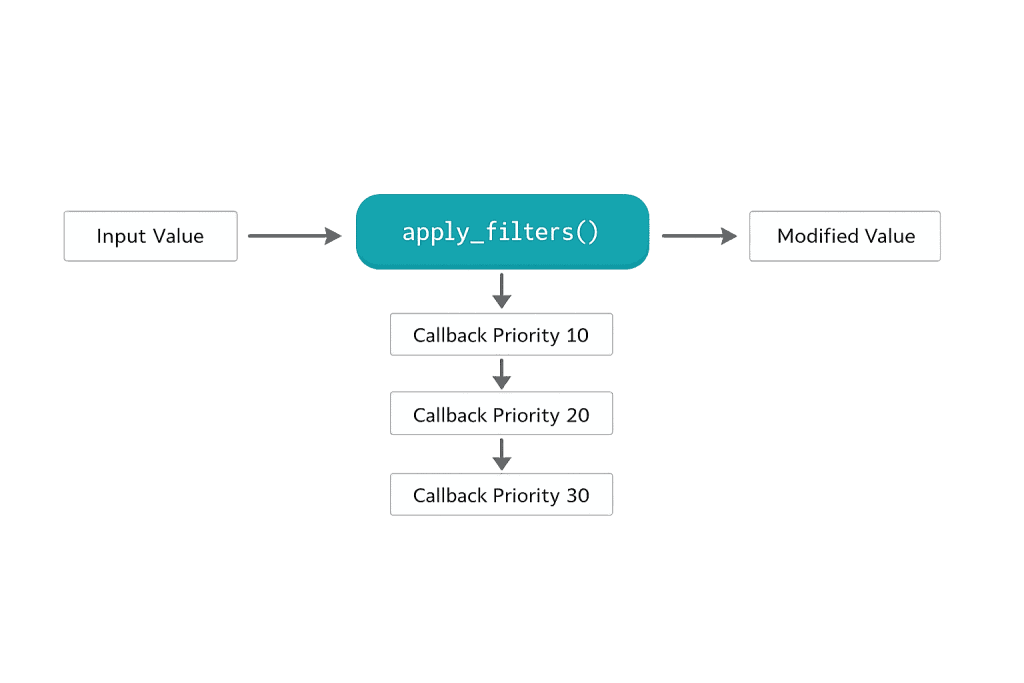
The filter system works through two core functions: apply_filters() and add_filter(). WordPress core (or a plugin) calls apply_filters() at a specific point, passing a value and the filter’s name. Any code that has registered a callback for that filter name using add_filter() gets to modify that value. The callbacks run in priority order, and the final modified value is returned.
The basic syntax for add_filter():
add_filter( $hook_name, $callback, $priority, $accepted_args );
Parameters:
– $hook_name — The name of the filter (e.g., the_title, the_content)
– $callback — The function that modifies the data and returns it
– $priority — Execution order (lower number = earlier; default is 10)
– $accepted_args — Number of arguments the callback accepts (default is 1)
[Image: Diagram showing data flowing through apply_filters() → callback functions in priority order → returned modified value]
Purpose & Benefits
1. Modify Content Without Editing Core Files
Filters let developers change how WordPress behaves by hooking into existing functionality rather than altering WordPress core, theme, or plugin files directly. This is essential for WordPress hardening and long-term maintainability — changes made through filters survive updates to WordPress core or third-party plugins. It keeps customizations clean and isolated in a child theme or custom plugin.
2. Extend Plugins and Themes Without Forking Them
Well-coded plugins expose their own filter hooks, allowing your developer to modify the plugin’s output without editing its source code. This means when the plugin updates, your customizations remain intact. Our WordPress development services rely on this pattern extensively — it’s how we build sites that stay maintainable as software evolves around them.
3. Fine-Grained Control Over Data at Every Stage
Filters can act on an enormous range of WordPress data — post content, titles, excerpts, query arguments, email messages, REST API responses, and hundreds of other values. This granularity means developers can make very precise changes without unintended side effects elsewhere on the site.
Examples
1. Modifying the Excerpt Length
WordPress sets a default excerpt length of 55 words. Changing it with a filter:
// Change the default excerpt length to 30 words
function cyberoptik_custom_excerpt_length( $length ) {
    return 30;
}
add_filter( 'excerpt_length', 'cyberoptik_custom_excerpt_length', 999 );
The priority of 999 ensures this runs after any other functions hooked to the same filter, preventing them from overriding your setting.
2. Appending a Disclaimer to Post Content
A common use case — adding a disclaimer to every post without editing each post individually:
// Append a disclaimer to all single post content
function cyberoptik_add_disclaimer( $content ) {
    if ( is_single() && in_the_loop() && is_main_query() ) {
        $disclaimer = '<p class="disclaimer">This content is for informational purposes only.</p>';
        return $content . $disclaimer;
    }
    return $content;
}
add_filter( 'the_content', 'cyberoptik_add_disclaimer' );
The conditional checks ensure the disclaimer only appears on single post views in the main content loop — not in widgets or other contexts.
3. Adding a Custom Field to WooCommerce Product Titles
Using the the_title filter to prepend brand information to product titles:
// Prepend brand name to WooCommerce product titles
function cyberoptik_add_brand_to_title( $title, $id ) {
    if ( is_admin() ) {
        return $title;
    }
    if ( 'product' === get_post_type( $id ) ) {
        $brand = get_post_meta( $id, '_product_brand', true );
        return $brand ? $brand . ' — ' . $title : $title;
    }
    return $title;
}
add_filter( 'the_title', 'cyberoptik_add_brand_to_title', 10, 2 );
Note the $accepted_args is set to 2 because the_title passes both the title and the post ID. The is_admin() check prevents this from affecting the dashboard.
Common Mistakes to Avoid
- Forgetting to return the value — Every filter callback must return a value. Failing to return causes the data to become empty or null, which can break content display or functionality entirely.
- Using
the_contentfilter without context checks — Thethe_contentfilter runs in multiple contexts. Without checks likeis_main_query()andin_the_loop(), your modification may appear in widgets, RSS feeds, or other unintended places. - Setting priorities without intention — Priority 10 is the default, and many functions share it. If two filters at the same priority run in an unpredictable order, you may get inconsistent results. Use explicit priorities when order matters.
- Confusing filters with actions — Actions execute code; filters modify and return data. Using
add_action()when you needadd_filter()(or vice versa) will produce no result or an error.
Best Practices
1. Always Return a Value
Every function registered with add_filter() must return the value it received — either modified or unmodified. If your callback conditionally modifies the value, make sure every code path returns something. An empty return; or missing return statement will break the filter chain.
2. Use Descriptive Function Names
Name your callback functions clearly to avoid conflicts with other PHP code. Prefix them with your theme or plugin name:
// Good: prefixed, descriptive name
function mytheme_modify_excerpt_length( $length ) { ... }

// Avoid: generic name that could conflict
function modify_excerpt( $length ) { ... }
This is especially important in WordPress because all functions share a global namespace.
3. Register Filters at the Right Time
Hook your add_filter() calls inside an init action or another appropriate action hook, or at the top level of your functions.php file. Registering filters too late in the loading process means they may not run for the data you’re trying to modify.
Frequently Asked Questions
What is the difference between a filter and an action in WordPress?
Actions execute code at a specific point in WordPress’s execution — they don’t return a value. Filters intercept a piece of data, allow you to modify it, and require you to return it. If you want to add something (send an email, log data), use an action. If you want to change something (shorten text, reformat output), use a filter.
Can I remove a filter someone else added?
Yes. WordPress provides remove_filter() for this purpose. You need to match the hook name, the callback function name, and the priority that was used when the filter was registered. This is how developers can override default plugin or theme behavior cleanly.
Do I need a developer to work with filters?
Yes, for custom filter work. Filters require PHP code written in your theme’s functions.php file or a custom plugin. While some plugins expose filter settings through their UI, the underlying mechanism is always code. Attempting to write filter code without development experience can break your site.
Where should I put filter code?
The safest place is your child theme’s functions.php file or a site-specific plugin. Never add filter code to a parent theme’s files or WordPress core files — those changes get wiped out on the next update.
How do I find what filters are available?
The WordPress Developer Resources documentation lists all built-in hooks, including filters. Plugins and themes also document their own hooks. You can also search plugin source code for apply_filters( to find every filterable point.
Related Glossary Terms
How CyberOptik Can Help
As a WordPress-focused agency, filters are part of our daily development toolkit. Whether you need a plugin’s behavior modified, theme output customized, or a complex content transformation built cleanly without touching core files, our developers know how to use the filter system the right way. You don’t need to understand the code — that’s what we’re here for. Get in touch to discuss your project or explore our WordPress development services.


