
add_action() is a core WordPress PHP function that hooks a custom callback function onto a specific action hook — telling WordPress to execute your code at a defined point in its loading sequence. It’s one of the two primary hooking functions in WordPress (alongside add_filter()) and the foundation of how plugins and themes extend WordPress without modifying core files.
When WordPress loads a page, it fires a series of action hooks at predictable moments — when the header loads, when a post is saved, when a script is enqueued. add_action() is how developers attach their own functions to those moments. Without this system, every customization would require editing WordPress core code directly, which would be overwritten with every update.
[Image: Diagram showing WordPress execution timeline with action hooks firing at intervals, and custom functions attaching to specific hooks]
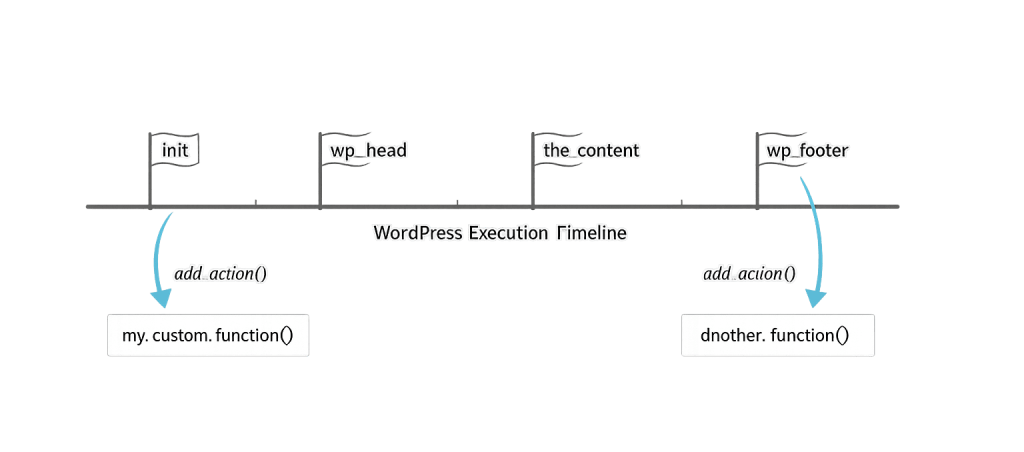
How add_action() Works
The function signature is:
add_action( string $hook_name, callable $callback, int $priority = 10, int $accepted_args = 1 ): trueThe four parameters:
- $hook_name — The name of the action hook to attach to (e.g.,
'wp_footer','init','save_post') - $callback — The name of the function you want to run when that hook fires
- $priority — (Optional) Order of execution. Default is
10. Lower numbers run earlier; multiple functions on the same hook run in priority order - $accepted_args — (Optional) How many arguments the hook passes to your callback. Default is
1
The function returns true regardless of whether the callback is valid — so always verify your callback function actually exists.
Purpose & Benefits
1. Extend WordPress Without Touching Core Files
add_action() is the correct way to add functionality to WordPress — whether that’s registering a custom post type, sending a notification when a form is submitted, or enqueuing a stylesheet. Because your code lives in a plugin or the theme’s functions.php, it survives WordPress core updates cleanly. This is the architectural principle that makes WordPress so extensible.
2. Control Execution Timing Precisely
Not all customizations should run at the same point in the page load cycle. By choosing the right hook, you ensure your code runs at the correct moment. Enqueueing scripts on wp_enqueue_scripts rather than init is the right approach — and the priority parameter lets you control execution order when multiple functions share the same hook, which matters for plugin compatibility.
3. Keep Code Organized and Maintainable
By hooking functions to specific events, code stays modular and purpose-driven. Each function does one thing and runs at the right time. This structure makes debugging easier — when something breaks, you can identify which hook’s callback is responsible. Our team uses this pattern across every custom build to keep WordPress development projects maintainable over time.
Examples
1. Enqueue a Custom JavaScript File
The most common use of add_action() in theme development:
// Enqueue a custom script on the frontend
function my_theme_enqueue_scripts() {
    wp_enqueue_script(
        'my-custom-script',
        get_template_directory_uri() . '/js/custom.js',
        array( 'jquery' ),
        '1.0.0',
        true
    );
}
add_action( 'wp_enqueue_scripts', 'my_theme_enqueue_scripts' );
This hooks into wp_enqueue_scripts — the correct hook for loading frontend assets — and loads a JavaScript file that depends on jQuery. Placing scripts here (rather than hardcoding <script> tags) prevents conflicts with other plugins.
2. Send a Notification When a Post Is Published
// Fire a custom function when a post transitions to "publish" status
function notify_on_publish( $new_status, $old_status, $post ) {
    if ( 'publish' === $new_status && 'publish' !== $old_status ) {
        // Your notification logic here (email, Slack, webhook, etc.)
        wp_mail( '[email protected]', 'New post published', $post->post_title );
    }
}
add_action( 'transition_post_status', 'notify_on_publish', 10, 3 );
Note the fourth argument (3) — this tells WordPress to pass all three arguments that transition_post_status provides ($new_status, $old_status, $post) to the callback.
3. Register a Custom Post Type on Init
// Register a custom post type during WordPress initialization
function register_team_post_type() {
    register_post_type( 'team_member', array(
        'labels'  => array( 'name' => 'Team Members' ),
        'public'  => true,
        'supports' => array( 'title', 'editor', 'thumbnail' ),
    ) );
}
add_action( 'init', 'register_team_post_type' );
Using init is the correct hook for registering custom post types. Running this code too early (or too late) in the WordPress load cycle would cause the post type not to appear correctly.
Common Mistakes to Avoid
- Using the wrong hook — Hooking into
initwhenwp_enqueue_scriptsis needed (or vice versa) causes functionality to fail or load incorrectly. Choosing the right hook requires understanding the WordPress execution order. - Forgetting the accepted_args count — If a hook passes multiple arguments and your callback needs them, omitting the fourth parameter means your function only receives the first argument. This is a subtle but common source of bugs.
- Duplicate hook registration — Calling
add_action()inside a function that itself runs on a hook can register the callback multiple times, causing it to fire repeatedly. Structure your code so eachadd_action()call runs once at page load. - Hooking too early — Some WordPress functions aren’t available until a certain hook fires. Calling
get_permalink()orWP_Querybeforewploads will produce errors or empty results.
Best Practices
1. Prefix Your Callback Functions
Always prefix function names to avoid collisions with WordPress core, other plugins, or other themes. If your plugin is called “My Plugin,” name your function myplugin_enqueue_scripts() rather than enqueue_scripts(). Without prefixes, two plugins defining the same function name will cause a fatal PHP error.
2. Choose the Most Specific Hook Available
WordPress offers hundreds of action hooks. Rather than using a broad hook like init for everything, find the most specific hook for the task. Use save_post_product instead of save_post when you only need to respond to WooCommerce product saves. Specificity reduces unnecessary function calls and potential conflicts.
3. Use remove_action() to Unhook Cleanly
// Remove a default WordPress action
remove_action( 'wp_head', 'wp_generator' );
remove_action() is the counterpart to add_action(). Use it to disable default WordPress behavior or unhook code from themes and plugins — rather than modifying theme files directly, which would be lost on the next theme update. This pairs naturally with child themes for theme customization.
Frequently Asked Questions
What is the difference between add_action() and add_filter()?
add_action() is for doing something — executing code at a point in WordPress’s lifecycle. add_filter() is for modifying something — intercepting a value and returning a changed version. Actions don’t need to return anything; filters must return the modified value. Both are types of hooks.
Where should I put add_action() calls?
Most commonly in a plugin file or a theme’s functions.php file. For anything beyond simple theme customizations, a dedicated plugin is cleaner — it keeps functionality independent of whichever theme is active.
What happens if I hook a function that doesn’t exist?
WordPress will register the hook and return true, but when the hook fires, it will trigger a PHP warning or fatal error because the callback doesn’t exist. Always define your callback function before or alongside the add_action() call.
Can I add the same function to multiple hooks?
Yes. You can call add_action() multiple times with the same callback but different hook names. For example, you might want a function to run on both wp_head and wp_footer. Each add_action() call is independent.
What is do_action() and how does it relate?
do_action() is the other half of the system. While add_action() registers a callback, do_action() fires the hook — telling WordPress to execute all attached callbacks. Plugin and theme developers use do_action() to create custom hooks that others can tap into, extending the same system WordPress uses internally.
Related Glossary Terms
How CyberOptik Can Help
As a WordPress-focused agency, add_action() is part of how we build on every project. Whether you need custom post types registered, third-party integrations connected, or complex functionality added without touching core files, our developers use the hook system to build clean, maintainable code that survives updates. You don’t need to write this code yourself — but knowing what it does helps you have better conversations with your development team. Get in touch to discuss your project or explore our WordPress development services.


