WordPress REST API endpoints are specific URLs through which external applications and JavaScript code can access, create, update, or delete WordPress data. Each endpoint represents a resource — posts, pages, users, media, categories, or custom content types — and responds to standard HTTP methods (GET, POST, PUT, DELETE) with structured JSON data.
You don’t need to write this code yourself. But understanding what REST API endpoints do helps you grasp how modern WordPress features work: the block editor, headless WordPress setups, mobile apps that connect to WordPress, and JavaScript-powered front-ends all depend on the REST API to communicate with the WordPress database. The endpoint structure is the address system that makes all of this possible.
[Image: Diagram showing a browser or app sending a GET request to a WordPress REST API URL, and receiving a JSON response with post data]
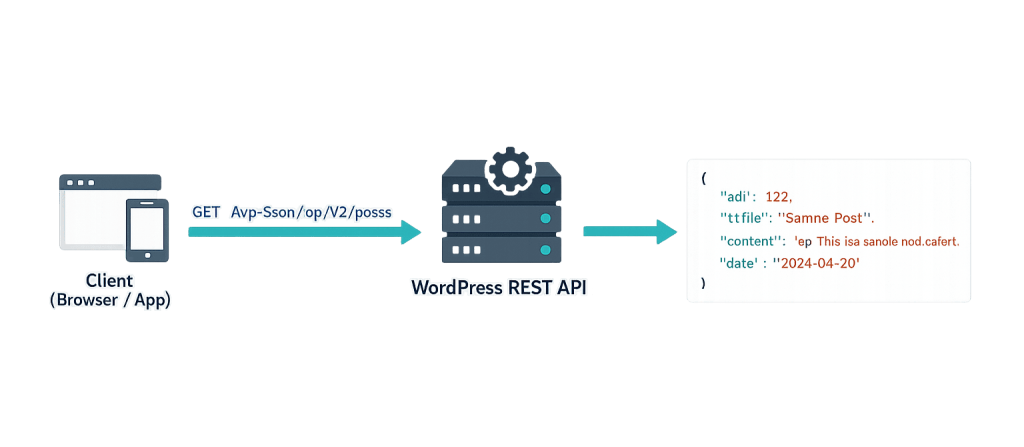
How WordPress REST API Endpoints Work
Every self-hosted WordPress site exposes its REST API at a base URL:
https://yoursite.com/wp-json/
This “discovery” endpoint lists all available routes. From there, core endpoints follow a consistent pattern:
https://yoursite.com/wp-json/wp/v2/{resource}
Where {resource} is the type of content you’re accessing: posts, pages, users, media, categories, tags, or a custom post type slug.
The wp/v2 portion is the namespace and version. WordPress uses namespacing so that plugin-added endpoints don’t conflict with core endpoints. A plugin might register endpoints under its own namespace: myplugin/v1/settings.
HTTP methods determine the action:
| Method | Action |
|---|---|
| GET | Retrieve data |
| POST | Create new content |
| PUT / PATCH | Update existing content |
| DELETE | Remove content |
Authentication controls what you can access. Public endpoints (reading published posts) require no authentication. Endpoints that create, modify, or delete content require authentication via cookies + nonces (for in-browser JavaScript), Application Passwords (for external tools), or OAuth/JWT tokens (for third-party integrations).
Purpose & Benefits
1. Powers Modern Block Editor Functionality
The WordPress block editor communicates with WordPress almost entirely through REST API endpoints. Every autosave, every content fetch, every media upload the editor makes happens via the API. This is why disabling the REST API completely breaks the block editor. Understanding this dependency helps when troubleshooting editor performance or configuring security rules.
2. Enables Headless WordPress Architectures
In a headless WordPress setup, WordPress handles content management while a separate front-end framework (React, Vue, Next.js) renders the actual pages. The front-end fetches content by calling REST API endpoints. This decoupled architecture offers front-end flexibility while keeping WordPress’s admin interface and content editing experience intact.
3. Connects WordPress to External Applications
REST API endpoints allow external tools — mobile apps, CRMs, marketing automation platforms, analytics dashboards, and custom scripts — to read and write WordPress content without accessing the database directly. A well-secured set of endpoints is far safer than direct database access and works across any platform that can make HTTP requests.
Examples
1. Fetching Posts with a GET Request
The simplest endpoint use case — retrieving published posts as JSON:
// Fetch the 5 most recent published posts
fetch('https://yoursite.com/wp-json/wp/v2/posts?per_page=5')
  .then(response => response.json())
  .then(posts => {
    posts.forEach(post => {
      console.log(post.title.rendered, post.link);
    });
  });
This returns an array of post objects with all core fields. You can filter by category, author, date, and many other parameters using query string arguments.
2. Registering a Custom REST API Endpoint
Developers can register custom endpoints using register_rest_route() to expose only the specific data an application needs:
// Register a custom endpoint that returns minimal post data
add_action( 'rest_api_init', function() {
    register_rest_route( 'myapp/v1', '/recent-titles', array(
        'methods'             => 'GET',
        'callback'            => 'myapp_get_recent_titles',
        'permission_callback' => '__return_true',
    ) );
} );

function myapp_get_recent_titles() {
    $posts = get_posts( array( 'numberposts' => 5 ) );
    $titles = array();
    foreach ( $posts as $post ) {
        $titles[] = array(
            'id'    => $post->ID,
            'title' => $post->post_title,
            'url'   => get_permalink( $post->ID ),
        );
    }
    return rest_ensure_response( $titles );
}
This creates the endpoint https://yoursite.com/wp-json/myapp/v1/recent-titles, which returns only the ID, title, and URL of the five most recent posts — nothing more.
3. Creating a Post via the API (Authenticated Request)
With Application Password authentication, external tools can create content programmatically:
// Create a draft post using fetch (Application Password auth)
const credentials = btoa('username:application_password');

fetch('https://yoursite.com/wp-json/wp/v2/posts', {
  method: 'POST',
  headers: {
    'Content-Type': 'application/json',
    'Authorization': 'Basic ' + credentials,
  },
  body: JSON.stringify({
    title: 'New Post Title',
    content: 'Post content here.',
    status: 'draft',
  }),
})
.then(response => response.json())
.then(data => console.log('Created post ID:', data.id));
This creates a draft post authenticated with Application Passwords, available since WordPress 5.6. Never expose credentials in client-side JavaScript in production — this pattern is for server-to-server communication.
Common Mistakes to Avoid
- Exposing the
/wp-json/wp/v2/users/endpoint publicly — By default, this endpoint lists all usernames and user IDs on your site, providing half the credentials an attacker needs to attempt a brute-force login. Restrict or secure this endpoint if user enumeration is a concern. - Disabling the REST API entirely — The block editor and many plugins depend on the REST API. Disabling it completely breaks the WordPress admin. If the goal is security, restrict unauthorized access to specific endpoints rather than blanket disabling.
- Creating custom endpoints without proper permission callbacks — Every custom endpoint needs a
permission_callbackthat validates whether the requesting user has access. Using__return_trueon endpoints that modify data is a significant security vulnerability. - Forgetting to flush rewrite rules after registering routes — After registering a custom REST route, visiting Settings → Permalinks and saving (or calling
flush_rewrite_rules()) is required for the new endpoint URL to work correctly.
Best Practices
1. Use Custom Endpoints to Limit Data Exposure
The default core endpoints return full post objects with dozens of fields. For performance and security, register custom endpoints that return only the specific fields your application needs. This reduces response payload size and prevents accidental exposure of draft content, user data, or private meta fields.
2. Always Implement Authentication for Write Operations
Any endpoint that creates, updates, or deletes data must require authentication. Use the permission_callback parameter to verify user capabilities:
// Restrict endpoint to users who can publish posts
'permission_callback' => function() {
    return current_user_can( 'publish_posts' );
},
For external integrations, Application Passwords (WordPress 5.6+) provide a clean, revocable authentication method without sharing admin credentials.
3. Validate and Sanitize All Input
REST API endpoints receive data from external sources. Always validate that incoming data matches expected formats and types using WordPress’s built-in sanitization functions (sanitize_text_field(), absint(), wp_kses_post(), and others). Never pass REST API input directly to database queries without sanitization.
Frequently Asked Questions
What’s the base URL for the WordPress REST API?
Every self-hosted WordPress site exposes the API at https://yoursite.com/wp-json/. From there, core endpoints live under /wp/v2/ — for example, /wp-json/wp/v2/posts for posts and /wp-json/wp/v2/pages for pages. Pretty permalinks must be enabled for the API to work correctly.
How is the REST API different from WP_Query?
WP_Query is a PHP class that runs server-side database queries within WordPress templates. The REST API exposes content over HTTP as JSON, accessible from JavaScript, external applications, and other servers. Use WP_Query for server-side rendering; use the REST API for client-side JavaScript or external integrations.
Do I need the REST API for a normal WordPress site?
The block editor uses it constantly, so yes — even a standard WordPress site depends on the REST API being functional. For content delivery to external applications or headless setups, the API becomes the primary data channel. You don’t need to interact with it directly, but it needs to be available.
Can I restrict who can access REST API endpoints?
Yes. You can restrict endpoints based on authentication status, user role, or custom permission logic using the permission_callback parameter. Plugins like Disable WP REST API or security plugins with REST API controls can also restrict unauthenticated access to non-public endpoints site-wide.
Is the WordPress REST API secure by default?
It’s reasonably secure for read-only public data. Write operations require authentication by default. The primary security considerations are: preventing user enumeration via the /users/ endpoint, securing any custom endpoints you create, and using HTTPS so authentication credentials aren’t transmitted in plain text.
Related Glossary Terms
- WordPress REST API
- API (Application Programming Interface)
- Headless WordPress
- JavaScript
- WP_Query
- Custom Post Type
- Authentication / 2FA
How CyberOptik Can Help
As a WordPress-focused agency, we build with the REST API on every project that involves custom integrations, headless setups, or JavaScript-powered front-end components. You don’t need to write this code — that’s what we’re here for. Whether you need a custom endpoint for an external application or a full headless WordPress build, our developers can help. Get in touch to discuss your project or explore our WordPress development services.