
WordPress Nonce is a security token used to verify that a request made to a WordPress site is legitimate and intentional — protecting against Cross-Site Request Forgery (CSRF) attacks. The name comes from “number used once,” though in practice a WordPress nonce is valid for a limited time window rather than strictly one use. It’s embedded in forms, URLs, and AJAX requests so WordPress can confirm the action was triggered by an authorized user in the expected context.
Nonces matter because WordPress sites regularly process sensitive actions: saving settings, deleting content, submitting forms, and making administrative changes. Without a nonce check, a malicious site could trick a logged-in administrator into unknowingly triggering one of these actions by embedding a hidden request in an image tag or link. Nonces close that vulnerability by tying each request to a specific user session, action, and time window — typically 24 hours by default.
How WordPress Nonces Work
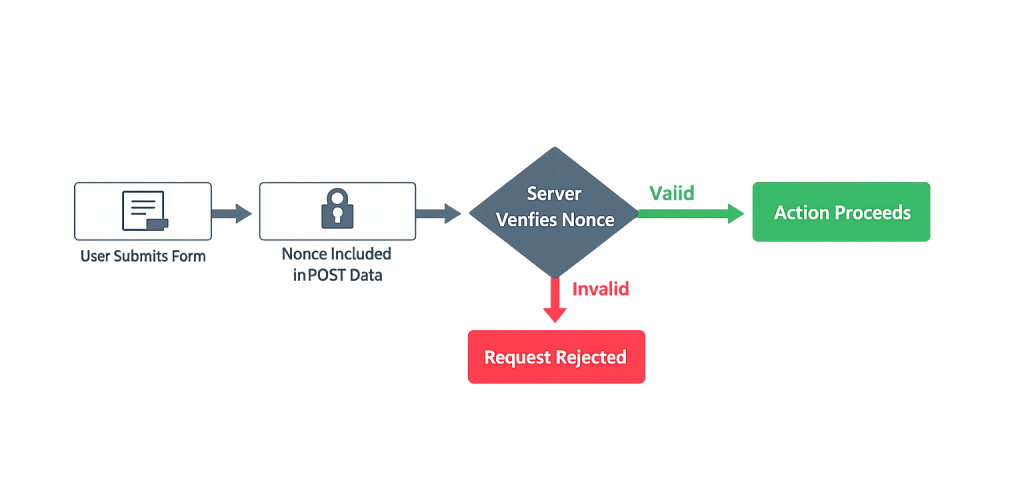
When WordPress generates a nonce, it hashes together several values: the current user’s ID, their session token, the action name, and the current time period. This hash is unique to that combination — a nonce generated for “delete-post-123” cannot be reused to authorize “save-settings.” When the form or request is submitted, WordPress recalculates the expected nonce and compares it against what was submitted. If they don’t match, the request is rejected.
Key nonce functions in WordPress:
wp_create_nonce( $action )— Generates a nonce value for a given action name. Use this when building custom AJAX requests or URLs.wp_nonce_field( $action, $name )— Outputs a hidden<input>field with the nonce value. Used inside HTML forms.wp_nonce_url( $url, $action )— Appends a nonce to a URL as a query string parameter. Used for action links.wp_verify_nonce( $nonce, $action )— Validates a submitted nonce. Returnsfalseif invalid, or1/2indicating which time period the nonce belongs to.check_admin_referer( $action )— A convenience function for verifying nonces in admin context that also checks the HTTP referer.
[Image: Diagram showing form submission flow — User submits form → Nonce included in POST data → Server verifies nonce → Action proceeds or is rejected]
Purpose & Benefits
1. Protection Against CSRF Attacks
Nonces prevent Cross-Site Request Forgery — one of the most common web application vulnerabilities. Without them, a malicious site could craft a hidden request that executes actions on your WordPress site using your logged-in session. Nonces make this impossible because the attacker cannot predict or replicate the token tied to your session. This is a foundational part of WordPress hardening for any custom development work.
2. Scoped Action Validation
Each nonce is tied to a specific action name, so it cannot be reused for unintended purposes. A nonce generated for a contact form submission cannot be repurposed to authorize a post deletion. This scoping ensures that even if a nonce were somehow obtained, it’s only valid in the exact context it was created for — limiting the blast radius of any potential security issue.
3. Time-Limited Authorization
WordPress nonces expire after 24 hours by default, with a grace period that allows the previous 12-hour window’s nonce to remain valid. This automatic expiration means that old or cached nonce values can’t be replayed indefinitely. For sites handling sensitive data — like plugin admin pages, user management, or custom form submissions — this time-bounding adds a meaningful layer of protection. Our WordPress development services always include proper nonce implementation for custom forms and AJAX handlers.
Examples
1. Securing a Custom Form with wp_nonce_field()
The most common nonce use case is protecting an HTML form that performs a sensitive action:
// Add a nonce field to a custom admin form
<form method="post" action="">
    <?php wp_nonce_field( 'save_custom_settings', 'custom_settings_nonce' ); ?>
    <input type="text" name="setting_value" />
    <input type="submit" value="Save Settings" />
</form>
On the processing side, verify the nonce before handling the data:
// Verify nonce before processing the form submission
if (
    isset( $_POST['custom_settings_nonce'] ) &&
    wp_verify_nonce( sanitize_text_field( wp_unslash( $_POST['custom_settings_nonce'] ) ), 'save_custom_settings' )
) {
    // Nonce is valid — proceed with processing
    $setting_value = sanitize_text_field( $_POST['setting_value'] );
    update_option( 'my_custom_setting', $setting_value );
} else {
    wp_die( 'Security check failed.' );
}
This form passes a nonce named custom_settings_nonce. When submitted, WordPress verifies it matches the expected hash for the save_custom_settings action and the current user’s session.
2. Nonce in an AJAX Request
For front-end forms that submit data via AJAX without a full page reload, nonces must be passed in the JavaScript request:
// Localize a nonce value to JavaScript
function my_plugin_enqueue_scripts() {
    wp_enqueue_script( 'my-plugin-script', plugin_dir_url( __FILE__ ) . 'js/my-plugin.js', array( 'jquery' ), '1.0', true );
    wp_localize_script( 'my-plugin-script', 'myPluginData', array(
        'nonce' => wp_create_nonce( 'my_ajax_action' ),
        'ajaxUrl' => admin_url( 'admin-ajax.php' ),
    ) );
}
add_action( 'wp_enqueue_scripts', 'my_plugin_enqueue_scripts' );
// Send the nonce with your AJAX request
jQuery.post( myPluginData.ajaxUrl, {
    action: 'my_custom_ajax_handler',
    nonce:  myPluginData.nonce,
    data:   { someField: 'someValue' }
});
On the PHP side, the handler verifies the nonce using check_ajax_referer( 'my_ajax_action', 'nonce' ) before processing.
3. Nonce in a Custom Action URL
When building admin action links — like a “Reset Settings” or “Export Data” button — append a nonce to the URL rather than using a form:
// Generate a secure URL for a custom admin action
$reset_url = wp_nonce_url(
    admin_url( 'admin.php?page=my-plugin&action=reset' ),
    'reset_plugin_settings'
);

echo '<a href="' . esc_url( $reset_url ) . '">Reset Settings</a>';
When the user clicks the link, check_admin_referer( 'reset_plugin_settings' ) verifies the nonce in the URL before allowing the reset to proceed.
Common Mistakes to Avoid
- Skipping nonce verification entirely — Processing form data or AJAX requests without checking a nonce leaves your site open to CSRF attacks. Every action that changes data should verify a nonce before proceeding.
- Using the same nonce action name for multiple forms — Each form or action should have a unique, descriptive action name. Generic names like
'nonce'or'form_nonce'reduce security by making nonces interchangeable across actions. - Storing nonces in cookies or localStorage — Nonces are meant to be embedded in forms or URLs, not stored on the client side. Storing them client-side exposes them to XSS attacks, defeating the purpose.
- Not sanitizing before verifying — Always sanitize the submitted nonce value with
sanitize_text_field( wp_unslash( $_POST['nonce'] ) )before passing it towp_verify_nonce(). WordPress Coding Standards require this, and it prevents unexpected behavior with slashed inputs.
Best Practices
1. Name Nonce Actions Descriptively and Specifically
Use action names that describe exactly what the nonce authorizes — for example, 'delete-post-' . $post_id rather than just 'delete-post'. Including the specific resource ID in the action name scopes the nonce tightly, so it can only authorize the deletion of that specific post. This reduces risk in any scenario where a nonce might be exposed or reused.
2. Always Verify Before Processing
The verification step is where the security actually happens. No matter how a form is submitted — standard POST, AJAX, or URL parameter — your server-side handler must call wp_verify_nonce() or check_admin_referer() before touching any data. Treat the nonce check as a gatekeeper: if it fails, stop execution immediately with wp_die() or a clean return.
// Exit early if nonce check fails
if ( ! wp_verify_nonce( sanitize_text_field( wp_unslash( $_POST['my_nonce'] ) ), 'my_action' ) ) {
    wp_die( 'Security check failed.' );
}
3. Combine Nonces with Capability Checks
Nonces confirm intent, but they don’t confirm permission. A valid nonce from a subscriber shouldn’t allow them to delete posts. Always pair wp_verify_nonce() with a current_user_can() check to verify both that the request is legitimate and that the user has the user role and permissions required to perform the action.
Frequently Asked Questions
What’s the difference between a nonce and a password?
A nonce is not a login credential — it’s a temporary token that proves a specific action was intentionally triggered by the current user in the current session. Nonces expire automatically and are scoped to a single action type. They verify intent and session context, while passwords verify identity.
How long does a WordPress nonce last?
By default, a WordPress nonce is valid for 24 hours, split into two 12-hour windows. WordPress accepts nonces from both the current and immediately previous window. This means nonces can remain valid for up to 24 hours. You can filter the expiration with the nonce_life hook if your use case requires shorter validity periods.
Do nonces protect against all security threats?
No — nonces specifically protect against CSRF attacks. They don’t protect against SQL injection, XSS, or brute-force attacks. Proper WordPress hardening involves multiple layers: nonces for CSRF protection, data sanitization and escaping for injection prevention, and strong two-factor authentication (2FA) for account security.
Are nonces required for public-facing forms?
If a form submits data that performs any action on the site — saving a post, sending an email, modifying user data — it should use a nonce. Even on public contact forms, nonces add protection against automated abuse. For purely informational GET requests that don’t modify any data, nonces are not required.
What happens if a nonce check fails?
The request stops. For admin-context checks using check_admin_referer(), WordPress displays a “Are you sure?” error page. For custom verifications using wp_verify_nonce(), your code controls the failure behavior — typically a wp_die() call or an error response. AJAX handlers typically return a JSON error response with a 403 status.
Related Glossary Terms
- WordPress Hardening
- User Permissions
- User Roles (Administrator, Editor, etc.)
- WordPress REST API
- Two-Factor Authentication (2FA)
- Plugin
- wp-config.php
- Action (WordPress Hook)
How CyberOptik Can Help
As a WordPress-focused agency, we implement nonces on every custom form, AJAX handler, and admin action we build. Proper nonce implementation isn’t optional — it’s a baseline security requirement for any plugin or theme code. If your site has custom functionality that handles form submissions or user-triggered actions, our team can audit the code and ensure it follows current security standards. Get in touch to discuss your project or explore our WordPress development services.


