Scalability refers to a website’s or hosting environment’s ability to handle increasing amounts of traffic, data, and demand without degrading performance. A scalable system can grow alongside your business — adding resources when traffic spikes and pulling them back during slower periods — rather than hitting a hard ceiling that causes slowdowns or outages.
For WordPress sites, scalability is a hosting and infrastructure question as much as it is a development one. A site built on shared hosting may run fine with 500 monthly visitors but start struggling at 5,000. A site on a properly configured managed hosting environment with a content delivery network (CDN) can handle millions of page views without breaking a sweat. Understanding scalability helps you make smarter decisions about your hosting plan before growth forces your hand.
How Scalability Works in WordPress Hosting
Scalability in a WordPress context comes from several layers working together:
- Vertical scaling — Adding more resources (CPU, RAM) to an existing server. This has limits and often requires downtime.
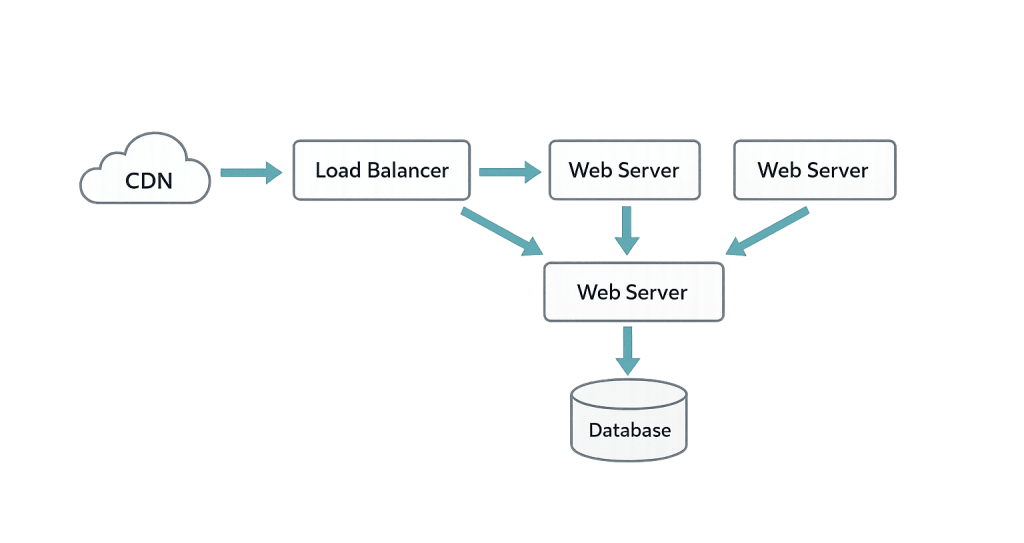
- Horizontal scaling — Adding more servers to distribute traffic load. This is the approach used by enterprise hosting providers.
- Caching layers — Server-side caching, object caching, and CDN caching reduce the work your server must do per request, multiplying its effective capacity.
- Database optimization — Efficient queries and database read replicas prevent the database from becoming a bottleneck under load.
- CDN integration — Offloading static assets (images, CSS, JavaScript) to a CDN frees your origin server to handle dynamic requests.
Managed WordPress hosts like WP Engine, Kinsta, and Pantheon build scalability into their platforms automatically — container-based architecture, burst scaling, and Redis object caching are standard features rather than manual configurations.
[Image: Diagram showing traffic flowing through CDN → load balancer → multiple web servers → shared database, illustrating horizontal scaling architecture]
Purpose & Benefits
1. Handle Traffic Spikes Without Downtime
When a news story links to your site, a promotional email goes out, or a seasonal campaign drives unexpected traffic, a scalable hosting environment absorbs the surge automatically. Sites without scalability can crash at exactly the moment visibility peaks — turning an opportunity into a problem. Properly configured WordPress hosting prevents this.
2. Support Business Growth Without Forced Migrations
A scalable infrastructure grows with you. Rather than rebuilding your hosting environment every time your business reaches a new tier, scalable platforms let you adjust resources on demand. This reduces disruption and the technical overhead of repeated migrations.
3. Maintain Performance as Content and Functionality Expand
Every new plugin, image, and database record adds load. Scalable architecture — including object caching and CDN delivery — keeps page load times consistent as your site grows in size and complexity. Performance directly influences search rankings, so scalability and PageSpeed are closely linked.
Examples
1. E-Commerce Store During a Sale Event
An online retailer normally receives 200 concurrent visitors. During a Black Friday promotion, traffic spikes to 2,000. On shared hosting, the site slows to a crawl or goes offline entirely. On a scalable managed hosting platform, the environment automatically provisions additional PHP workers and serves cached pages through a CDN, handling the load without intervention.
2. Media Site With Viral Content
A blog post gets shared widely on social media and picks up thousands of visitors in a few hours. A site with server-side caching serves pre-built HTML pages directly from memory — the database and PHP engine barely register the spike. Without caching and scalable infrastructure, each visit triggers a full database query, overwhelming the server quickly.
3. Growing Service Business
A professional services firm starts with a 10-page brochure site and expands over three years into a 200-page site with a client portal, multiple forms, and integrated marketing tools. Scalable VPS hosting or managed hosting accommodates this growth without requiring a full infrastructure overhaul.
Common Mistakes to Avoid
- Starting on shared hosting and waiting too long to upgrade — Shared hosting is fine for early-stage sites, but many businesses wait until performance problems become severe before moving. By then, the impact on rankings and user experience is already measurable.
- Confusing scalability with raw server size — A large server with poor caching and no CDN will still struggle under load. Scalability is about architecture, not just hardware specs.
- Ignoring database performance — Most WordPress scaling bottlenecks happen at the database level. Unoptimized queries, lack of indexing, and large post revisions slow sites down before CPU or RAM become the constraint.
- Not testing under load — Sites that appear fast under normal conditions can fail catastrophically during traffic spikes. Load testing before major campaigns reveals weak points while there’s still time to address them.
Best Practices
1. Implement Multi-Layer Caching
Combine server-side caching, object caching, and browser caching to minimize the number of full PHP/database requests your server handles. Each caching layer multiplies your effective capacity. On high-traffic sites, full-page caching alone can allow a single server to handle 10–50x its uncached load.
2. Use a CDN for Static Assets
Offloading images, CSS, JavaScript, and other static files to a content delivery network reduces origin server load and speeds delivery globally. This is one of the highest-leverage infrastructure improvements available for growing WordPress sites.
3. Choose Hosting That Scales Automatically
Select a hosting platform that offers burst scaling, auto-provisioning, or container-based architecture rather than fixed resource limits. When evaluating hosts, ask specifically how the platform handles traffic spikes — not just what the baseline resource allocation is. Dedicated hosting or managed cloud environments are better long-term fits for businesses expecting significant growth.
Frequently Asked Questions
How do I know if my WordPress site has a scalability problem?
Signs include slow load times that worsen as traffic increases, server errors (500 or 503) during traffic peaks, and hosting alerts about resource limits being hit. Tools like Google PageSpeed Insights, GTmetrix, and your hosting dashboard’s resource usage graphs help identify the problem.
What’s the difference between scalability and performance?
Performance is how fast your site loads under normal conditions. Scalability is how well performance holds up as load increases. A site can be fast with 10 visitors but fail completely with 1,000. True scalability means performance degrades gracefully — or not at all — as demand grows.
Is shared hosting ever scalable enough?
For low-traffic sites — personal blogs, early-stage businesses — shared hosting is adequate. Once a site regularly receives thousands of daily visitors or relies on consistent uptime for revenue, the resource contention of shared hosting becomes a real risk. VPS hosting or managed WordPress hosting is a more appropriate foundation for growth.
Does a CDN replace the need for scalable hosting?
No — they work together. A CDN reduces the load on your origin server by serving cached assets from edge locations, but dynamic requests (checkout pages, logged-in users, search queries) still hit your origin server. Scalable hosting ensures the origin server can handle those dynamic requests under load.
Can WordPress handle enterprise-level traffic?
Yes. WordPress powers some of the highest-traffic sites on the internet — major media outlets, government sites, and global brands all run on WordPress. The key is proper hosting architecture: managed hosting platforms, multi-layer caching, CDN integration, and database optimization. The platform scales; the infrastructure around it must be configured correctly.
Related Glossary Terms
- Dedicated Hosting
- VPS Hosting (Virtual Private Server)
- Content Delivery Network (CDN)
- Server Cache (Server-Side Caching)
- Object Cache
- Shared Hosting
- PageSpeed
- WordPress Hosting
How CyberOptik Can Help
A site that can’t handle growth is a liability, not an asset. We manage WordPress hosting and performance optimization for clients across a range of traffic levels — from growing small businesses to established brands running high-stakes campaigns. Whether your current setup is showing strain or you want to get infrastructure right before you need it, we can help. Contact us to discuss your hosting needs or learn about our hosting and speed optimization services.