
Pageview is a metric in web analytics that records each time a browser loads a page on your website. Every time a visitor navigates to a URL on your site — whether arriving from a search engine, clicking an internal link, or reloading a page — that counts as one pageview. If the same person reloads the same page five times in a single visit, that registers as five pageviews.
Pageviews are one of the foundational metrics in digital analytics, reported in platforms like Google Analytics 4 (GA4) and most other web analytics tools. They measure content consumption and site activity, though they need context to be meaningful. High pageview counts on a blog signal that content is being read and that visitors are exploring the site. High pageview counts on a checkout flow with no conversions might signal friction or confusion. Pageviews are most useful when analyzed alongside other metrics — sessions, engagement rate, conversions, and time on page — rather than interpreted in isolation.
[Image: GA4 Pages and Screens report showing page path, pageviews, average engagement time, and conversion events per page]
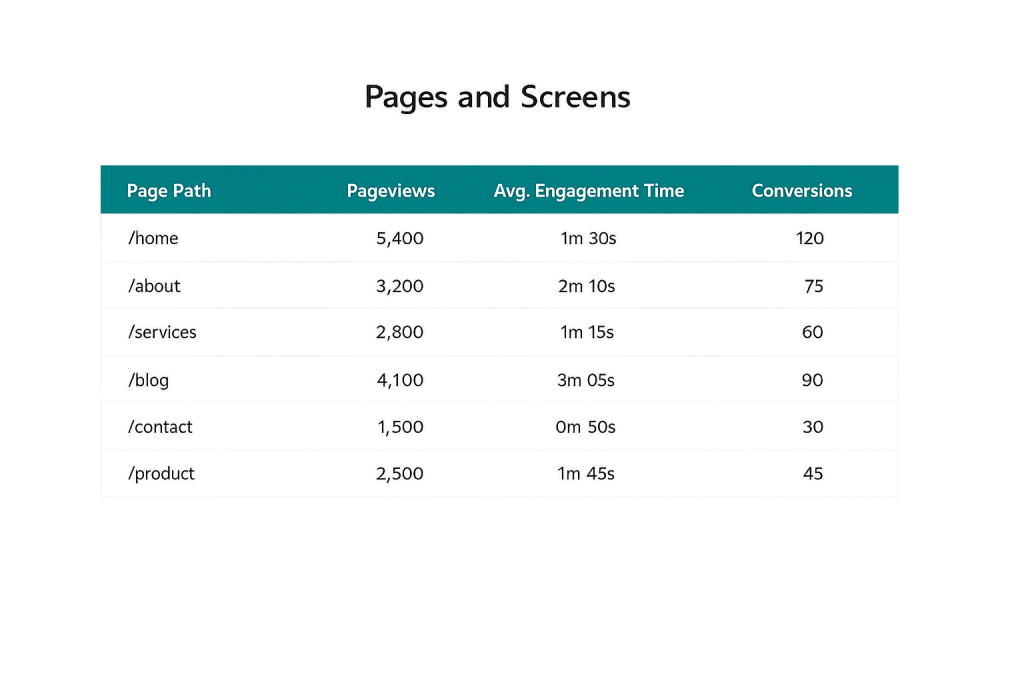
How Pageviews Are Tracked
Pageviews are recorded when a web analytics tracking code — typically a JavaScript snippet — fires on a page load. In GA4, the default page_view event triggers automatically each time a page loads in a browser that has the tracking code installed.
Key distinctions:
- Pageviews vs. sessions — A website session is a group of interactions a single visitor has during one visit. One session can include multiple pageviews. A visitor who reads three blog posts in one sitting contributes three pageviews but one session.
- Pageviews vs. unique pageviews — In older versions of Google Analytics (Universal Analytics), “unique pageviews” counted the number of sessions in which a page was viewed at least once, regardless of how many times it loaded within a session. GA4 handles this differently, using “views” as the primary metric.
- Pageviews vs. users — A unique visitor represents a distinct person (device) regardless of how many pages they view or how many times they visit. A single user can generate dozens of pageviews across multiple sessions.
In GA4, the primary metric is “Views” rather than the older “Pageviews” label, but the underlying concept is the same.
Purpose & Benefits
1. Understanding Which Content Gets the Most Attention
Pageview data, sorted by page path, reveals immediately which pages attract the most visitors. This is actionable for content strategy — high-traffic pages deserve investment (keeping them updated, adding internal links from them to other content, optimizing for conversion). Low-traffic pages on important topics may need SEO improvement or better internal linking. Our digital marketing services use this data to inform content decisions.
2. Diagnosing Navigation and UX Issues
When you compare pageviews to session data and exit rates, patterns emerge. A page with high pageviews but very high exit rates may signal that visitors aren’t finding what they expected. A checkout page with pageviews concentrated at step one but dropping sharply at step two reveals a specific friction point. Pageview flow analysis is one of the first tools used in conversion rate optimization diagnostics.
3. Benchmarking Content Performance Over Time
Month-over-month and year-over-year pageview trends reveal whether your content is growing in reach or losing traction. A blog post that earned 300 pageviews when published but now earns 1,500/month has likely gained organic rankings. A service page that was receiving 400 pageviews in January but only 80 in June warrants investigation — ranking drop, algorithm update, seasonal change, or a technical issue could all be factors.
Examples
1. Blog Measuring Content Engagement
A marketing agency publishes 20 blog posts over a quarter. Checking pageviews by post reveals that three posts account for 65% of all blog traffic. These high-performing posts are updated with fresh data, stronger CTAs, and links to related service pages — turning organic traffic magnets into actual lead generators. The remaining 17 posts receive internal link boosts to improve their visibility.
2. eCommerce Site Analyzing Product Page Behavior
An online retailer notices that its top-five product pages each receive high pageviews but low add-to-cart rates. Comparing these pages against higher-converting pages reveals that the underperforming product pages lack customer reviews and have slower load times. Fixing these issues reduces the gap between pageviews and conversions.
3. Service Business Tracking Key Page Performance
A law firm tracks pageviews on its practice area pages monthly. When a specific practice area page shows a 40% pageview decline over two months, the team investigates — discovering the page had dropped from position 3 to position 12 in Google for its primary keyword after a content refresh inadvertently removed key terms. The issue is caught and corrected before it significantly impacts leads.
Common Mistakes to Avoid
- Treating pageviews as the primary success metric — Pageviews measure exposure, not outcomes. A page can receive thousands of views and generate zero conversions. Always connect pageview data to business outcomes.
- Not filtering out internal traffic — If your team regularly visits your own website, those visits inflate pageview counts. Set up filters or internal traffic exclusions in GA4 to ensure your data reflects actual visitor behavior.
- Counting page reloads as meaningful engagement — A single user reloading the same page repeatedly inflates pageview counts without meaningful engagement. Context from engagement rate and average engagement time provides a more honest picture of how content is performing.
- Comparing pageviews across GA4 and Universal Analytics — GA4 measures engagement differently than its predecessor. Direct comparisons of pageview numbers between the two systems can be misleading.
Best Practices
1. Segment Pageview Data by Traffic Source
Total pageviews across all traffic sources can mask important variations. Organic search may drive 70% of pageviews on your blog while direct traffic dominates your service pages. Segmenting by channel, device type, and new vs. returning users reveals which audiences are engaging with which content — and informs where to focus optimization efforts.
2. Combine Pageview Data With Engagement Metrics
Pageviews alone don’t tell you whether visitors are reading, scanning, or immediately leaving. In GA4, average engagement time per page and engagement rate provide context. A page with 5,000 pageviews and an average engagement time of 12 seconds needs different attention than a page with 1,000 pageviews and 4 minutes of average engagement. Use both metrics together.
3. Set Up Event Tracking Beyond Pageviews
For many business goals, pageviews are a leading indicator — but the outcomes you actually care about are actions: form submissions, phone number clicks, button clicks, video plays, scroll depth. GA4 makes it easier than its predecessor to track these events natively. Building a measurement framework around conversion tracking alongside pageviews gives a complete picture of what your traffic actually accomplishes.
Frequently Asked Questions
What’s the difference between a pageview and a session?
A session represents one visit to your website — it begins when a user arrives and ends after 30 minutes of inactivity or when they leave. A pageview is each individual page load within that session. One session typically contains multiple pageviews if the visitor navigates through your site.
Are high pageviews always a good sign?
Not necessarily. High pageviews on key service or product pages that lead to conversions are very positive. High pageviews combined with high exit rates and no conversions suggest a disconnect between what visitors expect and what the page delivers. Always interpret pageviews alongside engagement and conversion data.
How is a pageview counted in GA4?
In GA4, a page_view event fires automatically each time a page loads for a visitor with tracking code installed. Pageviews are reported as “Views” in GA4’s Pages and Screens report. If a visitor reloads a page, that counts as an additional view.
Should I care more about pageviews or unique visitors?
Both measure different things. Pageviews measure content consumption volume — how much of your site is being read. Unique visitors measure reach — how many distinct people came to your site. For content performance analysis, pageviews are more useful. For audience measurement and growth tracking, unique visitors are more relevant.
Related Glossary Terms
How CyberOptik Can Help
Getting meaningful insight from your analytics data takes more than having GA4 installed — it takes knowing what to measure and how to act on it. Our team helps businesses set up proper analytics tracking, interpret pageview and engagement data correctly, and connect website performance to actual business outcomes. Explore our marketing services or get in touch to discuss your analytics setup.


