
Database optimization is the process of cleaning, reorganizing, and tuning a WordPress database to improve query performance and reduce unnecessary data overhead. Over time, every WordPress site accumulates database bloat — post revisions, expired transients, spam comments, orphaned metadata, and leftover data from deleted plugins. Optimization removes this excess and reorganizes database tables so queries run faster.
The connection between database health and site speed is direct. WordPress can execute 20–100+ database queries per page load on uncached sites. When tables are fragmented, oversized with irrelevant data, or filled with unindexed metadata, those queries take longer to complete — and that delay shows up as slower page load times, higher Time to First Byte (TTFB), and lower PageSpeed scores. For business sites, slower load times translate to higher bounce rates and lower search rankings.
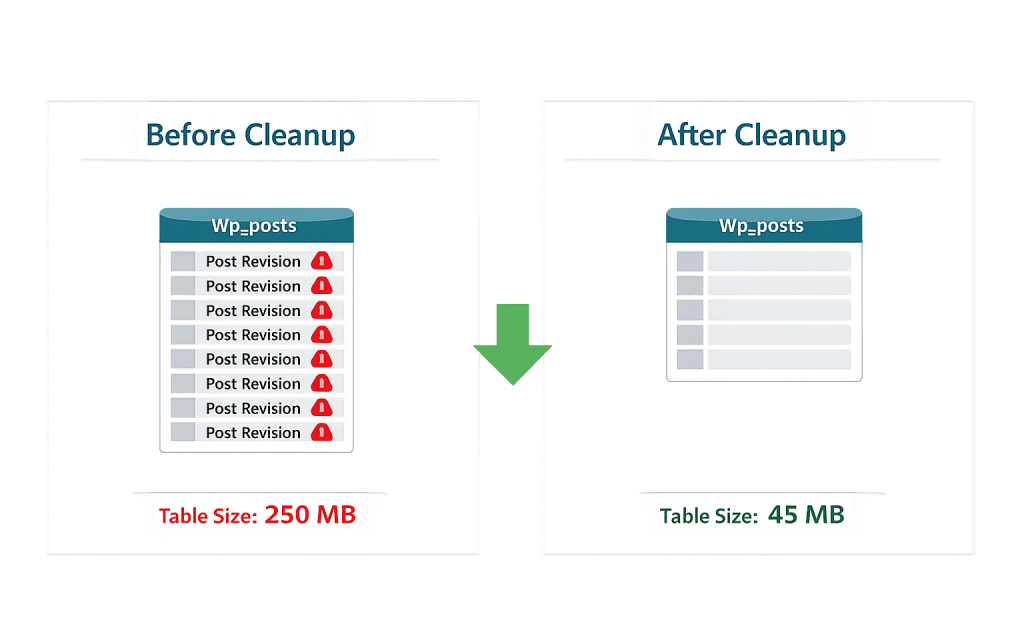
[Image: Before/after comparison showing wp_posts table size with and without revision cleanup]
What WordPress Database Optimization Actually Addresses
Database optimization is not a single action — it’s a set of related cleanup and tuning tasks:
- Post revisions — WordPress saves a revision every time you update content. On a site with hundreds of posts, this creates thousands of revision rows that are never served to visitors but slow down queries.
- Auto-drafts — Unsaved drafts and auto-save records accumulate in the
wp_poststable over time. - Expired transients — Plugins and WordPress core store temporary data in
wp_optionsusing transients. Expired transients that aren’t properly cleared inflate this critical table. - Spam and trash — Comments in spam or trash status, and posts in the trash, continue to occupy database space until permanently deleted.
- Orphaned metadata — When posts, users, or other items are deleted, their associated metadata rows in
wp_postmeta,wp_usermeta, andwp_commentmetaoften remain. - Leftover plugin data — Deactivated or deleted plugins frequently leave behind tables and option rows that no longer serve any purpose.
- Table optimization — MySQL and MariaDB tables can become fragmented after many inserts and deletes. Running OPTIMIZE TABLE reclaims unused space and defragments the table structure.
Purpose & Benefits
1. Faster Page Load Times
Reducing table bloat and optimizing fragmented tables directly speeds up database queries. A leaner wp_posts table with fewer revision rows returns results faster. A cleaned wp_options table — which is loaded on virtually every WordPress page request — reduces the overhead of one of the most performance-critical database operations. These improvements show up in your PageSpeed metrics and in your users’ experience.
2. Reduced Server Resource Usage
A bloated database consumes more memory and CPU time on every query. On shared hosting environments with resource limits, this can push sites into throttling territory during traffic spikes. Optimization reduces the memory footprint of routine queries, leaving more resources available for the actual processing your site needs. This pairs well with caching to reduce the total number of queries hitting the database.
3. Improved Backup and Migration Speed
A smaller, optimized database takes less time and storage to back up, and it transfers faster when migrating between hosts. If your database is bloated with years of revisions and orphaned data, every backup captures that unnecessary weight. Cleanup before a migration also reduces the risk of import errors caused by oversized database files.
Examples
1. Post Revision Cleanup on a Long-Running Blog
A business site with 300 published posts and no revision limit enabled has accumulated over 4,000 revision rows in wp_posts. Removing all but the last 3 revisions per post reduces the table to roughly 900 posts — a 77% reduction in row count for that content type. Query times against wp_posts drop noticeably, and the database backup size decreases from 85MB to 22MB.
2. Clearing a Bloated wp_options Table
A site has had 40+ plugins installed and removed over five years. Each left behind option rows in wp_options. The table has grown to 3,000+ rows, many of which are orphaned autoloaded options from plugins that no longer exist. Cleaning out confirmed orphaned rows reduces the autoloaded data — the subset that loads on every page request — and improves TTFB.
3. Scheduled Optimization on a WooCommerce Store
An online store processes dozens of orders per day. Product data, customer records, order metadata, and session data accumulate rapidly. Scheduling a weekly database optimization routine — using WP-Optimize or a similar plugin — clears expired WooCommerce sessions, removes orphaned order metadata, and runs table optimization. This keeps the database performing consistently as the store grows, rather than letting performance degrade unnoticed.
Common Mistakes to Avoid
- Optimizing without a backup first — Database optimization is generally safe, but it modifies data. Always take a full backup before running optimization routines, especially on production sites.
- Deleting all revisions without thought — Post revisions exist for a reason — they’re your safety net when content changes go wrong. Rather than deleting all revisions, set a reasonable limit (3–5 per post) going forward and clean up older excess revisions carefully.
- Over-relying on optimization alone — Database optimization improves performance, but it’s one part of a broader approach. If your site is slow, also examine caching, image compression, server configuration, and plugin efficiency. An optimized database under a poorly configured server is still slow.
- Running optimization on live traffic without testing — Table optimization (OPTIMIZE TABLE) can lock tables briefly during execution. On high-traffic sites, schedule this during low-traffic periods to avoid brief disruptions to visitors.
Best Practices
1. Set a Revision Limit
Rather than letting revisions accumulate indefinitely, set a reasonable limit in wp-config.php using the WP_POST_REVISIONS constant, or configure it through a maintenance plugin. Three to five revisions per post balances protection with performance. This prevents the problem from recurring after a one-time cleanup.
2. Schedule Regular Automated Cleanup
Manual database optimization is easy to forget. Use a plugin like WP-Optimize, WP-Sweep, or Advanced Database Cleaner to schedule weekly or monthly cleanup tasks automatically. This keeps the database from re-accumulating bloat between manual interventions and makes performance degradation gradual rather than sudden.
3. Audit Plugin Data After Removal
Before removing a plugin, check whether it stores data in the database and whether that data will be cleaned up on deletion. Many plugins offer a “delete all data on uninstall” option in their settings. Enabling this before removing the plugin is cleaner than hunting for orphaned tables and rows afterward.
Frequently Asked Questions
How often should I optimize my WordPress database?
For most small-to-medium business sites, monthly optimization is sufficient. High-traffic sites, active blogs, or WooCommerce stores may benefit from weekly optimization. The goal is preventing accumulation rather than emergency cleanup. Automated scheduling through a plugin makes this painless.
Will database optimization speed up my site?
It depends on how much bloat has accumulated. On a newer site with minimal revisions and clean plugins, the impact will be small. On a site that has been running for years without maintenance, removing thousands of revisions and orphaned rows can produce a measurable speed improvement — particularly in TTFB and uncached page load times.
Can database optimization break my site?
Optimization itself is generally safe. Deleting data, however, carries risk — which is why a backup is essential before any cleanup. The risk is in accidentally removing data that’s still needed, not in the optimization process itself. Use reputable tools and review what they’re removing before confirming.
What tools are best for WordPress database optimization?
WP-Optimize is the most widely used option and handles revisions, transients, spam comments, and table optimization in a single interface. WP-Sweep offers similar functionality with a more granular approach. For advanced users, phpMyAdmin allows direct SQL-level optimization. Your hosting provider may also offer server-level database optimization tools.
Is it different from database backup?
Yes — these are separate tasks. A backup creates a copy of your database for restoration purposes. Optimization modifies the live database to improve performance. Both are important, and backup should always precede optimization.
Related Glossary Terms
How CyberOptik Can Help
Site performance directly impacts your search rankings and user experience. Database bloat is one of the most common — and most overlooked — causes of slow WordPress sites. We include database optimization as part of our managed WordPress hosting and maintenance services, keeping your site’s foundation clean and fast without you needing to think about it. Learn about our hosting solutions or our speed optimization services, or contact us.


