
MariaDB is an open-source relational database management system created as a fork of MySQL. It was developed in 2009 by Michael “Monty” Widenius — the original creator of MySQL — after Oracle acquired MySQL through its purchase of Sun Microsystems. MariaDB is designed to be a drop-in replacement for MySQL, meaning it uses the same commands, interfaces, and data storage conventions, so switching between the two is straightforward for most applications.
For WordPress sites, the database is where everything lives — posts, pages, settings, user accounts, comments, plugin data, and more. WordPress was originally built around MySQL, but MariaDB’s compatibility means WordPress runs on either without modification. Many managed WordPress hosting environments now use MariaDB as their default database server, often citing performance advantages over MySQL for typical web workloads. If your host uses MariaDB, your WordPress site is likely already running on it, possibly without you ever having thought about it.
How MariaDB Differs from MySQL
While the two are largely interchangeable for WordPress, there are meaningful differences under the hood:
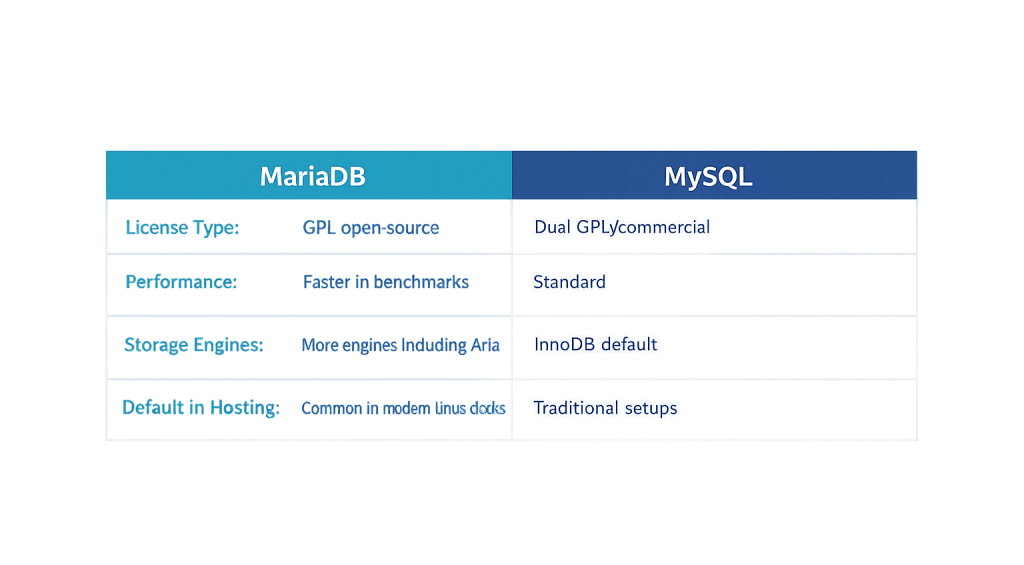
- Licensing — MariaDB is fully open source under the GPL. MySQL has both an open-source community edition and a commercial enterprise edition maintained by Oracle. The fully open nature of MariaDB means its development is driven by the community rather than a corporate roadmap.
- Performance — MariaDB generally performs faster than MySQL for typical web application workloads. Benchmarks show MariaDB can reduce database query response times by 20–40% in certain scenarios, directly impacting page load speeds.
- Storage engines — MariaDB supports more storage engines than MySQL, including Aria, ColumnStore, and RocksDB. MySQL’s default InnoDB engine is available in MariaDB as well.
- Development pace — MariaDB tends to adopt new features and optimizations faster than MySQL’s community edition. Some features available in MariaDB require MySQL’s paid enterprise edition.
- Compatibility — For WordPress and most web applications, the two are functionally identical. MySQL queries run on MariaDB without modification.
[Image: Side-by-side comparison table of MariaDB vs MySQL key attributes: license type, performance, storage engines, default in WordPress hosting environments]
Purpose & Benefits
1. Faster Database Queries for WordPress
Every WordPress page load involves multiple database queries — retrieving post content, checking user sessions, loading widget data, and pulling plugin settings. MariaDB’s query optimizer and storage engine choices tend to handle these read-heavy workloads more efficiently than MySQL. In practice, switching from MySQL to MariaDB can measurably reduce database response times, contributing to overall improvements in page load speed and database optimization.
2. Fully Open-Source and Community-Driven
MySQL’s dual licensing model means some advanced features and support tiers are behind a commercial paywall. MariaDB is entirely open source, with no enterprise gating of features. For hosting providers and developers who prefer a fully open stack, MariaDB is the natural choice. This is part of why many Linux distributions now ship with MariaDB as the default MySQL-compatible database — including distributions commonly used in WordPress hosting environments.
3. Seamless WordPress Compatibility
WordPress has supported MariaDB for years. The WordPress database API (wpdb) interacts with the database through PHP’s MySQLi or PDO extension, both of which work identically with MariaDB and MySQL. Plugin and theme developers overwhelmingly write code that works on both. For a site owner, this compatibility means the hosting environment can choose whichever database performs best without requiring any changes to your site.
Examples
1. Managed WordPress Hosting Default
A business owner signs up for managed WordPress hosting. The hosting provider runs MariaDB 10.6 rather than MySQL. The WordPress installation, all plugins, and all themes function identically — because MariaDB is fully compatible with WordPress’s MySQL-oriented code. The business owner never interacts with the database directly; the performance benefits appear in faster page load times and better scores in speed tests.
2. Database Migration During a Server Move
A site is being migrated from one hosting provider to another. The old host runs MySQL, the new host runs MariaDB. The WordPress database is exported using phpMyAdmin or WP-CLI as a standard SQL dump file, then imported into MariaDB on the new server without modification. The site comes up on the new host working exactly as it did before — no database compatibility issues.
3. Performance Troubleshooting on a Slow Site
A WooCommerce store is experiencing slow page loads on product archive pages. Investigation shows that the bottleneck is slow database queries involving complex product filter joins. Moving from MySQL to MariaDB at the hosting level, combined with proper database optimization (query caching, table indexing), reduces the query execution time substantially — improving page load scores and reducing cart abandonment from frustrated shoppers.
Common Mistakes to Avoid
- Assuming MariaDB and MySQL are identical in every edge case — For standard WordPress use, they’re interchangeable. But if you’re running complex database operations or using a plugin that explicitly calls MySQL-specific features, test compatibility before switching.
- Neglecting database maintenance regardless of which system you use — MariaDB’s performance advantages don’t eliminate the need for regular database optimization. Orphaned rows, autoloaded option bloat, and post revisions accumulate in both database systems and should be periodically cleaned.
- Manually managing databases without proper backups — Whether you’re running MySQL or MariaDB, any direct database manipulation should be preceded by a complete backup. Database errors are easier to recover from when you have a clean restore point.
- Choosing a host based solely on MySQL/MariaDB branding — The choice of database system has relatively modest real-world impact compared to other hosting factors like server resources, PHP version, caching configuration, and proximity to your audience.
Best Practices
1. Let Your Hosting Environment Drive the Database Choice
For most WordPress sites, the choice between MariaDB and MySQL should be made by your hosting provider based on what performs best in their environment — not by the site owner. Focus on choosing quality managed hosting that handles database configuration, updates, and optimization as part of the service. Our web hosting services include these considerations in the stack we configure for clients.
2. Keep the Database Engine Updated
Whether you’re running MariaDB or MySQL, keeping the database engine on a current version matters for security and performance. Outdated database versions can have known vulnerabilities and miss performance improvements. Quality managed hosting providers handle database engine updates as part of their infrastructure maintenance.
3. Optimize WordPress Database Usage
Regardless of which database system powers your site, reducing unnecessary database calls and keeping the database lean improves performance. Use a caching layer to serve frequently requested data without hitting the database. Regularly clean up orphaned data using a plugin or WP-CLI. Proper indexing of custom database tables (for plugins that add their own tables) ensures queries stay fast as data grows. These database optimization practices apply equally to both systems.
Frequently Asked Questions
Does WordPress work with MariaDB?
Yes, fully. WordPress treats MariaDB as MySQL-compatible because it is. WordPress’s database interactions work identically on MariaDB as on MySQL. Most WordPress users running MariaDB aren’t even aware of it — their hosting provider made the choice for them.
Is MariaDB faster than MySQL for WordPress?
In most real-world WordPress scenarios, yes. MariaDB generally performs faster on read-heavy workloads typical of WordPress sites, with some benchmarks showing 20–40% improvements in query response times. The practical impact on perceived page speed varies depending on other factors — caching, server resources, and query optimization matter significantly.
Should I switch my WordPress site from MySQL to MariaDB?
Probably not as a DIY project. Switching database systems on a live site involves migrating data, changing connection strings, and testing compatibility — with real risk if something goes wrong. If your hosting environment already uses MariaDB, you’re fine. If you’re on MySQL and want the potential performance benefit, the cleanest path is migrating to a host that uses MariaDB rather than switching the database engine on your current server.
Can I use MariaDB with WooCommerce?
Yes. WooCommerce runs on MariaDB without modification. The compatibility that applies to WordPress core applies equally to WooCommerce and its extensions.
What version of MariaDB should WordPress use?
WordPress recommends MySQL 8.0 or higher, or MariaDB 10.6 or higher. Current versions of either database engine are supported. Your hosting provider typically manages the database engine version as part of their infrastructure; this isn’t something site owners normally need to configure directly.
Related Glossary Terms
How CyberOptik Can Help
Database configuration is part of the hosting and infrastructure foundation we set up for every client site. Whether you’re on a managed WordPress hosting plan, migrating from one host to another, or troubleshooting performance issues that trace back to database inefficiencies, our team handles the technical details. Learn about our hosting solutions or contact us to discuss your project.


