
Largest Contentful Paint (LCP) is a website speed metric that measures how long it takes for the largest visible content element on a page to load. That element might be a hero image, headline block, banner, or other major piece of above-the-fold content.
In your monthly report, this may be labeled Main content load. The technical name is Largest Contentful Paint, but the practical question is simple: how quickly did the main part of the page appear for visitors?
If you are reviewing this in your report, start with How to Read Your Monthly Website Care Report for the non-technical explanation.
For business owners, LCP is worth understanding because it reflects how quickly a visitor feels the page is usable. A page can technically start loading quickly, but still feel slow if the main content takes too long to appear.
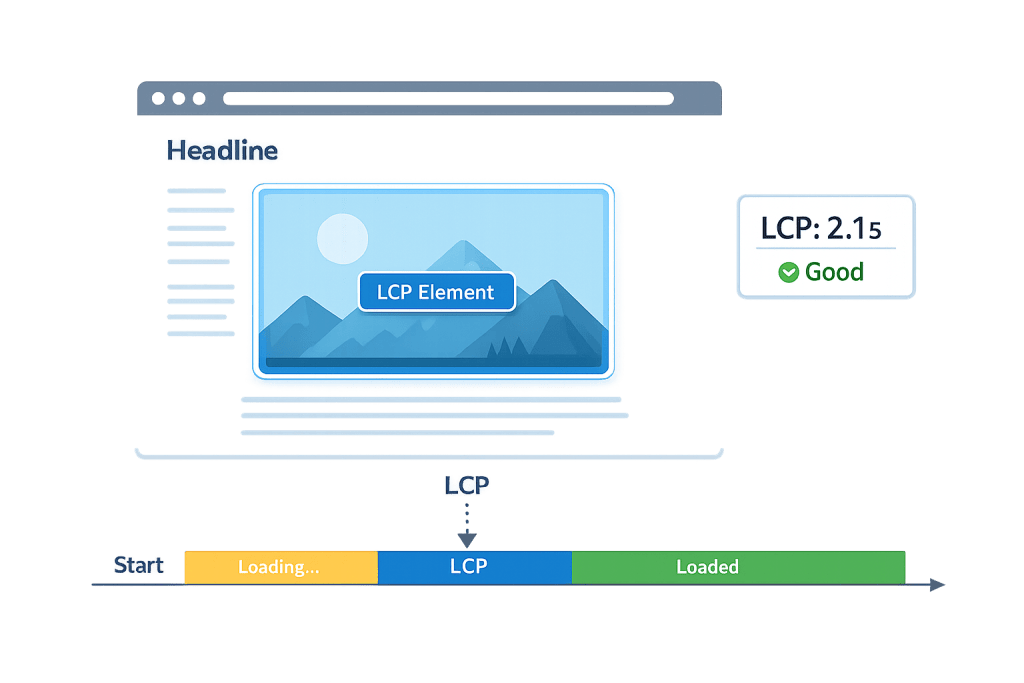
How Largest Contentful Paint Works
LCP is one of Google’s Core Web Vitals. It focuses on the main content in the browser viewport, not every file on the page. The clock starts when the page begins loading and stops when the largest visible content element finishes rendering.
Common LCP elements include:
- A hero image.
- A large heading or text block.
- A featured video thumbnail.
- A banner image or background image.
- A prominent content card.
Google generally considers an LCP of 2.5 seconds or less to be good. Between 2.5 and 4 seconds needs improvement, and over 4 seconds is considered poor.
Purpose & Benefits
1. Measures Perceived Speed
Visitors care about when the page feels ready. LCP helps measure that real-world perception better than a simple total load time. It is closely related to PageSpeed and overall user experience.
2. Supports Search and UX Goals
Core Web Vitals are part of Google’s page experience signals. A good LCP does not guarantee rankings, but a slow page can hurt users and make SEO efforts less effective.
3. Highlights Specific Optimization Targets
Because LCP usually points to one major element, it gives developers a clearer place to start. Optimizing a hero image, caching, or server response time can improve the metric.
Examples
1. Oversized Hero Image
A homepage uses a large, uncompressed hero image. The rest of the page starts quickly, but the main image appears late. Compressing, resizing, and properly serving the image can improve LCP.
2. Slow Server Response
If the server takes too long to respond, every page speed metric suffers. Better hosting, caching, or database optimization may reduce the delay before the browser can even start loading content.
3. Render-Blocking Scripts
Too many scripts loading early can delay the main content. Deferring non-critical scripts and cleaning up plugin output can help the primary content render faster.
Common Mistakes to Avoid
- Only checking desktop speed — Mobile performance is often slower and more important for real users.
- Trying to diagnose the technical cause alone — If this metric is flagged in your report, contact our team so we can review the cause and recommend the right fix.
- Treating one test as final — Speed tests can vary. We look for patterns before calling something a serious issue.
- Ignoring hosting — Poor hosting can limit speed improvements, no matter how well the page is optimized.
Best Practices
1. Optimize the Main Visual Element
Identify the LCP element first. If it is an image, resize it, compress it, use modern formats where appropriate, and avoid loading unnecessarily large versions.
2. Improve Caching and Server Response
Good caching, a strong content delivery network, and quality WordPress hosting help the page respond quickly before browser rendering begins.
3. Reduce Render-Blocking Assets
Clean up unused scripts and styles, delay non-critical JavaScript, and avoid loading excessive third-party tools above the fold. This supports better website performance overall.
Frequently Asked Questions
Is LCP the same as page load time?
No. Page load time measures broader loading behavior. LCP focuses on when the largest visible content element appears, which often better reflects how fast the page feels to a visitor.
What is a good LCP score?
Google generally considers 2.5 seconds or less good. The exact target can be harder on complex pages, but that benchmark is a useful goal for most business websites.
Why does LCP change between tests?
Speed tests vary based on device, network, location, caching, server load, and what content appears above the fold. Look for patterns across several tests instead of one isolated result.
Related Glossary Terms
Related Report Help
How CyberOptik Can Help
LCP improvement usually requires a mix of design, development, hosting, and WordPress optimization. Our team can identify the element slowing the page down and apply practical fixes that improve real visitor experience. Learn about our speed optimization services or contact us to review your website.


