
Meta description is an HTML meta tag that provides a brief summary of a web page’s content. It appears in the <head> section of a page’s HTML and is typically displayed as the description snippet beneath a page title in search engine results pages (SERPs). A well-written meta description communicates what a page is about, why it’s relevant to the searcher’s query, and gives them a reason to click through rather than choosing another result.
Meta descriptions are not a direct ranking factor — Google has confirmed they don’t use the meta description content to determine where a page ranks. What they do affect is click-through rate (CTR): the percentage of people who see your listing in search results and choose to click on it. A compelling meta description can meaningfully improve your CTR, which drives more organic traffic from the same rankings. It also communicates your brand’s voice and value proposition to people seeing your site for the very first time.
[Image: Example SERP listing showing page title, URL, and meta description highlighted, with annotations pointing to the 150-160 character description text]
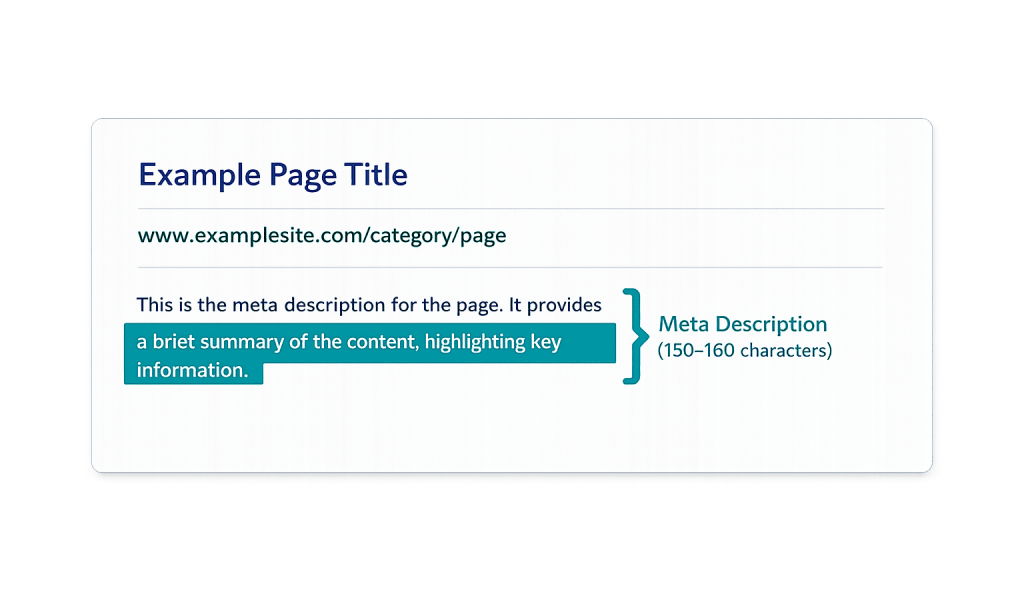
How Meta Descriptions Work
The meta description tag appears in a page’s HTML like this:
<meta name="description" content="Your description text goes here, ideally 150–160 characters.">
In WordPress, this is typically managed through an SEO plugin like Yoast SEO or Rank Math, which adds fields for the meta description in the post/page editor — no need to edit HTML directly.
Worth understanding: Google does not always display the meta description you write. Studies show Google rewrites meta descriptions in a significant portion of search results, often pulling text directly from the page’s body content when it believes that text better matches the user’s specific query. This doesn’t mean writing meta descriptions is a waste of effort — your description is still used when Google doesn’t override it, and it still affects how social sharing displays your content.
Key specifications:
– Recommended length: 150–160 characters (approximately 920 pixels at desktop display width)
– Mobile display: Typically truncated at around 120 characters
– Format: Plain text only — HTML tags in the description are stripped
Purpose & Benefits
1. Improving Click-Through Rate From Search Results
Your meta description is effectively the ad copy for your search listing. The page title hooks attention; the description closes the click. A description that directly addresses the searcher’s intent — mentioning the specific benefit or answer they’ll find on the page — outperforms a generic summary. Higher CTR from the same rankings means more traffic without needing to move up in position, making meta description optimization a high-leverage, low-cost SEO activity that complements broader on-page SEO work.
2. Setting Accurate Expectations and Reducing Bounce
A meta description that accurately represents the page’s content attracts visitors who are genuinely interested in what they’ll find. This reduces bounce rate — visitors who click through expecting X and find Y leave immediately. Accurate, compelling descriptions filter for quality visitors, not just quantity. The result is better engagement metrics, which are positive signals for search performance over time.
3. Consistent Brand Voice in Search Results
Search results are often the first touchpoint a potential customer has with your business. The meta description is an opportunity to communicate your brand’s tone, value proposition, and differentiators before the visitor ever arrives on your site. A thoughtfully written description that speaks directly to your audience and reflects your voice creates a stronger first impression than a generic summary pulled automatically from your page’s first paragraph.
Examples
1. Service Page Meta Description
A web design agency’s SEO services page:
“We build SEO strategies that drive qualified traffic for businesses — from technical audits to content and link building. See how our team approaches organic growth.”
This description is specific about what the service involves, uses active voice, and invites the reader to explore without making exaggerated claims.
2. Product Page Meta Description for E-Commerce
An online retailer selling handmade candles:
“Hand-poured soy candles with 50+ hour burn time. Choose from 30 seasonal and year-round scents. Free shipping on orders over $50.”
This description includes concrete, useful details — burn time, scent count, shipping threshold — that help a purchase-ready shopper decide immediately whether this result is worth clicking.
3. Blog Post Meta Description
A WordPress tutorial post:
“WordPress showing a white screen? This guide walks through the most common causes — PHP errors, plugin conflicts, and memory limits — and how to fix each one quickly.”
This description mirrors the language someone searching “WordPress white screen fix” would use, lists specific sub-topics they’ll find, and sets expectations for the depth of the answer.
Common Mistakes to Avoid
- Leaving it blank — When no meta description is set, Google pulls text from the page — often an unsatisfying opening sentence or a block of navigation text. Writing your own gives you control over the first impression in search results.
- Writing a description that doesn’t match the page — A description that promises something the page doesn’t deliver generates clicks that immediately bounce. This hurts engagement metrics and wastes the traffic you earned.
- Writing the same description for multiple pages — Duplicate meta descriptions across a site are a wasted opportunity. Each page should have a unique description tailored to its specific content and the queries likely to surface it. An SEO plugin makes managing unique descriptions per page practical.
- Stuffing keywords — Meta descriptions are not a keyword ranking signal. Forcing unnatural keyword repetition into a description makes it read poorly and reduces CTR. Write for the human reader, not for an algorithm.
Best Practices
1. Write for the Searcher’s Intent, Not for Keywords
The most effective meta descriptions directly address what the searcher is looking for and give them a clear reason to click. Think about the query that will surface your page, who’s searching it, and what they need to know before they’ll click. Mirror their language naturally. A description that reads like it was written for a human — which it was — will always outperform one that reads like it was written for a keyword report.
2. Keep It Within 150–160 Characters
Descriptions longer than 160 characters are truncated with an ellipsis in desktop search results (and even shorter on mobile, around 120 characters). Front-load the most important information so that even a truncated version conveys the key message. The first 120 characters should contain your core value proposition — what you have, why it matters, and who it’s for.
3. Include a Soft Call to Action Where Natural
Ending with a subtle call to action — “Learn more,” “See how we approach it,” “Find out what’s included” — can improve CTR by giving the reader a clear next step. This works best when the CTA is consistent with the page’s actual content and the searcher’s likely intent. For high-commercial-intent queries, a CTA toward action tends to outperform one toward exploration.
Frequently Asked Questions
Does the meta description affect search rankings?
Not directly. Google has confirmed the meta description content is not used as a ranking signal. What it does affect is click-through rate, which drives more traffic from your existing rankings. Higher CTR over time may indirectly influence rankings through engagement signals, but the primary value of a strong meta description is more traffic, not higher position.
Does Google always use my meta description?
No. Google frequently rewrites meta descriptions — pulling text from the page body that it believes better matches the searcher’s specific query. This is more likely when your meta description is vague, too short, or doesn’t align with the query that triggered the result. Writing a specific, accurate description makes it more likely Google will use yours as written.
How long should a meta description be?
The practical limit for desktop display is about 150–160 characters (920 pixels). Mobile truncates at around 120 characters. Aim for 150–160 characters and ensure the most important information falls within the first 120 so it’s not cut off on mobile. Don’t pad shorter descriptions to hit a character count — a clear 100-character description is better than a padded 155-character one.
Should I write meta descriptions for every page?
For important pages — service pages, landing pages, blog posts — yes, absolutely. For lower-priority pages, at minimum ensure they’re not blank. An SEO plugin like Yoast or Rank Math will flag pages with missing or short descriptions and makes it practical to manage descriptions across a large site. Prioritize pages that rank or that you’re actively trying to drive traffic to.
What’s the relationship between meta description and Open Graph tags?
They serve similar but different purposes. The meta description appears in search results. Open Graph tags control how your page appears when shared on social media — including a separate og:description tag for the social share snippet. Setting both independently gives you control over how your content appears across different distribution channels.
Related Glossary Terms
- On-Page SEO
- Search Engine Results Page (SERP)
- Click-Through Rate (CTR)
- SEO Plugin
- Open Graph Tags
- Keyword
- Featured Snippet
How CyberOptik Can Help
Meta descriptions are one of many on-page elements we optimize as part of every SEO engagement. Getting them right — specific, compelling, and aligned with search intent — is part of how we help clients earn more traffic from their existing rankings. Whether you need a full SEO audit, page-by-page optimization, or a strategy for improving underperforming content, we can help. Contact us for a free website review or learn more about our SEO services.


