
WordPress Pattern is a pre-designed group of blocks that can be inserted into any post, page, or template in the WordPress block editor. Patterns provide ready-made layouts — hero sections, testimonial rows, call-to-action blocks, feature grids — that you can drop in and customize with your own content. Rather than building a section from scratch each time, you select a pattern, swap in your text and images, and move on.
Patterns are a core feature of the WordPress block editor (Gutenberg) and have become central to how modern WordPress sites are built and maintained. The WordPress pattern library at wordpress.org contains thousands of community-contributed layouts across every common design need. Themes can also ship their own patterns, and site owners can create custom patterns saved directly in the dashboard. As of WordPress 6.0 and later, patterns are first-class citizens of the editing experience — available in the block inserter, searchable by category, and compatible with Full Site Editing (FSE).
How WordPress Patterns Work
A pattern is, at its core, a snapshot of block markup. When you insert a pattern, WordPress copies that block structure into your editor — you’re working with regular, editable blocks from that point forward. Changes you make to an inserted pattern do not affect the pattern itself or any other instances of it.
WordPress offers two types of patterns:
- Unsynced Patterns — The standard pattern type. When you insert an unsynced pattern, you get an independent copy. Edit it freely — changes stay local to that page or post. This is ideal for design templates where the layout is consistent but the content varies (think: a team member card layout used on multiple pages with different people in each).
- Synced Patterns — Formerly called Reusable Blocks. When you edit a synced pattern anywhere on the site, that change propagates to every location where the pattern is used. This is the right choice for global elements that should stay identical across the site — a promotional banner, a disclaimer block, or a standard call-to-action section.
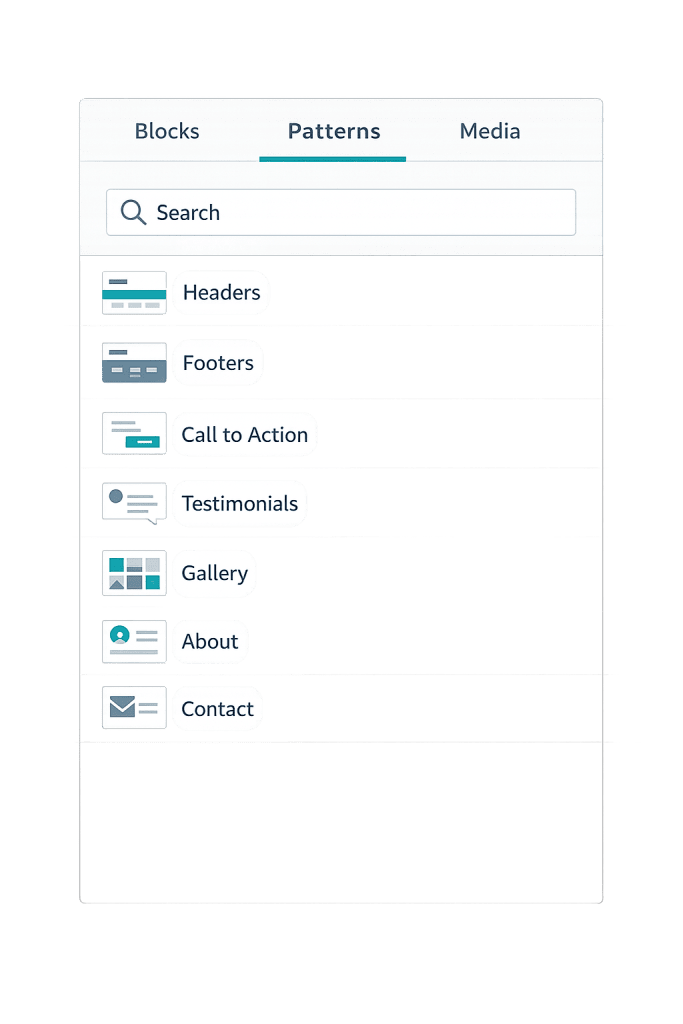
[Image: WordPress block inserter showing the Patterns tab with categories like Headers, Footers, Call to Action, Testimonials, and Gallery]
Patterns can be created in three ways:
1. From the block editor — Select a group of blocks, open the three-dot menu, and choose “Create Pattern.”
2. From the dashboard — Navigate to Appearance → Design → Patterns to manage saved patterns.
3. Registered by a theme or plugin — Themes and plugins can register patterns programmatically, making them available to anyone using that theme.
Purpose & Benefits
1. Faster, More Consistent Page Building
Patterns dramatically reduce the time needed to build new pages. Instead of recreating a pricing table, testimonial section, or feature list from scratch, you insert a pattern and fill in the details. For teams managing sites where multiple people create content, patterns enforce layout consistency without requiring design skills. Our web design services often include building a custom pattern library so clients can maintain their sites confidently.
2. Scalable Design System for Non-Developers
Patterns let designers and developers define approved layouts once — and then hand off those layouts to content editors who aren’t comfortable building with blocks. An editor can publish a polished, on-brand page without touching the customizer or requesting developer help. This is especially valuable for organizations publishing frequently across multiple content types or custom post types.
3. Global Updates Through Synced Patterns
For content that lives in many places but needs to stay identical — such as an event announcement, a seasonal promotion, or a footer disclaimer — synced patterns eliminate the tedium of manual updates. Change the synced pattern once and every instance across the site updates automatically. This reduces human error and ensures critical messaging stays accurate site-wide, which matters for compliance-sensitive content or time-sensitive promotions.
Examples
1. Hero Section Pattern for Landing Pages
A web design agency creates a hero pattern containing a background image block, a heading, a subheading paragraph, and two button blocks side by side. The pattern is registered with the theme and categorized under “Headers.” Content editors building new landing pages insert the pattern, swap in the page-specific headline, change the button destinations, and update the background image — all without touching any code. Each landing page gets a consistent hero structure with unique content.
2. Testimonial Grid Pattern
A professional services firm needs client testimonials on multiple pages: the homepage, service pages, and a dedicated social proof page. The developer builds a three-column testimonial pattern with headings, quote blocks, client name fields, and star rating markup. Because each page needs different testimonials, they use unsynced patterns — inserting and customizing independently on each page. The layout stays identical; only the content changes.
3. Synced Promotional Banner
An e-commerce site runs a seasonal promotion and wants a “Free shipping on orders over $75” banner at the top of every product page. The developer creates this as a synced pattern. When the promotion ends, they update the pattern once — removing the banner or swapping in a new promotion — and the change appears instantly on all affected pages. No manual editing of individual pages required. This approach works well alongside WordPress Revisions since each pattern edit is tracked.
Common Mistakes to Avoid
- Using synced patterns when you need independent edits — If you want to customize each instance differently, an unsynced pattern is the right choice. Accidentally using a synced pattern means changes to one location will overwrite content on every page where that pattern appears.
- Treating patterns as a replacement for templates — Patterns are reusable content sections; they’re not the same as page templates or template parts in Full Site Editing. Templates define the overall page structure; patterns define sections within that structure.
- Skipping the pattern library — The WordPress pattern library at wordpress.org contains thousands of designs. Many teams spend time building patterns from scratch that already exist — or that could be adapted quickly from an existing design.
- Not organizing patterns by category — When a site accumulates many custom patterns, finding the right one becomes slow. Assigning patterns to meaningful categories (Headers, CTAs, Feature Sections) keeps the block inserter navigable as the library grows.
Best Practices
1. Define Synced vs. Unsynced Intentionally
Before creating a pattern, decide upfront whether instances should stay in sync or behave independently. Synced patterns are right for global content; unsynced patterns are right for layout templates. Making this decision deliberately — rather than defaulting — prevents confusing situations where editing one section unexpectedly changes pages across the site.
2. Build Patterns That Match Your Design System
Patterns work best when they’re built using your site’s established color palette, typography, and spacing. In block themes, patterns automatically inherit the active theme styles, making it straightforward to keep patterns on-brand. If you’re using a classic theme with custom CSS, patterns should be built to match the site’s visual system rather than introducing their own arbitrary styling.
3. Create a Custom Pattern Library Early in a Project
Rather than adding patterns ad hoc, plan the pattern library during the design phase. Identify the recurring layout types your site will need — service cards, team bios, FAQ blocks, CTA sections — and build patterns for each before handing off to content editors. This sets up a self-service workflow where editors can build new pages without design intervention, and it reduces the chance of inconsistent layouts appearing over time.
Frequently Asked Questions
What’s the difference between a WordPress Pattern and a Reusable Block?
They’re closely related. “Reusable Blocks” was the older term for what WordPress now calls Synced Patterns. Both allow a single edit to update all instances. The term “Reusable Block” still appears in some older documentation and plugin interfaces, but if you’re on a current version of WordPress, you’re working with Synced Patterns.
Do patterns affect site performance?
Patterns have no inherent performance impact — they’re just blocks with regular markup. The performance of a section depends on its content (images, video, external embeds), not whether it was inserted via a pattern. A well-designed pattern using lightweight blocks will be as fast as the same layout built manually.
Can I import patterns from other sites?
Not natively through the WordPress admin, but patterns are just block markup, so they can be copied and pasted between sites. Some plugins and block libraries offer pattern import functionality. Themes that ship with built-in patterns also effectively transfer those patterns when you activate them.
Are patterns available in the Classic Editor?
No. Patterns are a block editor feature. The Classic Editor uses a single rich-text field rather than a block-based layout, so the concept of inserting a multi-block pattern doesn’t apply. If your site is still using the Classic Editor, switching to the block editor would be necessary to take advantage of patterns.
Can developers add custom patterns through code?
Yes. Patterns can be registered using the register_block_pattern() function in PHP, allowing developers to include them in themes or plugins. This is how themes ship predefined patterns — by registering them at activation so they appear in the block inserter for all users of that theme.
Related Glossary Terms
- Block Editor (Gutenberg)
- Full Site Editing (FSE)
- WordPress Block Theme
- WordPress Revisions
- Custom Post Type
- Template Part
- Widget
- Customizer
How CyberOptik Can Help
Well-designed patterns make a site easier to maintain and keep content editors productive. We build custom pattern libraries as part of our WordPress projects — designing the recurring section types your team will actually use and setting them up so anyone can build new pages confidently. Whether you need a full site build with a custom pattern system or help organizing an existing site’s editing workflow, we can help. See our web design services or get in touch to start a project.


