
WHOIS (pronounced “who is”) is a publicly accessible database and query protocol that stores registration information for domain names. When someone registers a domain, the Internet Corporation for Assigned Names and Numbers (ICANN) requires the registrant to provide contact information — including name, organization, address, phone number, and email — which is then stored in the WHOIS database. Anyone can look up a domain name and retrieve this registration data using a WHOIS lookup tool.
WHOIS has been a foundational part of internet infrastructure since the early days of the public web. It serves multiple legitimate purposes: verifying domain ownership, identifying who to contact about a site’s content or technical issues, investigating cybersecurity incidents, and enabling legal processes like trademark disputes. At the same time, the public nature of WHOIS records has made privacy protection a significant concern for domain registrants, leading to widespread adoption of WHOIS privacy services and GDPR-driven data restrictions on European registrations.
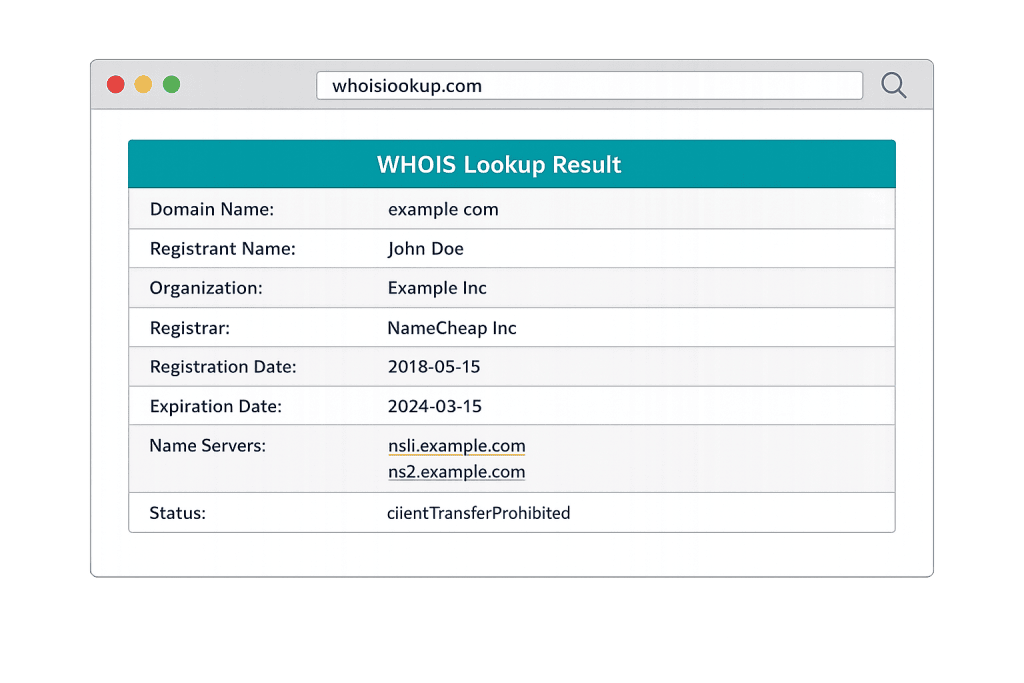
[Image: Screenshot of a WHOIS lookup result showing typical fields: registrant name, organization, registrar, registration date, expiration date, nameservers]
How WHOIS Works
The WHOIS system operates through a distributed network of databases maintained by domain registrars and registry operators. When a domain is registered, the registrar submits the registrant’s contact details to the appropriate registry — for example, Verisign manages the .com and .net registries.
A WHOIS query works like this:
- You enter a domain name into a WHOIS lookup tool (many registrars, hosting providers, and tools like lookup.icann.org offer these)
- The tool queries the relevant registry for the top-level domain (.com, .org, .net, etc.)
- The registry returns the registration record, including:
– Registrant contact information (name, organization, address, email, phone)
– Registrar name (the company where the domain was purchased)
– Registration date and expiration date
– Last updated date
– Name servers (which point the domain to its hosting)
– Domain status codes (whether it’s active, locked, pending transfer, etc.)
The impact of GDPR and privacy laws: Since the EU’s General Data Protection Regulation took effect in 2018, many WHOIS records for domains registered by EU residents or through EU-based registrars display redacted contact fields — showing “Redacted for Privacy” or proxy information in place of the actual registrant’s details. This has made full WHOIS data less universally accessible, though the underlying record still exists.
WHOIS privacy services: Most domain registrars offer WHOIS privacy (sometimes called ID protection or domain privacy) as an add-on or included feature. When enabled, the registrar replaces your personal contact information in the public WHOIS record with proxy contact details — typically the registrar’s own address or an anonymization service. Your domain remains legally registered to you; only the publicly displayed information changes.
Purpose & Benefits
1. Verifies Domain Ownership and Status
WHOIS is the authoritative record for who owns a domain and when it expires. Before acquiring a domain, transferring one, or entering a business arrangement involving a website, a WHOIS lookup confirms the current registrant, registration status, and expiration date. Our website hosting services include guidance on domain ownership verification as part of every client onboarding.
2. Identifies Domain Expiration Risks
WHOIS records include the domain’s expiration date — critical information for any business that depends on its website. A domain that lapses can be registered by anyone, including competitors or domain squatters. Monitoring WHOIS expiration dates (or setting up automatic renewal with your registrar) protects one of your most important digital assets.
3. Supports Security and Abuse Investigations
Cybersecurity professionals, law enforcement, and abuse teams use WHOIS data to investigate phishing sites, spam sources, and malicious domains. Knowing who registered a suspicious domain — or at least which registrar and when — is a starting point for takedown requests and legal action. This is one reason ICANN has preserved the WHOIS system even as privacy concerns have limited what’s publicly visible.
Examples
1. Checking a Domain Before Purchasing
A business owner wants to purchase an exact-match domain that’s already registered. They run a WHOIS lookup to find the registrant’s contact email (or a proxy contact for a privacy-protected domain) and the expiration date. If the domain expires in two weeks and the owner hasn’t set up auto-renew, the buyer might simply monitor it and attempt to register it when it drops — rather than paying a premium to the current owner.
2. Troubleshooting DNS Issues
A developer is trying to resolve a DNS misconfiguration. They run a WHOIS lookup on the domain to confirm which name servers are registered — these should match what’s configured in the hosting account. A mismatch between the WHOIS name server records and the hosting provider’s expected settings is often the root cause of propagation issues after a hosting migration.
3. Verifying a Potential Partner’s Online Presence
A business owner wants to vet a potential supplier they found online. A WHOIS lookup shows the supplier’s domain was registered six months ago, despite the site claiming they’ve been in business for 15 years. This discrepancy doesn’t prove fraud, but it raises a question worth investigating — and it’s the kind of due diligence that WHOIS enables in under 60 seconds.
Common Mistakes to Avoid
- Registering a domain without WHOIS privacy enabled — If you use a personal address and phone number to register a domain without privacy protection, that information is publicly accessible. Spam, solicitation, and worse can follow. Enable WHOIS privacy at registration, not after the fact.
- Letting domain registration details go stale — If your contact email in WHOIS becomes inactive, you may miss critical renewal notices, transfer approvals, or abuse complaints. Keep your registrar account’s contact information current even if you use WHOIS privacy.
- Assuming WHOIS data is always accurate — Registrants are required to provide accurate information, but enforcement is inconsistent. WHOIS data for older or maliciously registered domains may be fictitious. Use WHOIS as one signal in due diligence, not as a definitive verification.
- Confusing WHOIS with DNS lookup — WHOIS tells you who owns a domain and basic registration details. A DNS lookup tells you where the domain points — which IP address, which mail servers, which name servers. They’re complementary tools that answer different questions.
Best Practices
1. Always Enable WHOIS Privacy on New Domains
Most reputable registrars now include WHOIS privacy at no extra cost. Enable it by default for any domain you register. This protects your personal information without affecting how your website functions — visitors, search engines, and legitimate business contacts are unaffected. Only your raw contact information is replaced with proxy details in the public record.
2. Monitor Domain Expiration Dates
Run a WHOIS lookup on all domains associated with your business — including older or parked domains — and note their expiration dates. Set up automatic renewal where possible, and add expiration reminders to your calendar for any domain where auto-renew isn’t reliable. A lapsed domain can be devastating for a business that depends on its web presence. Our WordPress maintenance services include domain health checks as part of ongoing site care.
3. Use WHOIS as Part of Domain Due Diligence
Before purchasing an existing domain, migrating a site, or evaluating a domain redirect, run a WHOIS lookup to confirm current ownership, check for any domain status flags (like “clientTransferProhibited”), and verify name server configuration. Understanding the domain’s history — including registration age — also affects its SEO value.
Frequently Asked Questions
What is WHOIS privacy and do I need it?
WHOIS privacy replaces your personal contact information in the public WHOIS database with proxy contact details provided by your registrar. You retain full ownership and control of the domain — only the publicly displayed information changes. We recommend enabling it for virtually every domain registration. It costs little (often nothing with modern registrars) and protects you from spam and privacy exposure.
Can I find out who owns a private/privacy-protected domain?
When WHOIS privacy is enabled, the public record shows the registrar or privacy service’s contact information instead of the actual owner’s. You can still contact the owner through the registrar’s relay system for legitimate purposes. Legal entities — like law enforcement or trademark holders — can request the underlying registrant information directly from the registrar with proper justification.
Does WHOIS affect my website’s SEO?
Not directly. Search engines don’t use WHOIS data as a ranking factor. However, domain age — visible in WHOIS — can indirectly influence SEO because older domains often have established authority and backlink profiles. Keeping your domain registration current (not letting it lapse and re-register) preserves that history.
What information does WHOIS show?
A standard WHOIS record includes registrant name and contact details (unless privacy-protected), registrar name, registration date, expiration date, last updated date, domain status codes, and the name servers the domain is pointing to. Privacy-protected records show proxy contact details in place of the actual registrant’s personal information.
How do I look up WHOIS information?
You can perform a WHOIS lookup through your domain registrar’s site, through the official ICANN lookup tool at lookup.icann.org, or through any number of third-party WHOIS tools. Simply enter the domain name and the tool will return the available registration record.
Related Glossary Terms
- SSL Certificate
- Domain Name
- DNS (Domain Name System)
- WordPress Hosting
- VPS Hosting (Virtual Private Server)
- HTTPS
- Backlink
How CyberOptik Can Help
Site performance, domain health, and infrastructure decisions directly impact your search rankings and user experience. We offer managed WordPress hosting and proactive site maintenance — including domain and DNS monitoring — to keep your site running reliably. Learn about our hosting solutions or explore our WordPress maintenance services.