
An RSS feed (Really Simple Syndication) is a standardized XML file that a website generates automatically to publish a stream of its newest content — blog posts, news articles, podcasts, or other regularly updated items — in a format that other applications can read and display. When a site publishes new content, the RSS feed updates to reflect it, and any application subscribed to that feed retrieves the update automatically.
WordPress generates RSS feeds by default for every site. Without any configuration, your WordPress blog has a working feed at yoursite.com/feed/ that lists your most recent posts. Visitors can subscribe to that feed using a feed reader application, and they’ll receive your new content as you publish it — without needing to visit your site directly or sign up for email notifications.
[Image: Diagram showing WordPress publishing a new post, the RSS feed XML updating automatically, and a feed reader app retrieving and displaying the new content]
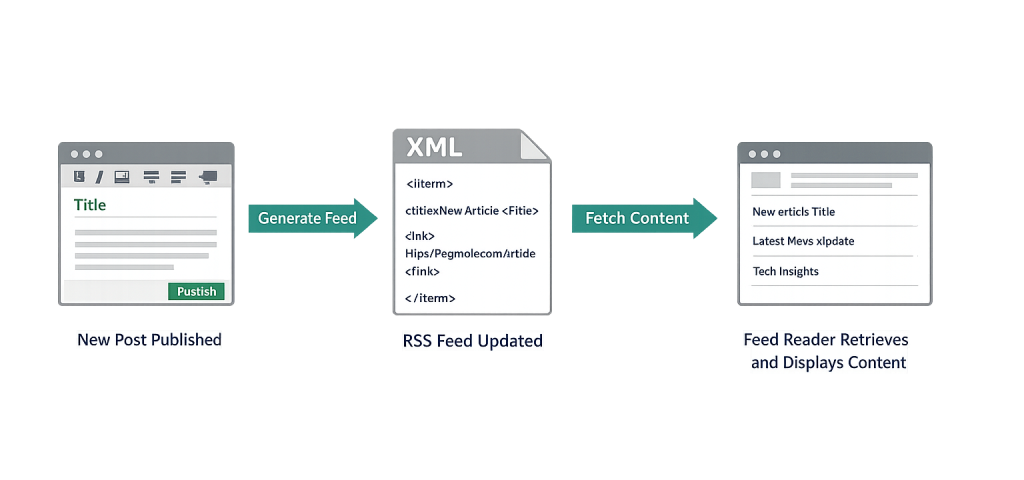
How RSS Feeds Work
RSS operates through a simple three-part cycle:
- Content is published — When you publish a post in WordPress, the site’s RSS feed (an XML file) is updated automatically to include the new item. Each item in the feed contains a title, link, publication date, author, and description or full content — depending on your Reading Settings.
- Subscribers’ readers check for updates — RSS reader applications (Feedly, NetNewsWire, Inoreader, and similar tools) periodically request your feed file and compare it to what they’ve already downloaded. New items are fetched and displayed.
- Content is delivered without a site visit — The reader presents the content in its own interface. The subscriber reads your content in one centralized place alongside other feeds they follow.
WordPress generates several types of feeds by default:
- Main feed —
yoursite.com/feed/— all recent posts - Category feed —
yoursite.com/category/name/feed/— posts from a specific category - Tag feed —
yoursite.com/tag/name/feed/— posts with a specific tag - Comments feed —
yoursite.com/comments/feed/— site-wide comments
Purpose & Benefits
1. Passive Content Distribution
An RSS feed distributes your content automatically without any additional action after publishing. Subscribers receive updates through their reader apps; content aggregators and news sites may pull your feed to surface your content to their audiences. This extends the reach of your blog and blogging content with zero ongoing effort beyond writing and publishing.
2. Powering Email Automation
Many email automation platforms — Mailchimp, ActiveCampaign, ConvertKit, and others — support RSS-to-email campaigns. You configure the feed URL once, and the platform automatically sends a digest email to subscribers whenever new content appears. This is one of the most efficient ways to maintain an active newsletter without manually compiling each send.
3. Connecting WordPress Content to External Platforms
RSS feeds are a standard bridge between WordPress and external systems. Podcast hosting platforms, content aggregators, news readers, and Slack integrations all consume RSS feeds to pull content automatically. A properly formatted feed keeps your content flowing to wherever your audience already spends time, without requiring manual cross-posting to each channel.
Examples
1. Subscriber RSS Reader Use
A regular reader of a web agency’s blog subscribes to agencysite.com/feed/ using Feedly. Every time the agency publishes a new article — about WordPress, SEO, or design — it appears in the subscriber’s Feedly dashboard alongside other feeds they follow. The subscriber reads the full post or a summary directly in Feedly and clicks through to the agency’s site when they want to see the full piece.
2. RSS-to-Email Newsletter
A consulting firm uses Mailchimp’s RSS-to-Email campaign feature. They configure it with their blog’s feed URL and set it to send every Friday at 8 AM if new content was published that week. Mailchimp checks the feed automatically, pulls the latest post titles and summaries, formats them into a branded email template, and sends to the list — all without any manual work after the initial setup.
3. Podcast Feed as a Special Case of RSS
A business podcast hosted on WordPress uses a podcast plugin (like Seriously Simple Podcasting or Buzzsprout) that generates a media-enriched RSS feed. That feed is submitted to Apple Podcasts, Spotify, and Google Podcasts. Each podcast directory reads the feed to list new episodes. When a new episode is published in WordPress, it appears on all connected podcast platforms within hours — all driven by the same RSS syndication mechanism.
Common Mistakes to Avoid
- Not knowing your feed URL — WordPress creates feeds automatically, but many site owners don’t know they exist and have never checked whether they’re working correctly. Verify your main feed is accessible at
yoursite.com/feed/and returns valid XML. - Publishing full content in the feed vs. summaries — By default, WordPress can be configured to include either the full post or just an excerpt in the RSS feed. Full content makes it easier for scrapers to republish your content without attribution. Summaries drive traffic back to your site. The setting is in Settings → Reading → “For each post in a feed, include.”
- Forgetting to update feed URLs when migrating — If you move your site to a new domain or change your permalink structure, feed URLs can break. Subscribers who have bookmarked your old feed URL will stop receiving updates. Set up redirects from old feed URLs to new ones as part of any site migration.
- Overlooking feed security — WordPress comment feeds can expose user data. Some security configurations restrict or redirect feeds as part of hardening. Review what your feeds expose before making them widely public.
Best Practices
1. Configure Feed Content in Reading Settings
Visit WordPress Settings → Reading to control how many posts appear in your feed and whether full content or summaries are included. Summaries encourage click-throughs to your site; full content is preferable if you want to maximize subscriber convenience. Choose based on your content goals and how much you trust your feed audience to engage with your site directly.
2. Submit Your Feed to Relevant Aggregators
If you publish regularly on a specific topic, submit your feed to topically relevant aggregators, directories, and community platforms where your audience gathers. Industry news sites, WordPress community resources, and niche reading apps often accept feed submissions. This extends your content’s reach without additional publishing effort.
3. Connect Your Feed to Email Marketing
Link your RSS feed to your email automation platform to automate newsletter sends. This keeps your email list engaged without requiring you to manually produce newsletter content separate from your regular blogging workflow. Set a publishing cadence (weekly, biweekly), configure the RSS-to-email campaign once, and let the automation handle distribution.
Frequently Asked Questions
Is RSS still used in 2025?
Yes, though its mainstream consumer use has declined since Google Reader shut down in 2013. RSS remains widely used by journalists, researchers, marketers, developers, and power users who follow many content sources. Its most significant current applications are podcast syndication, RSS-to-email automation, and developer/power-user feed readers. For publishers, maintaining a well-functioning feed costs nothing and continues to serve niche-but-valuable audiences.
Where do I find my WordPress RSS feed URL?
Your main RSS feed is at yoursite.com/feed/. You can also append /feed/ to most archive URLs: yoursite.com/category/news/feed/ for a category feed, or yoursite.com/author/username/feed/ for an author feed. If your feed URL returns a 404 error, check that your permalink settings are saved in Settings → Permalinks.
Can I customize my WordPress RSS feed?
Yes. WordPress provides filters like the_content_feed, the_excerpt_rss, and others that allow developers to modify feed output. Plugins can add or remove fields from the feed, insert custom content, or generate feeds for custom post types. The feed’s appearance and content can be customized significantly via your theme’s functions.php or a dedicated plugin.
Can RSS feeds hurt SEO?
RSS feeds themselves don’t directly harm SEO. The concern is content scraping — sites that aggregate your RSS feed and republish your content verbatim can create duplicate content issues if Google indexes their versions alongside yours. Mitigations include publishing summaries instead of full content, including canonical URLs within feed items, and publishing quickly so your version is indexed first.
What’s the difference between an RSS feed and an email newsletter?
An RSS feed is a machine-readable file that feed reader apps poll automatically — subscribers receive content in their reader app without giving you their email address. An email newsletter is delivered directly to an inbox and requires explicit email signup. The two aren’t mutually exclusive; many publishers use RSS to power their email newsletters via RSS-to-email automation, combining the automation of RSS with the personal delivery of email.
Related Glossary Terms
How CyberOptik Can Help
Understanding how WordPress works under the hood — including feeds, reading settings, and content distribution — helps you make better decisions about your site and your content strategy. Our team manages WordPress sites for clients every day, from configuration to content workflow setup. Get in touch to discuss your project or explore our WordPress development services.


