
Post is the default WordPress content type designed for time-stamped, chronological content — most commonly blog entries, news articles, and announcements. Unlike pages, which are static and exist outside of any time-based structure, posts are organized reverse-chronologically and can be assigned to categories and tags to help visitors navigate related content.
Posts are the foundation of WordPress’s blogging functionality, and they remain a central content type for businesses publishing regular content — whether that’s a weekly blog, a product update feed, or a company news section. Every post has a publication date, an author, and optional taxonomy classifications. They’re also what powers RSS feeds, allowing subscribers to receive new content automatically.
How Posts Work in WordPress
WordPress stores all posts in the wp_posts database table, using the post_type column to distinguish them from pages, attachments, and other content types. The key characteristics that define a post:
- Chronological display — Posts appear in reverse order by date on archive pages, with the newest first
- Date and time stamp — Each post carries a publication timestamp that affects its position in feeds and archives
- Category and tag support — Posts support WordPress’s default taxonomy system out of the box
- RSS feed inclusion — Posts are automatically included in your site’s RSS feed
- Author attribution — Each post is associated with a WordPress user account
[Image: WordPress post editor screenshot showing title, content area, categories, tags, and publish settings]
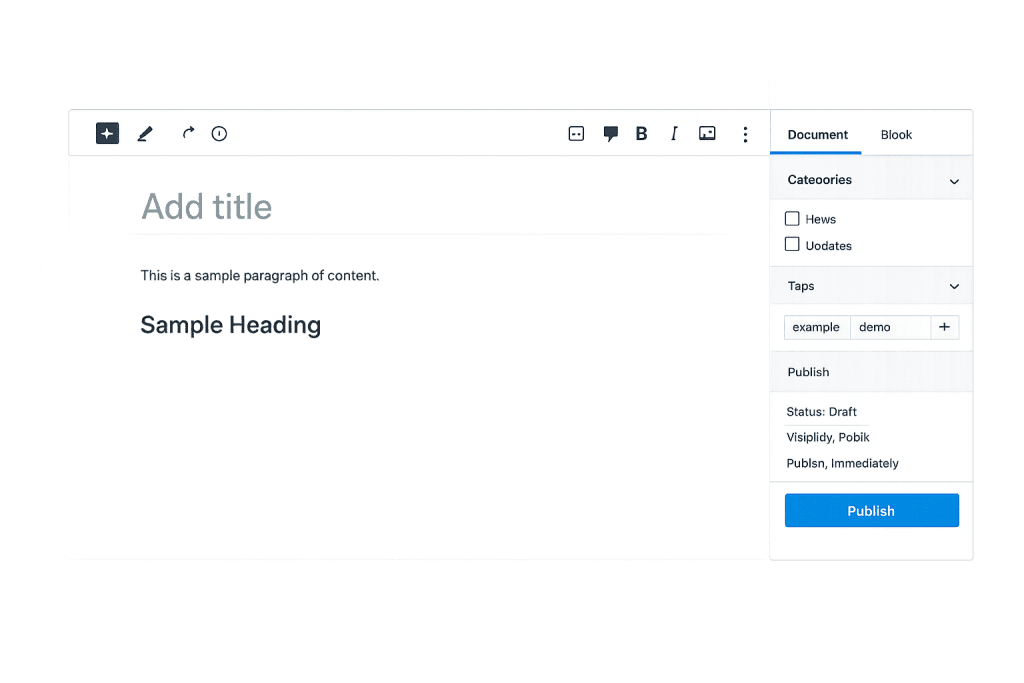
In the WordPress admin, posts are managed under Posts > All Posts. The Block Editor (Gutenberg) is the default editing interface, though some sites continue to use the Classic Editor via plugin.
Purpose & Benefits
1. Content Publishing and SEO
Posts are one of the most effective ways to build search visibility over time. Each post creates a new indexed URL, and a consistent publishing schedule signals to search engines that your site is actively maintained. Categories and tags create additional archive pages that can rank for broader topic searches — extending the reach of each individual post.
2. Audience Engagement and Authority Building
A well-maintained blog builds credibility in your industry. Posts give you a vehicle to demonstrate expertise, answer common customer questions, and address topics your audience is actively searching for. Over time, a body of posts establishes your site as a resource rather than just a brochure. This is the practical foundation of content marketing.
3. Content Organization via Taxonomies
The built-in category and tag system makes it straightforward to organize posts into logical groups. Categories create a primary hierarchy — like departments in a store — while tags handle more granular cross-referencing. This structure improves both user navigation and how search engines understand the relationships between your content.
Examples
1. A Service Business Blog
A landscaping company publishes posts covering seasonal care tips, project spotlights, and common questions from customers. Each post is assigned to a category like “Lawn Care,” “Design Ideas,” or “Seasonal Guides.” Over time, this library of posts attracts organic search traffic from people researching those topics — and establishes the company as a knowledgeable resource before any sales conversation begins.
2. A Product Update Feed
A software company uses posts to announce new features, bug fixes, and release notes. Posts are assigned to a “Changelog” category, giving users a reliable way to follow product developments. The same content automatically appears in the site’s RSS feed, letting subscribers track updates without visiting the site manually.
3. A News and Events Archive
A nonprofit organization publishes posts for press releases, event recaps, and announcements. The reverse-chronological display keeps the most recent news front and center, while the archive creates a searchable history of the organization’s activities over time.
Common Mistakes to Avoid
- Confusing posts with pages — Posts belong in the chronological feed; pages are for timeless, structural content like About, Services, and Contact. Publishing a services page as a post buries it in the blog archive where it doesn’t belong.
- Publishing without categories — Every post should be assigned at least one category. Leaving posts in the default “Uncategorized” category misses an organizational opportunity and creates a disorganized archive for visitors.
- Inconsistent publishing cadence — An archive with one post from three years ago and nothing recent sends the wrong signal to both visitors and search engines. If you’re going to blog, commit to a sustainable schedule.
- Neglecting featured images — Posts without featured images display poorly in archive pages, social sharing previews, and many theme layouts. Always assign a relevant, high-quality image before publishing.
Best Practices
1. Use Categories and Tags Thoughtfully
Assign each post to one primary category and use tags sparingly for specific subtopics. Avoid creating a new category or tag for every post — the goal is a manageable structure that genuinely helps visitors find related content. A site with 50 posts shouldn’t need 50 categories.
2. Write Descriptive Titles and Optimize Slugs
Post titles become headlines in search results and social shares — they need to be clear and compelling. The auto-generated slug often includes unnecessary words (“a,” “the,” “and”). Review and clean up the slug before publishing so the URL is concise and keyword-relevant.
3. Include an Excerpt
Many themes use the excerpt for post listings, archive pages, and RSS feeds. If you don’t write a manual excerpt, WordPress auto-generates one from the post’s opening text. In most cases, a manually crafted excerpt — two or three sentences summarizing the post — is better for both readability and SEO than whatever the system pulls automatically.
Frequently Asked Questions
What’s the difference between a post and a page in WordPress?
Posts are time-stamped, organized chronologically, and support categories and tags. Pages are static, don’t appear in the blog feed, and are used for structural content like About or Services. Think of posts as newspaper articles and pages as the permanent sections of a magazine.
Can I convert a post to a page (or vice versa)?
Yes. In the post editor, you can change the content type under the “Post” attributes panel by editing the URL or using a plugin. However, changing content types can affect URLs, so plan for redirects if the content is already indexed by search engines.
Do posts affect SEO differently than pages?
Posts and pages are treated similarly by search engines from a technical standpoint. The practical difference is that posts are more naturally suited to topic clusters, frequent publishing, and news-type content — all of which support SEO over time. Pages tend to target high-priority, evergreen keywords.
What’s a custom post type?
A custom post type is a developer-defined content type that behaves like posts but is used for a specific purpose — like products, events, or portfolio items. They have their own admin sections and can have custom taxonomies separate from the default category and tag system.
How many posts should I publish per month?
There’s no universal answer. Consistency matters more than volume. Publishing two well-researched posts per month is more effective than publishing eight shallow ones. Focus on quality and a cadence you can maintain over the long term.
Related Glossary Terms
How CyberOptik Can Help
A well-structured content publishing setup — with the right post types, categories, and templates — makes your WordPress site easier to manage and more effective for SEO. Our team helps businesses configure WordPress correctly from the start and develop content strategies that support long-term growth. Get in touch to discuss your project or explore our WordPress development services.


