
A permalink is the permanent URL assigned to a specific piece of content on a WordPress site — a post, page, category archive, or custom post type. The term combines “permanent” and “link,” reflecting the intent that once set, the URL should remain stable and not change. WordPress generates permalinks automatically based on the structure you’ve configured in Permalink Settings, using variables like the post name, category, or date to build the URL.
Permalinks matter for two reasons: user experience and SEO. A clean, descriptive URL like yoursite.com/wordpress-seo-guide/ communicates the page’s topic to both visitors and search engines before they ever click. A URL like yoursite.com/?p=847 communicates nothing. The slug — the final segment of a permalink — is the part you most often customize. How you configure your permalink structure affects how every URL on your site is built, which is why getting it right early matters.
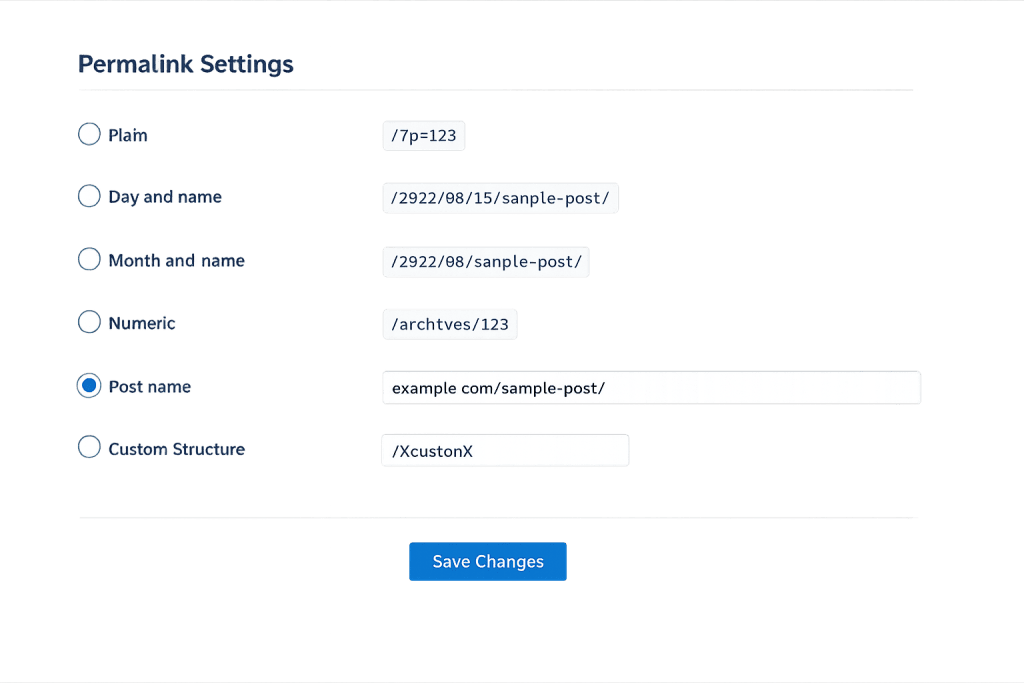
[Image: Screenshot of the WordPress Permalink Settings page showing the available structures, with Post name selected]
How Permalinks Work in WordPress
WordPress stores a permalink structure setting that uses “tags” (variable placeholders) to define the URL format for all posts. Common tag combinations:
/%postname%/→yoursite.com/my-post-title/— clean, SEO-friendly, most widely recommended/%category%/%postname%/→yoursite.com/blog/my-post-title/— adds category context/%year%/%monthnum%/%postname%/→yoursite.com/2025/03/my-post-title/— date-based, common for news/?p=123— plain numeric, the WordPress default, poor for SEO and usability
The structure applies globally to all posts. Pages use their own slug hierarchy, so a page called “About Us” at yoursite.com/about-us/ isn’t affected by the post permalink structure.
When you change a permalink, WordPress (or an SEO plugin) should automatically create a 301 redirect from the old URL to the new one to preserve any links or search rankings pointing to the old address.
Purpose & Benefits
1. SEO Signals Embedded in Every URL
Search engines read URLs as a relevance signal. A post name-based permalink that includes the target keyword gives Google a clean, direct signal about the page’s topic. According to both Yoast and AIOSEO — two leading SEO plugins — the Post Name structure (/%postname%/) is the most recommended option for search performance. Clean URLs also appear more trustworthy in search results, which can improve click-through rates.
2. Improved User Experience and Shareability
Descriptive permalinks are easier for users to read, remember, and share. A URL like /how-to-speed-up-wordpress/ gives a reader an immediate sense of what they’re about to click before they do. Numeric or cryptic URLs (?p=123, /archives/847) provide no such preview. The URL is visible in browser address bars, search results, social media previews, and anywhere a link is shared.
3. Foundation for Internal Link Architecture
Your permalink structure shapes how internal linking works across your site. Category-prefixed permalinks (/blog/post-name/) create a natural hierarchy. Post-name-only permalinks are flatter but cleaner. The choice affects how 301 redirects need to be managed if you reorganize content, and how clearly your site’s structure communicates topical relationships to search engines.
Examples
1. Changing from Default to Post Name
A business site has been running with the WordPress default plain permalink structure (?p=123). After configuring the Post Name structure, every URL changes from /p=847 format to /service-name/ or /blog-post-title/ format. With an SEO plugin like Yoast or AIOSEO handling the redirect rules, old URLs 301 redirect to the new ones automatically, preserving any existing search rankings.
2. Blog with Category Structure
A content-heavy site uses the /%category%/%postname%/ structure. An article in the “WordPress Hosting” category lives at /wordpress-hosting/best-managed-wordpress-hosts/. The category in the URL reinforces topical relevance, and navigating to /wordpress-hosting/ brings up all posts in that category — supporting both user navigation and topical authority signals.
3. Clean Permalink for a Service Page
A service page about WordPress speed optimization is manually given the slug speed-optimization, resulting in the permalink yoursite.com/speed-optimization/. Rather than using the full page title “WordPress Website Speed Optimization Services”, the slug is trimmed to the essential keyword phrase — keeping the URL clean and focused without unnecessary stop words.
Common Mistakes to Avoid
- Changing permalink structure on an established site without redirect handling — Changing the permalink structure on a live site with existing search rankings and backlinks will break all existing URLs unless 301 redirects are properly configured. This is one of the most impactful SEO mistakes a site owner can make.
- Including dates in post URLs — Date-based structures (e.g.,
/2023/03/post-title/) make URLs look outdated as content ages and complicate future URL changes. Most content benefits from timeless URLs. - Using stop words in slugs — WordPress auto-generates slugs from post titles, including words like “the,” “a,” and “and.” Trimming these from slugs keeps URLs shorter and more keyword-focused. A post titled “The Complete Guide to WordPress SEO” should have the slug
complete-guide-wordpress-seo, notthe-complete-guide-to-wordpress-seo. - Using the plain or numeric permalink structure — The default WordPress permalink structure (
?p=123) is terrible for SEO and user experience. This should be one of the first things changed on any new WordPress install.
Best Practices
1. Choose Post Name Structure Early and Stick With It
The /%postname%/ structure is clean, flexible, and the most widely recommended by SEO tools including Yoast and AIOSEO. Choose it when you set up the site — or as early in the site’s life as possible — and commit to it. Changing permalink structures after a site has been live and indexed requires careful 301 redirect management and should not be done casually.
2. Edit Slugs Before Publishing
WordPress auto-generates a slug from your post title, but auto-generated slugs often include stop words and unnecessary words. Before publishing, review the slug in the editor and trim it to the essential keyword phrase. A post titled “10 Reasons Your WordPress Site Is Slow” might get a trimmed slug of wordpress-site-slow or why-wordpress-site-slow.
3. Use Hyphens, Not Underscores
Google treats hyphens as word separators in URLs and underscores as word joiners. my-post is readable as two words; my_post is treated as one word mypost by Google’s indexing. WordPress defaults to hyphens, which is correct — never use underscores in URLs, even in custom slugs.
Frequently Asked Questions
Should I include my category name in my post permalinks?
It depends on your site structure and goals. Category-prefixed URLs (/%category%/%postname%/) add topical context and create a natural content hierarchy, which can support topical authority. However, they make URLs longer and make it harder to change categories later without breaking URLs. For most sites, /%postname%/ is simpler to manage and performs well for SEO.
What happens to SEO if I change my permalink structure?
If you change the permalink structure without setting up 301 redirects, your existing search rankings will drop as Google encounters broken URLs. Properly configured 301 redirects pass the ranking value from old URLs to new ones, minimizing the SEO impact. Still, any structural change carries some risk on established sites — it’s best to plan carefully and test on a staging site first.
Can I have different permalink structures for posts and pages?
WordPress uses one global permalink structure for posts but pages use their own hierarchy based on parent/child relationships. You can’t set completely different structures for posts vs. pages through settings alone. However, custom post types can have their own URL base configured separately.
How do I update a permalink without losing SEO value?
When you change a post’s individual slug, WordPress saves the new URL. If an SEO plugin like Yoast or Rank Math is installed, it typically prompts you to create a 301 redirect from the old URL. Accept this redirect — it preserves any backlinks and search ranking signals from the previous URL.
Does permalink length affect SEO?
Shorter URLs are generally better — they’re cleaner, easier to share, and marginally easier for search engines to process. That said, there’s no specific character limit that triggers a penalty. Focus on descriptiveness and keyword inclusion over length minimization. A URL like /seo-audit-checklist/ is better than /seo/ (too vague) or /complete-comprehensive-seo-audit-checklist-for-websites/ (unnecessarily long).
Related Glossary Terms
How CyberOptik Can Help
Understanding how WordPress works under the hood — including how permalink structures affect SEO and long-term site maintenance — helps you make better decisions about your site. Our team manages permalink configuration, slug optimization, and redirect implementation for clients every day. Get in touch to discuss your project or explore our WordPress development services.


